
Are you wondering which version of PHP your WordPress site should be running? You’re not alone.
Choosing the right PHP version is crucial for your website’s performance, security, and compatibility. It’s like finding the perfect fuel for your car—essential for smooth operation. We’ll unravel the mystery behind the best PHP version for WordPress, ensuring your site runs efficiently and safely.
You’ll discover how using the right PHP version can boost your site speed, protect against vulnerabilities, and enhance your user experience. Stay with us to unlock these secrets and empower your WordPress site like never before.
Importance Of Php In WordPress
PHP is vital for WordPress websites. It makes sites run smoothly. It acts like a strong engine. Without PHP, WordPress cannot function. It is the main language for WordPress. PHP allows users to create dynamic content. This means websites can change on the go. It helps in managing databases and user interactions. PHP versions affect website speed. Newer versions are faster and safer. They help protect against hacks. Keeping PHP updated is important. It ensures better performance. It enhances security features. Developers use PHP to build plugins and themes. These add new features to sites. PHP is a key part of the WordPress experience.
Credit: betterstudio.com
Determining Your Current Php Version
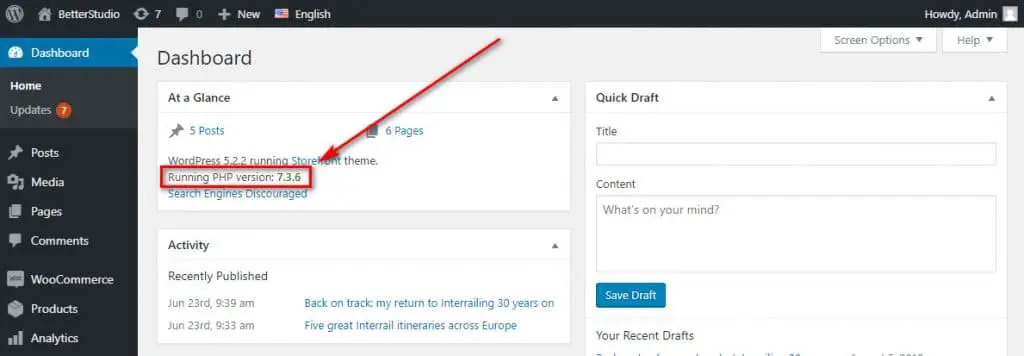
The WordPress Site Health tool helps check PHP version. Navigate to your WordPress dashboard. Click on “Tools.” Select “Site Health.” Here, you find details about your site’s PHP version. This feature is easy to use. It shows important info quickly. If PHP is outdated, WordPress will alert you. Keeping PHP updated is crucial. Updated PHP keeps your site secure. It also enhances performance.
Another way to check PHP version is through your hosting provider. Log into your hosting account. Look for “PHP Settings” or “Server Info.” The PHP version should be listed here. Contact your host if you can’t find it. Hosting providers often show this info. It’s important for site maintenance. Knowing your PHP version helps with troubleshooting. Always keep track of these details.
Recommended Php Versions For WordPress
WordPress needs a minimum PHP version to work. PHP 7.4 is the least version required. Older versions may cause problems. Using PHP 7.4 makes your site safe. Updates fix bugs and security holes. Always check your site’s PHP version. Ensure it meets the minimum needs.
For the best speed, use PHP 8.0 or later. Newer versions run faster. They handle more tasks at once. Your site loads quickly with PHP 8.0. Visitors like fast sites. Fast sites keep users happy. PHP 8.0 also saves on resources. Less memory means fewer costs. Upgrade to the latest PHP for better performance.
Benefits Of Using Latest Php Versions
Latest PHP versions bring better security. They fix old bugs. New updates keep hackers away. Using old PHP is risky. New versions are safer. They protect your site more.
PHP updates make websites faster. They use less memory. Faster sites keep visitors happy. New PHP makes code run smoother. Old PHP might slow down your site.
New PHP versions have fresh features. These features help developers. Better tools make coding easier. Latest PHP works with new plugins. Old PHP can cause problems. Compatibility is key for smooth operations.
Steps To Upgrade Php Version
Always backup your website before any changes. Use a plugin or manual methods. This ensures you can restore your website if something goes wrong. Keep your backup in a safe location. You may need it later.
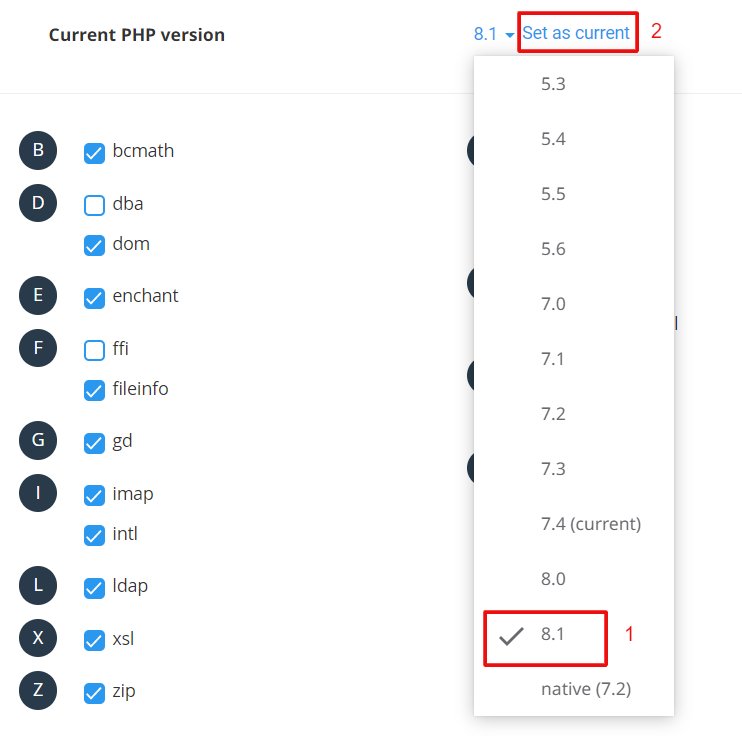
Contact your hosting provider for PHP updates. They know the best way to upgrade. Some hosts offer a simple tool for this. Others require manual steps. Always ask for help if unsure.
After upgrading, test your website. Check every page and feature. Ensure everything works as expected. Look for errors or broken links. Fix any issues quickly. This step is crucial for a smooth user experience.

Credit: make.wordpress.org
Common Issues After Php Upgrade
Theme and plugin compatibility can break after a PHP update. Older themes might not work well with the latest PHP version. This can cause errors or strange layouts on your site. Plugins can also face compatibility issues. Some plugins stop working or cause issues if not updated.
Updating themes and plugins to their latest versions often helps. Developers usually release updates to fix these problems. Regularly checking for updates is important. Keeping everything updated prevents many issues.
Troubleshooting Errors
Errors might pop up after changing PHP versions. These errors can be hard to fix. Reading error messages helps understand the problem. Look for specific error words or codes. These clues can show what needs fixing.
Sometimes, disabling plugins can help find the problem. Turn them off one by one. This method finds which plugin is causing trouble. Contacting plugin or theme support can offer solutions too. They might have patches or advice to solve the error.
Future Of Php In WordPress
WordPress needs PHP to work smoothly. New versions of PHP come often. They bring better speed and security. WordPress uses these updates to stay modern. Developers check the changes carefully. They make sure WordPress runs well with each new PHP version.
Updates can make websites faster and safer. Older PHP versions may stop working well. Then, WordPress users should update their PHP version. This keeps their sites running smoothly.
New PHP versions also bring new features. These features help developers create better plugins and themes. So, keeping PHP updated is very important for WordPress.
Credit: wedevs.com
Frequently Asked Questions
What Php Version Does WordPress Require?
WordPress recommends using PHP version 7. 4 or higher for optimal performance. Using the latest PHP version ensures better security and faster website speed. Always verify compatibility with your themes and plugins before upgrading. Keeping PHP updated minimizes security vulnerabilities and enhances your WordPress site’s overall functionality and reliability.
How To Check WordPress Php Version?
To check your WordPress PHP version, access your WordPress dashboard. Navigate to “Tools” and click “Site Health. ” Under “Info,” find the “Server” section to view your current PHP version. Alternatively, contact your hosting provider for assistance. Regularly checking ensures your site meets recommended PHP standards.
How To Update Php Version In WordPress?
To update your PHP version, first, back up your WordPress site. Access your hosting control panel, locate the PHP settings, and select a newer version. Confirm compatibility with your themes and plugins. After updating, test your site to ensure everything functions correctly.
Contact your hosting provider for detailed guidance if needed.
Why Is Updating Php Important For WordPress?
Updating PHP is crucial for WordPress as it enhances security and performance. Newer PHP versions fix vulnerabilities and improve website speed. They also provide access to new features and functionalities. Staying updated ensures your WordPress site remains secure, efficient, and compatible with the latest themes and plugins.
Conclusion
Choosing the right PHP version for WordPress is crucial. It affects speed, security, and compatibility. Always update to the latest PHP version. This keeps your site running smoothly. Check your hosting provider for PHP updates. They often offer easy upgrade options.
Regular updates help maintain optimal performance. They also reduce security risks. Always back up your site before updating PHP. This ensures data safety. Remember, a well-maintained WordPress site boosts user experience. It also enhances your site’s reliability. Stay informed and proactive with PHP updates.
Your website’s performance depends on it.


