
Ever found yourself scratching your head, wondering “WordPress, what user ID am I?” You’re not alone.
Navigating the backend of WordPress can sometimes feel like searching for a needle in a haystack. Yet, knowing your user ID is crucial, especially when customizing your site or managing multiple users. Imagine the ease and control you’ll gain by having this small but mighty piece of information at your fingertips.
This simple guide will illuminate the path, making it clear and straightforward. Stay with us to discover how to effortlessly find your WordPress user ID and unlock a new level of site management.
WordPress User Roles
The Administrator is the top role in WordPress. They can do almost anything. They manage other users. They can change settings. They can add new plugins and themes. They control the site fully.
The Editor role can edit posts. They manage categories. They can approve comments. They oversee content. Editors cannot change site settings. They focus on content management.
An Author can write posts. They can publish their own posts. They can upload files. Authors cannot edit other users’ posts. They work mainly with their own content.
A Contributor can write posts. They cannot publish them. They need approval for posts. Contributors cannot upload files. They help with content creation.
A Subscriber can read posts. They can comment on posts. They have limited access. Subscribers cannot write posts. They mainly enjoy the content.
Credit: www.greengeeks.com
Finding Your User Id
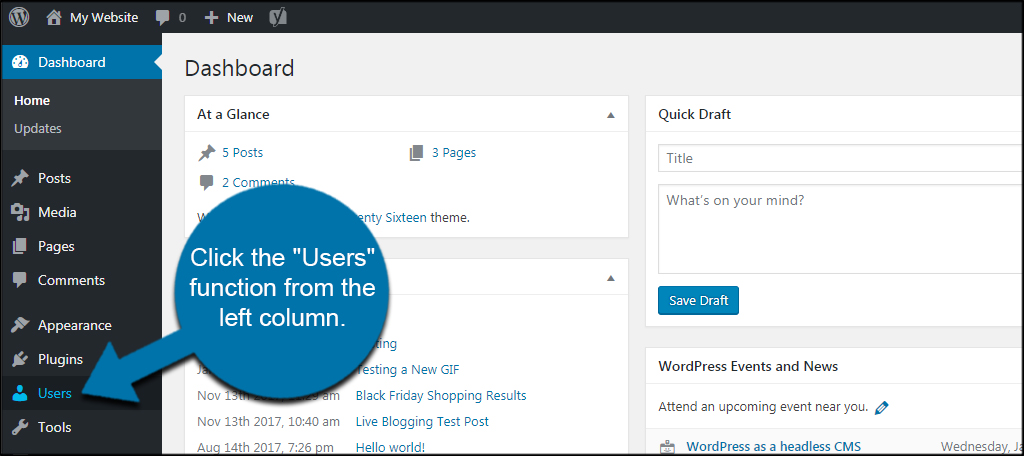
Open your WordPress dashboard. Go to the Users section. Find your name in the list. Hover over your name. Look at the bottom of your browser. You will see a URL. The number at the end is your User ID.
Go to your profile page. Check the URL in the address bar.
The number after ?user_id= is your ID.
This is simple and fast. You can do it in seconds.
Access your website’s database. Use a tool like phpMyAdmin.
Look for the wp_users table. Find your username.
The ID column shows your User ID.
Be careful. Do not change anything in the database.
Tools And Plugins
Plugins make finding user IDs easy. User ID Finder is a popular choice. This plugin is simple to use. It shows IDs right in the dashboard. No need for coding skills. Another good plugin is Show User IDs. It displays IDs next to usernames. Both plugins save time and effort. They are perfect for beginners.
Developers have special tools. Chrome DevTools is useful. It helps find user IDs quickly. Open it by pressing F12. Look under the Elements tab. Another tool is Firefox Developer Edition. It works like Chrome DevTools. These tools are free and easy to use. Good for people who know a bit about coding.

Credit: www.wpallimport.com
Practical Uses Of User Id
User IDs help make websites personal. They allow tailored content for each visitor. Users see content that matches their interests. It feels like the site knows them. This makes users happy. They stay longer on the site.
Every user sees different content. This is because of their User ID. If you like sports, you’ll see more sports stories. If you like art, you’ll see art stories. This makes the experience unique for everyone. Users feel special and understood.
User IDs help manage many users. Admins can see user activities. They can also manage user roles with ease. This way, the site runs smoothly. Everyone gets the right access level. It helps keep the site safe and organized.
Troubleshooting User Id Issues
User ID issues can confuse many people. Sometimes, users face trouble finding their User ID. This may happen due to incorrect settings or plugin conflicts. Some users may even see errors in their WordPress dashboard. This can be frustrating.
Always check your profile page. It often shows your User ID. Another tip is to look in the URL when editing your profile. Your User ID may appear there. Use plugins like User ID Revealer for help. This plugin shows IDs easily. Regularly update your WordPress. Updates fix many bugs. This keeps your site running smoothly.
Best Practices For User Management
Discovering your user ID in WordPress enhances user management practices. Navigate to your profile and find the “User ID” section. This straightforward step helps manage roles and permissions effectively.
Security Considerations
Strong passwords are vital for protecting accounts. Encourage users to create complex passwords. Include numbers, symbols, and capital letters. Regular password updates can enhance security. Limited login attempts prevent unauthorized access. Alert users about suspicious activity. Two-factor authentication adds an extra layer of security. Keep software and plugins updated to close vulnerabilities. Regular backups are essential. They protect data from loss or corruption. Admins should monitor user activity regularly. This helps identify unusual behavior quickly.
Efficient User Role Assignment
Assigning user roles wisely is key to efficient management. Each role should have specific permissions. Only give access to necessary functions. This reduces the risk of errors or misuse. Admin roles should be limited to trusted individuals. Regularly review user roles and permissions. Adjust them as needed. This ensures users have the right access. It keeps the system organized and secure. Clear role definitions help users understand their responsibilities. This improves workflow and minimizes confusion.
Credit: wordpress.com
Frequently Asked Questions
How To Find My WordPress User Id?
To find your WordPress user ID, log in to your dashboard. Navigate to “Users,” then “All Users. ” Hover over your username, and you’ll see a URL at the bottom of your browser. The number following “user_id=” in this URL is your user ID.
Why Is WordPress User Id Important?
Your WordPress user ID is crucial for managing user roles, permissions, and capabilities. It helps in customizing user-specific features and functionalities. Understanding your user ID can assist in troubleshooting and enhancing your website’s security, ensuring a seamless WordPress experience.
Can I Change My WordPress User Id?
No, you cannot change your WordPress user ID directly. It is a unique identifier assigned by WordPress during user creation. However, you can create a new user with a different ID and transfer content if necessary.
Is WordPress User Id Secure?
WordPress user IDs are generally secure but can be exposed. It’s important to use strong passwords and two-factor authentication. Limiting user roles and permissions also enhances security. Regularly updating WordPress and plugins helps protect against vulnerabilities.
Conclusion
Discovering your WordPress user ID is simple and useful. It helps in managing your site efficiently. Knowing your user ID can enhance your website experience. You can easily find it through the dashboard or profile URL. This small step can make a big difference.
It ensures smooth operations and better control. Now you can manage users more effectively. Remember, every detail counts in WordPress management. Keep exploring and learning for more insights. Stay informed and keep your website running smoothly. Your WordPress journey is just beginning!


