
Are you trying to figure out the perfect size for your WordPress header image? You’re not alone.
Choosing the right dimensions for your header can be a game-changer for your website’s first impression. Imagine landing on a site where the header is either too large, stretching awkwardly, or too small, leaving too much empty space. It’s not the best way to welcome visitors, right?
You want your website to look polished and professional from the get-go. We’ll guide you through the ideal header image sizes for WordPress, ensuring your site stands out for all the right reasons. Stick around to discover how getting this detail right can boost your site’s aesthetics and functionality.

Credit: cloudinary.com
Importance Of Header Image Size
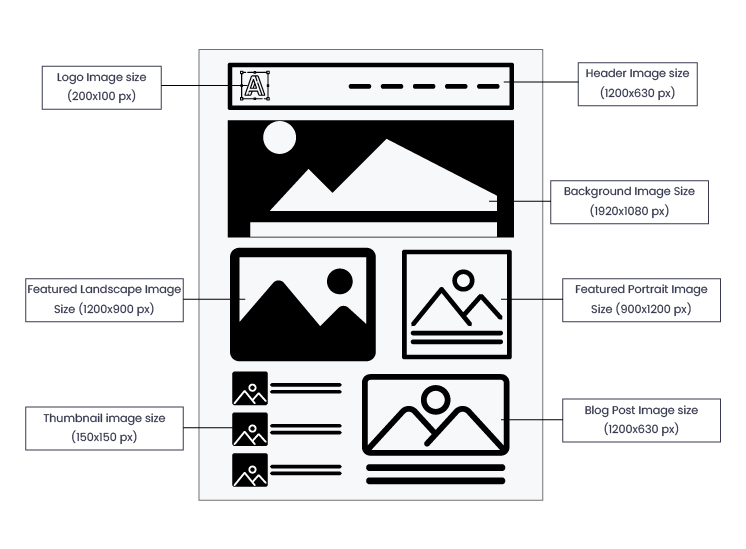
Header images are key to your website’s look. They set the mood for visitors. The right size is important. A too large image can slow down your site. A too small image may look blurry or pixelated. The perfect size keeps your site fast. It also makes the image clear and sharp. Balance is crucial for a good user experience. WordPress themes often suggest specific sizes. Common sizes are 1920 x 1080 pixels or 1280 x 720 pixels. These sizes are popular for most themes. Always check your theme’s guide for exact size. It ensures your header looks great.
Standard Header Image Dimensions
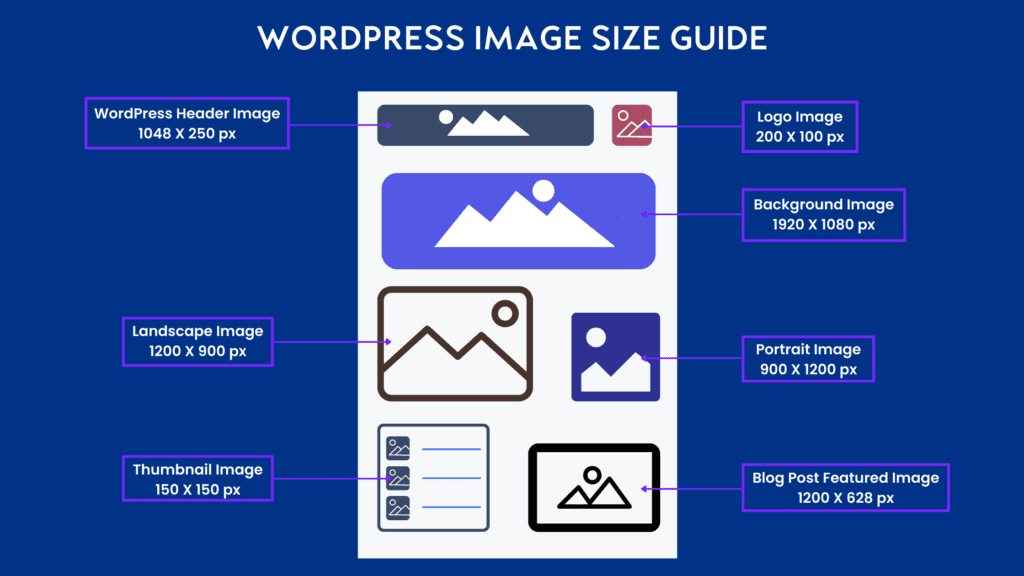
Header images play a big role on your website. They are the first thing visitors see. The standard size for WordPress header images is usually 1048 x 250 pixels. This size fits most themes. It keeps your site looking neat and organized.
Some themes need a different size. Always check your theme’s guidelines. This helps in keeping the image clear and not stretched. A good header image can make your site look professional. Clear images are more appealing and attract visitors.
If your image is too small, it can look blurry. Too big, and it might slow your site down. So, always pick the right size. This ensures your site loads fast and looks great.
Responsive Design Considerations
A good header image is very important. It helps your site look nice. The image should be clear. It should also fit well. A common size is 1920×1080 pixels. This size works well for most screens. The image should load fast. Slow images make people leave.
Responsive design means the image looks good everywhere. On phones, tablets, and computers. The image should not be blurry. Make sure it is light. Keep the file size small. Use formats like JPEG or PNG. They are good for quality and size.
Always check how the image looks. Use different devices. This makes your site friendly. Everyone can enjoy it.
Impact On Website Performance
The size of the header image affects website speed. Large images can slow down a site. This may cause visitors to leave early. A slow site can lower your search engine ranking.
Smaller header images load faster. This improves user experience. It keeps visitors on your site longer. Fast loading sites rank better. They also use less bandwidth.
Optimize your images before uploading. Use the right format. JPEGs work well for photos. PNGs are good for graphics. Try to keep your header images under 200KB. This helps your site load quickly.
Custom Header Image Sizes
Choosing the right header image size is crucial. It affects both design and performance. A common size for WordPress headers is 1920×1080 pixels. This size fits most screens well. But, it might not work for everyone. Some themes need different sizes. Always check your theme’s documentation. It will guide you on the best size.
Smaller images can load faster. This improves your website’s speed. A size like 1280×720 pixels is a good choice for faster loads. But, it might not look as detailed. Balancing quality and speed is key. Use image editing tools to adjust sizes. This ensures your images look great and load quickly.
Tools For Resizing Images
Online tools help make images the right size. Canva is easy to use. It offers many templates. Drag and drop your image. Adjust the size with simple clicks.
Adobe Photoshop provides more control. You can change image size and quality. It is powerful but needs practice.
GIMP is a free option. It works like Photoshop. Resize and edit images with ease.
PicResize is quick and simple. Upload your image. Choose your size. Download the resized image.
All tools make resizing easy. Choose one that fits your needs.
Best Practices For Image Quality
Always choose a clear and sharp image for your header. The ideal size for a WordPress header image is 1280 x 720 pixels. This size fits most themes and screens. Smaller images may look blurry. Larger images can slow down your site. It’s important to keep the file size small. Aim for under 100KB for faster loading. Use the JPEG format for photos. For graphics, use PNG. These formats keep the quality high. Always preview your header on different devices. Make sure it looks good on both mobile and desktop.
If you use text on your image, make sure it’s readable. Choose a simple font. Avoid using too many colors. Stick to two or three colors. This keeps your header clean and professional.
Common Mistakes To Avoid
Many people choose the wrong size for their header image. This can make your website look bad. Always check the recommended size. WordPress usually gives suggestions. Make sure your image is not too big. It can slow down your site. Slow sites lose visitors. Also, don’t pick an image with too many details. Simple is better. Visitors should know what your site is about in one glance. Avoid using images with text. Text can be hard to read on small screens. Use short names for image files. This helps with loading speed. Remember, a good image makes your site look professional.
Testing Header Images
Testing header images is important. It helps your site look good. Start by trying different sizes. This helps find the best fit. Use images that are clear and bright. A good size is 1200×600 pixels. This size works for most themes. But, some themes need different sizes. Always check your theme’s guide. It can tell you the best size. Make sure the image is not too big. This can make your site slow. A small file size is better. It loads faster. Fast sites keep visitors happy. They stay longer. This helps your site grow.
Credit: wpexperts.io
Case Studies And Examples
Many websites use header images. It’s important they are the right size. A good size for a header image is 1200×600 pixels. This size works well on most devices. Some websites use larger images. They might choose 1920×1080 pixels. This is a full-screen size. It looks great on big screens. Smaller images can look blurry. It’s important to keep the image clear.
Some websites use sliders. These can show many images. Each image should be the same size. It keeps the website looking neat. Header images should be easy to load. Big images can slow down the site. Users might leave if it takes too long. Always check how the image looks on mobile. Some images look different on phones.
Credit: www.mrkwp.com
Frequently Asked Questions
What Is The Ideal Size For A WordPress Header Image?
The ideal size for a WordPress header image is typically 1048 x 250 pixels. This size ensures your image looks great on most devices and themes. However, always check your specific theme’s requirements, as they might vary.
How Do I Resize A Header Image In WordPress?
To resize a header image in WordPress, use an image editing tool like Photoshop or Canva. After resizing, upload the image to your WordPress media library. Then, set it as your header in the theme customizer.
Why Is Header Image Size Important For Seo?
Header image size affects website loading speed, which impacts SEO. A properly sized image ensures faster loading times, improving user experience and search engine rankings. Always optimize your header images for both size and quality.
Can I Use A Different Header Size For Mobile?
Yes, responsive themes allow different header sizes for mobile devices. Use CSS media queries or theme settings to adjust header images for mobile. This ensures an optimal viewing experience across all devices.
Conclusion
Choosing the right header image size boosts your website’s appearance. It helps with faster loading and keeps your site looking neat. A clear and well-sized header image makes navigation easy for users. Your content stands out when the header image fits perfectly.
Keep experimenting to find what looks best for your site. Always consider user experience when selecting image dimensions. An optimized header enriches your site’s overall appeal. Remember, the right size can enhance your site’s visual impact and functionality. Make sure your header image complements your theme and content effectively.


