
Have you ever wondered why WordPress is mentioned so often whenever people talk about building a website? If you’re thinking about creating your own site, or just curious about what WordPress actually offers, you’re in the right place.
WordPress is not just a buzzword; it’s a powerful tool that can transform the way you communicate online. Whether you’re a small business owner, a blogger, or someone just eager to share your thoughts with the world, understanding the potential of WordPress could be your first step towards success.
Imagine having a platform that is easy to use, flexible, and can grow with you. WordPress offers all this and more. It’s like having a magic toolbox that caters to both beginners and tech-savvy users. But what makes it truly special for you? Stick around, because we’re going to dive into why WordPress might just be the perfect fit for your needs.
Credit: www.wpbeginner.com
History And Evolution
WordPress began in 2003. Two developers wanted a simple blog tool. It was free and easy to use. People liked it. WordPress grew fast. Plugins made it better. Themes changed how sites looked. WordPress was not just for blogs anymore. It became a website builder. Businesses started using it. Updates kept coming. Each update added features. Security got stronger. WordPress stayed popular. Today, it powers many websites. It is more than a tool. WordPress is a community now. People help each other. They share ideas. They make new plugins. WordPress keeps growing.
Core Features
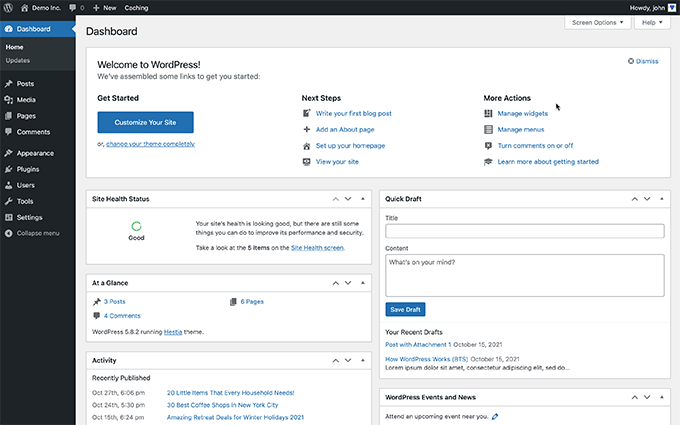
WordPress has a simple interface. Even beginners can use it. The dashboard is clear. Users can find things easily. Pages and posts are easy to make. Buttons are simple. Anyone can learn quickly. No coding skills needed. Just click and type. Easy for all ages.
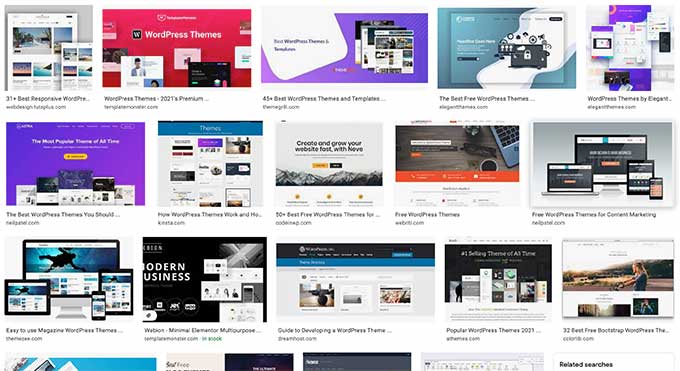
Choose from thousands of themes. They change how the site looks. Users can customize colors and fonts. Each site can look unique. Themes are easy to switch. No special skills needed. Just click and change. Make your site match your style. Fun and easy.
Plugins add new features to WordPress. They are like apps for your site. There are plugins for forms, shops, and more. Many are free. Users can install them easily. No need for coding. Just pick and add. Make your site do more. It’s simple and quick.
Ideal Use Cases
WordPress is a great tool for blogging. It lets you write and share stories. You can add pictures and videos too. Many people read blogs on WordPress. It’s easy to use. You can change how your blog looks. Pick from many themes. Your blog can be about anything. Hobbies, travel, or even food. Readers can leave comments. You can reply to them. It’s fun to connect with others.
Selling things online is simple with WordPress. You can create a store. Add products and prices. Customers can buy with a click. WordPress has plugins like WooCommerce. These help you manage sales. You can track orders and payments. It’s safe for buyers. Your store can look nice and clean. Choose from many designs. Update products easily. Sell to people all over the world.
Artists and designers use WordPress for portfolio sites. Show off your work. Add photos and descriptions. Visitors can see your talent. It’s important to look professional. Choose a style that fits you. WordPress offers many options. It’s easy to add new projects. Share your site with clients. They can contact you through your site. This helps you get more jobs.
Credit: www.wpbeginner.com
Seo Advantages
WordPress has many SEO tools built into it. These tools help you make your site better for search engines. You can use them to add keywords and meta tags. This helps your site show up in search results. It’s easy to use even for beginners.
You can use SEO plugins with WordPress. These plugins help you make your site even better. They give tips and tricks to improve your content. Popular plugins include Yoast SEO and All in One SEO Pack. They help with site optimization. They are easy to install and use.
Community And Support
WordPress offers a rich community. Many people share their ideas. You can find help in forums. Ask questions and get answers. Many users are friendly. They love to help each other. Tutorials are everywhere. They show how to use WordPress. Step by step. Easy to follow. Even for beginners. Video tutorials are great. Watch and learn fast. Reading guides is useful too. Many experts write them. They share their knowledge for free.
Developers love WordPress. They make plugins and themes. Many are free to use. You can find them in WordPress library. Developers work together. They share codes and ideas. This makes WordPress grow fast. Fixes come quickly. New updates are exciting. Developers help each other. They solve problems fast. Many blogs share tips. Developers write them with care. You learn new tricks. Enhance your site with ease.
Credit: www.seobility.net
Security Considerations
WordPress offers versatile functionality for websites. Security considerations are crucial to protect data and maintain trust. Regular updates and strong passwords enhance safety, making WordPress a reliable choice for diverse projects.
Regular Updates
WordPress often gets new updates. These updates fix bugs and improve security. Always keep your WordPress site up to date. Updates protect your site from hackers. They also add new features. Updating is easy. Just click the update button in your dashboard. This will help keep your site safe and secure.
Security Plugins
Security plugins help protect your site. They block harmful attacks and keep your data safe. Some popular plugins include Wordfence and Sucuri. Install a security plugin to monitor your site. These plugins scan for malware. They alert you to any threats. Using security plugins is a smart way to keep your site secure.
Cost And Maintenance
WordPress needs a place to live online. That’s hosting. Many companies offer this. Prices vary. Some are cheap. Others cost more. Shared hosting is often cheaper. But dedicated hosting is safer. Choose based on your budget. Think about your needs. Small sites can use shared hosting. Big sites might need dedicated hosting. There are also managed hosting services. They handle updates for you. This saves time. Managed hosting is good for busy people.
WordPress needs care. Regular updates keep it safe. Plugins must be updated too. This prevents problems. Backup your site often. This protects your data. Use a tool for backups. Many are free. Strong passwords are important. Change them often. This stops hackers. Check for broken links. Fix them quickly. Broken links confuse visitors. They also hurt SEO. Monitor your site’s speed. Slow sites lose visitors. Faster sites are better. Use tools to test speed. They help find issues.
Future Trends
WordPress is a versatile platform ideal for creating websites and blogs. It offers customizable themes and plugins, making it easy to tailor any site. Its user-friendly interface caters to both beginners and experts, ensuring accessibility and efficiency in web development.
Gutenberg Editor
The Gutenberg Editor is a new way to edit in WordPress. It uses blocks to build pages. These blocks can be text, images, or videos. This makes it easy for beginners. No coding needed. Drag and drop to create beautiful pages. Gutenberg helps make your site look good on phones and computers. It’s fast and saves time. Many people like this simple way to edit.
Headless WordPress
Headless WordPress is a new concept. It separates the backend from the frontend. This allows more flexibility. Developers can use any tool for the frontend. Fast loading times improve user experience. It is great for apps and websites that need speed. Headless WordPress is perfect for tech-savvy users. It offers powerful customization. The future of WordPress is bright with these new ideas.
Frequently Asked Questions
What Is WordPress Used For?
WordPress is a versatile platform used for creating websites and blogs. It’s popular for building e-commerce sites, portfolios, and business websites. With its vast range of plugins and themes, users can customize their sites to meet specific needs. It’s user-friendly, making it ideal for both beginners and professionals.
Is WordPress Good For Seo?
Yes, WordPress is excellent for SEO. It offers numerous plugins that enhance SEO capabilities. The platform is structured to make content optimization easy. Its clean code and responsive design improve site speed and mobile-friendliness. These features help improve search engine rankings significantly.
Can WordPress Handle E-commerce Sites?
Absolutely, WordPress can manage e-commerce sites efficiently. With plugins like WooCommerce, it transforms into a robust online store. These plugins offer features for inventory management, payment processing, and shipping. WordPress’s flexibility allows businesses to create a customized shopping experience for their customers.
Is WordPress Suitable For Beginners?
Yes, WordPress is beginner-friendly. It offers an intuitive interface that’s easy to navigate. With its vast resources, users can learn and set up their sites quickly. Many hosting providers offer one-click WordPress installations, making the setup process straightforward for novices.
Conclusion
WordPress offers a simple way to create a website. It suits bloggers, businesses, and creatives. Easy customization helps users build unique sites. Plugins extend functionality, adding more features. Beginners and experts find it user-friendly. Many themes make design choices flexible.
SEO tools boost site visibility. Security features protect your content. Support from a large community aids problem-solving. WordPress adapts to any project size. From small blogs to large e-commerce sites. It remains a top choice in web development. A versatile platform for diverse needs.


