
Are you thinking about building a website but worried it might be too hard? You’re not alone.
Many people feel overwhelmed when they hear about WordPress. But here’s the truth: WordPress is much easier than you might think. Whether you want a simple blog or a full online store, WordPress makes it possible without needing to be a tech expert.
You’ll discover just how simple it is to get started, customize your site, and make it truly yours. Keep reading, and you’ll see how easy WordPress can be for you.
Credit: www.wpbeginner.com
Why Choose WordPress
Choosing the right platform for your website matters a lot. WordPress stands out as a reliable and user-friendly choice. It helps beginners and experts create websites with ease. The platform offers many benefits that suit different needs and budgets.
Popularity And Community Support
WordPress powers over 40% of all websites online. This popularity means many people use and trust it. A large community of users and developers is always ready to help. You can find answers, tutorials, and plugins easily. The support network makes solving problems fast and simple.
Flexibility For Different Website Types
WordPress works for blogs, business sites, online stores, and more. It adapts to many purposes with thousands of themes and plugins. You can create a simple page or a complex website. The platform grows with your needs without extra hassle.
Cost-effectiveness
Starting with WordPress costs little or nothing. The software is free to use and open source. Many free themes and plugins help you avoid big expenses. Hosting and domain fees are the main costs. WordPress lets you build a site without breaking your budget.
Getting Started With WordPress
Starting a website can feel hard. WordPress makes it simple. This platform helps create websites fast. No need to know much about coding. This section guides you through the first steps.
Follow these easy steps to begin your WordPress journey. Each step is clear and quick.
Setting Up Hosting And Domain
Your website needs a home on the internet. Hosting is this home. Choose a hosting provider that fits your needs and budget. Many offer easy WordPress installation.
Next, pick a domain name. This is your website’s address. Choose a name that is short and easy to remember. Register it through your hosting service or a domain registrar.
Installing WordPress
Most hosting services offer one-click WordPress installation. Click the install button and follow prompts. Wait a few minutes. WordPress will be ready to use. No technical skills required.
If your host doesn’t provide this, download WordPress from its official site. Upload files to your hosting space. Run the installation script. It guides you step-by-step.
Exploring The Dashboard
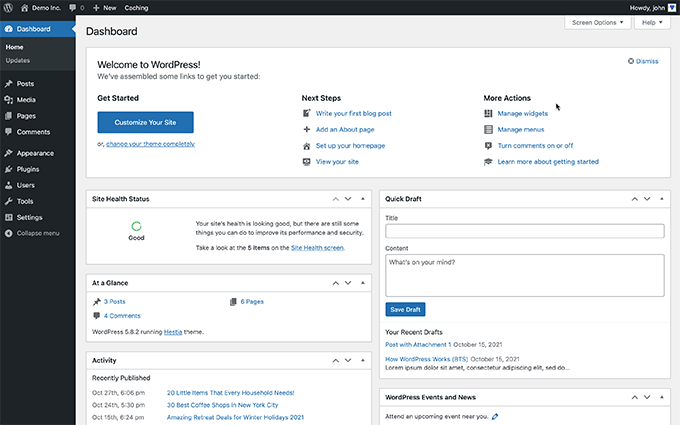
The dashboard is your website’s control center. It looks simple and clean. Here, you create posts, pages, and manage settings.
On the left, find menus for different tasks. Click “Posts” to add blog articles. Use “Appearance” to change how your site looks. Take a few minutes to explore all options.
Designing Your Site
Designing your site in WordPress is simple and flexible. It lets you create a website that looks just right for your needs. You do not need coding skills to start. The platform offers many tools to help you build a great website quickly.
Choosing Themes
The first step in design is picking a theme. Themes control your website’s look and layout. WordPress has thousands of free and paid themes. Choose one that fits your style and purpose. Themes vary from simple to complex designs. Many themes come with demo content to help you get started.
Customizing Appearance
After choosing a theme, customize your site’s appearance. You can change colors, fonts, and layouts easily. Use the WordPress Customizer to see live previews. Adjust your site’s header, background, and menus. Customization helps your site look unique and personal. No coding is needed for most changes.
Using Page Builders
Page builders are tools that make design easier. They let you drag and drop elements on your pages. Popular page builders like Elementor or Beaver Builder work with WordPress. You can add text, images, buttons, and more. Page builders give you control over every detail. Your site will look professional without complex steps.
Adding Content Easily
Adding content in WordPress is simple and straightforward. The platform offers tools to create and manage your content without hassle. Anyone can start writing pages or posts quickly. The user-friendly interface guides you through every step. Organizing and managing media files is also easy. This keeps your website tidy and attractive. Categories and tags help arrange your content well. They improve navigation for your visitors and search engines.
Creating Pages And Posts
WordPress divides content into pages and posts. Pages are for static content like About or Contact. Posts are for blog updates or news. To create a new page or post, click the “Add New” button. A simple editor appears for typing your text. You can add headings, lists, and links with a few clicks. The editor also lets you preview your work before publishing. Publishing is one click away, making the process fast.
Managing Media Files
Uploading images and videos is easy with the media library. Click “Add Media” to upload files from your computer. WordPress supports many file types like JPG, PNG, and MP4. After uploading, you can insert media directly into your posts or pages. The library keeps all your files organized in one place. You can also edit images, such as cropping or resizing, inside WordPress.
Organizing With Categories And Tags
Categories group your posts by topic. They create a clear structure for your website. Tags add more details about the post content. Both help visitors find related articles quickly. Adding categories or tags is simple during post creation. Just choose from existing options or create new ones. A well-organized site helps readers explore more content easily.
Extending Functionality
WordPress is known for its flexibility. You can extend its features beyond the basic setup. This helps create a website that fits your needs perfectly. Plugins play a big role in this process. They add new functions without needing to code.
Installing Plugins
Adding a plugin is simple and quick. From the WordPress dashboard, go to the Plugins section. Click on “Add New” and search for the plugin you want. Then, click “Install Now” and activate it. The plugin is ready to use immediately.
Popular Plugins For Beginners
Some plugins are great for new users. For example, Yoast SEO helps improve your site’s search visibility. Contact Form 7 lets visitors send you messages easily. WooCommerce turns your site into an online store. These plugins are easy to set up and use.
Keeping Plugins Updated
Regular updates keep your site safe and fast. Updates fix bugs and add new features. Check for updates in the Plugins menu. Click “Update Now” to install the latest version. Staying updated avoids problems and improves performance.
Maintaining Your Website
Maintaining your WordPress website is simple and keeps your site running smoothly. Regular care prevents problems and keeps visitors happy. You do not need special skills to manage basic tasks.
Regular Backups
Backups save a copy of your website data. They protect your site from losing content by accident. Use plugins or hosting services to create backups automatically. Store backups in a safe place, like cloud storage or your computer.
Security Measures
Security keeps your website safe from hackers and malware. Use strong passwords and change them often. Update WordPress, themes, and plugins to fix security holes. Install security plugins to monitor threats and block attacks.
Performance Optimization
Fast websites attract and keep visitors. Optimize images by resizing and compressing them. Use caching plugins to speed up loading time. Clean up your database to remove old data and reduce clutter.
Common Challenges And Solutions
WordPress is popular for its ease of use. Yet, users face some common challenges. These issues can slow down your progress. Knowing simple solutions helps keep your site running smoothly. This section explains common problems and easy fixes.
Troubleshooting Errors
Errors can appear after installing plugins or themes. A white screen or error message may show up. Start by disabling all plugins. Reactivate them one by one to find the cause. Switch to a default theme to check theme issues. Clear your browser and site cache. These steps often fix common errors fast.
Handling Updates
WordPress needs regular updates for security and features. Updates sometimes cause conflicts with plugins or themes. Always back up your site before updating. Update plugins and themes first, then WordPress core. Test your site after each update to catch problems early. This keeps your site stable and secure.
Finding Help And Resources
Many users worry about where to get help. WordPress offers a large community and support forums. Official documentation explains key features clearly. Tutorials and videos help with step-by-step guides. Join forums to ask questions and learn from others. These resources make solving problems easier.
Credit: themeisle.com

Credit: wordpress.com
Frequently Asked Questions
How Easy Is It To Set Up WordPress?
Setting up WordPress is very easy. You just need a hosting provider, a domain, and a few clicks. Most hosts offer one-click WordPress installs, making the process quick and beginner-friendly. No coding skills are required, which makes it accessible for all users.
Can Beginners Use WordPress Without Technical Skills?
Yes, beginners can use WordPress without technical skills. The platform has a simple dashboard and intuitive interface. It offers many themes and plugins that require no coding. Tutorials and community support also help new users learn quickly and build websites easily.
Is WordPress Customization User-friendly?
WordPress customization is user-friendly, thanks to its visual editors and theme options. You can easily change layouts, colors, fonts, and add features with plugins. The block editor allows drag-and-drop content creation, making customization accessible to users of all skill levels.
Does WordPress Require Coding Knowledge To Manage?
No, WordPress doesn’t require coding knowledge for basic management. You can add posts, pages, images, and plugins through the dashboard. Coding is only needed for advanced customizations, which are optional. Most users manage their sites efficiently without touching any code.
Conclusion
WordPress makes website building simple and fast for everyone. You can create pages, add content, and customize designs with ease. No need to know coding or technical skills. Many tools and plugins help improve your site quickly. This platform suits beginners and small businesses well.
Start your website project today without stress or confusion. WordPress offers a user-friendly path to online presence. Easy to use, flexible, and widely supported. Great for anyone wanting a simple website solution.



