
Are you ready to unlock the magic of WordPress and elevate your online presence? Imagine having the power to create captivating content that draws readers in and keeps them coming back for more.
Whether you’re a seasoned blogger or just starting out, understanding how to create posts in WordPress can transform your website into a dynamic and engaging platform. In this guide, we’ll delve into the essentials of crafting posts that not only convey your message but also captivate your audience.
Stick with us, and you’ll discover how to turn your ideas into compelling content that resonates with your readers, making them eager to explore every word you write. Ready to dive in and master the art of creating posts on WordPress? Let’s get started!
Basics Of Creating Posts
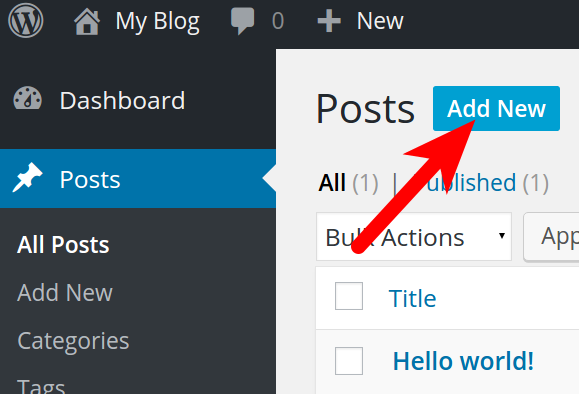
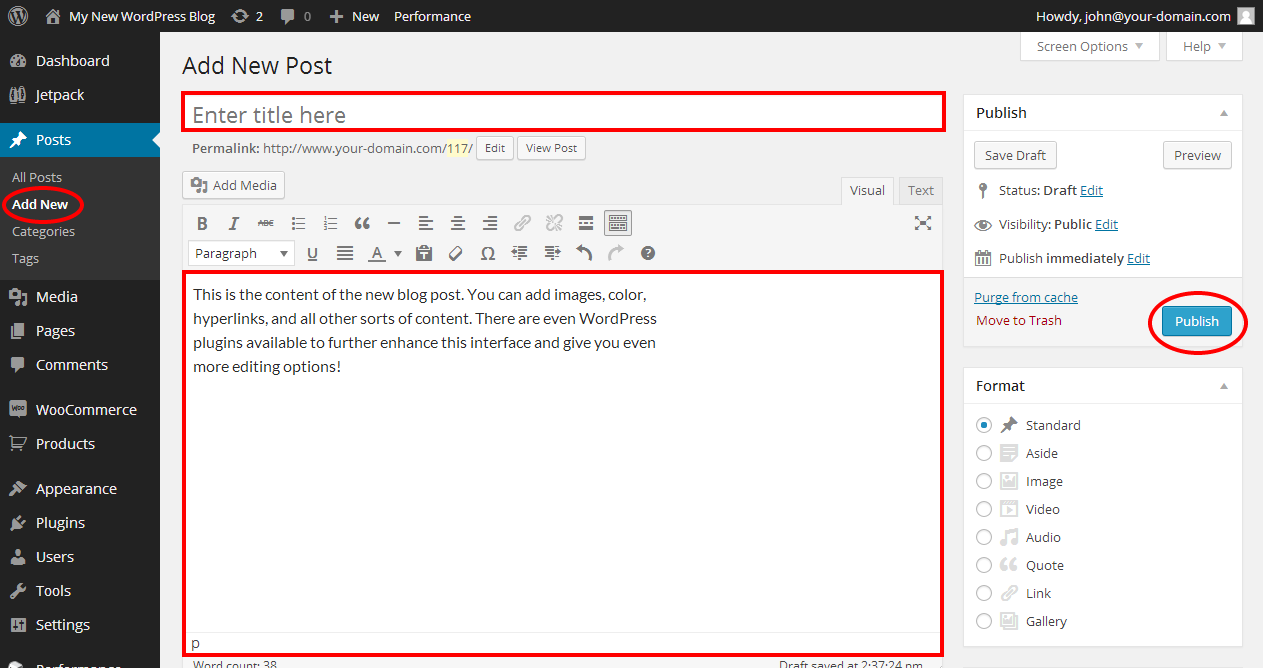
Creating posts in WordPress is simple. First, go to the dashboard. Click on “Posts” and then “Add New”. Now, you can write your post. Use the toolbar to make text bold or italic. Add images by clicking “Add Media”. You can also add links. Just select text and click the link icon. Remember to save your work. Use the “Save Draft” button often. When ready, click “Publish”. Your post is now live. It is easy to edit posts later. Just click on “Posts” and select the post you want to edit. Make changes and save. WordPress makes it easy for anyone to write online.
Credit: www.dreamhost.com
Accessing The Post Editor
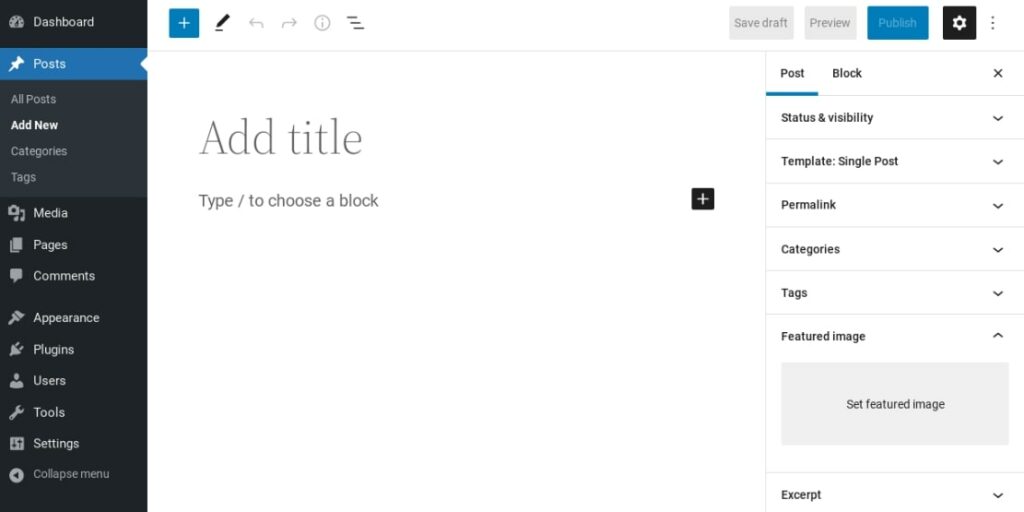
The Post Editor is where you create and edit your posts. Find it inside your WordPress dashboard. Click on Posts, then Add New. This opens the editor. It’s simple and easy to use. On the left, you’ll see the text area. This is where you write your post. Add your words here.
On the right, find post settings. Here, set your post category. Choose tags that fit your post. Add a featured image to make it stand out. The toolbar helps you format your text. Make headings, lists, or add links. It’s all here. Save your draft often. This prevents losing your work.
To publish your post, hit the Publish button. Your post goes live. It can be viewed by others. Remember, you can always edit your post later. Use the Edit option. Keep your content fresh and updated.
Understanding The Gutenberg Editor
The Gutenberg Editor in WordPress uses blocks to create content. Each block can hold different types of content. For example, text, images, or videos. Blocks are like building pieces. They help make a post look nice. You can add, move, and delete blocks. This makes editing easy. Blocks allow you to create unique layouts. You can also change the style of each block. This gives you more control over your post’s look. Blocks are flexible and user-friendly.
Each block has settings you can change. You can adjust the size, color, or font. This helps make the content stand out. You can also add links or change alignment. This lets you design your post as you like. You can save your favorite settings as reusable blocks. This saves time in future posts. Customizing blocks is fun and easy. It makes your post look special and unique.
Formatting Options For Posts
Text formatting tools make words look better. You can make words bold. You can make them italic. Some words can be underlined. Lists are helpful too:
- Bold text grabs attention.
- Italic text is soft.
- Underlined text stands out.
Pictures and videos make posts fun. They tell stories. Words alone can be boring. Images can help. Videos are cool too. They show action. Adding media is easy. Use the add media button. Choose a file from your computer. Put it in your post. Media makes posts interesting.
Optimizing Post Seo
Keywords are words people search. They help find your post. Use them smartly. Put them in the title. Use them in headings. Sprinkle them in the content. But don’t overdo it. Too many keywords can harm your post.
Tags help organize posts. They are like labels. Use tags to group similar posts. This helps readers find related content easily. It also boosts search engine visibility.
Meta descriptions are summaries of your post. They appear in search results. Write clear meta descriptions. Include keywords. Keep it short and engaging. This attracts clicks to your post.
Credit: www.inmotionhosting.com
Scheduling And Publishing Posts
You can set a date to publish your post. This helps manage your blog better. Choose a date and time in advance. Your post will go live automatically. This is called scheduling. It saves you time. You don’t have to be online. Your readers get fresh content regularly. It keeps your blog active. Scheduling is a smart move for busy bloggers.
Always preview your post before publishing. Check for errors in spelling or grammar. Look at the layout and images. Make sure everything looks good. The preview option shows how the post will appear. This helps avoid mistakes. It gives you a final look before it goes live. Always use this tool. It’s a good habit. It keeps your blog professional.
Managing Post Categories And Tags
Categories help organize your posts. They group similar topics together. Creating a category is simple. First, go to your WordPress dashboard. Find the “Posts” section. Click on “Categories”. You will see a form. Enter the name of your category. Add a slug if needed. A slug is the URL-friendly name. You can add a parent category too. This helps in creating sub-categories. Fill out the description if you want. Once done, click “Add New Category”. Your new category appears in the list. Use categories wisely. They help users find content easily.
Tags are keywords for your posts. They describe specific details. Tags are not the same as categories. They are more flexible. You can use many tags for one post. To add tags, go to the “Posts” section. Click on “Add New” or edit an existing post. On the right side, find “Tags”. Type the tag name and press “Enter”. You can add multiple tags. Separate each with a comma. Tags help in searching. They improve post visibility. Always choose relevant tags. They make finding posts easier.
Enhancing Posts With Plugins
Plugins make your blog better. They add new features. Bloggers like using Yoast SEO. It helps with search engines. Another good one is Jetpack. It improves site performance. Akismet blocks spam comments. These tools are easy to use. They help make your blog more fun.
Social sharing is important. It lets people share your posts. The Social Warfare plugin is useful. It makes sharing buttons. Monarch is another option. It offers many button designs. Sharing increases your post’s reach. More people will see your content. This helps grow your audience.
Credit: www.bluehost.com
Frequently Asked Questions
What Is A WordPress Post?
A WordPress post is a dynamic content type for blogs. Posts appear in reverse chronological order on your site. They are ideal for time-sensitive content like news, updates, or personal insights. Posts can be categorized, tagged, and archived, enhancing site navigation and user experience.
How Do I Create A WordPress Post?
To create a WordPress post, log into your dashboard. Click on ‘Posts’ then ‘Add New. ‘ Enter your content in the editor. Add a title, categories, and tags. Finally, click ‘Publish’ to make it live. This simple process helps maintain an active blog.
What Are The Benefits Of WordPress Posts?
WordPress posts improve SEO and user engagement. They keep your website updated with fresh content. Posts allow interaction through comments, enhancing community engagement. Categorizing and tagging posts improves site navigation. This makes it easier for visitors to find related content.
How Do Categories Help In WordPress Posts?
Categories organize your WordPress posts into topics. They enhance user experience by grouping similar content. This helps readers find related posts easily. Proper categorization improves website navigation and boosts SEO. It helps search engines understand your site’s structure better.
Conclusion
Creating posts in WordPress is simple and rewarding. It allows you to share ideas effortlessly. You can easily customize your content. Adding images, links, and videos enriches posts. Remember to use keywords for better search visibility. This helps more people find your posts.
Practice makes perfect. Keep exploring and experimenting. Your blog will grow stronger with time. Stay consistent and creative. Your audience will appreciate your efforts. Happy blogging!


