
Imagine having a magic tool that keeps you updated with your favorite blogs and websites without having to visit each one individually. Sounds convenient, right?
That’s precisely what an RSS feed URL can do for you. If you’ve ever wondered what an RSS feed URL is and how it can simplify your digital life, you’re in the right place. This article will unfold the mystery behind RSS feed URLs in WordPress, revealing how they can save you time and keep you informed.
By the end, you’ll discover how easy it is to stay updated and never miss out on the content you love. Ready to streamline your online experience? Keep reading to unlock the secrets of RSS feeds in WordPress.
What Is An Rss Feed?
RSS stands for Really Simple Syndication. It started in the late 1990s. Developers wanted a simple way to share news. RSS was created for this purpose. It helps websites share updates easily.
RSS feeds let users get updates from their favorite sites. They don’t need to visit each site. It saves time. Users see all updates in one place. Websites use RSS to reach more readers. It’s helpful for bloggers and news sites. RSS feeds keep readers informed.
Credit: www.wpbeginner.com
Rss Feed Url In WordPress
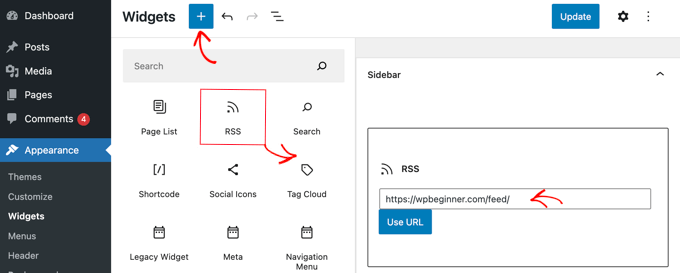
The RSS Feed URL in WordPress is a way to share updates. It lets people know when new posts are up. The default URL is simple. It usually looks like this: http://example.com/feed/. This URL is easy to find. Just add /feed to your site address. It’s a helpful tool for sharing content. Many use it to keep up with blogs.
You can change the RSS Feed URL to make it unique. Some people use plugins to do this. Others change code in the theme. This makes the feed look different. It can help with branding. But be careful. Changes can break the feed if done wrong. Always check your changes. Make sure the feed still works.
Accessing Rss Feed Url
Many websites use RSS feeds to share updates. WordPress makes it easy to find your RSS feed URL. First, visit your website. Add /feed at the end of your website’s URL. This directs you to your site’s RSS feed. For example, www.yoursite.com/feed. Some themes or plugins may change this URL. Always check your site’s settings if you can’t find it.
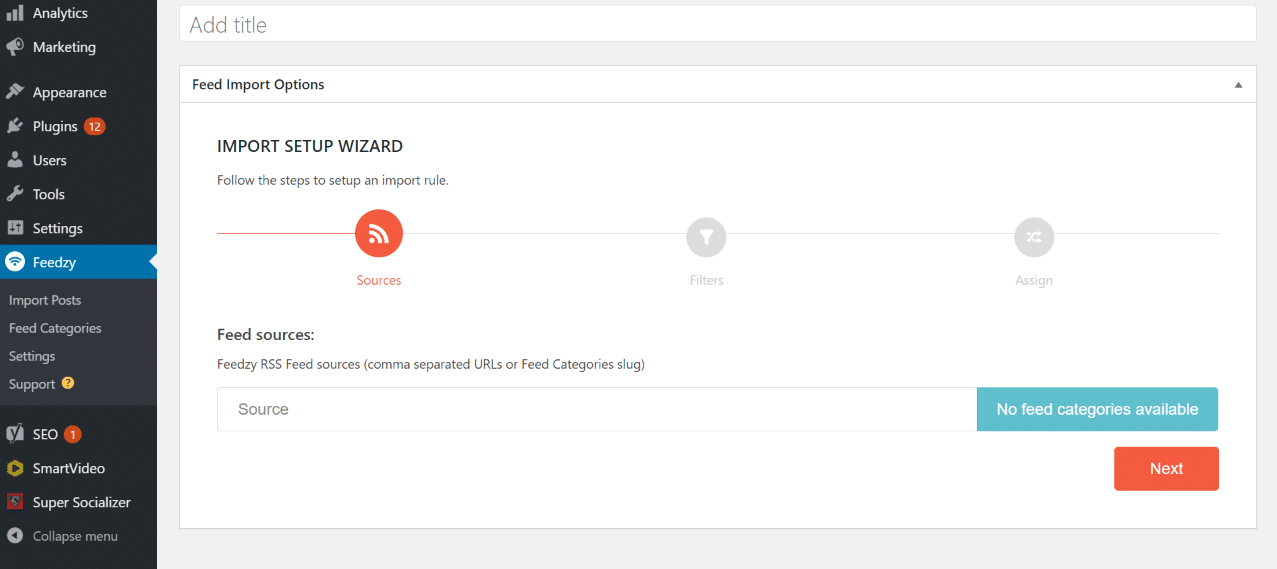
Plugins help in finding the RSS feed. One popular plugin is Yoast SEO. After installing, go to the plugin settings. Look for the RSS tab. It shows your feed URL. Another plugin is WP RSS Aggregator. This plugin also provides easy access to your feed. Using plugins simplifies the process for beginners.
Credit: kinsta.com
Benefits Of Using Rss Feeds
RSS feeds make it easy to share your content. Your readers get updates without visiting your site. This means your content reaches more people. Many platforms support RSS feeds for easy distribution.
RSS feeds can help with SEO. Search engines can find your site easily. This can lead to better rankings in search results. More visibility means more traffic. Fresh content is key.
With RSS feeds, readers get new content quickly. This keeps them interested and coming back. Consistent updates can build a loyal audience. Engaged readers are more likely to share your content. This helps grow your community.
Common Issues With Rss Feeds
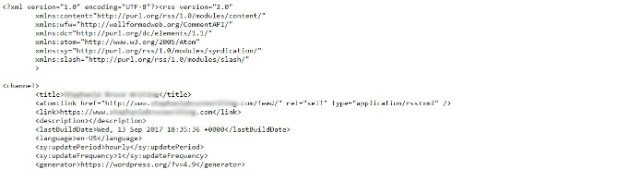
RSS feeds sometimes show errors. This can be frustrating. Feed errors occur due to bad formatting. Double-check your feed’s XML code. Look for missing tags or typos. These can cause problems.
Another issue is outdated URLs. Update your feed URL regularly. Changes in your website can affect the feed. Make sure all links are correct. Check if your website supports RSS. Some sites don’t allow it. This may cause errors.
Fixing RSS feed URLs is important. Always verify the URL. Check for extra spaces or characters. They can break the link. Use tools to test your RSS feed. These tools can find errors easily. Fix them to ensure smooth operation.
Sometimes plugins cause issues. Disable them one by one. This helps find the problem. Update your plugins regularly. Old plugins might not work well. Keep your WordPress and plugins updated. This prevents feed errors.
Credit: wpengine.com
Enhancing Rss Feeds
RSS feeds can connect to social media. Share your blog posts easily. Use tools like IFTTT or Zapier. They help automate sharing. Every new post can go to Facebook or Twitter. This saves time and effort. Keep your followers updated. Let them know about new content. Make sure your feed is always up-to-date.
Feed readers help people read many blogs. They collect all posts in one place. Popular readers include Feedly and Inoreader. Use them to follow favorite blogs. Stay updated without visiting each site. Just open the feed reader. Find all new posts there. It’s simple and easy to use. Great for those who love reading blogs.
Frequently Asked Questions
What Is An Rss Feed Url In WordPress?
An RSS Feed URL in WordPress allows users to subscribe to updates from your site. It provides a simple way for readers to receive new content automatically. This URL can be accessed by feed readers to display your site’s latest posts, ensuring timely updates for subscribers.
How Do I Find My WordPress Rss Feed Url?
To find your RSS Feed URL in WordPress, simply add `/feed/` to your site’s main URL. For example, if your site is `example. com`, the RSS Feed URL would be `example. com/feed/`. This provides subscribers with updates on new blog posts or content.
Why Should I Use Rss Feeds In WordPress?
Using RSS Feeds in WordPress is beneficial for distributing content efficiently. It allows readers to subscribe and receive updates automatically. RSS Feeds enhance engagement by keeping your audience informed of new posts without manual checking, increasing traffic and readership.
Can I Customize My WordPress Rss Feed Url?
Yes, you can customize your WordPress RSS Feed URL with plugins or code adjustments. This allows you to modify the feed format or include specific content. Customization helps tailor the feed to suit your audience’s preferences and improve how your site’s updates are delivered.
Conclusion
Understanding RSS feed URLs in WordPress helps manage content effectively. They simplify content delivery to users. This enhances the reader’s experience. Easy access to updates keeps your audience engaged. RSS feeds streamline content sharing. They improve visibility and reach. You can boost traffic with regular updates.
Efficient content management saves time. Consistency is key. Encourage readers to subscribe for updates. Stay informed with automatic notifications. RSS feeds remain a useful tool in WordPress. They support your blogging journey. Keep exploring and learning. Your blog will benefit.


