
Imagine having a secret room on your website, a space where only those with the right key can enter. This is exactly what a private post in WordPress offers you.
Whether you’re a blogger wanting to share exclusive content with a select few, or a business owner looking to collaborate privately with your team, understanding private posts can be a game-changer for your content strategy. You might wonder, why should you care about private posts?
Well, they hold the power to transform how you manage and share your content. Dive into this article to discover the magic behind WordPress private posts and how they can serve your unique needs.
Private Post Basics
Private posts are a special feature in WordPress. Only selected people can see them. They are not visible to everyone. Privacy is important for personal content. It keeps your information safe. Sharing with specific users is possible. Choose who can view your private posts. Control is in your hands. You decide who gets access. Protect your content from strangers. Use this feature wisely. It’s simple to use. Settings allow easy setup of private posts. No need for complicated steps. Secure your thoughts and ideas. Keep them away from public view. Freedom to share only with trusted people. It’s like having a private diary online.

Credit: wordpress.com
Creating A Private Post
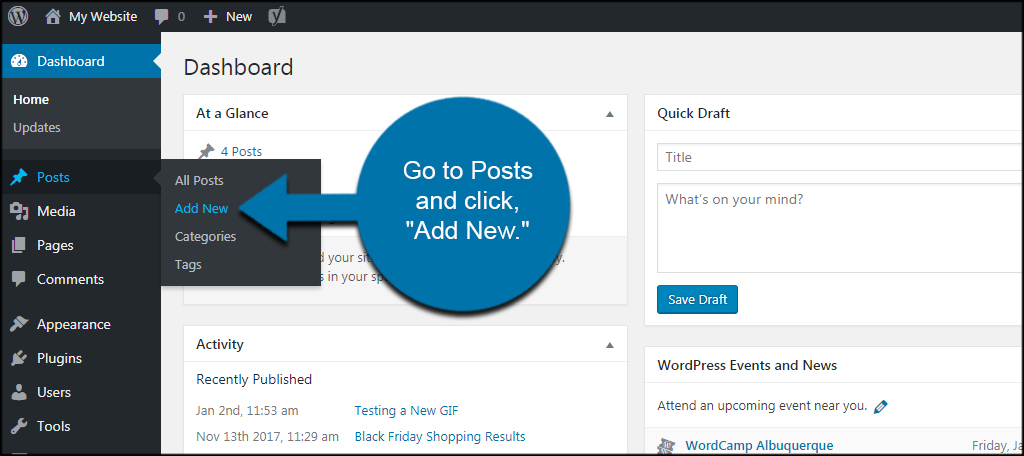
Creating a private post on WordPress is simple. First, open your WordPress dashboard. Select “Posts” and click “Add New”. Write your post. Then, look at the “Visibility” setting. It is on the right side. Change it from “Public” to “Private”. This makes the post hidden. Only you and chosen users can see it. Don’t forget to save or publish the post. Now, your post is private. It is safe from public eyes.
Accessing Private Posts
WordPress private posts offer controlled visibility. Only users with specific permissions can view them. They help protect sensitive content from public access.
User Roles And Permissions
Different users have different roles in WordPress. These roles decide what users can do on the site. Only some users can see private posts. Administrators can see all posts. This includes private ones. Authors and editors can only see their own private posts. Subscribers cannot see any private posts.
Viewing As An Administrator
Administrators have the highest permissions. They can see and edit all posts. This includes private and public ones. They can change post settings. They can also assign roles to other users. This helps control who can view and edit private posts. Administrators make sure the site runs well. They also keep content safe and secure.

Credit: webextent.net
Benefits Of Private Posts
Private posts are useful for many reasons. They keep your content hidden from public view. Only selected users can see them. This ensures privacy and security. You can use them to share drafts with team members. They help in gathering feedback. This is ideal for collaborative projects.
Private posts are also great for internal communication. You can share sensitive information safely. Family blogs often use this feature too. They share personal moments without the world seeing. Private posts allow for a focused audience. No unwanted readers or comments. This gives a sense of control and comfort.
Use Cases For Private Posts
Private posts are hidden from the public eye. They serve specific purposes. One use is for internal team updates. Teams can share news only with members. It keeps sensitive information safe. Everyone stays on the same page.
Another use is for client-specific content. Businesses share details only with clients. It might include contracts or reports. This helps maintain privacy. Clients see only what is meant for them.
Private posts protect confidential information. No outsiders can see them. This is important for security.
Managing Private Posts
Private posts can be updated like any other posts. Click on the edit button to make changes. You can add or remove content. Always save your changes. This keeps the post up to date. Only users with the right permissions can see these edits. It’s important to check who can view the post.
Deleting private posts is simple. Go to the post you want to delete. Click on the delete option. The post will be removed from your site. Once deleted, it cannot be seen by anyone. Make sure you really want to delete it before doing so. Deleted posts cannot be recovered easily.
Privacy Considerations
Private posts in WordPress are helpful for keeping content hidden. Only specific users can see these posts. Others won’t know they exist. This feature is great for sharing sensitive information. Businesses might use it for internal updates. Bloggers can keep drafts safe. Privacy settings are easy to adjust. WordPress lets you choose who sees your private posts. Only those with permission can access them. This keeps information secure. The private post feature can be turned on with a few clicks. It’s simple and quick. Users can also make posts public again. This gives flexibility in managing content. WordPress takes privacy seriously. It offers tools to protect user data.
Credit: www.greengeeks.com
Troubleshooting Common Issues
Private posts in WordPress remain hidden from public view, accessible only to logged-in users with permission. This feature ensures privacy for content like drafts or sensitive information, keeping it secure from unwanted access. Adjust visibility settings to control who can see private posts, enhancing your site’s confidentiality.
Access Problems
Many users face access problems with private posts. These posts are meant to be hidden from general viewers. Only specific users can see them. Sometimes, permissions get mixed up. This leads to confusion. Check user roles in settings. Ensure only chosen users have access. Private posts may not appear for others. Make sure your settings are correct.
Visibility Errors
Visibility errors occur when posts are not correctly set. If a post is private, it should not show in public areas. This includes the homepage and search results. Double-check the visibility settings. Ensure the post is marked as private. Sometimes, plugins interfere. Disable plugins temporarily to test visibility. A quick check of settings can solve these errors.
Frequently Asked Questions
What Is A Private Post In WordPress?
A private post in WordPress is visible only to authorized users. It ensures content is hidden from the public, requiring users to log in to view it. This feature is useful for sharing confidential information, drafts, or internal communications within a team or organization.
How Do I Create A Private Post?
To create a private post, start by drafting a new post. Before publishing, locate the “Visibility” option in the Publish section. Select “Private” and then click “OK” to confirm. Finally, publish your post, ensuring only authorized users can access it.
Who Can View Private Posts In WordPress?
Private posts in WordPress are accessible only to users with specific roles. Typically, only administrators and editors have permission to view private content. This restriction ensures that sensitive information remains secure, visible only to trusted individuals within your WordPress site.
Can Search Engines Index Private Posts?
No, search engines cannot index private posts. These posts are hidden from the public and require authentication to view. This ensures that private content remains secure and does not appear in search engine results, maintaining the privacy of your sensitive information.
Conclusion
Private posts on WordPress keep your content secure. Only selected users can see them. This feature is great for personal thoughts or team projects. It offers control over your audience. You decide who accesses your content. No need to worry about unwanted eyes.
Setting a post to private is simple. Just follow the steps in your WordPress dashboard. Enjoy sharing only with trusted viewers. Keep your content confidential with ease. Using private posts can enhance your WordPress experience. Try it today. Protect your content while staying connected.


