
Imagine your website as a bustling city, full of streets leading visitors to different destinations. Each street needs a clear, unique name to guide travelers smoothly.
In the world of WordPress, these street names are called permalinks. So, what exactly is a permalink, and why should you care? Permalinks are more than just URLs or web addresses. They play a critical role in enhancing your site’s visibility and user experience.
They determine how your content is found and shared, impacting everything from your search engine rankings to your site’s credibility. By understanding and optimizing permalinks, you hold the power to boost your website’s performance. Curious about how to unlock this potential? Stick around as we delve deeper into the world of permalinks and uncover how they can transform your digital presence.

Credit: www.geeksforgeeks.org
Permalinks Defined
Permalinks are the web addresses used for your posts. They are the permanent links to your content. Permalinks help readers find your posts easily. They are important for SEO. Search engines use these links to find your pages. Each permalink is unique. They never change. This makes them reliable for users.
WordPress lets you customize permalinks. You can choose different styles. This helps make them easy to read. For example, a permalink can have your post title. Or it can have the date of the post. Good permalinks are short and descriptive. They should explain what the page is about.

Credit: kinsta.com
Importance Of Permalinks
Permalinks are crucial for a website’s SEO. They help search engines find your content easily. Simple and clear permalinks improve search rankings. Users also find them easier to remember. A good permalink should include keywords. This makes it more relevant to search queries. Avoid using random numbers or special characters. Keep it clean and neat.
A nice permalink enhances user experience. Users can understand the page topic from the URL. This builds trust and makes them stay longer. Clear permalinks help users navigate your site easily. They feel more engaged and confident in finding what they need. Always aim for short and descriptive URLs.
Structure Of Permalinks
WordPress sets permalinks in a simple way. It uses the post ID as a default. This is a number that tells where the post is. For example, it may look like example.com/?p=123. This is easy for computers but not for people. People like to read words, not numbers.
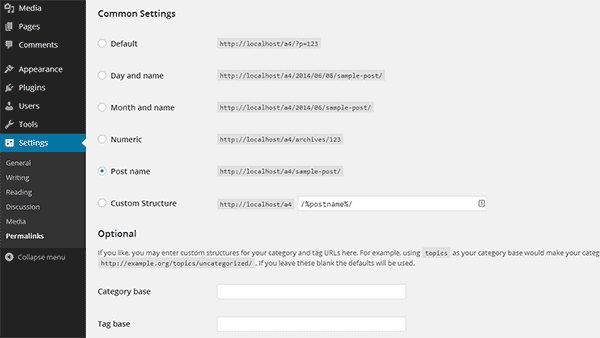
You can change permalinks to make them better. Use words instead of numbers. This helps people and search engines. You can add the post name. This is the name of your blog post. It might look like example.com/blog-post-title. This way, it is easier to remember and understand. Change these settings in the WordPress dashboard. Go to Settings and then Permalinks. Choose the style you like.
Creating Seo-friendly Permalinks
Place keywords at the start of the permalink. This helps search engines find them easily. Use simple words that match your content. Keywords should relate to the topic. Avoid using many words.
Stop words are common words like “and”, “the”, or “is”. Removing them makes permalinks cleaner. Search engines skip stop words. Keep permalinks short and to the point. This improves search results.
Common Permalink Issues
Broken links can make users sad. They click but find nothing. This happens if a page moves or deletes. Fixing links is important. Check links often. It helps keep your site healthy. Tools can help find broken links. Use them to fix quickly. Users want things to work.
Duplicate content can confuse search engines. They don’t know which page to show. This can hurt your site ranking. Make sure every page is unique. Use different words and ideas. Avoid copying from other sites. This helps your site look better. Be careful with similar pages. Fix them to avoid problems.
Permalink Best Practices
Consistent Structure helps users and search engines. Use simple and clear formats. Include keywords for better SEO. Avoid using dates and numbers. They can confuse readers. Keep URLs short and precise. Always reflect the content.
Redirects and Updates are important. Keep links active. Update them if needed. Use redirects for old links. This keeps visitors happy. It helps them find your content. Avoid broken links. They hurt your site’s reputation.
Tools For Managing Permalinks
Permalinks in WordPress are the permanent URLs for your posts and pages. They help users and search engines find content. Tools like Yoast SEO and Permalink Manager Pro simplify editing and managing these URLs, ensuring they remain user-friendly and SEO optimized.
Plugins And Extensions
Plugins help make permalinks easy. One popular plugin is Yoast SEO. It helps with permalink settings. Permalink Manager Lite is another option. It lets you edit permalinks easily. These tools help keep links neat and tidy.
Extensions are like plugins. They help manage permalinks too. Pretty Links is a useful extension. It shortens long links. This makes links look clean. Redirection is another tool. It helps fix broken links. Keeping links correct is important.
Analytics And Tracking
Analytics tools show how links perform. Google Analytics helps track link clicks. It shows which links people like. MonsterInsights is a plugin for this. It makes tracking easy inside WordPress. Knowing link performance is key.
Tracking helps understand user behavior. It shows which links get more clicks. This helps in making better links. Clicky is a tool that helps track in real-time. Real-time data helps make fast decisions.
Credit: www.isitwp.com
Frequently Asked Questions
What Is A Permalink In WordPress?
A permalink is a permanent URL to a specific WordPress post or page. It helps users and search engines find your content. Permalinks are essential for SEO, as they contribute to a site’s structure and readability. Customizing permalinks can enhance user experience and improve search engine rankings.
How Do Permalinks Affect Seo?
Permalinks play a crucial role in SEO by improving URL readability and structure. Search engines prefer URLs that are descriptive and keyword-rich. Well-structured permalinks make it easier for search engines to index your content. They also improve user experience by providing clear navigation paths.
How Can I Customize WordPress Permalinks?
You can customize WordPress permalinks in the settings menu. Go to Settings > Permalinks to choose your preferred structure. Options include plain, day and name, month and name, numeric, and post name. Customizing permalinks can improve both SEO and user experience by providing clear, descriptive URLs.
Why Are Permalinks Important For Websites?
Permalinks are vital for websites as they provide a consistent URL structure. They enhance user experience by making URLs easy to remember and share. They also improve SEO by helping search engines understand content hierarchy. Properly structured permalinks can boost site visibility and ranking.
Conclusion
Permalinks are crucial for WordPress success. They help organize your site. Improve your SEO and user experience with clean links. Choose the right structure for your content. Consistency is key. Make sure links are easy to read and remember. Search engines prefer simple, descriptive URLs.
Avoid unnecessary words or numbers. Test your permalinks regularly to ensure they work. Keep your audience in mind when creating URLs. A well-structured permalink enhances navigation. It builds trust with visitors. By understanding permalinks, you strengthen your site’s foundation. Keep learning and refining your strategy.
Your efforts will pay off in the long run.


