
Are you diving into the world of WordPress and finding yourself puzzled by the term “Parent Page”? You’re not alone.
Understanding what a Parent Page is and how it can benefit your website is crucial for organizing your content effectively. Imagine your website as a family tree, where each page has its rightful place. By grasping the concept of Parent Pages, you can create a seamless and intuitive user experience, making it easier for your visitors to navigate through your site.
Curious to know how this simple feature can transform your website’s structure? Keep reading to unlock the potential of Parent Pages and take control of your WordPress site like a pro.
Credit: www.hostinger.com
Understanding Parent Pages
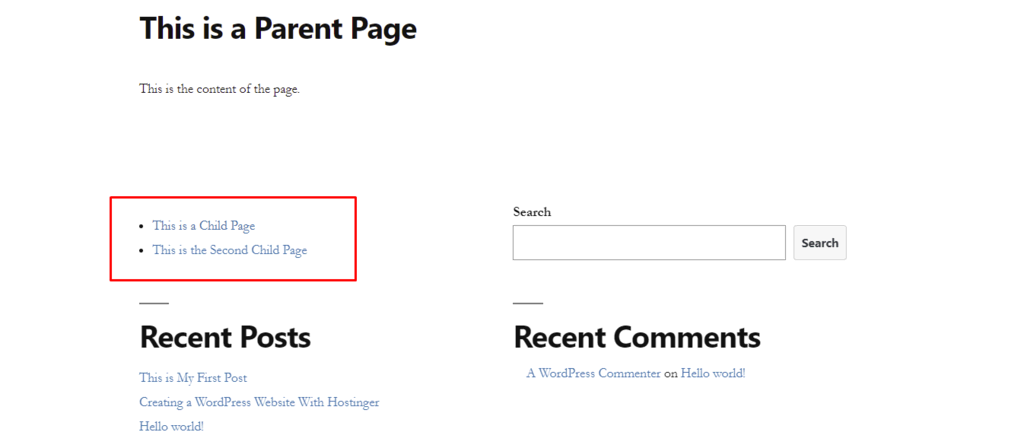
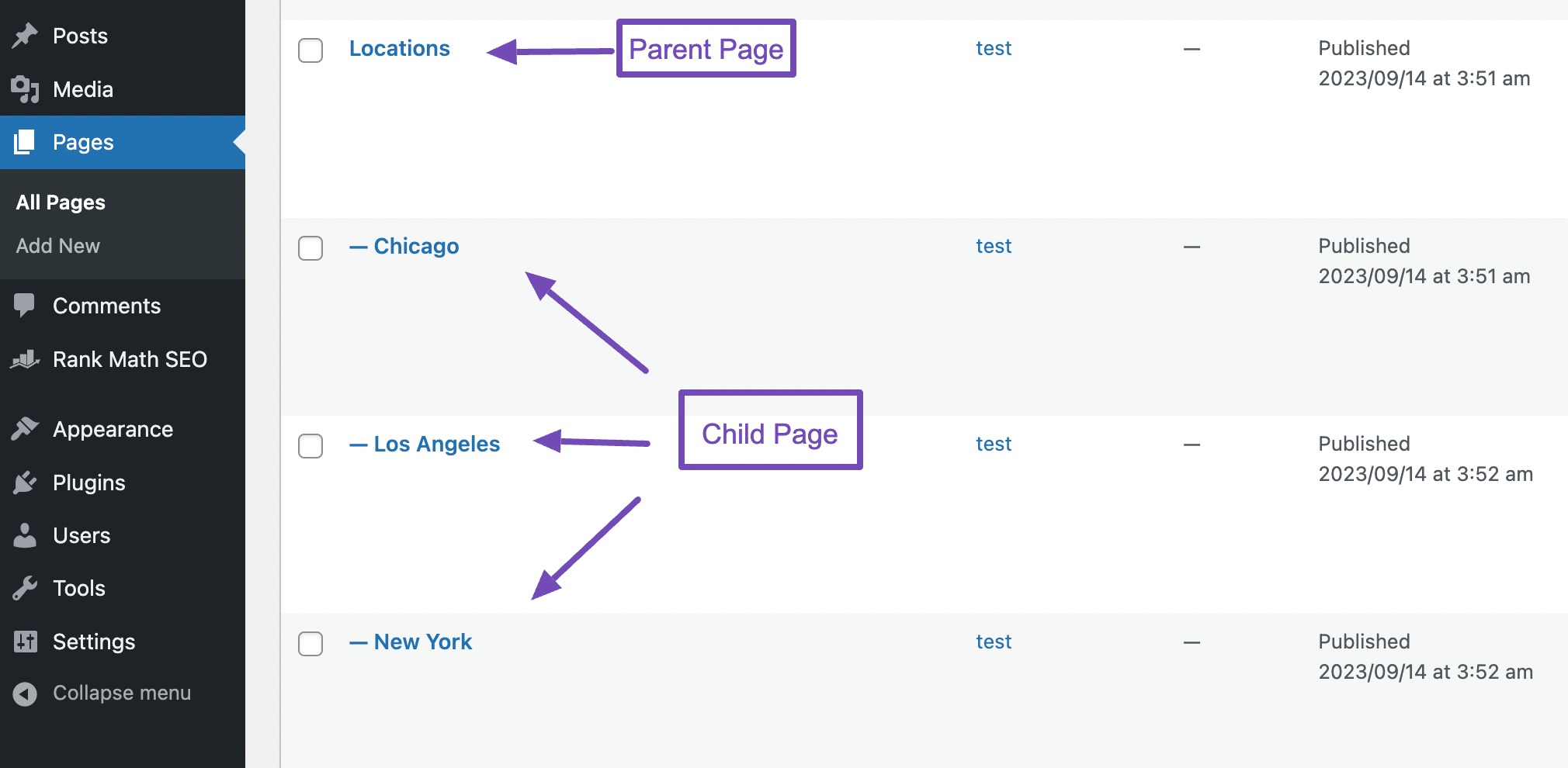
A Parent Page in WordPress is like a big folder. It holds other pages inside it. These pages are called Child Pages. Parent Pages help organize your website. They make navigation easy. Visitors can find information faster.
Parent Pages play a key role in website structure. They group related pages together. This makes the site look tidy. It enhances user experience. You get a clear hierarchy. Parent Pages improve SEO. Search engines understand your site better. They boost your site’s visibility.
Benefits Of Using Parent Pages
Parent pages make websites easier to explore. They help users find information quickly. Users don’t get lost on the website. Parent pages guide visitors through the site smoothly. They show the relationship between different pages. This makes browsing intuitive and simple.
Parent pages organize information neatly. Content becomes well-structured and clear. Users can see how pages connect. This aids in understanding the site’s layout. Well-organized content looks professional. It helps users locate relevant information easily. Parent pages offer a logical flow of content.
Creating A Parent Page In WordPress
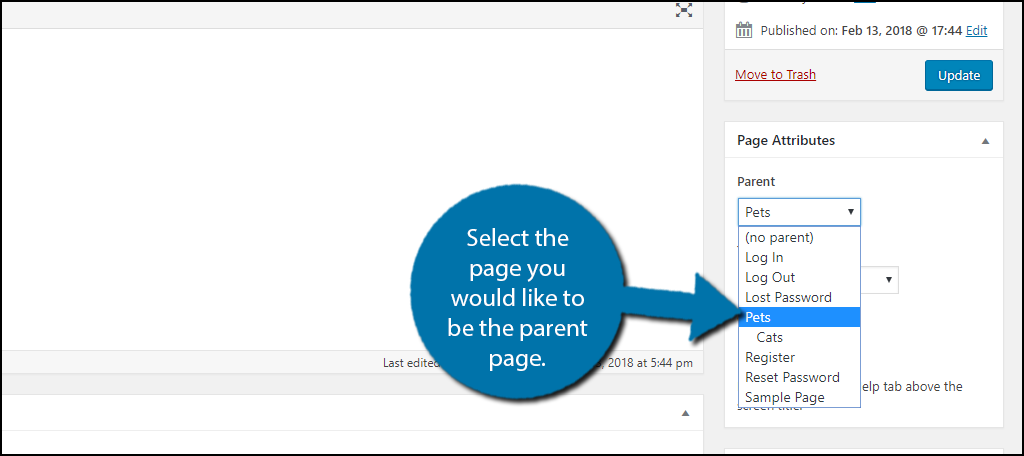
First, log in to your WordPress dashboard. Click on Pages from the menu. Now, choose Add New to create a new page. In the editor, write the title for your new page. Scroll down to the Page Attributes section. Select the Parent Page from the dropdown menu. Click Publish to save your new page. Your page now has a parent.
Think about the main topic of your website. Choose a parent page that fits this topic. It helps keep your site organized. If your site is about animals, a parent page could be Animals. Under it, you can have pages like Cats and Dogs. This makes your site easy to use.
Editing And Managing Parent Pages
Modifying Parent-Child Relationships is simple in WordPress. First, go to the Pages section in your dashboard. Click on the page you want to edit. Look for the Page Attributes box. Here, you can change the parent page. Choose the new parent from the dropdown menu. Then, click the update button. This changes the page’s position in your site.
Troubleshooting Common Issues can be easy with a few steps. Sometimes the changes don’t show up. Try clearing your browser cache. Or, refresh the page to see updates. Make sure you have the right permissions. Some themes may not support this feature. Check your theme settings if you face issues.
Best Practices For Parent Pages
Using a consistent hierarchy is crucial for parent pages. It helps users understand the site structure. Pages should follow a logical order. Each page should link to its parent and child pages. This makes navigation easy.
Organize pages by topics or themes. Group similar pages together. This improves user experience. Search engines prefer well-organized sites. A clear hierarchy boosts SEO. It improves site visibility in search results.
Parent pages play a key role in SEO. Keywords should be placed strategically. Title tags and meta descriptions are important. They should contain relevant keywords. This helps search engines rank your pages.
Use internal links wisely. Linking child pages to parent pages improves site structure. It enhances SEO and user navigation. Regularly check links for updates. Broken links affect SEO negatively.
Credit: www.greengeeks.com
Examples Of Effective Parent Pages
WordPress parent pages help organize content. They can group related topics. This makes navigation easier for users. One example is travel websites. They use parent pages to group destinations by region. This helps users find information quickly. Another example is recipe websites. They use parent pages for meal types like breakfast or dinner. This makes finding recipes easy.
Popular websites use parent pages well. They improve user experience. For instance, education sites use parent pages. They group courses by subject. This helps students find courses fast. E-commerce sites use parent pages for products. They group items by category. This helps customers shop easily. Parent pages are vital for clear website structure.
Credit: rankmath.com
Frequently Asked Questions
What Is A Parent Page In WordPress?
A parent page in WordPress is a top-level page that can have subpages. It helps in organizing site content hierarchically. By using parent pages, you can create a structured and intuitive navigation. This enhances user experience and makes your website easier to manage.
How To Create A Parent Page?
To create a parent page, go to your WordPress dashboard. Navigate to Pages, then click Add New. Enter a title and content for your page. In the Page Attributes section, select ‘no parent’ to make it a parent page. Finally, publish your page.
Why Use Parent Pages On WordPress?
Using parent pages helps in organizing content logically. It improves site navigation and enhances user experience. Parent pages also assist in SEO by creating a clear hierarchy. This structure helps search engines understand content relationships better.
Can A Parent Page Have Multiple Child Pages?
Yes, a parent page can have multiple child pages. This allows you to organize related content under a single parent. It simplifies navigation and improves user experience. You can create as many child pages as needed to structure your content effectively.
Conclusion
Parent pages help organize your WordPress site effectively. They create a clear hierarchy. This helps users navigate more easily. You can group similar content under one parent page. It keeps everything tidy and accessible. Users find related topics quickly. Parent pages simplify site management.
They streamline content updates. You gain better control over your website’s structure. This enhances user experience. Search engines understand your site better. This can improve your SEO ranking. Start using parent pages today. They make your WordPress site more intuitive.
Your audience will appreciate the structured layout. Happy organizing!


