
Imagine a sleek, modern website where your images and content flow seamlessly, catching your eye and drawing you in. This is the magic of a masonry grid.
If you’re building a WordPress site, this layout can transform your pages from static to stunning. But what exactly is a masonry grid, and why should you consider using it? You might have seen it on popular sites without even realizing it, where the content is arranged in a way that feels both dynamic and organized.
You’ll discover how a masonry grid can elevate your WordPress site, making it not only visually appealing but also user-friendly. Get ready to dive into the world of masonry grids and unlock the potential of your website’s design. Are you ready to make your site stand out? Let’s get started!
Masonry Grid Basics
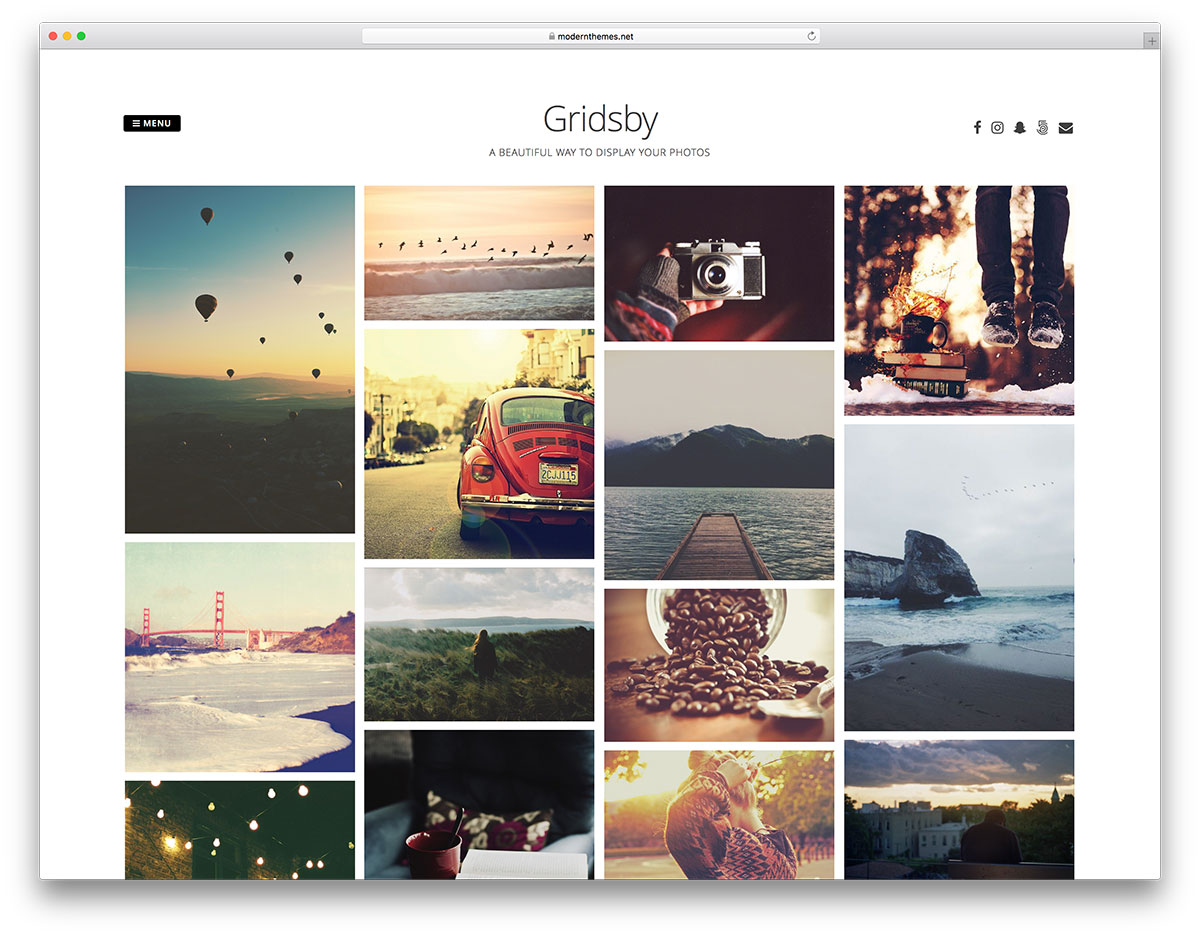
A masonry grid arranges items in a staggered pattern. Each item fits next to another. No spaces left unused. This layout is popular for image galleries. It allows images of different sizes to be placed together. The grid looks neat and tidy.
Designers love this layout. It gives a modern look to websites. Items flow naturally in a masonry grid. No need for strict rows or columns. This grid is flexible. It adjusts to different screen sizes easily. Users can see more without scrolling much.
Setting up a masonry grid is easy. WordPress offers plugins for this layout. These plugins help users create stylish grids. They don’t need coding skills. Just a few clicks and the grid is ready. This makes it accessible to everyone.

Credit: gutenberghub.com
Design Principles
A masonry grid in WordPress brings a fresh look. It does not follow a strict pattern. Blocks of content are arranged with different sizes. This creates an interesting design. Viewers see images and text in a new way. It feels like a puzzle. Each piece fits, yet stands out. This makes the layout unique and creative. It’s not like a boring, straight row.
Content moves and adjusts automatically. This keeps the website lively. Users see changes as they scroll. The grid reacts to the screen size. On smaller screens, blocks shuffle to fit. This makes the site look good on any device. No need for constant adjustments. The grid handles it all. It’s like having a smart helper for your design.
Benefits Of Masonry Grid
A masonry grid makes your website look cool. It arranges images and content in a unique way. Each item has its own place. This style is like a brick wall. All things fit together. It looks neat and tidy. People love sites that look good. It keeps them interested. They might stay longer. They might come back again. A good look is important for any site. With a masonry grid, this is easy to achieve.
Masonry grids make the best use of space. They fit more items on a page. No space is wasted. Every image has its spot. It’s like a puzzle. All pieces fit perfectly. This makes everything easy to see. Your page looks full but not crowded. More content means more fun. Visitors see more without scrolling a lot. It is a clever way to show many things at once.
Use Cases In WordPress
A masonry grid displays items in a unique way. Each item fits nicely, like stones in a wall. It’s great for portfolio showcases. Photographers use it to show many pictures. Artists can show their art pieces. Everything looks neat and tidy. No wasted space. Easy to see and admire.
Blogs look fresh with a masonry layout. Posts appear in cool blocks. Readers see more content at once. It is ideal for picture-heavy blogs. Also good for fashion or travel blogs. Users can browse easily. They enjoy the visual appeal. It keeps them engaged longer. A simple way to organize and present content.
Popular Plugins
Essential Grid helps in creating beautiful grids. It is easy to use. This plugin offers many design choices. Users can make their grids look unique. It works well with images and videos. Many users love its simple settings. Mobile-friendly grids are a big plus. With its powerful features, it suits all needs.
WPBakery Page Builder adds flexibility to WordPress. It offers a drag-and-drop feature. Users can build pages without coding. It supports many grid styles. Customizable layouts are easy with this plugin. It works with most themes. Users can make websites look professional. Many developers prefer it for its simplicity.

Credit: gutenberghub.com
Customization Tips
Discover the Masonry Grid in WordPress for a stylish, Pinterest-like layout. It displays posts in a dynamic, brick-like arrangement. Ideal for showcasing creative content or portfolios in an organized, visually appealing manner.
Responsive Design
A Masonry Grid must adjust on different screens. This helps users view content easily. Make sure images and text fit well. Use CSS media queries to change layout sizes. This ensures the grid looks good everywhere. Check the grid on phones and computers.
Color and style are important. Choose colors that match your site. Make sure the text is easy to read. Use colors that complement your brand. Keep the style simple and clean. Avoid too many bright colors. This can distract users. A balanced design is best for all users.
Troubleshooting Common Issues
Masonry Grid in WordPress arranges posts and images in a stylish, staggered layout. It creates a Pinterest-like experience, enhancing visual appeal. Troubleshooting involves checking plugin settings and theme compatibility for smooth operation.
Load Time Optimization
Slow websites can be very annoying. They make users leave quickly. To make a masonry grid load faster, use smaller images. Big images take longer to load. This can slow down your site.
Compress images to reduce their size. Use tools like TinyPNG or JPEGmini. They help make images smaller. Also, use a content delivery network (CDN). A CDN helps load your website faster by using many servers.
Layout Fixes
Sometimes, the grid layout breaks. This makes the site look messy. To fix it, check your CSS code first. Look for any mistakes in the code. Check for missing brackets or extra spaces.
Make sure your theme supports the grid layout. Some themes do not work well with masonry grids. Also, try updating your theme or plugins. Updates often fix bugs that cause layout issues.
Future Trends
WordPress Masonry Grid arranges images and content in a dynamic, Pinterest-style layout. This design is flexible, adjusting to various screen sizes. It enhances visual appeal by organizing elements in an engaging way.
Advanced Features
Masonry grids are getting more advanced. New features are coming. These features help users. They make websites look better. They help organize content.
Integration With Ai
AI can work with masonry grids. This helps create dynamic layouts. AI can suggest the best images. It can also adjust grid sizes. This makes websites more engaging. Users stay on sites longer. They find what they want easily.
Credit: colorlib.com
Frequently Asked Questions
What Is A Masonry Grid In WordPress?
A masonry grid is a layout design that arranges elements in a staggered, overlapping pattern. It optimizes space by stacking items vertically, like bricks in a wall. This grid style is popular for photo galleries and portfolios, offering a visually appealing and dynamic presentation.
How To Create A Masonry Grid In WordPress?
Creating a masonry grid in WordPress involves using themes or plugins that support this layout style. Themes like “Divi” or plugins like “Essential Grid” offer easy options. Simply install and customize the settings to fit your design needs and content requirements.
Why Use Masonry Grid For WordPress Sites?
Using a masonry grid enhances the visual appeal of your WordPress site. It creates a dynamic and engaging layout that showcases content effectively. This layout is ideal for galleries, portfolios, and blogs, allowing for varied content display without uniformity constraints.
Can Masonry Grids Improve Website Engagement?
Yes, masonry grids can improve website engagement by offering a unique and visually appealing layout. They encourage users to explore content due to the dynamic arrangement. This design style can increase time spent on the site and reduce bounce rates.
Conclusion
A masonry grid in WordPress offers a unique layout. It arranges posts or images like bricks in a wall. This design is both stylish and functional. It helps content stand out and attracts attention. Many themes support masonry grids. No coding skills needed.
Just a few clicks, and you’re set. This grid layout suits blogs, portfolios, and galleries. Try it for a fresh look. Enhance your site’s visual appeal today. Keep exploring WordPress features for more creativity.


