
Ever wondered what’s happening behind the scenes of your WordPress site? You know, those magical tools that make your website run smoothly, offer great features, and enhance user experience?
Yes, we’re talking about plugins. But here’s the catch: do you know which ones are actually in use? Identifying your active plugins is crucial for maintaining a well-oiled WordPress site. Not only does it help you streamline functionality and improve security, but it also boosts your site’s performance.
You’ll learn how to easily display the plugins currently in use on your WordPress site. This knowledge can empower you to take control, optimize your website, and ultimately deliver a better experience for your visitors. Curious to unlock these insights? Let’s dive in.
Credit: weplugins.com
Importance Of Identifying Active Plugins
Plugins make your WordPress site work better. Knowing which plugins are active is very important. Active plugins can affect your site’s speed and security. Some plugins may cause conflicts. This can make your site crash. Identifying these plugins helps avoid problems.
Active plugins can slow down your site. A slow site can lose visitors fast. People don’t like to wait. Active plugins can also make your site unsafe. Hackers can use plugins to attack sites. Regular checks on plugins keep your site safe.
Some plugins might not be needed anymore. Removing unused plugins frees up space. This can make your site faster. Knowing active plugins helps manage your site well.
Benefits Of Displaying Active Plugins
Knowing active plugins helps manage site speed. Remove unused plugins to speed up loading. Fewer plugins mean less server load. This ensures smooth user experience.
Active plugins list can enhance site security. Identify plugins needing updates for better security. Updated plugins protect against vulnerabilities. Displaying plugins keeps site safe.
Display of plugins aids in easy troubleshooting. Find conflicting plugins quickly. Fix errors without hassle. Knowing active plugins avoids compatibility issues. This makes site management efficient.
Methods To Display Active Plugins
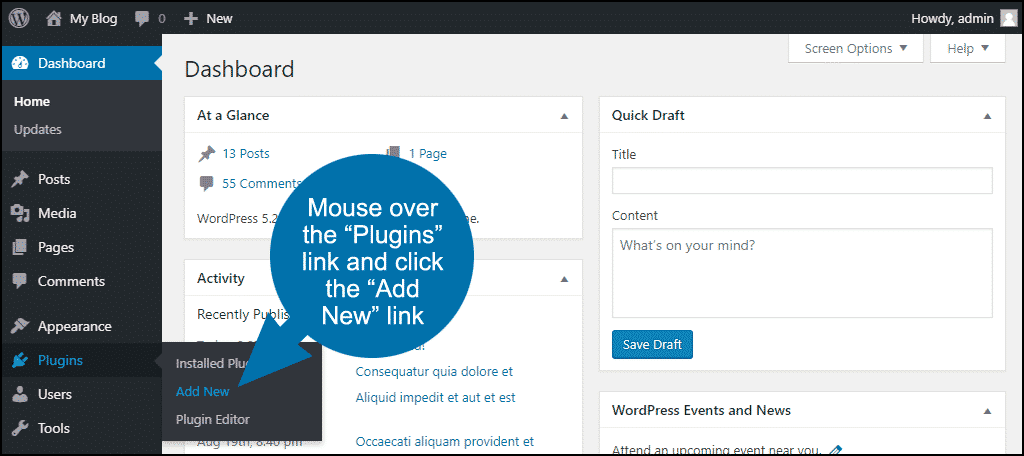
The dashboard is an easy way to view active plugins. Just log in to your WordPress site. Go to the Plugins section. You will see all plugins listed. The plugins with a checkmark are active. No need for extra tools. This is simple and quick.
Custom code can help display active plugins. Add code to your theme’s functions.php file. This code lists all active plugins. Make sure to back up your site first. Coding needs careful attention. Mistakes can break your site.
Some plugins show what other plugins are active. They make it easier to track plugins. Search for these in the WordPress plugin directory. Install the one you like. Activate it. Follow the instructions given. Useful for beginners and experts alike.
Recommended Plugins For Displaying Active Plugins
Plugin A helps you see all active plugins. It is easy to use and shows a list of plugins. This makes it simple to manage your site. You can check for updates too. Plugin A is a favorite for many users. It does not slow down your site. Lightweight and efficient. That’s Plugin A for you.
Plugin B gives clear information on each plugin. You see what is running and when. It helps keep your site fast. Plugin B is user-friendly. Many find it helpful for organizing plugins. It offers good support. Plugin B is reliable for displaying plugins.
Plugin C shows plugin details in one click. It is perfect for beginners. Easy to install and use. Plugin C keeps your site organized. It checks for plugin updates too. Many users like its simple design. Plugin C makes managing plugins a breeze.
Best Practices For Managing Plugins
Keeping plugins up to date is very important. Updates fix bugs and add new features. Regular updates also keep your site safe. Developers often fix security holes in updates. So, always check for new updates. Set a schedule to update your plugins. This can be weekly or monthly. Keeping your plugins updated helps your site run smoothly.
Using too many plugins can cause problems. Some plugins don’t work well together. This is called a conflict. To avoid this, only use plugins you need. Before adding a new plugin, check reviews. Make sure it works well with others. Always test new plugins in a safe area first. This is called a staging site. It helps keep your main site safe.
Plugins can slow down your site. Monitor their performance often. Use tools to check how fast your site is. If a plugin makes your site slow, find another one. Or see if it needs an update. Sometimes, removing a plugin can speed up your site. Keep an eye on how each plugin affects your site. This will help maintain a fast and smooth website.

Credit: creativeminds.helpscoutdocs.com
Common Issues And Solutions
Struggling to identify active plugins on your WordPress site? A plugin such as “Plugin Detective” offers quick solutions. Easily track usage and optimize performance with these handy tools, ensuring a smoother website experience.
Plugins Not Displaying
Plugins might not show up due to installation errors. Check if the plugin is activated. Sometimes, a plugin is installed but not turned on. Go to the plugins page and ensure the plugin is active. Also, ensure the plugin is compatible with your WordPress version. Always use plugins from trusted sources to avoid problems.
Compatibility Issues
Not all plugins work well with each other. Some plugins may conflict. This can cause your site to break. Disable other plugins to find the problem. Always update plugins to their latest versions. Regular updates can fix many compatibility problems. Test new plugins on a staging site first. This way, your main site stays safe.
Performance Impact
Too many plugins can slow your site. Each plugin uses resources. Try to use only the necessary plugins. Remove unused plugins to keep your site fast. Some plugins may hog resources more than others. Test your site speed before and after installing a plugin. This helps in identifying slow plugins.
Future Trends In Plugin Management
Exploring future trends, WordPress enhances plugin management by displaying active plugins directly on the dashboard. This transparency aids in efficient site management, helping users understand plugin impact without complicated tools. Simplified display ensures non-native English speakers easily grasp plugin functionality and usage.
Automation In Plugin Management
Automation is becoming vital in plugin management. It makes managing plugins easier and less time-consuming. Many tools now offer automatic updates for plugins. This keeps your site secure and up-to-date without manual work. Automated checks can ensure plugins are compatible before updates. This prevents site crashes and conflicts. Automation helps in identifying unused plugins. Removing them boosts site speed and performance.
Ai-driven Plugin Recommendations
AI is helping in suggesting the best plugins. These recommendations are based on your site’s needs. AI analyzes site data and user behavior. It then suggests plugins that improve functionality and user experience. This reduces the time spent searching for the right plugins. AI can predict future plugin needs. It helps in planning and optimizing site features ahead of time.
Credit: www.greengeeks.com
Frequently Asked Questions
How To Check Active Plugins In WordPress?
To check active plugins in WordPress, navigate to your dashboard. Click on “Plugins” in the left sidebar. The plugins listed under “Active” are currently in use. This method helps you easily identify and manage the plugins impacting your website’s performance and functionality.
Can I See Plugin Details Without Dashboard Access?
Yes, you can see plugin details without dashboard access by using FTP or hosting file manager. Access the “wp-content/plugins” directory, where you’ll find folders named after each installed plugin. Reviewing these folders can give you insights into the plugins in use on your WordPress site.
Are There Tools To List Active WordPress Plugins?
Yes, tools like WP-CLI and specific WordPress plugins can list active plugins. WP-CLI, a command-line tool, allows you to manage plugins through simple commands. Additionally, plugins like “Plugin Inspector” provide detailed insights into active plugins directly from the WordPress dashboard.
Why Is It Important To Know Active Plugins?
Knowing active plugins is important for managing website performance and security. Active plugins can affect site speed and functionality. Regularly reviewing them helps identify outdated or unnecessary plugins. This ensures your WordPress site remains optimized and secure, providing a better user experience.
Conclusion
Understanding which plugins are active in WordPress is essential. It helps in managing your site effectively. You can improve performance by identifying unnecessary plugins. This ensures a smoother user experience. Regular checks keep your website secure and updated. Knowing your plugins saves time and effort.
It also aids in troubleshooting issues quickly. Staying informed about plugin usage is beneficial. It boosts your site’s functionality and reliability. Always monitor and manage plugins wisely. Your WordPress site will thank you for it. Keep your digital space efficient and user-friendly.


