
Are you wondering which software model powers Business Intelligence systems and how it impacts your decision-making? Understanding the right software model can unlock the full potential of your data, helping you make smarter, faster choices.
This article will guide you through the key software models behind Business Intelligence, showing you how they work and why they matter for your business success. Keep reading to discover the model that can transform the way you analyze data and drive growth.
Business Intelligence Systems Overview
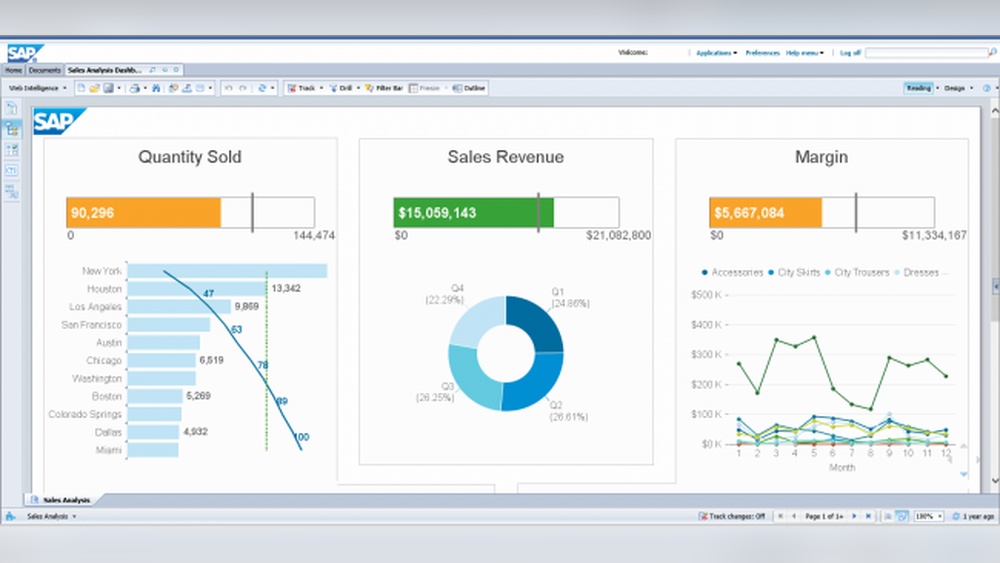
Business Intelligence (BI) systems help companies collect and analyze data. They turn raw data into useful information. This information supports better business decisions. BI systems combine software and tools to gather, store, and analyze data. They provide clear reports and visualizations. These systems help businesses understand trends and patterns.
BI systems are designed to be user-friendly. They allow users to access data easily. This makes it simple to explore and find insights. BI systems support many types of data sources. They work with databases, spreadsheets, and cloud services. This flexibility helps companies use all their data effectively.
Key Features Of Bi Systems
BI systems include several important features. They offer data integration to combine information from different sources. Data visualization tools create charts and graphs that are easy to understand. Reporting features generate regular updates on business performance. Analytics tools help users explore data and find trends. Many BI systems support real-time data analysis. This allows quick reactions to changes in the market or operations.
Role In Decision Making
BI systems improve decision-making by providing accurate information. They reduce guesswork and rely on facts. Managers can see clear data on sales, costs, and customer behavior. This helps them make informed choices. BI systems highlight key performance indicators (KPIs) to track goals. They also identify problems early, so businesses can act fast. Decisions based on BI data tend to be more effective and timely.
Common Software Models In Bi
Business Intelligence (BI) systems rely on software models to guide their development and implementation. These models shape how teams plan, build, and improve BI solutions. Choosing the right model affects project success and system quality.
Below are some common software models used in BI projects. Each model offers different steps and flexibility. Understanding these can help businesses pick the best approach for their needs.
Waterfall Model
The Waterfall Model is a linear, step-by-step process. It moves from one phase to the next without going back. Phases include requirements, design, development, testing, and deployment. This model fits projects with clear, fixed goals. It is easy to manage but less flexible for changes.
Agile Model
The Agile Model emphasizes flexibility and fast delivery. Work happens in small cycles called sprints. Teams review and adjust after each sprint. Agile helps handle changing requirements well. It promotes collaboration and continuous improvement throughout the project.
Iterative Model
The Iterative Model builds the system in repeated cycles. Each cycle improves the product by adding features or fixing issues. Users can see early versions and give feedback. This model reduces risks and improves quality. It suits projects with uncertain or evolving needs.
Spiral Model
The Spiral Model combines design and risk analysis. It repeats phases in loops called spirals. Each spiral includes planning, risk evaluation, engineering, and testing. This model focuses on identifying and solving risks early. It works well for complex and large BI projects.
Suitability Of Software Models For Bi
Choosing the right software model is crucial for Business Intelligence (BI) systems. The model must handle complex data and support fast decision-making. It should also adapt to changing business needs. Not all software models fit BI systems equally well. Understanding their strengths and weaknesses helps in making the best choice.
Flexibility And Adaptability
BI systems need software that adjusts easily to new data and user needs. Flexible models allow quick changes without much cost. Adaptability means the system can grow as the business grows. This helps companies stay competitive and respond to market changes fast.
Data Integration Challenges
BI systems collect data from many sources. Software models must handle data integration smoothly. Some models struggle with different data formats or large volumes. Choosing a model that supports easy and reliable integration reduces errors and saves time.
User Feedback Incorporation
User input is vital for improving BI systems. Software models that allow regular updates based on feedback work better. They help fix problems and add needed features quickly. This keeps users satisfied and the system effective over time.

Credit: www.researchgate.net
Agile Model And Bi Systems
The Agile Model fits well with Business Intelligence (BI) systems development. It allows teams to work in short cycles and adapt quickly to changing needs. BI projects often need updates based on new data and user feedback. Agile supports these changes smoothly without major delays or costs.
This model breaks work into small parts, making it easier to manage. Teams can deliver useful BI features faster. Users get value early and give feedback for improvement. This keeps the BI system relevant and useful over time.
Benefits For Bi Development
Agile helps BI teams stay flexible and focused. It promotes better communication between developers and users. This reduces misunderstandings and errors. Agile also speeds up the delivery of reports and dashboards. It allows teams to fix issues and add features faster. Overall, it improves the quality of BI solutions.
Sprint Planning And Bi Features
Sprint planning divides BI work into clear, manageable tasks. Each sprint targets specific BI features or improvements. Teams decide which features bring the most value first. This helps prioritize important reports, data models, or dashboards. Sprint goals keep the team aligned and productive. Progress is visible and measurable after every sprint.
Continuous Improvement In Bi
Agile encourages constant feedback and learning. BI systems evolve with each sprint based on user input. This ensures the system meets real business needs. Teams review past work and find ways to improve. Small, regular updates keep the BI system fresh. Continuous improvement leads to better data insights and decision-making.
Iterative Development In Bi
Iterative development plays a key role in building Business Intelligence (BI) systems. It means creating and improving BI solutions step by step. This approach allows teams to adapt and refine their work based on real feedback. It helps deliver useful insights faster and with better accuracy.
The iterative process breaks down complex BI projects into smaller, manageable parts. Each part is developed, tested, and improved before moving on. This method keeps the project flexible and reduces errors. It suits BI systems well because data needs can change quickly.
Prototyping Bi Solutions
Prototyping is a core part of iterative development in BI. It involves building a simple model of the BI system early on. This model shows how data will be collected, processed, and displayed. Users can review the prototype and give feedback.
Prototyping helps catch misunderstandings and design flaws early. Teams can make quick changes without much cost. It also improves communication between developers and users. This step saves time and effort in the long run.
Incremental Data Analysis
Incremental data analysis means adding new data and features in small steps. Instead of waiting for a full system, teams analyze data bit by bit. This approach uncovers insights faster and supports ongoing decision-making.
Each increment builds on the last one. It allows teams to focus on the most important data first. Users start seeing results sooner, which helps keep the project aligned with business goals.
Risk Reduction
Iterative development lowers risks in BI projects. Breaking work into parts reduces the chance of major failures. Problems can be found and fixed early before they grow.
Frequent testing and user feedback reduce uncertainty. Teams avoid wasting time on features that do not work well. This approach ensures the BI system meets real needs and improves over time.
Waterfall Model Limitations For Bi
The Waterfall Model is a traditional software development approach. It follows a strict sequence of steps. Each phase must finish before the next one starts. This model often struggles with Business Intelligence (BI) systems due to their complex and changing nature.
BI systems need flexibility. They gather data from many sources. Requirements often change as business needs evolve. The Waterfall Model’s rigid structure limits its effectiveness for BI projects. It causes delays and reduces the ability to adapt quickly.
Rigidity In Requirements
The Waterfall Model requires clear, fixed requirements at the start. BI projects rarely have complete requirements early on. Data sources or business goals may change during development. This rigidity causes problems. Teams cannot easily adjust to new insights or needs. The result is a system that may not fully meet business demands.
Delayed Feedback Issues
In the Waterfall Model, testing and feedback come late. BI systems benefit from early and continuous feedback. Delays in feedback slow down problem detection. Mistakes or misinterpretations stay hidden longer. This leads to costly fixes and missed opportunities to improve the system during development.
Choosing The Right Model For Bi Projects
Choosing the right software model for a business intelligence (BI) project is key to its success. It shapes how the project moves from idea to reality. The right model fits the project’s needs and team capabilities. It also helps meet deadlines and budget limits. Let’s explore factors that guide this choice.
Project Size And Complexity
Large BI projects need a flexible model. Complex data and many features require careful planning. Smaller projects benefit from simpler, faster models. This keeps things moving without too much overhead. Assess the project size before picking the model.
Stakeholder Involvement
Stakeholders guide BI project goals. Their input shapes how the system works. If many stakeholders are involved, choose a model that supports frequent feedback. This keeps the project aligned with business needs. For fewer stakeholders, a straightforward model works well.
Resource Availability
Resources include team skills, time, and budget. A model must match what the team can handle. Limited resources call for a lean, efficient approach. More resources allow for detailed models with extra checks. Match the model to resource levels for best results.

Credit: onlinedegrees.scu.edu
Emerging Trends In Bi Software Development
Emerging trends in Business Intelligence (BI) software development shape how companies analyze data. These trends focus on speed, accuracy, and ease of use. They help businesses gain insights faster and make better decisions. Developers adopt new methods and technologies to improve BI systems continuously.
Modern BI software models evolve to meet growing data demands. They integrate with other tools and use smart algorithms. Cloud platforms also play a big role in this evolution. Understanding these trends helps companies choose the right BI solutions for their needs.
Devops Integration
DevOps brings development and operations closer in BI software. It supports faster updates and fixes in BI systems. Continuous integration and delivery improve software quality. Teams can respond quickly to user feedback. This integration reduces downtime and enhances system reliability.
Ai-driven Bi Solutions
Artificial Intelligence (AI) adds intelligence to BI software. AI analyzes data patterns without human effort. It offers predictive insights and automates reporting. Natural language processing helps users ask questions in simple words. AI makes BI tools smarter and easier to use.
Cloud-based Bi Models
Cloud computing changes how BI software is deployed. Cloud-based BI offers flexibility and scalability. Users can access data anywhere at any time. It reduces costs by eliminating physical hardware needs. Cloud models support collaboration across global teams.

Credit: www.maximizemarketresearch.com
Frequently Asked Questions
What Software Model Suits Business Intelligence Systems Best?
The layered software model best suits business intelligence systems. It separates data processing, analytics, and presentation for better efficiency. This model supports scalability and easy integration of new tools. It enhances data accuracy and user experience through modular design.
How Does The Software Model Impact Bi System Performance?
A well-structured software model improves data processing speed and reliability. It ensures seamless data flow from extraction to visualization. This reduces errors and downtime, enhancing overall system performance. Proper modeling also supports quick updates and scalability.
Why Is Modularity Important In Bi Software Models?
Modularity allows independent development and maintenance of BI components. It enables easy integration of new features without disrupting the entire system. This improves flexibility and reduces costs. Users can customize modules based on specific business needs.
Can Bi Systems Use Agile Software Models?
Yes, agile software models are effective for BI systems. They promote iterative development and quick adaptation to changing requirements. Agile enhances collaboration between developers and business users. This results in faster delivery of relevant insights.
Conclusion
Business Intelligence Systems mainly use a client-server software model. This model supports data sharing between users and central servers. It helps businesses analyze data quickly and make smart decisions. The client-server model keeps information organized and easy to access. It fits well with BI tools that need to work with large amounts of data.
Choosing the right software model helps companies improve their data insights. This choice affects how fast and reliable the BI system will be. Understanding this helps businesses pick the best system for their needs.


