
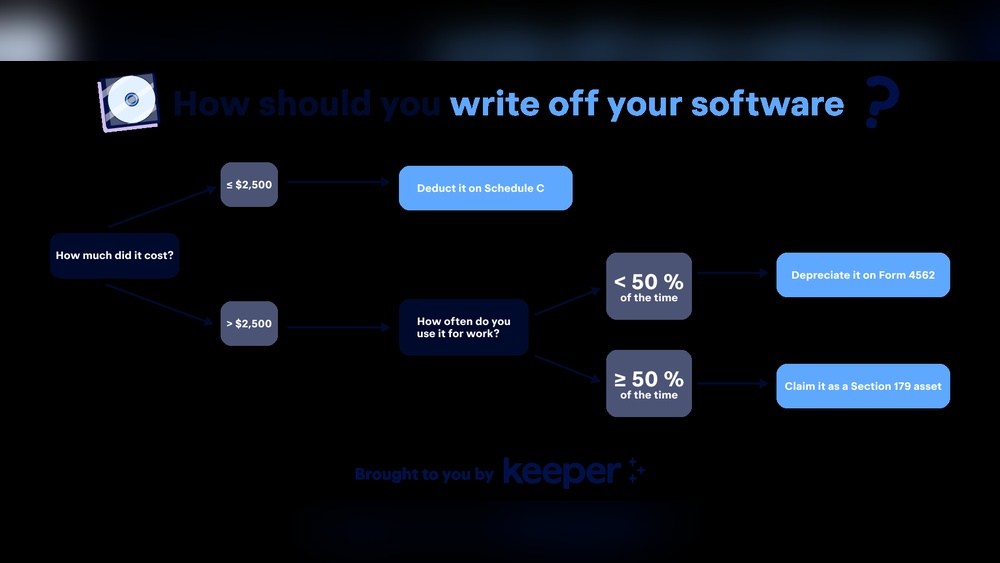
Are you wondering where to write off your business software expenses? Knowing exactly where these costs fit on your taxes can save you money and headaches.
You’ve invested in tools that keep your business running smoothly—now it’s time to make sure those expenses work for you come tax season. You’ll discover the simple steps to properly write off your software costs and keep more of your hard-earned cash.
Keep reading to unlock easy tax tips that every business owner should know.

Credit: www.keepertax.com
Types Of Business Software Expenses
Business software expenses come in various forms. Each type has different rules for write-offs. Understanding these types helps in managing your business finances better.
One-time Purchases
One-time purchases include software you buy outright. You pay once and own the software. This type is often a capital expense. You may write off the cost over several years.
Subscription-based Software
Subscription software requires regular payments. Monthly or yearly fees are common. These expenses usually qualify as operating costs. You can write them off in the year paid.
Custom Software Development
Custom software is built specifically for your business. Costs include design, coding, and testing. These expenses might be capitalized. You write them off over the software’s useful life.
Software Maintenance And Support
Maintenance covers updates and fixes for your software. Support includes help desk or technical assistance. These costs are often ongoing operating expenses. You can deduct them fully in the year incurred.
Tax Rules For Software Deductions
Understanding tax rules for software deductions helps businesses save money. Knowing how to write off software expenses can reduce taxable income. The IRS has specific rules on how software costs are handled for taxes. Software expenses may qualify for different types of deductions. This section explains key tax rules for software deductions.
Section 179 Deduction
The Section 179 deduction allows businesses to expense software costs immediately. Eligible software must be purchased and used for business. This deduction applies to both off-the-shelf and custom software. There is a limit on the total amount you can deduct. Using Section 179 helps reduce your taxable income quickly.
Bonus Depreciation
Bonus depreciation lets businesses deduct a large part of software cost in the first year. It applies to new and used software assets. This deduction works after the Section 179 limit is reached. Bonus depreciation can cover 100% of the cost in the first year. It helps spread tax benefits faster than standard depreciation.
Capitalizing Vs Expensing Software
Decide between capitalizing or expensing software costs. Capitalizing means spreading the cost over several years. Expensing allows you to deduct the full cost in one year. The choice depends on the software type and cost. Small, off-the-shelf software often qualifies for immediate expensing. Large or custom software usually requires capitalization and depreciation.
Software As A Service (saas) Treatment
SaaS subscriptions are treated as service expenses. Businesses deduct SaaS fees as operating expenses each year. There is no need to capitalize SaaS costs. Monthly or annual SaaS payments reduce taxable income directly. This treatment simplifies tax reporting for cloud-based software.
Where To Report Software Expenses
Knowing where to report software expenses is important for your business finances. Software costs can affect different parts of your financial documents. Proper reporting helps keep your records clear and accurate. It also ensures compliance with tax rules.
Income Statement Impact
Software expenses often appear on the income statement. They reduce your business income for the year. Some software costs are shown as operating expenses. Others might be listed as amortization if the software is capitalized. This affects your net profit or loss.
Balance Sheet Considerations
When software is bought for long-term use, it can be recorded as an asset. This asset goes on the balance sheet. The cost is then spread out over time through amortization. This shows the software’s value slowly decreasing. It helps match the expense with the period it benefits.
Irs Forms And Schedules
The IRS requires specific forms to report software expenses. Business owners often use Schedule C for sole proprietors. Corporations use Form 1120 or 1120S. Software costs may be listed under “Other Expenses” or “Depreciation.” Proper reporting helps avoid audits and penalties.

Credit: howtostartanllc.com
Strategies To Maximize Tax Savings
Maximizing tax savings on business software expenses requires smart planning. Choosing the right strategies can reduce your taxable income effectively. Small adjustments in how and when you record purchases make a difference. Understanding these methods helps you keep more money in your business.
Timing Your Purchases
Plan software purchases near the end of your fiscal year. This timing lets you claim deductions sooner. Buying early in the year spreads costs across multiple tax periods. Consider your cash flow and upcoming tax deadlines. This approach controls when you see tax benefits.
Bundling Software Costs
Combine multiple software purchases into one transaction. Bundling can simplify expense tracking and tax reporting. It may qualify you for larger immediate deductions. Check if your tax rules allow bundling for expense recognition. This method helps organize expenses clearly.
Leveraging Small Business Deductions
Take advantage of special deductions for small businesses. These often include software and technology expenses. Use Section 179 or similar rules to deduct full costs quickly. Smaller businesses gain more from these deductions. Always confirm eligibility with current tax guidelines.
Common Mistakes To Avoid
Writing off business software expenses can save money. Yet, many make simple mistakes. These errors cause confusion and may lead to tax problems. Knowing what to avoid helps keep your records clean. It also ensures you claim the right deductions.
Misclassifying Software Expenses
Software costs can be tricky to classify. Some treat all software as a one-time purchase. Others see it as a regular expense. The truth depends on the software type and use. Buying software outright is a capital expense. Subscription fees are operating expenses. Mixing these up can cause errors on tax forms. Always check the right category for each software expense.
Ignoring Subscription Renewals
Many businesses forget to track subscription renewals. Renewals can be monthly or yearly. Each renewal is a new expense. Missing these means understating your costs. Keep a calendar or reminder for all subscriptions. This simple step avoids missing write-offs. It also helps budget better for future expenses.
Overlooking Software Upgrades
Upgrades often come with extra costs. Some treat upgrades as free updates. Others count them as new purchases. The IRS usually allows write-offs for upgrades that add value. Ignoring these can miss deductible expenses. Track all upgrade charges carefully. This keeps your expense records accurate and complete.
Tools And Resources For Tracking Expenses
Tracking business software expenses is important for accurate accounting and tax reporting. Using the right tools helps you stay organized and avoid mistakes. It saves time and keeps your records clear. Good tracking also makes it easier to claim deductions properly.
Several tools and resources can help you manage these expenses well. Choosing the right method depends on your business size and needs. The following sections explain some options and tips for tracking software costs effectively.
Accounting Software Options
Many businesses use accounting software to track expenses. Popular choices include QuickBooks, Xero, and FreshBooks. These programs let you record purchases, categorize costs, and generate reports. Some even connect directly to your bank accounts. This reduces manual entry and errors.
Most accounting software offers mobile apps. This makes it easy to log expenses on the go. You can also upload receipts by taking photos. These features help keep all data in one place. This way, you can see your software expenses clearly anytime.
Expense Tracking Best Practices
Keep all receipts and invoices related to software purchases. Digital copies work well and reduce paper clutter. Update your records regularly, ideally weekly. This prevents missing any expenses.
Use clear categories for different types of software. For example, separate accounting tools from design software. Accurate categorization improves financial reports. It also helps during tax filing.
Review your expenses monthly. Check for any duplicate or incorrect entries. Correct mistakes quickly to keep your books accurate. Staying consistent with tracking avoids headaches later.
Consulting A Tax Professional
A tax professional can guide you on writing off software expenses correctly. They understand current tax laws and rules. This ensures you claim all eligible deductions.
Tax experts help identify which software costs qualify as business expenses. They also advise on how to report these costs on your tax return. This reduces the risk of audits or penalties.
Regular consultations keep you updated on changes in tax codes. A professional’s advice adds confidence to your expense tracking process. It is a good investment for any business owner.

Credit: www.patriotsoftware.com
Frequently Asked Questions
Where Do You Write Off Business Software Expenses?
You write off business software expenses on your tax return as a deductible business expense. Typically, this is reported on Schedule C for sole proprietors or the relevant form for your business type. It reduces your taxable income, saving money.
Can Software Costs Be Fully Deducted Immediately?
Yes, under IRS Section 179, many software costs can be fully deducted in the purchase year. This applies if the software is used more than 50% for business. Otherwise, software expenses may need to be amortized over several years.
What Accounting Category Includes Software Expenses?
Software expenses are usually categorized under “Office Expenses” or “Software and Subscriptions” in accounting. Proper categorization helps track costs and simplifies tax reporting. Always maintain accurate records and receipts for these expenses.
Are Subscription Software Fees Deductible Annually?
Yes, subscription software fees paid annually are deductible as operating expenses. You can deduct the full amount in the year you pay it, provided it is used for business purposes. Monthly fees are deducted in the month incurred.
Conclusion
Knowing where to write off business software expenses saves money. Track your purchases carefully to claim deductions correctly. Always keep receipts and records for easy filing. Consult tax guides or professionals for the best practices. This helps avoid errors and possible audits.
Deducting software costs reduces your taxable income. It supports better financial management for your business. Small steps like this add up to big savings. Stay informed and organized to benefit fully from these write-offs. Your business grows stronger with smart expense handling.


