
Imagine you’re about to dive into the world of blogging or website creation. You’ve heard of WordPress, but there’s a twist – there’s WordPress.com and WordPress.org.
Which one should you choose? Understanding the difference between these two can save you time, money, and a lot of frustration. Whether you’re a budding blogger or a business owner looking to make your mark online, knowing the ins and outs of these platforms is crucial.
You might be thinking, “Aren’t they the same thing? ” Surprisingly, they serve different needs and offer unique features that can impact your website’s success. As you read on, you’ll uncover the secrets that distinguish these two platforms, empowering you to make a choice that aligns perfectly with your goals and aspirations. Let’s get started and clear up the confusion!
WordPress.com Vs WordPress.org: The Basics
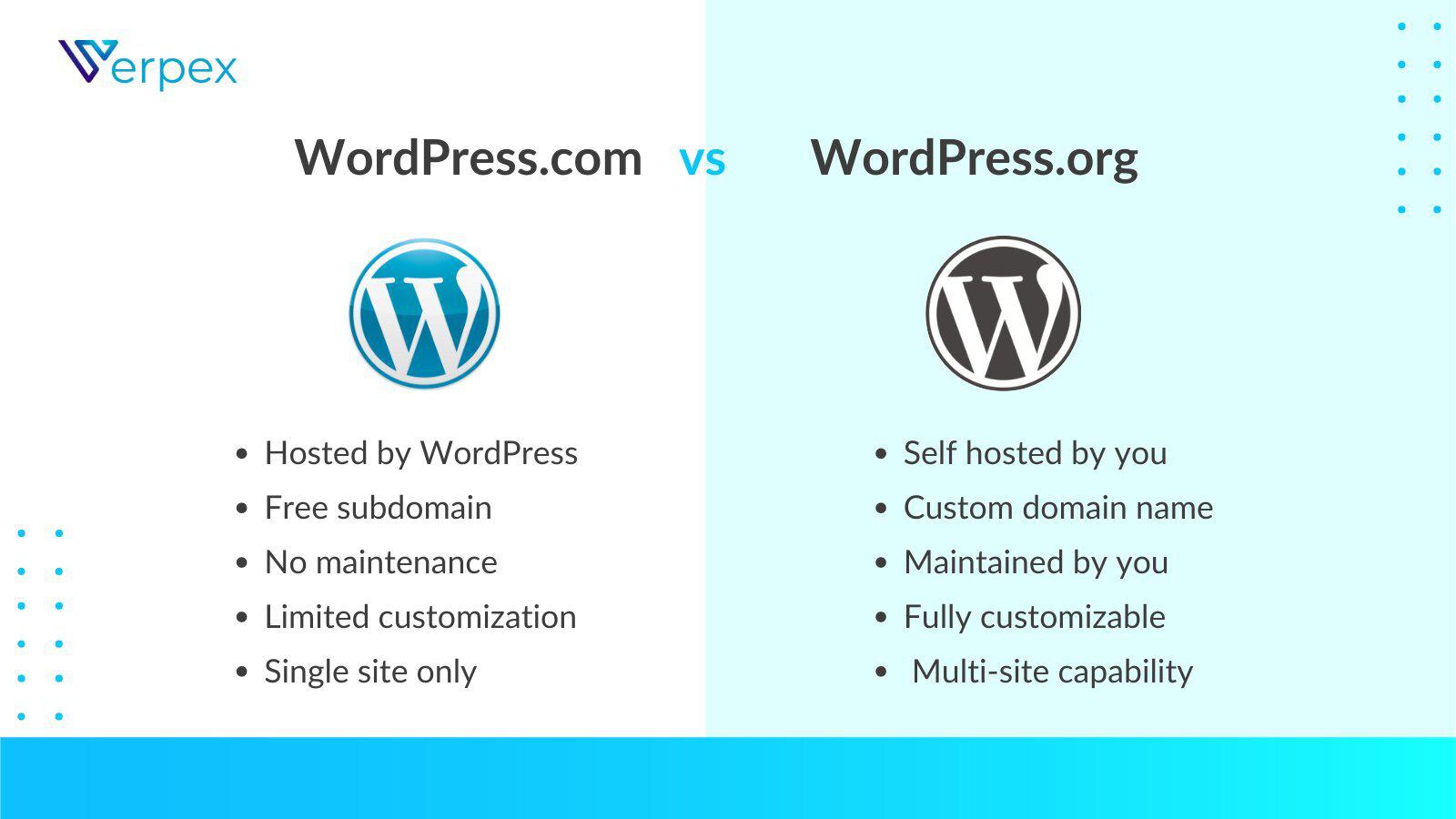
WordPress.com is a hosted platform. It takes care of your website hosting. You don’t have to worry about servers. It’s easy for beginners. You don’t need technical skills. It offers free and paid plans. Features depend on the plan you choose.
WordPress.org is self-hosted. You need to find your own hosting. It’s more flexible. You can customize it fully. You have control over plugins and themes. It’s free to use, but you pay for hosting and domain. It’s great for advanced users.
Both platforms help create websites. Your choice depends on your needs. Beginners might prefer WordPress.com. Tech-savvy users often choose WordPress.org.
Hosting And Domain Differences
WordPress.com is a hosted platform
WordPress.org is different. It needs self-hosting
Cost Comparison
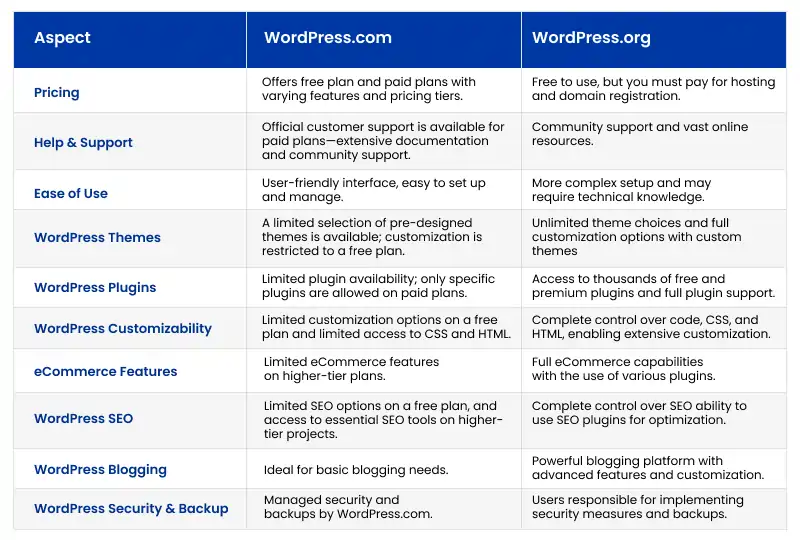
WordPress.com offers a free plan. It has basic features. You can upgrade to a paid plan. Paid plans give more options. WordPress.org is free to use. You need to pay for hosting. Hosting costs money. You can choose different hosts. Each host has different prices.
WordPress.com paid plans have fixed costs. You may need to buy themes or plugins. These can be extra expenses. WordPress.org has many extra costs. You need to buy themes and plugins. Hosting and domain name cost money too. Costs can add up.
Credit: www.janbaskdigitaldesign.com
Customization And Flexibility
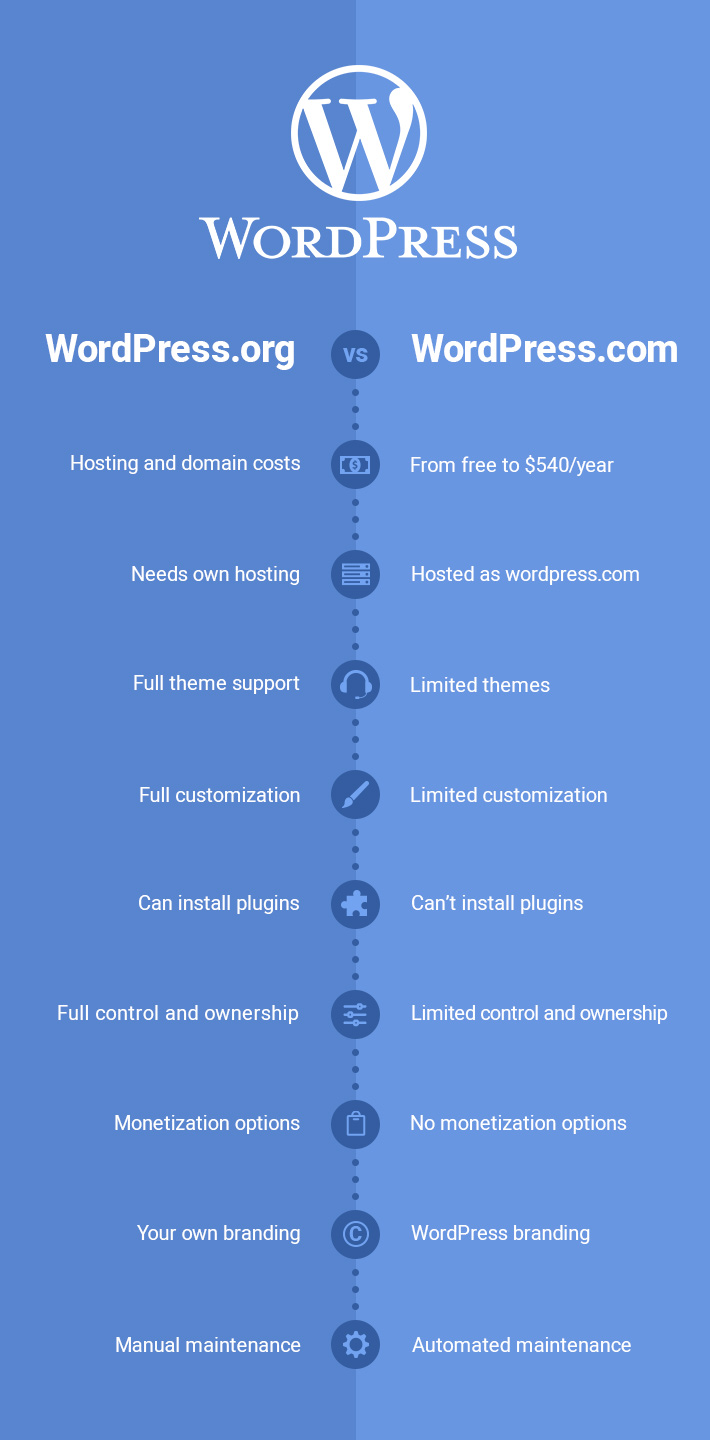
WordPress.org gives you access to thousands of themes and plugins. You can choose any theme or plugin you like. You can change them anytime.
WordPress.com has limited themes and plugins. You need a paid plan to get more options. You can’t install plugins on free plans.
With WordPress.org, you can access the code. You can change it as you wish. This gives you full control over your site.
WordPress.com does not allow code changes. You can’t modify the core files. This limits what you can do.
Monetization Opportunities
WordPress.com has limited options for ad revenue. Users need to upgrade to premium plans for ads. WordPress.org gives full control. Users can use any ad network. Google AdSense works well with WordPress.org. More freedom to earn money.
WordPress.com offers basic e-commerce features. Upgrading is needed for a full online store. WordPress.org supports WooCommerce plugin. Build powerful stores easily. Users can sell anything online. Digital products, physical goods, or services.
Credit: verpex.com
Security And Maintenance
WordPress. com offers built-in security and maintenance, while WordPress. org requires manual updates and security measures. WordPress. com handles backups, but WordPress. org needs plugins for maintenance tasks. Both platforms have distinct approaches to keeping sites safe.
Managed Security
WordPress.com offers managed security. This means less worry for you. It handles security tasks. You get protection from hackers. Updates and fixes are automatic. Your site stays safe without extra work.
Manual Updates And Backups
WordPress.org requires manual updates. You must check for updates yourself. Backups need special care. It’s up to you to keep data safe. This gives you more control. But it means more responsibility too.
Community Support
Forums and Documentation are key for WordPress users. WordPress.com offers limited forums. You get help from other users. It’s friendly but basic. WordPress.org has vast forums. Experts and users share ideas. You find answers quickly. Documentation is rich too. Clear guides help you understand better. This is helpful for beginners. WordPress.org wins on support.
Professional Assistance varies between the two. WordPress.com has paid support plans. These offer expert help. It costs money but it’s reliable. WordPress.org relies on community help. You can hire professionals. They are available online. The choice is yours. WordPress.org offers flexibility. WordPress.com offers convenience.
Ideal Users For Each Platform
WordPress.com is perfect for those who are new to blogging. It is simple to set up. No need to worry about hosting or updates. Everything is managed for you. Focus more on writing. Less on technical stuff. Choose this if you want ease.
WordPress.org is great for developers and businesses. It offers more freedom. You can customize your site fully. Add plugins and themes as you wish. Best for those who need control. Good for creating complex websites.
Migration Between Platforms
Migrating from WordPress.com to WordPress.org involves moving your content. First, export your data from WordPress.com. This includes posts, pages, and media files. Next, set up your WordPress.org site. Install the software and choose a hosting provider. Import your content into WordPress.org. Use the import tool for ease.
Check your site after import. Ensure all content is present. Fix any broken links or missing images. Set up your theme and plugins again. WordPress.org offers more themes and plugins. You have full control over your site.
Migration can be tricky. You might face technical issues. Some plugins might not work as expected. Data loss is a possible risk. Always backup your data before starting. Hosting costs are a factor too. WordPress.org requires a hosting plan. Consider your budget for hosting. Look for reliable hosting services.
SEO settings might need adjustment. Ensure your URLs stay consistent. Site speed can change after migration. Monitor site performance post-migration. Regular checks help catch issues early. Migrating provides freedom but requires careful planning.
Credit: qodeinteractive.com
Frequently Asked Questions
What Are WordPress.com And WordPress.org?
WordPress. com is a hosted platform offering ease of use and maintenance-free blogging. WordPress. org is a self-hosted solution providing customization and control. Both platforms serve different needs based on user expertise and goals.
How Do Costs Compare Between The Two?
WordPress. com has basic free options but charges for premium features. WordPress. org requires hosting and domain costs, offering more flexibility and control. Assess your budget and needs to choose the best option.
Which Is Better For Beginners?
WordPress. com is better for beginners due to its simplicity and maintenance-free setup. WordPress. org suits those with technical skills wanting more customization options and control over their site.
Can I Monetize Sites On Both?
Yes, but it’s easier on WordPress. org. WordPress. com restricts monetization unless you upgrade to higher plans. WordPress. org allows full control for ads and e-commerce without limitations.
Conclusion
Choosing between WordPress. com and WordPress. org depends on your needs. Both offer unique features. WordPress. com is simple to start. It handles hosting and updates. Great for beginners. WordPress. org offers more control. You host your site. Ideal for those wanting customization.
Consider your budget and technical skills. Think about your goals. Personal blog or business site? Each platform has strengths. Decide what fits your vision best. Start creating your online presence today. Explore both options. Make an informed choice. Your perfect platform awaits.


