
Are you venturing into the world of WordPress and feeling overwhelmed by the terms “installing” and “importing”? You’re not alone.
Many find themselves puzzled, wondering if these are just tech jargon or critical steps in their WordPress journey. Understanding the difference is essential for setting up your website successfully and ensuring it operates smoothly. We’ll break down these concepts into simple, digestible pieces, helping you grasp their unique roles in your WordPress experience.
By the end, you’ll be empowered with the knowledge to make informed decisions, saving time and avoiding potential headaches. Ready to become a WordPress whiz? Let’s dive in and uncover the mystery behind installing and importing WordPress.
Credit: www.plesk.com
Understanding WordPress Basics
WordPress is a popular tool for building websites. It’s called a Content Management System, or CMS. This means it helps you create and manage your website content. You don’t need to know coding. It’s easy to use. Many people use WordPress to make blogs, shops, or even big company sites.
WordPress is used by many websites. It’s trusted by millions. It’s free to use. You can make your site look unique. There are thousands of themes and plugins. These add features to your site. WordPress is also safe. It gets regular updates. Many people help improve it. This makes WordPress a strong choice for anyone.
Installing WordPress
First, download WordPress from the official site. Next, upload the files to your server. Use an FTP client for this. Create a database for WordPress. Name it wisely. Set up database user and password. Run the installation script. Visit your website. Follow the instructions on the screen. Choose a site title and username. Set a strong password. Click install. Your WordPress is ready!
Your server must support PHP. It should have MySQL or MariaDB. Check the PHP version. It should be compatible with WordPress. Ensure enough memory for WordPress. Check file permissions. They should allow WordPress to run. You need an FTP client. It helps upload files. A web browser is essential. It lets you access your site.
Sometimes, files don’t upload. Check your FTP settings. Database errors can occur. Verify database name and user. Password may be incorrect. Ensure you have the correct one. PHP version might be old. Update it if needed. Permissions may block actions. Adjust them properly. If WordPress doesn’t install, retry steps.
Importing WordPress
Importing WordPress helps move content from one site to another. It is useful when changing hosts or platforms. This keeps your posts, pages, and media safe. Importing can save time and effort. It ensures everything stays the same on your new site.
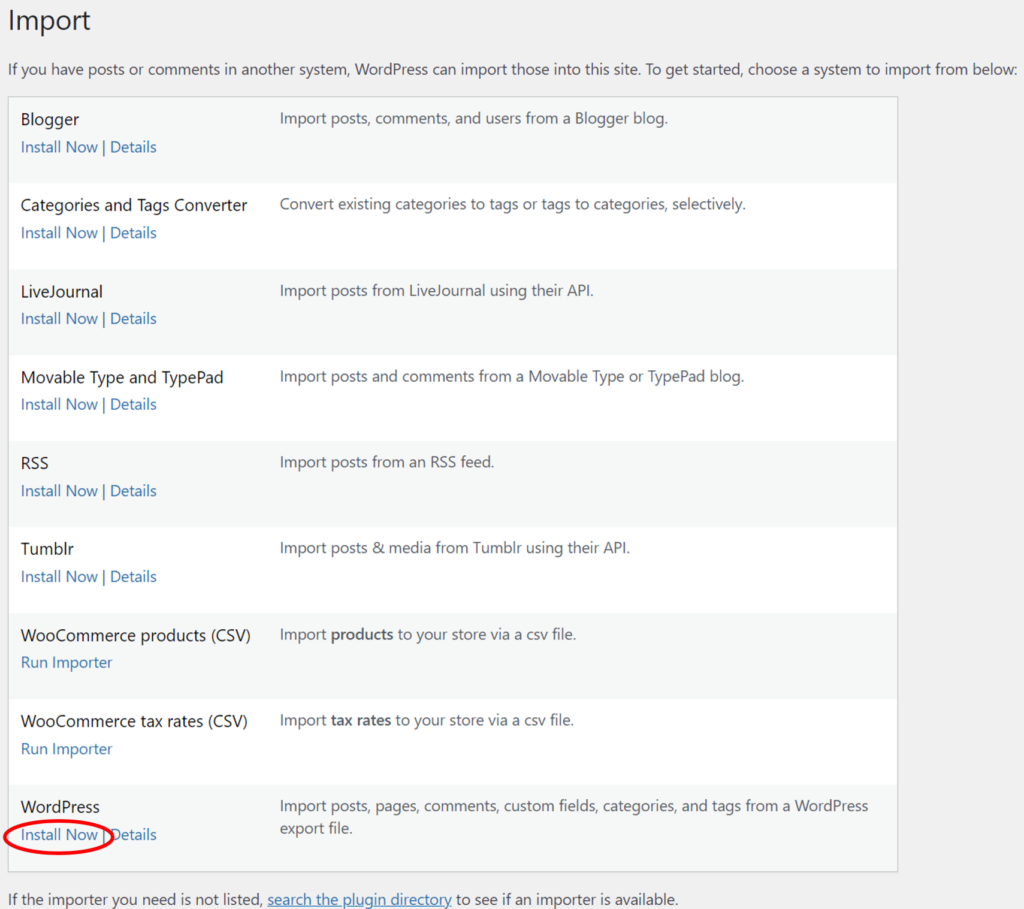
There are several ways to import WordPress. You can use the built-in import tool. Another way is using plugins. These plugins make the process easy. Popular plugins include All-in-One WP Migration and WP Import. You can also manually import using an XML file. Each method has its own steps and requirements.
Errors can happen during importing. Sometimes the import file is too large. This can cause the process to stop. Other times, file formats may not match. You might see missing content or broken links. Double-check settings to avoid these problems. Always back up your site before starting.
Comparing Installation And Importing
Installation is like starting fresh. You add WordPress to a new site. Everything begins from scratch. Importing is different. You bring old data to a new site. This can include posts, pages, and settings. Installation is for new websites. Importing is for old data.
Use installation for new projects. This is when starting from zero. Choose importing when shifting old content. This helps keep old posts. Installation is for new ideas. Importing is for old content.
Installing keeps the site clean. It has no old data. This makes it faster. Importing can slow it down. Old data might clutter the site. Installation is quick. Importing needs care. Performance depends on data size.
Tools And Plugins
Some tools help install WordPress easily. Softaculous is popular for quick installation. Many hosting services offer it. Fantastico is another tool. It simplifies setup. These tools save time. Users avoid manual steps. Installatron offers one-click installs. It supports WordPress and other apps. Using these tools is simple. They are user-friendly.
Importing plugins move content between sites. All-in-One WP Migration is well-known. It handles large files. Another plugin is WP Import Export. It manages data easily. WordPress Importer is a basic tool. It imports posts and pages. Duplicator helps copy sites. These plugins make migration simple.
Selecting the right tool is important. Consider needs first. Installation tools are for new sites. Importing plugins help with existing content. Look at features. Compare tools and plugins. Check reviews. User feedback helps. Choose based on ease of use. Find support options. Some tools have better help. Make sure it’s compatible with your site.
Credit: oxygenbuilder.com
Best Practices
Begin by choosing a reliable hosting provider. Use the latest WordPress version for best results. Always check compatibility with your server. Set up a strong database password. Backup your existing data if needed. Follow the installation guide step by step. Avoid skipping any important steps. Install only trusted plugins. This keeps your site safe.
First, export your data from the old site. Use the WordPress Importer tool. It helps in moving posts, pages, and comments. Ensure your file is not too large. Split it if necessary. Double-check all URLs and links after import. They should work fine. Make sure images are in the right place. Test your site for any errors.
Always use a strong password for your admin panel. Install a security plugin for extra protection. Keep your WordPress updated. It helps fix security holes. Regularly backup your site data. This keeps your information safe. Limit login attempts to prevent hacking. Use a two-factor authentication if possible. It adds an extra layer of security.

Credit: publishpress.com
Frequently Asked Questions
What Does Installing WordPress Mean?
Installing WordPress refers to setting up the WordPress software on a server. This process involves downloading WordPress, configuring the database, and setting up initial settings. It allows you to start building and customizing your website from scratch. Installation typically involves web hosting and domain configuration.
How Do You Import WordPress Content?
Importing WordPress content involves transferring data from one WordPress site to another. This includes posts, pages, media files, and settings. You can use WordPress tools like the Importer plugin for this task. The process ensures that your existing content is replicated on the new site.
Is Importing WordPress Content Difficult?
Importing WordPress content is generally straightforward, especially with built-in tools. WordPress provides an Importer plugin that guides users through the process. The steps are user-friendly, making it accessible for beginners. However, large websites may require additional tools or professional assistance.
Can You Import WordPress Without Losing Data?
Yes, you can import WordPress without losing data. Using the right tools and following proper procedures ensures data safety. WordPress Importer is designed to handle content migration efficiently. Always back up your data before starting the import process to prevent potential data loss.
Conclusion
Installing WordPress sets up your website’s framework. It’s the first step. Importing WordPress, on the other hand, brings in content. This could be posts, pages, or settings. Both processes are vital. They work hand in hand to build your site.
Remember, installation is about starting fresh. Importing is about adding to what you have. Each action has its purpose. Understanding the difference helps manage your site better. With this knowledge, you can confidently create and maintain your WordPress site. Enjoy the process and happy blogging!


