
Are you struggling to choose the right size for your WordPress pictures? You’re not alone.
Selecting the perfect picture size is more important than you might think. It directly impacts your website’s loading speed, user experience, and even your SEO rankings. A poorly sized image can slow down your site and frustrate your visitors, potentially driving them away before they’ve even had a chance to explore your content.
Imagine your audience clicking away just because an image took too long to load. You wouldn’t want that, right? By understanding what makes a picture size ‘good’ for WordPress, you can enhance your website’s performance and keep your visitors engaged. Dive into this article to discover the secrets of optimizing your images for WordPress, and transform how your site looks and functions.
Image Dimensions
Images should be clear and load quickly. For most WordPress themes, use a width of 1200 pixels. This is good for headers and full-width images. Smaller images, like in posts, can be 600 pixels wide. Thumbnails should be 150 x 150 pixels. This keeps your site fast and neat.
Aspect ratios help images fit well. A 4:3 ratio is common for photos. For wide images, use 16:9. This is great for videos too. Square images have a 1:1 ratio. Good for profile pictures. Choose the right aspect ratio for each image. This makes your site look great.

Credit: marketingwithwp.com
File Formats
JPEG images are smaller. They load faster on websites. Good for photos. PNG images are larger. They have better quality. Great for graphics with text. Use JPEG for speed. Use PNG for detail. Choose based on needs. Speed or quality.
WebP format is new. It combines JPEG and PNG benefits. Smaller than both. Yet, quality is high. Perfect for WordPress. It makes pages load quickly. This keeps visitors happy. They stay longer. Less waiting time. WebP is a smart choice.
Resolution And Quality
Resolution matters in pictures for WordPress. Higher resolution looks better. But it can slow down the site. Keep pictures clear but not too big. A good size is 1200×800 pixels. This size balances quality and speed.
DPI means dots per inch. For web, 72 DPI is enough. Higher DPI is for printing. 72 DPI keeps images light. They load faster on websites. This makes the site work better.
Quality and speed are important. Big pictures can slow down a site. Small pictures might look blurry. Compress images to find balance. Use tools to resize without losing quality. Users want sites that load fast.

Credit: marketingwithwp.com
Compression Techniques
Lossless compression keeps all picture details. This method makes file size smaller. It does not change quality. PNG is a popular format for lossless compression. Pictures stay clear and sharp. Perfect for important images. Like logos or diagrams. Easy to revert back to the original size.
Lossy compression reduces file size by removing some details. It makes images smaller. JPEG is a common format for lossy compression. Some quality is lost. But the file size becomes tiny. Great for web use. Like blog posts or galleries. Often, the quality loss is not noticeable. Best for large images that need quick loading.
Responsive Images
Images need to be clear and quick to load. SRCSET helps with this task. It lets browsers choose the best image size. This makes images fit different screens. Small screens get smaller images. Large screens get larger images. This saves data and makes sites faster.
The SRCSET attribute is key. It lists image sizes. The browser picks the best one. This is smart and efficient. It improves user experience. Users do not wait long for images. They get the right image size. Every time. This keeps visitors happy and engaged.
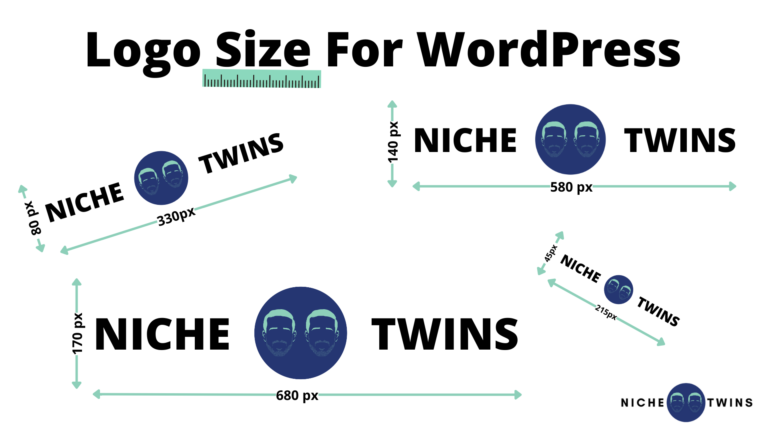
Credit: nichetwins.com
Image Optimization Plugins
Optimizing images is key for WordPress speed. Images around 1200×628 pixels often balance quality and loading time. This size suits most themes and ensures faster page loads, enhancing user experience.
Popular Plugins
Images can slow down your website. Popular plugins help fix this. Smush is a top choice. It compresses images without losing quality. Imagify is another great tool. It works fast and saves space. ShortPixel also offers good compression. These tools make websites load quickly.
Integration Tips
Adding plugins is easy. First, go to your WordPress dashboard. Look for the plugins section. Search for the plugin by name. Click install, then activate. Check settings to make sure it’s working. Adjust settings if needed. Remember, too many plugins can slow your site. Choose wisely.
Seo Considerations
Optimizing image size is crucial for WordPress. A good size is typically 1200×628 pixels. This ensures fast loading and maintains quality, enhancing user experience and SEO. Properly sized images boost site performance and search rankings.
Alt Text Importance
Alt text helps search engines understand images. It’s important for accessibility too. Use simple words to describe the image. Keep it short and clear. Alt text also helps in image search results. It can improve your site’s SEO. Make sure each image has unique alt text. Never use the same text for different images.
File Naming Strategies
Use simple names for your image files. Include keywords if possible. This helps search engines find your images. Avoid spaces in file names. Use dashes instead. Keep the file name descriptive but short. Good names help improve your SEO. Make sure each file name is unique. This can make your images more searchable.
Performance Testing
Images can slow down your site. Use speed tools to test this. Tools show how fast your site loads. Fast sites keep users happy. Slow sites make users leave.
Check images on your site. See if they slow your site. Big images take longer to load. Small images load quickly. Choose the right size for your site. This helps your site run better.
| Image Size | Load Time |
|---|---|
| Large | Slow |
| Medium | Average |
| Small | Fast |
Frequently Asked Questions
What Is The Optimal Image Size For WordPress?
The optimal image size for WordPress varies based on theme and purpose. Generally, a width of 1200 pixels is effective. For thumbnails, 150×150 pixels is standard. Use a responsive design to ensure images adjust well on all devices. Always optimize images for web to improve loading times.
How Do I Resize Images For WordPress?
Resizing images for WordPress can be done using built-in media settings. Go to Settings > Media to adjust sizes. Alternatively, use image editing software like Photoshop. Online tools like TinyPNG also help resize and compress images. Keep image quality in mind to maintain visual appeal.
Why Is Image Size Important For WordPress?
Image size affects website performance and user experience. Larger images can slow down page loading times. This impacts SEO and visitor retention negatively. Optimized images improve speed and responsiveness. Balancing quality with file size is crucial for a seamless browsing experience on WordPress sites.
What Are The Best Practices For WordPress Images?
Best practices include using the correct dimensions and file formats. JPEG is great for photos, while PNG suits graphics. Compress images without losing quality using tools like Smush. Always use descriptive file names and alt text. This enhances accessibility and SEO on your WordPress site.
Conclusion
Choosing the right picture size for WordPress is crucial. It affects your site’s speed and appearance. Smaller sizes load faster and save space. Larger images provide better quality but slow down your site. Balance is key. Use the recommended dimensions for your theme.
Optimize images before uploading. This reduces file size without losing quality. Remember, user experience matters. A faster site keeps visitors happy. Test your site speed regularly. Adjust image sizes as needed. Stay aware of trends and updates in WordPress. With the right approach, your site will perform well and look great.


