
Are you scratching your head wondering, “What WordPress version do I have?” You’re not alone.
Knowing your WordPress version is crucial for maintaining your site’s security, functionality, and compatibility with themes and plugins. Imagine if you could easily access this information and ensure your website runs smoothly and efficiently. You’ll discover simple steps to quickly find out your WordPress version.
Stay with us as we guide you through this essential process, empowering you to keep your website up-to-date and safe. Ready to uncover the mystery? Let’s dive in!

Credit: www.greengeeks.com
Checking WordPress Version
Go to your WordPress dashboard. Look at the bottom right corner. You will see your WordPress version there. It is easy and quick.
Open your website in a browser. Right-click on the page and choose “View Page Source”. Use the search function by pressing Ctrl + F. Type “generator” to find the version number. It will appear in the meta tag.
Access your WordPress files through FTP or hosting panel. Find the readme.html file in the root directory. Open it and look for the version number inside. It is usually at the top of the file.
Why WordPress Version Matters
WordPress is popular. Hackers often target it. Keeping the WordPress version updated is essential. New versions fix security holes. Older versions may have known vulnerabilities. These can be exploited by hackers. Updated versions protect your site. Secure sites build trust. Users feel safe when visiting.
Plugins and themes rely on compatibility. New versions may not work with old WordPress. Updates ensure everything runs smoothly. Old versions might break functionalities. Users face trouble using your site. Updated WordPress solves these issues. Developers design plugins for recent versions. This ensures better performance and user experience.
WordPress updates bring new features. They make websites better. New tools help manage content easier. Enhanced functionalities improve user interaction. Old versions lack these advancements. Updates keep your site modern and efficient. Users enjoy new features. They make navigation fun and easy.
Updating WordPress Safely
Always create a backup before updating. This keeps your site safe. Use a trusted plugin or manual method. Store the backup in a safe place. This is your safety net if things go wrong. Backups protect your hard work and data.
A staging site is a test version. It mirrors your live site. Test updates here first. This helps find problems before they reach users. A staging environment keeps your live site safe. No surprises for visitors.
Manual updates give you control. You choose when and what to update. Automatic updates save time. They happen without your help. Both have pros and cons. Choose based on your needs. Control or convenience, the choice is yours.
Troubleshooting Version Issues
Sometimes, updates fail. This can be frustrating. Errors might pop up. For instance, “Update Failed” or “Maintenance Mode.” Always check your internet connection first. Slow internet can cause problems. Also, ensure your server is not down. Clear the browser cache and try again. If still stuck, visit the WordPress forums. Many users share solutions there.
Backups are your best friend. If the update breaks the site, use a backup. Many plugins help with this. Install a backup plugin if you don’t have one. Restore the previous version from the backup. This process is usually simple. Follow the plugin instructions. Your site should return to normal.
Some issues need experts. Developers can fix complex problems. They know WordPress well. Hiring a developer might be wise. Especially if the site is important. Check their reviews before hiring. Ensure they have good experience. This will save time and avoid more issues.
Tools For Managing WordPress Versions
Plugins help in keeping WordPress updated. They save time. Version control plugins track changes. They alert you about updates. Easy to install and use. Popular choices include WP Rollback and VersionPress. These plugins are essential for maintaining stability. They ensure your site is secure.
Version tracking software monitors WordPress versions. It shows all changes made. Helps in identifying any issues early. Great for developers. This software keeps your site running smoothly. Git is a common choice. It tracks versions effectively. Keeps all data organized.
WordPress maintenance services offer version management. They handle updates for you. Professionals ensure everything works well. These services provide peace of mind. They manage backups too. Perfect for those with busy schedules. Makes WordPress management easy. Keeps your site safe and updated.
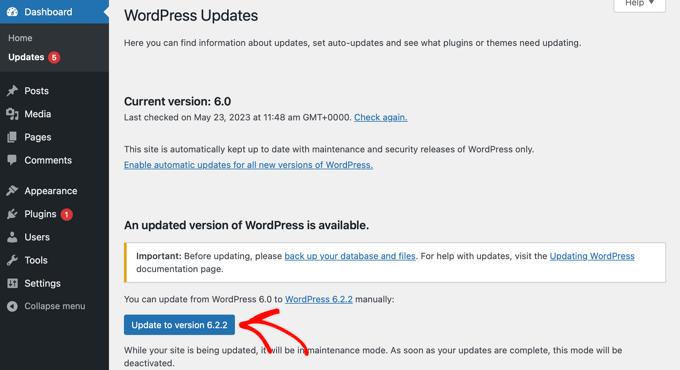
Credit: www.wpbeginner.com
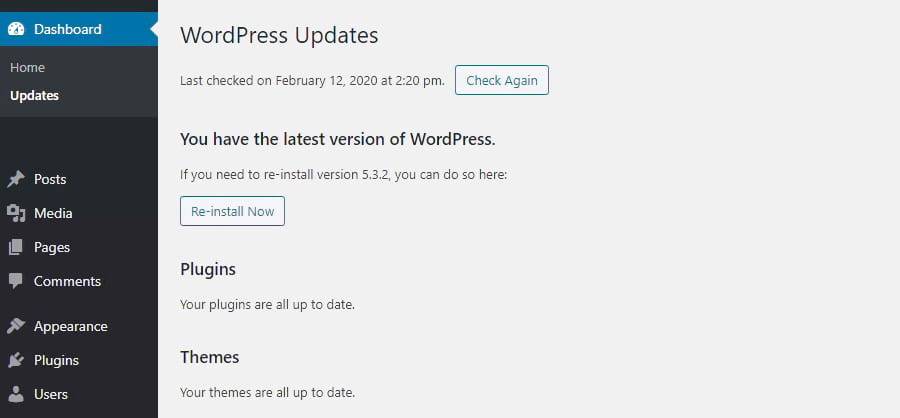
Credit: kinsta.com
Frequently Asked Questions
How Can I Check My WordPress Version?
To check your WordPress version, log into your dashboard. Look at the bottom-right corner of any page. You’ll see the version number displayed there.
Why Should I Know My WordPress Version?
Knowing your WordPress version ensures compatibility with themes and plugins. It helps you maintain security by applying necessary updates to protect your site.
Where Is The WordPress Version Located In Files?
You can find your WordPress version in the wp-includes/version. php file. Open this file with a text editor and check for the version number.
How Often Does WordPress Release Updates?
WordPress releases updates regularly to improve features and security. Minor updates may occur frequently, while major updates usually happen a few times a year.
Conclusion
Knowing your WordPress version is crucial for site health. It helps in maintaining security and compatibility. Always keep WordPress updated to avoid issues. Updates provide new features and fix bugs. Checking your version is simple with the dashboard. Regular updates improve performance and protect against threats.
Stay informed about the latest WordPress releases. This ensures your site runs smoothly and securely. Remember, a well-maintained site attracts more visitors. Make it a habit to check and update your WordPress version. Your website’s success depends on it. Keep your site safe and efficient.


