
Have you ever visited a website and wondered what makes it tick? Perhaps you’ve marveled at its smooth functionality, stunning design, or seamless user experience.
You might be surprised to learn that the secret often lies in the WordPress plugins it uses. These tiny yet powerful tools are the unsung heroes that enhance a website’s capabilities, making it more engaging and efficient. But how do you uncover which plugins are at work behind the scenes?
We’ll reveal the methods to discover what WordPress plugins a website is using, empowering you to unlock the potential to enhance your own site. Get ready to satisfy your curiosity and take your website to the next level with some of the best-kept secrets in the digital world.
Detecting Plugins
Finding what WordPress plugins a website uses can be fun. Many tools help you do this. Some are online, and others are software. These tools scan websites and show the plugins used.
Browser Extensions
Some browser extensions can detect plugins. Extensions like “Wappalyzer” or “BuiltWith” do this. You install them in your browser. They then show details about a site.
These extensions are easy to use. Click the icon, and it shows the plugins. They can also tell you more about a website’s technology. This includes CMS and server details.

Credit: wedevs.com
Popular Plugin Scanners
WPScan is a tool to find plugins on websites. It checks for vulnerabilities. Many people use it to keep sites safe. WPScan is easy to use. It finds WordPress plugins quickly. This helps in keeping the site secure.
BuiltWith shows what a website is built with. It tells about plugins and other tools. Easy to understand for everyone. BuiltWith gives a clear list of tools. This helps in knowing what a site uses.
WhatRuns is a browser extension. It tells what runs a site. It shows plugins and other technologies. WhatRuns is very simple to use. Just click to see the tools. It’s handy for those curious about websites.
Manual Inspection
Find the plugins by checking the website’s source code. Right-click on the page and select “View Page Source.” Look for the folder named wp-content/plugins. This shows the plugins used.
Check the HTML and CSS clues for plugin names. Some plugins add specific classes or IDs. Search for these unique names. This helps to identify the plugins.
Be careful while doing this. Some websites hide their plugins. Not all plugins will be visible this way. But many can be found easily.
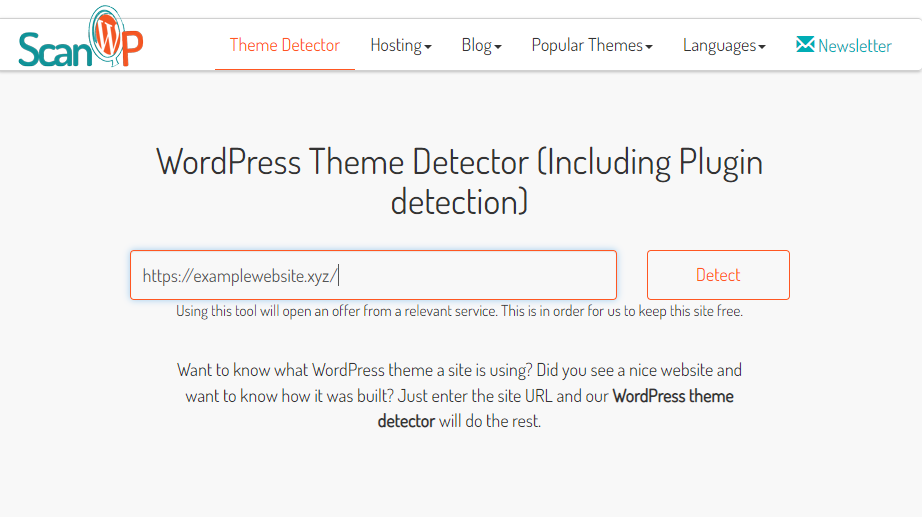
Credit: www.easywp.com
Considerations And Limitations
Exploring which WordPress plugins a website uses can be insightful but has limitations. Plugin detectors may not catch all plugins, especially custom or premium ones. Some plugins may be hidden due to security settings, affecting the accuracy of detection tools.
Accuracy Challenges
Identifying plugins is not always easy. Some plugins hide themselves. Tools may miss these hidden plugins. Also, plugins change over time. Updates can make plugins hard to find. Accuracy depends on the tools used. Some tools are better than others.
Security Implications
Knowing plugins can be risky. Hackers might exploit known plugins. They look for weak spots. Website owners should be careful. Protect your plugins and keep them updated. Always check for vulnerabilities. This helps keep your site safe. Security is important for every website.
Ethical Concerns
Exploring a website’s WordPress plugins raises ethical concerns. Accessing private data without consent can breach privacy laws. Respecting user privacy is essential when investigating plugins.
Respecting Privacy
Privacy is very important. Using tools to find plugins might raise privacy concerns. Always respect user data and privacy rules. Avoid gathering more data than needed. Be aware of what is ethical and what is not. Always think about how the information is used.
Legal Aspects
There are laws to protect digital privacy. Always follow these laws. Know the rules in your country. Breaking them might cause trouble. Respect copyright and trademark laws. Make sure you have permission to use any data. Legal issues can be serious, so be careful.
Future Trends
Exploring the future of WordPress plugins unveils exciting possibilities. Tools can now identify which plugins a website uses, enhancing web development strategies. Such insights simplify choosing the best plugins for specific needs, streamlining the website optimization process.
Evolving Detection Tools
New tools help find plugins on websites. They are getting smarter. These tools can spot plugins fast and easy. Accuracy is getting better. Speed is important too. Users love quick results. More websites use these tools now. They help find the best plugins. Simple tools are the most popular. People like tools they can use easily. Tools update often to stay current.
Impact Of WordPress Updates
WordPress updates change how plugins work. Updates can make plugins better. Sometimes they fix bugs. New features are added too. Developers need to keep plugins updated. This makes them work well. Old plugins may stop working after updates. Compatibility is important. Users need plugins that fit with updates. Updated plugins can be safer. Security is a big concern. Keeping plugins updated is a good practice.

Credit: stackcrawler.com
Frequently Asked Questions
How Can I Find Out What Plugins A Site Uses?
To identify plugins on a WordPress site, use online tools like WPThemeDetector or WhatRuns. These tools scan websites and list active plugins. Browser extensions like Wappalyzer can also detect plugins. For a manual approach, inspect the site’s source code for plugin-related directories.
Are There Free Tools To Detect WordPress Plugins?
Yes, several free tools can detect WordPress plugins. WPThemeDetector and BuiltWith are popular options. These tools provide insights into plugins and themes used by a website. Simply enter the site’s URL to get started. They offer a convenient way to discover plugin details.
Why Should I Know A Site’s WordPress Plugins?
Knowing a site’s WordPress plugins helps understand its functionality and features. It can inspire your own website improvements. Analyzing plugins also aids in identifying potential security vulnerabilities. Additionally, it can reveal popular plugins in your industry, offering insights into trends and competition.
Can I Detect Plugins On Any WordPress Site?
Detecting plugins on most WordPress sites is possible, but not guaranteed. Site owners can hide plugin information for security reasons. Tools and extensions can still identify many plugins. However, some sites employ measures to prevent detection, making it challenging to identify all plugins.
Conclusion
Understanding the plugins a website uses can enhance your online experience. These tools help you learn more about site functionality and design. Exploring plugins gives insights into website capabilities. It helps improve your own site too. Remember to regularly check for updates.
This ensures you get the latest features and security fixes. Use this knowledge to customize your site effectively. Stay curious and keep exploring new plugins. They can make your website more efficient and user-friendly. Happy exploring and optimizing your WordPress site!


