
Have you ever wondered what version of WordPress your site is running? Knowing your WordPress version is crucial for maintaining a secure and smoothly functioning website.
With the digital world evolving rapidly, staying up-to-date ensures you’re not left behind, vulnerable to security risks or missing out on the latest features. Imagine your website as a car; wouldn’t you want to know if it’s due for an upgrade or tune-up?
By understanding which version of WordPress you have, you can make informed decisions about updates, plugins, and more. Dive into this article to discover how easy it is to find out your WordPress version and why it matters for your site’s success.

Credit: make.wordpress.org
Checking WordPress Version Manually
Determining a site’s WordPress version manually involves accessing the site’s files or admin dashboard. Locate the “readme. html” file in the root directory, which usually displays the version number. Alternatively, check the bottom of the admin dashboard screen where the version is often listed.
Accessing Site Files
Access the site files through a FTP client or hosting panel. Find the root directory where WordPress is installed. This directory contains many important files.
Identifying Version In Readme File
Locate the readme.html file in the root directory. Open this file in a text editor or browser. The WordPress version is usually mentioned at the top. This file provides valuable information about the site.
Using WordPress Dashboard
Identifying your WordPress version is simple through the dashboard. Check the “At a Glance” section on the main page. Alternatively, find it at the bottom right corner of the dashboard.
Navigating To Updates Section
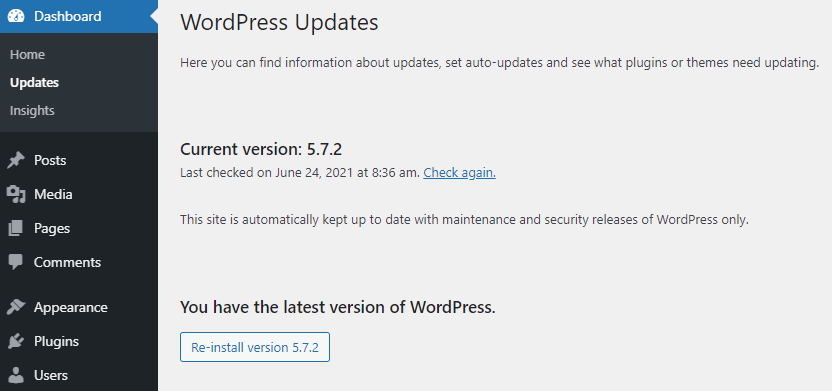
Finding the WordPress version is easy. Start by logging into the dashboard. Look for the Updates section on the left menu. Click on it.
Locating Version Information
The version number is usually at the top. It’s bold and clear. You can’t miss it. Always check this number. Make sure your site is updated. Updates keep your site safe.
WordPress Version Detection Tools
Popular online tools help find a site’s WordPress version. These tools check the meta tags or RSS feed. Some look at the readme.html file. Others use the API endpoint. Each tool has its own method. Some give quick results. Others take a little longer.
Understanding how these tools work is important. They scan the website code. They find specific information. This info tells them the WordPress version. Sometimes the site owner hides this info. Then, tools can’t find the version. Most tools are easy to use. Just enter the website URL. The tool does the rest. Results are usually accurate. But always double-check if needed.
Credit: www.hostinger.com
Reasons To Know Your WordPress Version
Knowing your WordPress version is very important. Every version update often fixes security holes. Old versions might have vulnerabilities. Hackers can exploit these to harm your site. New updates protect your site from such dangers. Always keep your WordPress updated for better security. A safe site means trust from your visitors. They feel secure browsing your pages.
Plugins need to work well with your WordPress version. Using an old version might cause plugin errors. Some plugins might not work at all. Updates ensure all features run smoothly. It helps in maintaining the site’s functionality. Always check plugin compatibility before updating. This avoids any unwanted surprises on your site.
Common Challenges In Version Detection
Custom themes can make version detection tricky. They often hide WordPress details. Plugins sometimes do this too. This can lead to confusion. The site may look different from its actual version. Checking code can help. It requires a keen eye. Many users find this hard. It’s important to know where to look.
Some sites restrict access. Admin areas might be hidden. This makes version checks tough. Permission settings affect this. Without access, it’s hard to find the version. Many sites use this for security reasons. It keeps important details safe. But, it complicates version detection. Users may need special tools.
Keeping Your WordPress Updated
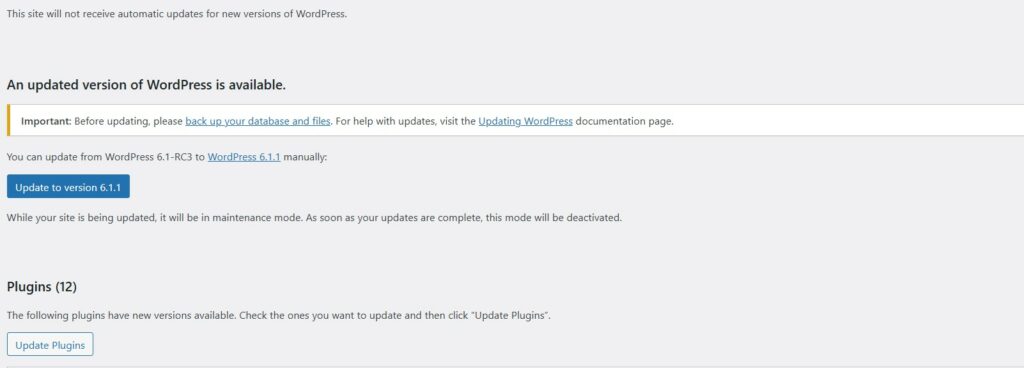
Regular updates keep your site secure and fast. Updates fix bugs and add new features. They also improve the site’s performance. Updates can protect from hackers and other threats. A site with outdated software is at risk. It can break or become slow. Keeping WordPress updated is like giving your site a strong shield.
Automating updates saves time. It makes sure your site is always current. Use plugins to help with this task. Some plugins check for updates daily. They install them without your help. It is a simple way to ensure everything runs smoothly. Automation is like having a helper for your website.
Credit: kubiobuilder.com
Frequently Asked Questions
How Can I Check My Site’s WordPress Version?
To check your WordPress version, log into your dashboard. Look for the “At a Glance” section on the home screen. Alternatively, view the page source of your site and search for “generator” to find the version number. Keeping your WordPress updated is crucial for security and performance.
Why Is Knowing My WordPress Version Important?
Knowing your WordPress version helps maintain your site’s security and compatibility. Updates often include security patches and new features. Running outdated versions may expose your site to vulnerabilities. Regularly checking ensures your site runs smoothly and benefits from the latest improvements and bug fixes.
Can Plugins Show My WordPress Version?
Yes, many plugins can display your WordPress version. Plugins like “Display WordPress Version” offer this functionality. They provide convenient ways to view your version directly from the dashboard. Using such plugins can simplify version management and keep you informed about necessary updates.
Does My WordPress Version Affect Themes?
Yes, your WordPress version can affect theme compatibility. Themes designed for newer versions might not work well with older ones. Regularly updating WordPress ensures your themes function correctly. It’s essential to check theme requirements and update both WordPress and themes for optimal performance.
Conclusion
Finding the WordPress version is crucial for site management. It ensures better security and compatibility. Keep your site updated. This prevents vulnerabilities and enhances performance. Use the tips shared to check your version easily. Regular checks help maintain a smooth-running website.
Stay informed about updates and new features. This knowledge supports better decision-making for your site. Remember, an updated WordPress site is a secure one. Take charge of your website’s health today. Enjoy a safer and more efficient online presence.


