
Have you ever found yourself wondering what version of WordPress a particular website is using? Maybe you’re curious because you’re considering new features for your own site, or perhaps you’re troubleshooting an issue and need to compare setups.
Whatever the reason, knowing the WordPress version can unlock a treasure trove of insights and possibilities. Imagine the confidence you’ll gain by understanding this crucial aspect of web development. By the end of this article, you’ll not only discover simple ways to identify a site’s WordPress version but also learn how this knowledge can empower you in your digital endeavors.
Stay with us to demystify this essential piece of the WordPress puzzle.
Credit: pkailash.com
Importance Of Knowing The WordPress Version
Knowing the WordPress version is important for many reasons. It helps you keep your site secure. Older versions may have security holes. Hackers can find these and cause trouble. Updating to the latest version fixes these issues.
It also ensures your site runs smoothly. New versions often have bug fixes. These fixes improve your site’s performance. If your site is slow, visitors may leave. This can hurt your site’s popularity.
Some plugins work only with certain versions. If your WordPress is outdated, some plugins might not work. This can limit your site’s features. Ensure you have the right version for your plugins.
Credit: www.hostinger.com
Methods To Identify WordPress Version
View a site’s HTML source. Right-click on the page and select “View Page Source”. Search for meta name=”generator”. This tag often shows the WordPress version. Not all sites have this tag. Some site owners hide it.
Use tools like WhatWP or WPThemeDetector. They can check a site’s WordPress version. Enter the site’s URL and click search. Results show the version. Some tools may not find all data.
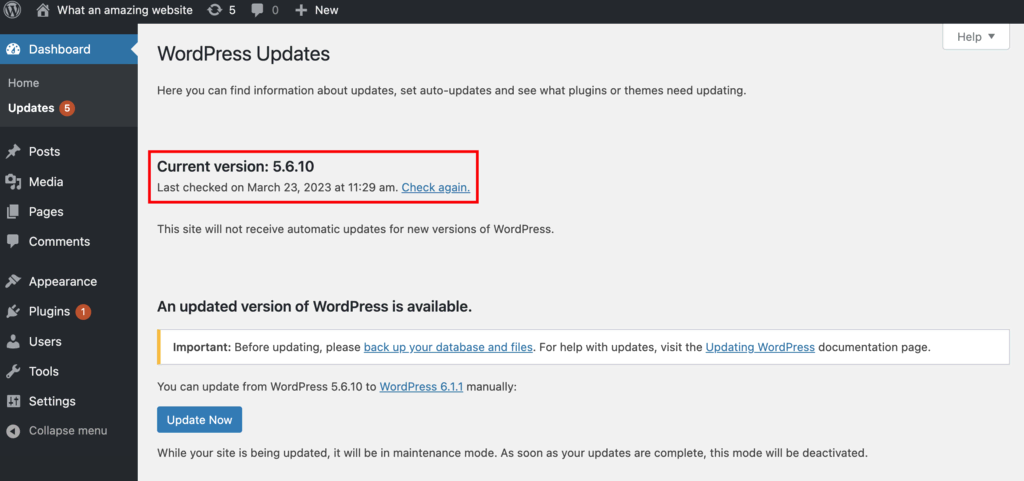
Log in to the WordPress admin area. Look at the bottom right corner. The version number is often there. Click “Updates” under Dashboard. It shows the current version. Only admins can see this info.
Security Implications Of WordPress Versions
Outdated WordPress versions have serious security risks. Hackers find it easier to attack these versions. They use known bugs to break into sites. This can lead to data theft or loss. Old versions can also cause website crashes. Plugins and themes may not work well. This makes user experience poor. Regular updates are crucial to avoid these issues.
New WordPress versions offer better security and performance. They have fixes for known bugs. This keeps hackers away. Updates also bring new features. These features make sites run better. Users enjoy a smoother experience. Updated versions also help with website speed. Faster sites keep visitors happy. Regular updates keep your site safe and efficient.
Troubleshooting WordPress Version Issues
WordPress updates can cause confusion for users. Different plugins may not work with new versions. Themes can break or look strange. Some features might be missing. Compatibility issues are common. Older versions might not support new features. Security risks increase with outdated versions. It is important to update regularly.
Always back up your site before updates. This prevents data loss. Check plugin compatibility. Update plugins regularly. Choose themes that work with new versions. Read update notes carefully. Test new versions on a staging site first. This helps catch issues early. Use a reliable hosting service. This ensures support for updates. Stay informed about WordPress news. It helps in planning updates.
Upgrading WordPress Safely
Make a backup of your site first. A backup saves your site data. Use plugins for easy backup. Check theme and plugin compatibility. Update them if needed. Review server requirements for new WordPress. Ensure your hosting supports the new version. These steps help prevent issues during upgrade.
- Log into your WordPress dashboard.
- Click on ‘Updates’ in the menu.
- Look for WordPress updates.
- Click ‘Update Now’ to start upgrade.
- Wait for the process to finish.
- Check your site after upgrade.
Follow each step carefully. This ensures a smooth upgrade. Regular updates keep your site secure.
Tools For Managing WordPress Versions
Plugins help in checking and managing WordPress versions. They can show you the exact version. Wordfence Security is a popular plugin. It protects your site and shows the WordPress version. Another plugin is WP-Health. It checks your site’s health and version. These tools make it easy to track updates.
Some plugins offer alerts. They notify you when a new version is out. Always update plugins and themes. This keeps your site safe. Using plugins saves time. It keeps your site secure.
There are many resources for learning. The WordPress Codex is very helpful. It has a lot of information. You can also visit WordPress forums. People share tips and tricks there. YouTube has video tutorials. They show how to use plugins. These resources are great for beginners. They help you learn more about WordPress.
Remember to always check trusted websites. This ensures you get accurate information. Learning never stops. Keep exploring and updating your skills.

Credit: make.wordpress.org
Frequently Asked Questions
How To Check WordPress Version Of A Site?
To check a site’s WordPress version, view the page source. Search for “generator” meta tag. Alternatively, log into the WordPress dashboard and check the bottom of the “At a Glance” widget on the home screen. Some plugins can also reveal the WordPress version.
Is There A Plugin To Detect WordPress Version?
Yes, several plugins can detect a site’s WordPress version. Plugins like WPVersionFinder or Theme Detector provide this functionality. These tools can help webmasters and developers ensure compatibility and identify potential security issues. Always ensure plugins are up-to-date for accurate results.
Can WordPress Version Affect Site Performance?
Yes, WordPress version can impact performance. Older versions might lack optimizations or features present in newer updates. Updating to the latest version can enhance speed, security, and compatibility with themes and plugins. Regular updates help maintain a site’s optimal performance and security.
Why Is Knowing WordPress Version Important?
Knowing your WordPress version is crucial for security and compatibility. Older versions might have vulnerabilities. Regular updates ensure access to new features and improvements. Understanding your version helps troubleshoot issues and ensure compatibility with themes and plugins.
Conclusion
Determining your site’s WordPress version is crucial. It helps with updates. This ensures security and compatibility. Checking the version is simple. Use the WordPress dashboard or view the source code. Regular updates keep your website safe. They also enhance performance.
Outdated versions pose security risks. Keep your site running smoothly with the latest updates. Regular checks are key. Understanding your WordPress version empowers better site management. Stay informed. Protect your site effectively. Follow these steps for peace of mind. Your website deserves the best care.


