
Choosing the right PHP version for your WordPress site can feel a bit like choosing the right ingredients for a recipe. Get it right, and everything runs smoothly.
Get it wrong, and you might find yourself facing a digital disaster. You might be wondering why PHP even matters. Well, it’s the backbone of your WordPress site, influencing everything from speed to security. Using the right version can boost your site’s performance, keep it secure from vulnerabilities, and even improve SEO.
But with so many versions out there, how do you know which one is best for you? You’ll discover how to choose the right PHP version for your WordPress site, ensuring it runs like a well-oiled machine. Ready to optimize your site? Let’s get started!
Importance Of Php Version For WordPress
PHP version is important for your WordPress site. It affects the speed and security of your website. Older versions may slow down your site. They might also have security issues. Newer versions are faster. They have better features. They improve website performance.
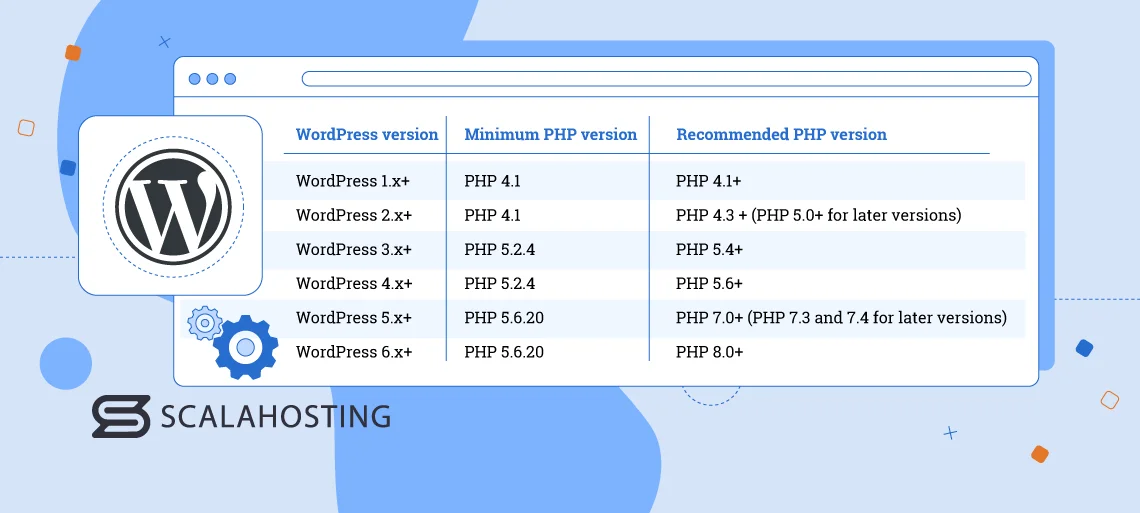
Most plugins need the latest PHP. They work better with it. Updates keep your site safe. They fix bugs and problems. Compatibility is key for plugins and themes. PHP 7.4 or higher is recommended. This ensures your site runs smoothly. It reduces errors and crashes.
Hosting companies often upgrade PHP. They want your site to be secure. It’s good to check your version. Make sure it’s updated. This makes your site better. Visitors will have a great experience.
Credit: kinsta.com
Current Recommended Php Version
The best PHP version for WordPress is PHP 8.0. It is fast and secure. PHP 8.0 offers many features. These features help your website run smoothly. A faster site means happy visitors.
WordPress works well with PHP 8.0. It fixes many bugs. This makes your site safer. Using the latest version is important. Older versions may have issues. They are not as safe.
Always check your website plugins. Make sure they work with PHP 8.0. Not all plugins update quickly. It is important to stay informed. Keep your site and plugins updated. This helps your site perform well.
Benefits Of Using Latest Php Versions
Latest PHP versions boost speed. Pages load faster. Users stay longer. Faster sites rank better. Performance matters. PHP updates bring improved efficiency. Quick response times. Better user experience.
New PHP versions offer stronger security. Protects data. Stops hackers. Old versions have vulnerabilities. Regular updates secure your site. Security is key. Safe sites build trust. Keep your website safe.
Latest PHP brings new features. Developers love new tools. Easier coding. Better functionality. Old PHP lacks updates. Modern features improve flexibility. Enhance your site. Embrace new technology.
Potential Risks Of Using Older Php Versions
Security vulnerabilities are a big risk with older PHP versions. Hackers find holes in these outdated systems. They can sneak into your website easily. Protect your site by using the latest PHP version.
Limited support is another issue. Older PHP versions get less help from developers. Newer versions have better support and updates. Your website can face problems without proper help.
Compatibility issues can cause trouble. New plugins and themes may not work well with old PHP versions. This can make your site look broken or work poorly. Keep your WordPress running smoothly with a newer PHP version.
How To Check Your Current Php Version
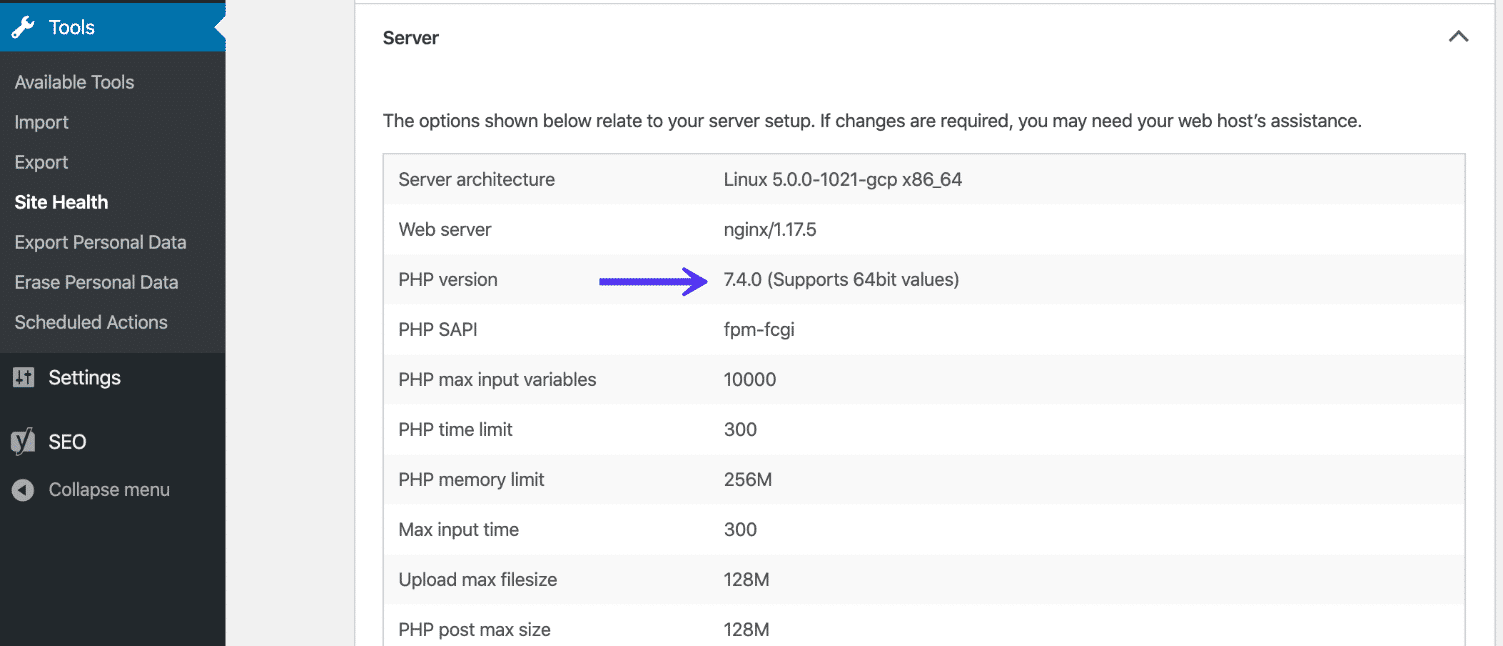
Open your WordPress dashboard. Click on “Tools” and then “Site Health”. This will show your PHP version. It is important to keep it updated. Your site will run faster and safer.
Log into your hosting account. Find the control panel. Look for “PHP settings”. Check your current PHP version there. Change it if needed. Always make sure your PHP is the latest. It helps in performance and security.
Credit: www.scalahosting.com
Steps To Upgrade Php Version
Backing up your website is very important. It keeps your data safe. Use a plugin to make backups easy. Save your backup on your computer or cloud. This way, your data is always safe.
Contact your hosting provider for help. They can guide you to upgrade PHP. Some providers offer a control panel. You can change PHP versions there. Always ask if you’re not sure.
After upgrading, check your website. Ensure everything works fine. Test all pages and features. Look for any errors or issues. If problems arise, consider seeking help. Keeping things smooth is key.
Common Compatibility Concerns
Choosing the right PHP version is crucial for WordPress. PHP 7. 4 or higher offers better speed and security. Many plugins and themes require these versions to work smoothly. Using outdated versions can lead to compatibility issues and vulnerabilities. Always ensure your hosting supports the latest PHP versions.
Plugin Compatibility
Plugins are like tools. They help your website do more. Some plugins need a certain PHP version. If your PHP version is too old, plugins may not work. This can make your website slow or even break it. Always check which PHP version your plugins need. This keeps your website running smoothly.
Theme Compatibility
Themes change how your website looks. They also need a specific PHP version. If you use an old PHP version, your theme might not look right. This can make your site look messy. Make sure your theme and PHP version match. This helps your site look good and work well.
Resources For Further Assistance
Choosing the right PHP version for WordPress ensures compatibility and security. PHP 8. 0 or higher is recommended for optimal performance. Official WordPress forums and hosting provider guides offer valuable insights for making an informed decision.
Online Forums
Online forums are a great place for WordPress help. People share tips and solutions. You can ask questions or read others’ experiences. Many users face similar issues. You learn from their stories. Forums are often free to use. You just need to sign up. Popular forums have many active members. They reply quickly. This helps you solve problems fast. WordPress.org has a big forum. Many experts visit it. They offer valuable advice. You can trust their answers. Forums are a helpful part of the community.
WordPress Support
WordPress Support offers direct help. It has useful guides and tutorials. You can find answers to common issues. The support team is knowledgeable. They provide step-by-step solutions. You can contact them anytime. Many users trust their support. It is reliable and easy to use. The site has a help section. You can search for topics. This makes finding information quick. It is a helpful resource for beginners and advanced users.

Credit: www.reddit.com
Frequently Asked Questions
What Is The Best Php Version For WordPress?
The best PHP version for WordPress is 8. 0 or higher. It ensures optimal performance, security, and compatibility with themes and plugins. Regular updates are essential to maintaining efficiency and security. Always check the WordPress requirements and consult your hosting provider for compatibility before upgrading.
Is Php 7.4 Still Supported For WordPress?
PHP 7. 4 is supported but not recommended for long-term use. It receives security updates but lacks the improvements found in PHP 8. 0 or higher. Upgrading to a newer version enhances performance, security, and overall functionality. Always test your site with a staging environment before making any changes.
Why Should I Upgrade My Php Version?
Upgrading your PHP version improves site performance, security, and compatibility. Newer versions offer better speed and advanced features. They also receive regular security patches. Using outdated PHP versions can leave your site vulnerable to attacks. Always ensure your themes and plugins are compatible before upgrading.
How Do I Check My WordPress Php Version?
To check your WordPress PHP version, log in to your WordPress dashboard. Navigate to Tools > Site Health, then click on Info. Scroll down to the Server section to find your PHP version. Alternatively, contact your hosting provider for assistance in determining your current PHP version.
Conclusion
Choosing the right PHP version for WordPress is essential. It impacts performance, security, and compatibility. Always opt for the latest stable release. This ensures better speed and protection. Older PHP versions pose security risks. They also lack support. Update your PHP regularly.
This keeps your WordPress site running smoothly. Check your hosting provider’s PHP options. They should offer the latest versions. Regular updates mean fewer vulnerabilities. Take action now. Secure your website’s future. Keep your WordPress site optimized and secure.


