
Are you scratching your head trying to figure out what version of PHP is required for WordPress? You’re not alone.
With WordPress powering over 40% of the web, ensuring your website runs smoothly and securely is crucial. The PHP version you choose plays a vital role in your site’s performance, security, and future-proofing. But with all the technical jargon and numbers, it’s easy to feel overwhelmed.
Fear not! We’ll break down the essentials in a way that’s easy to digest, helping you make informed decisions without the hassle. Unlock the secret to a faster, more secure WordPress site, and keep your visitors coming back for more. Ready to dive in? Let’s get started!

Credit: make.wordpress.org
Php Compatibility With WordPress
WordPress needs PHP to work. The minimum PHP version required by WordPress is 7.4. Using an older version can cause issues. Problems like slow performance or bugs can happen. It’s best to use the latest PHP version available. PHP 8.0 and 8.1 are the current choices.
Newer versions have better security. They also run faster. Always update PHP when possible. Check with your hosting provider to upgrade. Regular updates ensure smooth operation of your website. A newer PHP version also supports more plugins and themes. This gives you more options to enhance your site.
Latest Php Versions
PHP is a computer language. It helps to make websites. WordPress uses PHP. The latest versions of PHP have new features. They also have better security. Using the latest PHP version is important. It makes your site faster. It also makes it safer. WordPress often updates to work with new PHP versions. This keeps your site up-to-date and safe.
PHP 8.0 and 8.1 are the newest versions. They offer better performance. WordPress recommends using PHP 7.4 or newer. Newer versions improve site speed. They also fix many bugs. Always choose the latest version for the best results.
Benefits Of Upgrading Php
Upgrading PHP can make your website run faster. It uses less memory and processes requests quickly. This means pages load quicker. Visitors will like that. Speed is important for user experience. Search engines also love fast sites. This can help your website rank better.
Older PHP versions have security holes. Hackers can use these to harm your site. Newer versions fix these problems. They offer better protection against threats. Keeping PHP updated is like locking your door. It keeps bad guys out. A secure site is a safe place for your visitors.

Credit: wptavern.com
Checking Your Current Php Version
Many users wonder about their current PHP version. It’s essential for WordPress. Start by finding the PHP info on your server. Most hosting providers offer a control panel. Locate the PHP version there. Another way is using a WordPress plugin. Some plugins show the PHP version in the dashboard. PHP version determines how WordPress runs. Older versions might not support new features. Always keep PHP updated for security. Updates fix bugs and improve performance. Check with your host for the latest PHP version. They often provide guides to update PHP. If unsure, ask your host for help. Updating PHP is vital for a smooth WordPress experience.
Updating Php For WordPress
Backing up your site is very important. It helps keep your data safe. You can use plugins to make this easy. Store backups in different places. This way, you can always restore your site if something goes wrong. Backups should be done often. Remember, safety comes first.
Updating PHP is easy. Log into your hosting panel. Look for the PHP settings. Choose the latest version available. Click to update. Some hosts might do it for you. Always check your host’s guides. Hosts can help if you face any issues.
Testing ensures everything works well. After the PHP update, visit your site. Check every page. Look for errors or broken links. Plugins might need updating too. Testing helps find problems early. Fix issues before they affect your visitors.
Common Issues Post-php Update
Many WordPress users face issues after updating PHP. Common problems include compatibility errors and broken themes or plugins. Ensuring your WordPress site runs smoothly requires PHP 7. 4 or higher.
Compatibility Problems
Updating PHP can cause compatibility issuesbroken features
Check error logs first. They show what went wrong. Use the logs to find broken plugins. Deactivate plugins one by one. This helps find the problem. Update all plugins and themes regularly. This prevents future issues. If errors persist, revert PHP to the older version. Contact plugin developers for help. They may have solutions. Use a staging site to test updates. This avoids live site errors.
Troubleshooting Tips
Tools For Php Version Management
PHP management tools help you switch between versions. PHP Manager for Windows is popular. It makes changes easy. Homebrew works well on Mac. It installs PHP fast. Docker is another tool. It runs PHP in containers. This keeps your system clean. PHPbrew lets you manage multiple PHP versions. It’s simple and effective. Composer is great for dependencies. It ensures compatibility. These tools keep your PHP updated. They save time and reduce errors.
Future Php Updates And WordPress
WordPress needs the right PHP version to work well. It helps keep your website safe and fast. New versions of PHP come out often. They fix bugs and make things better. Using the latest PHP version is a good idea. It brings more features and makes websites run smoothly.
Sometimes, older PHP versions stop getting updates. Then, they might not be safe anymore. Always check if your WordPress theme or plugin is ready for new PHP. This way, your site will stay secure and efficient. Many hosts let you update PHP with just a few clicks.
Make sure to have a backup before changing PHP. If something goes wrong, you can fix it quickly. Always stay updated on PHP news for the best WordPress experience.
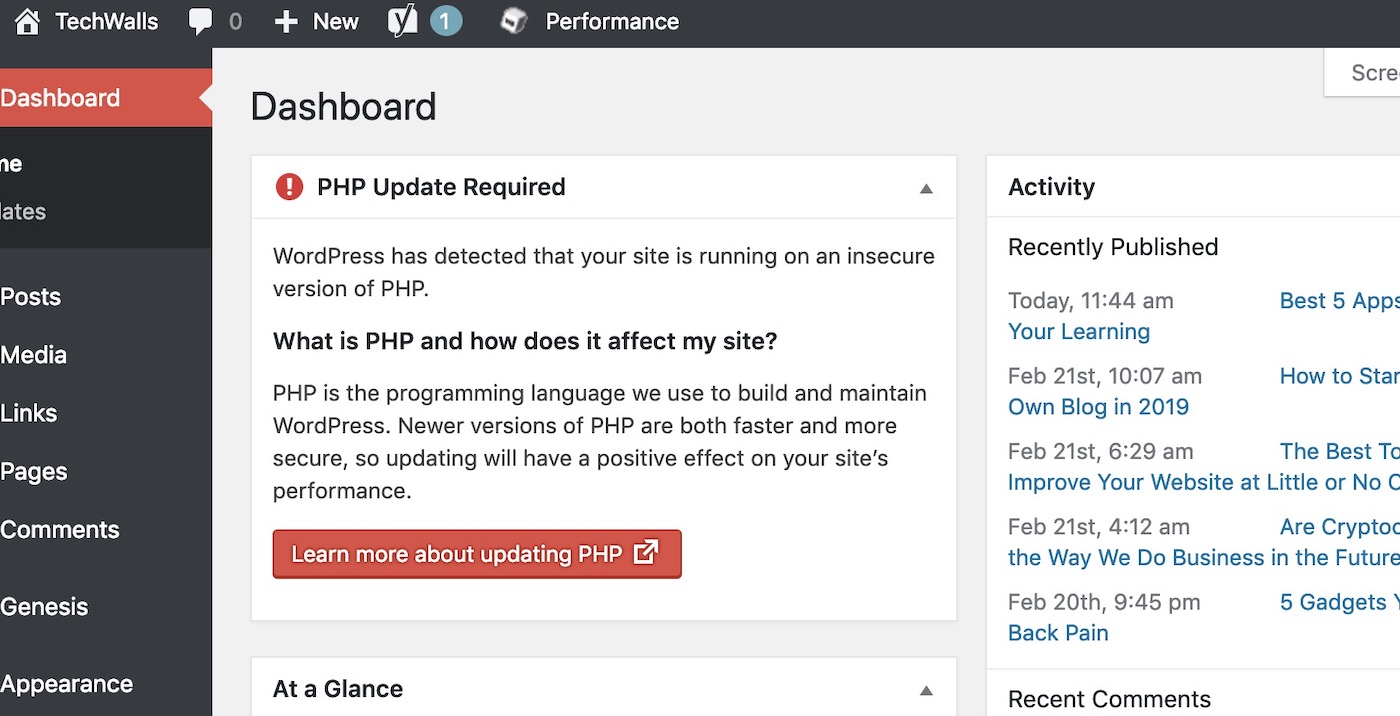
Credit: www.techwalls.com
Frequently Asked Questions
What Is The Minimum Php Version For WordPress?
WordPress requires at least PHP version 7. 4 for optimal performance. Using an outdated PHP version may lead to compatibility issues. It’s always recommended to use the latest PHP version supported by WordPress. This ensures better security, speed, and overall functionality for your website.
Why Is Php Version Important For WordPress?
PHP version affects WordPress performance and security. An updated PHP version enhances site speed, security, and compatibility. It also supports the latest WordPress features and plugins. Outdated PHP versions can lead to vulnerabilities and plugin issues, compromising your site’s integrity and user experience.
How To Check Php Version For WordPress?
To check your WordPress PHP version, log into your hosting account. Navigate to the control panel or use a plugin. The Site Health tool in WordPress can also provide this information. Keeping your PHP version updated is crucial for site functionality and security.
Can WordPress Run On Php 8?
Yes, WordPress can run on PHP 8. However, ensure your themes and plugins are compatible. PHP 8 offers improved performance and security features. Always test updates in a staging environment before applying changes to your live site. Compatibility ensures a smooth WordPress experience.
Conclusion
Choosing the right PHP version is vital for WordPress. It ensures security and performance. Always opt for the latest supported version. This keeps your site safe and fast. Regular updates help avoid vulnerabilities. Check compatibility with themes and plugins. Backup your site before upgrading PHP.
This prevents data loss. A well-maintained WordPress site attracts more visitors. So, keep PHP updated. It’s simple yet effective. Your website deserves the best care. Stay informed and proactive. Happy blogging!


