
Are you planning to launch a new WordPress site or perhaps you’re considering an upgrade? One critical element you shouldn’t overlook is the PHP version your WordPress supports.
Why does this matter to you? A compatible PHP version is crucial for optimal performance, security, and access to the latest features. Imagine your website running faster, more secure, and with fewer hiccups—all because you took the time to ensure compatibility.
Don’t let outdated PHP versions slow you down or put your site at risk. You’ll discover which PHP versions WordPress supports and why keeping your PHP up-to-date is a game-changer. Curious to know how this can impact your WordPress experience? Keep reading to unlock the full potential of your website.
Credit: pressidium.com
WordPress And Php Relationship
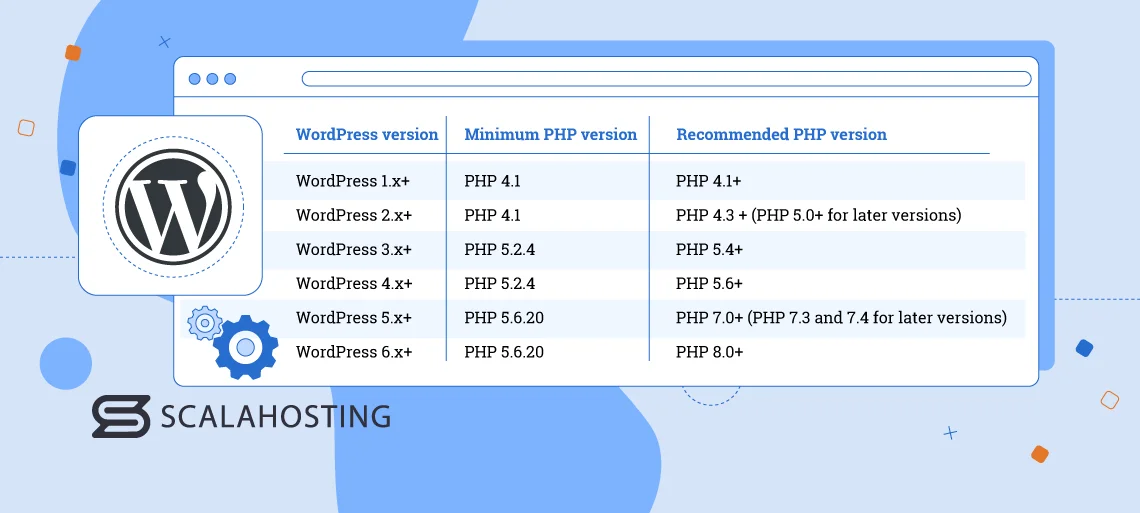
WordPress is a tool for building websites. It uses a language called PHP. This language helps WordPress talk to computers. The right PHP version is very important for WordPress. It makes sure everything runs fast and safe. WordPress works best with PHP 7.4 or newer. Using the newest version is smart. It keeps your site safe. New versions have better security features. They also fix old problems. Always check your host’s PHP version. Hosts are like the home for your website. They need to keep up to date, too. If your PHP is old, your site might be slow. Or worse, it might not work well. Regular updates are key.
Current Php Version For WordPress
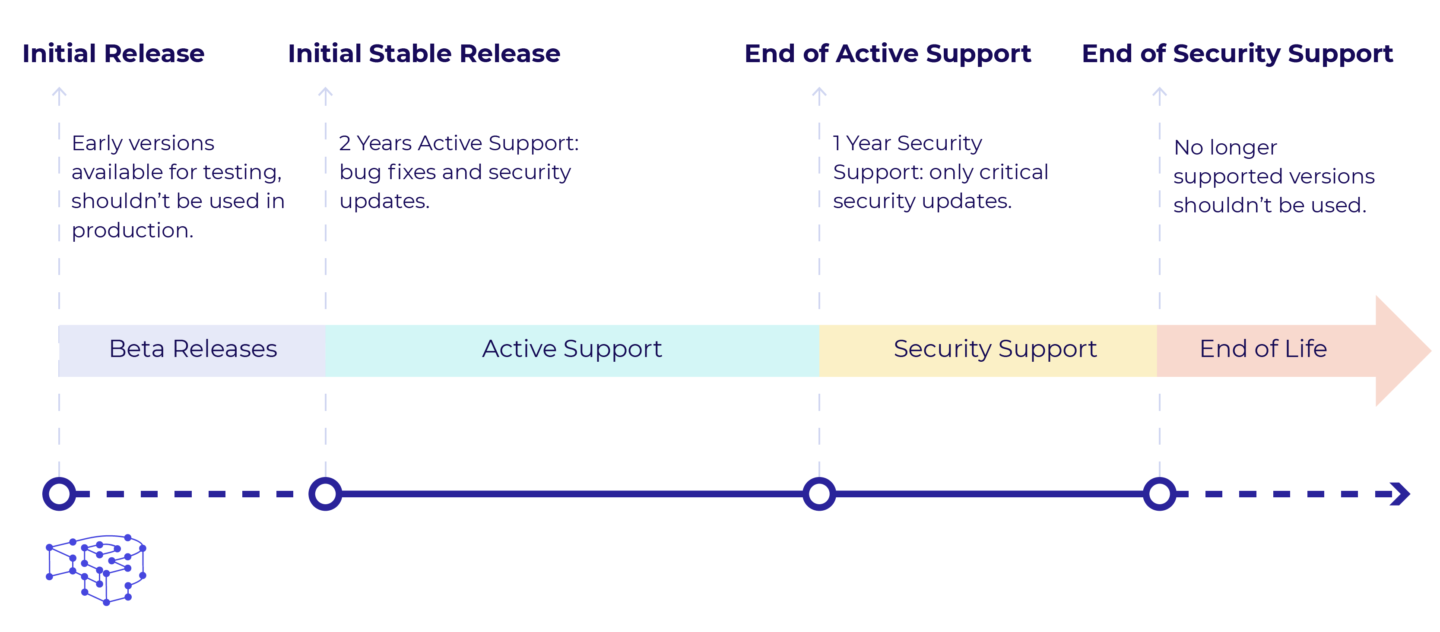
WordPress supports PHP versions starting from 7.4. Using the latest PHP ensures better performance. It also helps with security. PHP 8.0 is recommended for optimal results. Older versions might cause errors. They can also slow down your website.
PHP 8.1 offers new features. It improves speed and reliability. Always check your hosting provider. They should support these versions. Updating PHP is crucial. Keep your WordPress site secure and fast.
Benefits Of Using Recommended Php Version
The recommended PHP version makes your site faster. It runs more efficiently. Fast websites keep visitors happy. They spend more time exploring. This can reduce bounce rates. A smooth experience keeps users coming back.
New PHP versions have better security. They fix old security holes. Your site becomes safer from hackers. Security is important for trust. Visitors feel safe sharing information. This keeps your site and users protected.
The latest PHP version gives you new tools. You can use modern features. These help improve your site. Developers can create better plugins. Your site can do more exciting things. Stay updated to keep up with trends.
Checking Your Php Version
First, go to your WordPress dashboard. Click on Tools in the menu. Then, select Site Health. A new page opens. Look for the Info tab at the top. Click on it. Scroll down to find the Server section. Here, you will see your PHP version. It is good to know the version. Older versions might not be safe.
To update, contact your hosting provider. They will guide you. Always ensure you have the latest PHP version. New versions have better security. They also improve site speed. Keeping your PHP updated is crucial. It helps your WordPress site run smoothly.
Steps To Update Php Version
Always create a backup. It keeps your data safe. Use plugins like UpdraftPlus. They store backups in the cloud. Follow instructions for easy setup. Your site is now ready for updates. Safety first!
Ensure your themes and plugins work with new PHP. Use a staging site to test. Check for errors or issues. Solve them before updating PHP. Many plugins offer free staging features. Keep your site error-free.
Log in to your hosting account. Find the PHP settings. Select the latest version available. Click update. Some hosts offer automatic updates. Check support if needed. Your site is now running smoothly.
Credit: www.scalahosting.com
Common Issues With Php Version Updates
PHP updates can make some plugins and themes incompatible. This may cause websites to break. Developers need time to update their code. Check plugin details for PHP support. Use plugins that are regularly updated.
Older PHP versions might slow down your site. New versions can be faster. But some sites experience performance issues after updates. Monitor your site’s speed after updating PHP. Use caching tools to improve speed.
PHP changes can result in error messages. They help identify problems. Debugging is needed to fix errors. Use error logs to find out what went wrong. Keep your site updated to prevent errors. Regular checks help maintain performance.
Resources For Php Updates
WordPress shares important PHP details. Their official documentation is a helpful place. Here, find which PHP versions work best. Updates are explained clearly. They guide you on how to manage them. Simple steps help keep your site safe.
Many users chat in support forums. This is a good way to learn. People share their PHP update stories. They discuss challenges and solutions. You can ask questions too. Friendly people will help. Joining forums can make learning fun.
Hosting providers offer great help. Many have support teams ready to assist. They can guide on PHP updates. They know what WordPress needs. Some offer tools for easy PHP updates. Talking to them can make things easier.

Credit: make.wordpress.org
Frequently Asked Questions
What Php Version Is Recommended For WordPress?
WordPress recommends using PHP version 7. 4 or higher for optimal performance. This ensures compatibility with the latest features and security updates. Always check with your hosting provider to ensure they support the recommended PHP versions.
Can WordPress Run On Older Php Versions?
Yes, WordPress can run on older PHP versions, but it’s not recommended. Using older versions may expose your site to security risks. It’s best to keep your PHP version updated to benefit from improved performance and security features.
How To Check My WordPress Php Version?
To check your WordPress PHP version, log in to your WordPress dashboard. Go to Tools > Site Health > Info, and find the server section. Here, you’ll see your current PHP version.
Why Is Updating Php Important For WordPress?
Updating PHP is crucial for WordPress as it enhances security and performance. Newer PHP versions fix vulnerabilities and improve speed. Regular updates ensure your site runs smoothly and is protected against threats.
Conclusion
Choosing the right PHP version boosts your WordPress site’s performance. PHP 7. 4 is widely supported, offering speed and security. Versions like PHP 8 bring new features but check compatibility first. Regular updates ensure your site runs smoothly and securely.
Always back up before switching PHP versions. Keep your WordPress and plugins updated. This helps avoid problems and keeps your site safe. A well-maintained site attracts more visitors and builds trust. Stay informed. Your website’s success depends on it. Always aim for a seamless user experience.
Happy blogging!


