
Are you curious about how WordPress stores all your website’s data? If you’ve ever wondered what type of database powers your WordPress site, you’re in the right place.
Understanding the database behind WordPress can unlock a world of possibilities for optimizing your website’s performance and ensuring its security. We’ll delve into the specific database system WordPress uses, demystify some technical jargon, and reveal how this knowledge can empower you to make smarter decisions for your site.
Stick with us, and you’ll soon discover how this crucial component of WordPress works its magic to keep your content accessible and organized.

Credit: wordpress.stackexchange.com
WordPress Database Basics
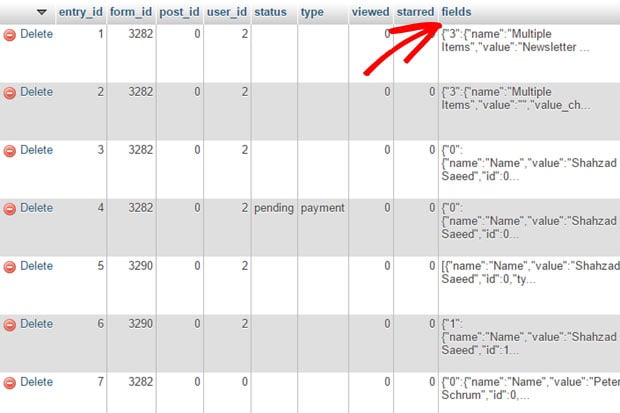
WordPress uses a simple database to store data. This database keeps things like posts and comments. The database is made of tables. Each table has rows and columns. The rows hold the data. The columns show what type of data it is.
WordPress has 12 main tables. These tables store different information. For example, one table holds user data. Another table keeps track of posts. These tables work together. They make sure your website runs smoothly.
MySQL is the database that WordPress uses. It is popular and open-source. MySQL is fast and reliable. It helps WordPress run websites well. Many people choose MySQL. It is easy to use and works on many servers.
MySQL and WordPress are a good team. They work together to keep your site data safe. They make sure your site is fast and ready for visitors.
Key Tables In WordPress
The wp_posts table holds all the content. Blog posts, pages, and attachments. Each item gets a unique ID. This ID helps link content to other tables. The table includes titles, text, and dates. Authors are also noted here. It is the heart of WordPress content.
The wp_users table stores user data. Names, emails, and passwords are saved here. Each user gets a unique ID. This ID is important for connecting users to their posts. Admins, editors, and regular users are all in this table. It keeps WordPress organized.
The wp_options table contains site settings. These include site name and URL. It also holds plugin settings and theme options. Each setting has a unique key. This table helps manage WordPress functionality. It is crucial for site customization.
Data Storage Mechanisms
WordPress uses a relational database. This database is called MySQL. Tables in the database hold different kinds of data. Posts, pages, and comments all have their own tables. This setup makes data easy to manage. You can quickly find what you need.
Relationships between tables help organize data. For example, a post links to the author. This makes it simple to keep track of connections. Queries fetch data from these tables. They are like questions you ask the database. The relational model helps WordPress run smoothly.
Metadata is extra information about content. WordPress stores this in special tables. For example, post metadata includes the post’s date and author. This helps give more context to the data.
Using metadata makes content flexible. You can add new details without changing the main table. This keeps the database organized. Metadata storage is a key part of how WordPress works. It supports many extra features.
Credit: wpforms.com
Custom Database Enhancements
WordPress uses a standard database. Sometimes you need more. Custom tables help store special data. This improves data management. Developers create tables for unique needs. Custom tables boost site performance. They make handling data easy. Regular tables might not fit all needs. Custom tables offer flexibility. They are useful for plugins and themes. Custom tables support complex data structures. They keep data organized. This helps in querying specific data. Custom tables are powerful tools for developers.
Database queries fetch data. They must be fast. Slow queries harm site speed. Optimizing queries improves performance. Good queries save time. They use less server resources. Developers must write efficient queries. This ensures quick data retrieval. Optimized queries make sites run smoothly. They help in handling large data sets. Proper indexing speeds up queries. Queries must be simple and direct. Optimized queries keep databases healthy. They are key to a fast WordPress site.
Database Performance Optimization
Caching makes websites faster. It saves data for reuse. WordPress uses caching to speed up page loads. Plugins help with caching. They store parts of your site. This reduces server load. Faster sites keep visitors happy. More visitors mean more success.
Indexing helps databases find data fast. It’s like a book’s index. You look up words and find pages quickly. WordPress uses indexes for its database. This speeds up searches. It makes your site run smoother. Good indexing is like a shortcut. It improves site performance.
Credit: learn.wordpress.org
Database Security Measures
WordPress uses a MySQL database to store its data. Keeping this database secure is crucial. Employing measures like regular updates, strong passwords, and database backups helps protect against unauthorized access.
Securing Sql Queries
WordPress uses SQL queries to get data from the database. Hackers can attack these queries. Always use prepared statements. They make queries safe. Validation of data is important. Only allow expected data. Never trust user input. Use escaping functions. They clean data before use. This keeps the database safe.
Backup And Recovery Solutions
Backups are a safety net. They save a copy of your data. If something goes wrong, you can restore it. Use plugins for easy backups. Store backups in a safe place. Not on your website. Regular backups are a must. They keep your data safe. If you lose data, you can get it back fast.
Frequently Asked Questions
What Database Does WordPress Use?
WordPress uses MySQL, a popular open-source relational database management system. It stores all site data, including posts, pages, and user information. MySQL is known for its reliability and scalability, making it suitable for WordPress websites of all sizes. It efficiently manages and retrieves data, ensuring smooth site performance.
Is Mysql The Only Option For WordPress?
Yes, MySQL is the default and most commonly used database for WordPress. However, WordPress also supports MariaDB, a MySQL-compatible database. Both databases offer similar functionality, ensuring seamless operation. MariaDB is often chosen for its enhanced performance features, but MySQL remains the standard choice for most installations.
Can WordPress Use Nosql Databases?
WordPress primarily relies on MySQL, a relational database. NoSQL databases aren’t directly supported by WordPress. However, developers can integrate NoSQL solutions like MongoDB through custom plugins or modifications. This requires advanced technical knowledge. The default MySQL setup is sufficient for most WordPress needs, ensuring reliability and compatibility.
Why Is Mysql Preferred For WordPress?
MySQL is preferred due to its robust performance, scalability, and wide support. It efficiently handles large volumes of data and complex queries. MySQL’s open-source nature offers flexibility for customization. Its widespread use ensures compatibility with hosting providers. These factors make MySQL ideal for WordPress’s dynamic content management.
Conclusion
WordPress uses MySQL for its database needs. This popular choice stores all essential site data efficiently. MySQL is open-source, making it accessible and cost-effective. Many users appreciate its stability and reliability. It handles data like posts, pages, and user information seamlessly.
This structure supports WordPress’s dynamic content management. Understanding this helps in managing and optimizing your WordPress site better. Knowing your database type is crucial for troubleshooting and customization. For a smooth experience, keep your WordPress and MySQL updated. This ensures security and performance.
With this knowledge, you can confidently manage your website.


