
Unlock the true potential of your WordPress images by mastering the art of crafting compelling image descriptions. You might be wondering why this is important.
Well, think about it this way: every image on your website is an opportunity to boost your site’s visibility and enhance user experience. But here’s the catch — it’s not just about having images; it’s about the words you choose to describe them.
Imagine your images as storytellers. With the right description, they can engage your audience, improve your SEO ranking, and make your content more accessible. When you optimize your image descriptions, you’re not only speaking to search engines but also directly to your audience. By the end of this article, you’ll know exactly what to put in your WordPress image descriptions to captivate both and elevate your site’s performance. Ready to transform your images into powerful tools? Let’s dive in!
Importance Of Image Descriptions
Image descriptions are vital for SEO. They help search engines understand your images. This boosts your site’s visibility. Use relevant keywords in descriptions. These keywords make your images searchable. More people can find them online. Descriptions should be clear and direct. Avoid long sentences. Keep it simple for better results.
Image descriptions also aid accessibility. They help those who can’t see the images. Use descriptions that explain the image well. Describe colors, objects, and actions. This helps everyone enjoy your content. Accessibility makes your site friendly for all users. It is important to include everyone. Descriptive text is key here.

Credit: www.fixrunner.com
Crafting Effective Descriptions
Choose words that describe the image clearly. Use simple terms. Think about the main idea in the image. Is there a cat or a sunset? Mention them. Use specific details. Talk about colors or actions.
Include keywords in the description. This helps with search. Pick keywords related to the image. Make sure they fit naturally. Do not just list them. Use them in a sentence. This makes the description useful and easy to read.
Common Mistakes To Avoid
Crafting clear image descriptions boosts your site’s SEO. Avoid vague terms like “image1” or “pic. ” Describe content precisely for better accessibility. Use keywords naturally, but don’t overstuff. Keep descriptions relevant and concise, helping search engines and users understand your images.
Overstuffing Keywords
Too many keywords make your image description look bad. It can confuse readers. Google can also penalize you. Use a few good words that describe the image well. This helps people find your image. It makes your site better.
Ignoring Context
Every image has a story. Descriptions should match the image and story. Context is important. It helps people understand what they see. It can be a few words or a short sentence. Always give the right context. This makes your content clear and helpful.
Tools And Plugins For Optimization
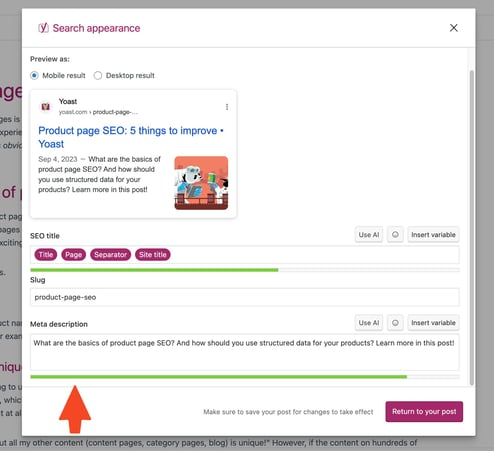
Many plugins help your images in WordPress. They improve your SEO. Plugins like Yoast SEO and Rank Math are popular choices. These tools guide you to write better descriptions. They suggest keywords and check your text length. This can make your images more searchable.
Some plugins also offer image compression. This helps your site load faster. A faster site keeps visitors happy. Remember, a good plugin saves time. It makes your website better without much effort.
Accessibility is important for all users. Tools like WP Accessibility help you. They check if your images have alt text. Alt text describes the image for those who can’t see it. It also helps search engines understand your images. This boosts your site’s ranking.
Some tools also provide color contrast checks. They ensure text is readable against the background. Good contrast makes your site easy to read. This is helpful for everyone, especially those with vision problems.
Best Practices For Image Descriptions
Every image needs a short descriptiondescribe the image. Mention key elements.
Relevance is important. Image text must match the content of the page. Users find it helpful. Search engines like it too. This boosts your site’s visibility. Avoid using complex terms. Use everyday language.
Always be precise. Avoid vague language. Describe what you see. Readers appreciate clarity. This makes the site easy to use. A clear description helps everyone. It makes the web more accessible.
Credit: yoast.com
Credit: www.fixrunner.com
Frequently Asked Questions
What Is WordPress Image Description?
WordPress image description is text that explains the image’s content. It enhances accessibility and SEO by providing context. This description helps search engines understand your image better. Including keywords can improve image search visibility. Always write clear, informative descriptions for each image uploaded to your WordPress site.
Why Is Image Description Important?
Image descriptions improve your website’s accessibility and SEO. They help visually impaired users understand image content. Descriptions also assist search engines in indexing your images correctly. This can increase your site’s visibility in search results. Always include relevant keywords in descriptions to enhance SEO effectiveness.
How Do I Write Effective Image Descriptions?
Effective image descriptions are concise, informative, and keyword-rich. Describe the image content clearly and accurately. Use relevant keywords naturally without stuffing. Ensure the description adds value to both users and search engines. Keep it short but detailed enough to convey the image’s purpose and context.
Can Image Descriptions Boost Seo?
Yes, image descriptions can boost SEO. They provide search engines with context about your images. This can improve your website’s visibility in image search results. Including keywords in descriptions can enhance search ranking. Ensure descriptions are relevant and informative to maximize SEO benefits.
Conclusion
Crafting clear image descriptions boosts your site’s visibility. They help search engines understand your content. Use simple words for better comprehension. Describe the image accurately. Include relevant keywords naturally. This improves your SEO rankings. Focus on user experience and accessibility.
Easy-to-read descriptions engage more visitors. They also support visually impaired users. A thoughtful image description enhances your website’s impact. Make it part of your content strategy. Your audience appreciates clarity. You’ll see improved interaction and retention. Remember, each image tells a story.
Let your descriptions share that story effectively.


