
Unlocking the full potential of your WordPress site often starts with mastering the basics. One essential element that can significantly impact your site’s performance and user experience is the stylesheet header.
You might wonder what exactly should go into the header of your WordPress stylesheet. Is it just a few lines of code, or does it hold the key to a more dynamic and efficient website? By understanding what to include in your stylesheet header, you can enhance your website’s functionality, improve its speed, and even boost its SEO performance.
Dive into this article to discover how the right header can transform your WordPress site. Your website deserves the best, and it all starts with a well-crafted stylesheet header. Curious? Let’s explore together.

Credit: developer.wordpress.org
Purpose Of Stylesheet Header
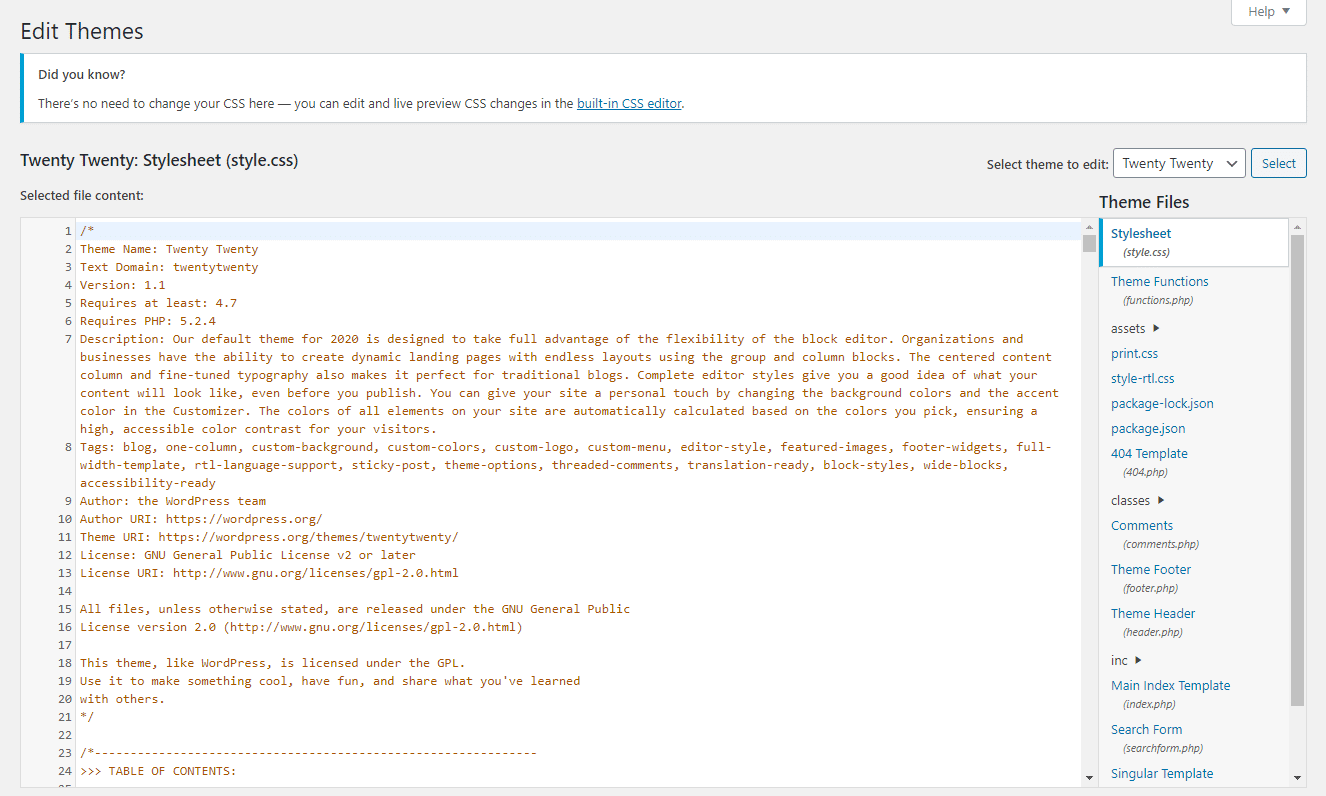
A stylesheet header is very important. It tells what the stylesheet is for. It helps other users understand your coding style. You need to include basic information. This includes the theme name. Also, add the author’s name. Don’t forget the version number and description. These details help with organization. They make sure everything is clear. This is helpful for future edits.
Also, headers make sharing easy. Other developers can quickly see the purpose. They can understand your work better. This makes teamwork easy. Headers are not just a formality. They are a key part of coding. Always include important details. It makes coding neat and easy to manage.
Basic Information
Theme Name shows the main name of your WordPress theme. This name helps users find and recognize your theme quickly. Choose a name that is simple and clear.
The Theme URI provides a link to more details about your theme. This link should lead to a web page with all the theme’s information. Make sure this link is active and correct.
Author Details tell who made the theme. Include the author’s name and a short description. This information helps users know who created the theme.
The Author URI gives a link to the author’s page. This link should show more about the author and their work. Ensure this link is accurate and easy to access.
Theme Description
A theme description tells what your theme does. It gives a clear idea about the theme’s purpose and features. Make it simple and short. Use easy words. This helps users understand quickly.
Include the theme’s author and version. This helps users trust the theme. Add a small note about what makes the theme special. Is it fast or colorful? Tell them here.
Version Control
Adding version control to your stylesheet header is smart. It helps track changes. You can see what updates were made. This makes managing your site easier. Each update gets a new version number. Use numbers like 1.0 or 1.1. This helps you know which version is current. It’s like a history book for your code. You can fix problems faster with this system. It’s also helpful for teams. Everyone can see the latest changes. Communication becomes better. No more guessing what was changed. This saves time and effort. Your site stays organized and efficient. Make sure to update the version number with every change. This keeps everything clear and understandable. Proper version control is essential for smooth operation.
License Information
The license type tells how you can use the code. It shows if the code is free or restricted. Some licenses allow you to change the code. Others have rules. Follow these rules to avoid problems.
The license URI is a web link. It leads to the license details. This link helps you understand the rules. It is important to check this link. Make sure you follow the license terms.
Text Domain And Tags
Text domain helps in translating themes. It should match the theme’s folder name. Tags help users find your theme. They describe your theme’s features. Examples are “blog”, “e-commerce”, or “portfolio”. Tags must be relevant. Too many tags confuse users. Always choose wisely.
For a successful theme, both text domain and tags are vital. They make your theme easy to find and use. Proper use of text domain helps in localization. It ensures your theme reaches a global audience. Tags improve searchability. They highlight your theme’s features and benefits.
Including Credits
Add credits to your stylesheet’s header. This shows respect to creators. Mention the theme or plugin creator’s name. Include any contributors too. This is a kind gesture. It shows appreciation for their work.
You can also add a brief description. Explain what the stylesheet does. Keep it short and clear. This helps others understand your code.
Don’t forget to add the version number of your stylesheet. This makes it easier to track changes. When you update, change the version number. This keeps things organized.
Finally, add a license. This tells others how they can use your code. Choose a license that fits your needs. This is important to protect your work.
Credit: kinsta.com
Best Practices
Keeping the header consistent helps in better organization. It makes your code easy to read and understand. The header should clearly state the purpose of the stylesheet. This helps others know what the file does.
Always aim for clear and concise information in the header. This means using simple words and short sentences. Avoid complex terms. This makes it easier for everyone to understand. Clearly mention the author’s name and the date of creation. This is useful for tracking changes. A clear header makes the stylesheet easy to manage.

Credit: support.reimbursify.com
Frequently Asked Questions
What Is A WordPress Stylesheet Header?
The header of a WordPress stylesheet contains metadata about the theme. It includes details like the theme name, author, version, and description. This information helps WordPress identify and manage themes effectively. It’s crucial for maintaining theme organization and ensuring proper functionality.
How To Format The Stylesheet Header?
The stylesheet header should be formatted using CSS comments. It starts with `/*` and ends with `*/`. Each piece of information, like theme name or author, is placed on a new line. This ensures clarity and proper parsing by WordPress.
Why Include Version In Stylesheet Header?
Including a version number in the stylesheet header helps in tracking updates. It allows developers and users to know which version of the theme is active. This is crucial for debugging, support, and ensuring compatibility with plugins and WordPress updates.
Can I Add Custom Fields To The Header?
Yes, you can add custom fields to the stylesheet header. Custom fields allow you to include additional information like theme URI or license. These fields enhance theme documentation and provide more context, especially useful for developers and users.
Conclusion
Crafting a well-structured stylesheet header in WordPress is essential. It helps in organizing your code effectively. A clear header guides both developers and users. It includes critical information like theme name and author. This practice enhances your website’s readability and usability.
Don’t forget to update version details. Consistency in your stylesheet header makes future edits easier. It also improves collaboration in team projects. Keeping these elements in mind ensures smooth website management. Focus on simplicity and clarity for the best results.
Happy coding with your WordPress stylesheet!


