
Are you ready to unlock the full potential of your WordPress site by optimizing its categories? If you’re scratching your head wondering what template categories use in WordPress, you’re not alone.
This is a question many WordPress users have, especially when looking to enhance user experience and site navigation. Understanding the right templates can revolutionize the way your content is organized and displayed, making it more appealing to your audience. Dive into this article to uncover the secrets behind category templates in WordPress and learn how they can transform your website into a user-friendly powerhouse.
Get ready to captivate your readers and boost your site’s performance with the right strategies at your fingertips.
Understanding WordPress Templates
WordPress templates are like the building blocks of a website. They tell the site how to display content. Each page or post uses a specific template. This helps make websites look nice and work well. Templates control the layout and design. They make sure everything fits together. Without templates, a site might look messy.
Templates are important. They make sure each page looks the same. This gives the site a professional look. Users can change templates to update their site. This is easy and does not need coding. Templates help keep everything organized.
WordPress uses several core template files. These files are essential for running a site. Some important ones are index.php, header.php, and footer.php. Each file has its job. The header file manages the top section. The footer file handles the bottom. The index file is a general layout.
Core files help keep the site working smoothly. They interact with each other. This ensures all parts of the website show correctly. Beginners can use these files to learn. They are the foundation of any WordPress theme.
Category Template Basics
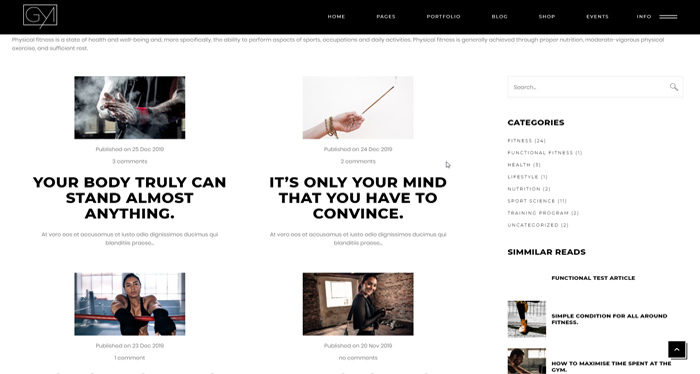
Category templates help organize posts on WordPress. They group posts by topic. This makes it easy to find related content. Users can browse by category. Category templates make websites neat and tidy. They help users navigate the site easily. Content is shown based on categories. This is useful for large sites. Visitors can find what they need faster.
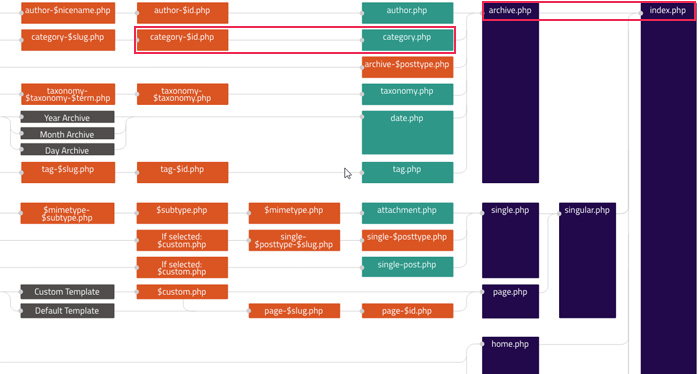
WordPress uses a template hierarchy. It decides which template to use. The hierarchy starts with category-specific templates. If none exist, it uses a default template. This ensures every category has a display format. Templates can be customized. They show posts in different ways. Developers can change templates to suit needs. This flexibility is valuable for site design.
Customizing Category Templates
WordPress lets users create custom category templates easily. Templates help organize and display posts. Each category can have its own design. This is great for websites with many topics. Users can change templates without coding skills. WordPress provides tools to make changes simple. Templates can include headers, footers, and sidebars. These parts make a page look unique. Users can choose colors and fonts to match their style. Changing templates can attract more visitors. Visitors like websites that look nice. A pretty website keeps them reading longer.
Template tags help display posts by category. Tags are small pieces of code. They tell WordPress what to show. Users can add tags to templates. Tags help show posts from one category. They make sorting posts easy. Tags also help with navigation. Users can find posts fast. Using tags makes websites work better. Good navigation keeps visitors happy. Happy visitors return often. Tags are easy to learn. WordPress has guides for them. Guides teach users how to use tags. Tags improve the user experience.
Credit: qodeinteractive.com
Best Practices For Template Design
Templates should work well on phones and tablets. Users expect fast loading times. Slow sites lose visitors quickly. Use flexible layouts. They fit any screen size. Test templates on different devices. Ensure images adjust smoothly. Avoid cluttered designs. Simplicity helps navigation. Use readable fonts. Small text frustrates users.
Search engines love clean code. Templates must have proper tags. Use alt text for images. It helps them rank. Add meta descriptions. They improve visibility on search results. Keep URLs short and clear. Long URLs confuse users. Use keywords naturally. They should fit the content.
Consistency builds trust. Use similar styles in all categories. Fonts and colors should match. It creates a uniform look. Navigation must be easy. Users prefer simple menus. Headers should be consistent. They guide users through pages. Templates should have clear structures. Avoid drastic changes.
Troubleshooting Common Issues
Finding which template WordPress uses for categories can be puzzling. Typically, WordPress defaults to the category. php template file for category pages. Adjustments in theme settings might change this, influencing design and layout.
Debugging Template Errors
Debugging can be tricky. A common issue is missing files. Check if your template files are in the right folder. Sometimes, you might see a blank page. This can happen if there are coding errors. Use a debugging tool to find mistakes. A good tool can help you spot errors quickly. Always backup your files before making changes. This way, you can go back if needed.
Resolving Template Conflicts
Conflicts can cause templates to break. Plugins often cause these issues. Try deactivating plugins one by one. This can help find the problem. Sometimes, two templates might not work well together. Choose one template to avoid clashes. Updating templates can also fix conflicts. Developers often release updates for better compatibility. Always keep your templates up-to-date for best results.

Credit: www.greengeeks.com
Leveraging Plugins For Template Enhancement
Plugins can make templates better. They add features and style. Some plugins are famous for category templates. They make templates look great.
Popular Plugins For Category Templates
Elementor is very popular. It helps to design pages easily. WPBakery offers many design options. It is good for beginners. Beaver Builder is another strong tool. It works well with templates.
Integrating Plugins With Custom Templates
Custom templates need plugins. They add extra functions. Yoast SEO helps with search. WooCommerce adds shopping features. Advanced Custom Fields is good for adding details.
Credit: qodeinteractive.com
Frequently Asked Questions
How To Identify A Category Template In WordPress?
In WordPress, category templates are identified using the category ID or slug. You can find them in your theme’s files. Look for files named category-{ID}. php or category-{slug}. php. These files define the layout and design for specific categories.
Can I Customize Category Templates In WordPress?
Yes, you can customize category templates. Access your theme’s folder via FTP or WordPress dashboard. Edit the category-{ID}. php or category-{slug}. php files. Use HTML, CSS, or PHP to change the layout and style according to your needs.
What Is The Default Category Template In WordPress?
WordPress uses category. php as the default template for categories. If category-{ID}. php or category-{slug}. php doesn’t exist, category. php is used. If category. php is absent, WordPress defaults to archive. php for category layouts.
How Does WordPress Choose Category Templates?
WordPress selects category templates based on hierarchy. It first looks for category-{ID}. php, then category-{slug}. php. If these aren’t found, it uses category. php. Finally, archive. php is used if no category-specific templates exist.
Conclusion
Understanding WordPress templates for categories can simplify your website tasks. Choose templates that match your brand and style. This improves user experience and site appearance. Experiment with different templates to find what fits best. Always keep your audience in mind.
They value clear, easy navigation. Templates help maintain consistency across your site. Consistent design boosts trust and engagement. Stay updated with WordPress trends for better choices. A well-chosen template enhances your site’s effectiveness. It makes content more accessible and enjoyable.
Your website can then grow and succeed.


