
Are you struggling to find the perfect size for your featured image in WordPress? You’re not alone.
Many WordPress users grapple with this question as they aim to make their website visually appealing. A well-sized featured image can dramatically impact your site’s look, feel, and even your user engagement. But what is the ideal size for a featured image in WordPress?
Get ready to unlock the secrets behind choosing the best dimensions for your images, making your website stand out, and keeping your visitors hooked. Dive into this guide, and discover how getting your featured image size right can be a game-changer for your site.
Importance Of Featured Images
Featured images make your website look nice. They grab attention quickly. A good image can make people click. This helps your site get more visitors. Visitors spend more time on sites with images. They remember what they see. This helps you share your message better.
Images also help with branding. They show what your site is about. A clear image can tell a story. It speaks without words. This makes your site feel alive. It attracts more people.
Images also help with SEO. Google likes sites with good images. This can help your site rank higher. More people will find your site. This is why featured images are important.
Standard Dimensions For Featured Images
Featured images make your blog look great. They grab attention. But they need the right size. 1200 x 628 pixels is a good size. Many themes use this size. It fits well on Facebook too. It’s called the optimal size.
Some themes need different sizes. Check your theme settings. Some need 640 x 360 pixels750 x 422 pixels. These sizes work well for many designs.
Images should be clear. They should not be blurry. Use high-quality images. They make your blog look nice. A good image catches the eye. It invites people to read more.
Impact Of Image Size On Website Performance
Large images slow down websites. Smaller images load quicker. Quick loading improves user experience. Google likes fast websites. Fast sites rank higher. Images must be optimized. Use the right size. Use JPEG or PNG formats. They are faster. Adjust image size before uploading. Do not use huge images. Huge images make pages slow. Slow pages frustrate visitors. They leave the site. This hurts your SEO. Optimize images for speed. Keep them small and clear. Always test your images. Check loading time. Make adjustments if needed. Keep your site fast and friendly.
Search engines love fast sites. Fast sites rank better. Image size affects ranking. Use alt tags for images. Describe the image. Help search engines understand. Use relevant keywords. Images must be clear and small. Small images help SEO. Keep file names simple. Use keywords in file names. Proper image size boosts SEO. It helps user experience. Users stay longer. They like fast pages. Fast pages are important. They are a priority. Keep images optimized. Fast images mean better SEO.
Credit: enginescout.com.au
Responsive Design Considerations
Images need to be clear and fit well on mobile screens. A good size for featured images is 1200×675 pixels. This size works well on most devices.
Large images can slow down your site. Slow sites make users leave quickly. Keep images under 100KB for faster loading.
Use adaptive images to save data. They adjust to different screen sizes. This helps images look good everywhere.
Use HTML5 to serve the right image size.
Use the tag to show images.
This tag helps in choosing the best image for the screen.
Choosing The Right File Format
JPEG files are smaller. They load fast on websites. Perfect for photos. PNG files are bigger. They keep more detail. Great for graphics and logos. Both have pros and cons. JPEG is best for speed. PNG is best for quality. Choose based on your need. Balance size and clarity.
WebP files are modern. They are smaller than JPEG and PNG. They keep good quality. WebP loads quickly. It saves server space. Many browsers support WebP. Not all do. Check your site needs. WebP can improve site speed. It’s a smart choice for many.
Tools For Image Resizing
Online tools can help resize images easily. They are often free. Canva is a popular choice. It offers many features for image editing. PicResize is another option. It’s simple and fast. Adobe Spark is easy to use. It allows quick resizing. These tools save time. They make images look better. Choose one that fits your needs.
Plugins for WordPress help resize images. Smush is a top plugin. It compresses images without losing quality. EWWW Image Optimizer is another plugin. It works with different formats. ShortPixel is also useful. It reduces image size efficiently. These plugins improve site speed. They make images load faster. Install them to manage images better.
Best Practices For Image Quality
High-resolution images look clear and sharp. Use images with a resolution of at least 1200 x 628 pixels. This size works well for most themes. Avoid using very small images. They can appear blurry or pixelated. Always check your image after uploading. Make sure it looks good on different devices. Phones, tablets, and computers can show images differently.
Large images can slow your website. Use compression to make images smaller. Tools like TinyPNG or JPEGmini are helpful. These tools reduce file size but keep quality. A smaller file size means faster loading. Faster loading makes visitors happy. Always balance size and quality. Don’t make images too small. Test your images to ensure they look nice.
Testing Image Display Across Devices
Featured images need to look good on all devices. Phones, tablets, and computers all show images differently. Each device has its own screen size. Making sure images fit is important for a good user experience.
Testing on different devices can help. Use tools to see how images look on phones and tablets. Adjust the image size if needed. Responsive images are key. They change size to fit the screen. This keeps them clear and sharp.
User experience testing matters. It helps see if images load well. Slow images can make users leave the site. Fast loading images keep users happy. Happy users stay longer and visit more pages.
Common Mistakes To Avoid
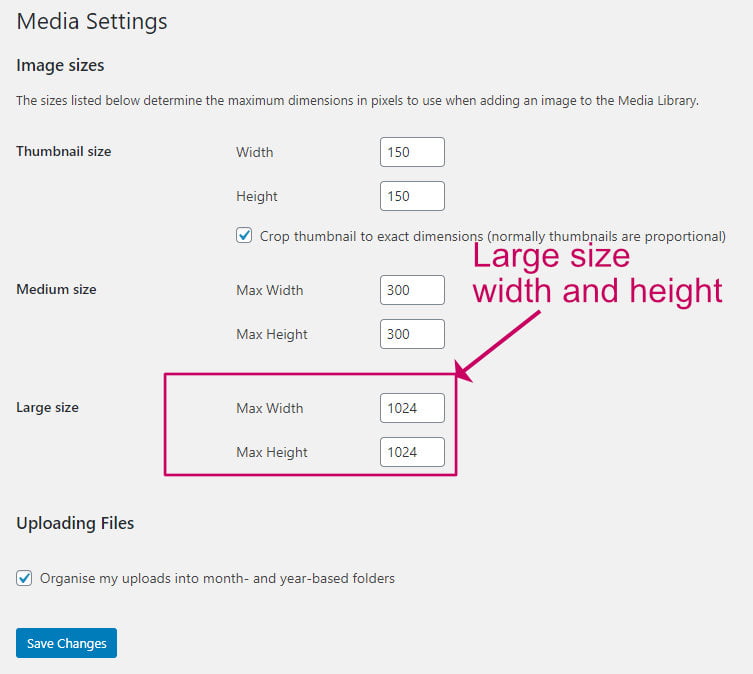
Choosing the right size for a featured image in WordPress is crucial. Images that are too large slow down your site. Small images might appear blurry. Aim for 1200 x 628 pixels for optimal display.
Oversized Images
Large images slow down websites. They take longer to load. This can upset visitors. A featured image should be 1200 pixels wide. It should not be larger. Bigger images need more space. They can make pages heavy. Heavy pages load slowly. Slow pages can lose visitors. Keep images small and quick.
Incorrect Aspect Ratios
Aspect ratios matter for images. Wrong ratios can look odd. Images can stretch or shrink. This ruins their appearance. Use a standard ratio like 16:9. This ratio works best. It keeps images looking nice. Always check your image’s ratio. Make sure it fits the design. A good ratio helps pages look neat.
Credit: wpkind.com

Credit: marketingwithwp.com
Frequently Asked Questions
What Is The Ideal Size For A WordPress Featured Image?
The ideal size for a WordPress featured image is 1200 x 628 pixels. This size ensures optimal display across various devices and platforms. It also helps in maintaining image quality and performance. Always use high-resolution images to avoid pixelation issues.
Why Does Featured Image Size Matter In WordPress?
Featured image size matters for visual appeal and loading speed. Properly sized images enhance user experience and engagement. They also improve your site’s SEO by ensuring fast loading times. Consistent image dimensions create a professional and cohesive website appearance.
How To Optimize WordPress Featured Images For Seo?
To optimize, use descriptive file names and alt text. Compress images without losing quality to improve loading speed. Ensure images are responsive for different devices. These practices enhance SEO and user experience, boosting site visibility and engagement.
Can I Use Different Sizes For Featured Images?
Yes, but maintaining consistency is important. Different sizes can affect site layout and user experience. Stick to recommended dimensions for uniformity and professionalism. Consistent sizes ensure better alignment and appearance across your WordPress site.
Conclusion
Choosing the right featured image size enhances your WordPress site. Images should load quickly and look good on all devices. Aim for 1200 x 628 pixels for social media sharing. This size balances quality and speed. Always compress images before uploading.
Use tools like TinyPNG or JPEGmini. Consistent image sizes create a professional look. Test your site to ensure images display correctly. Adjust as needed for different themes. Better images lead to more engagement. Keep your site visually appealing and user-friendly.
Remember, a well-chosen image speaks louder than words. Your site deserves the best.


