
Imagine visiting a website only to be greeted by blurry, oversized, or awkwardly cropped images. Frustrating, right?
As a WordPress user, you know that first impressions matter, and image thumbnails play a crucial role in capturing your audience’s attention. You’re probably wondering, “What size should my image thumbnails be to ensure they look perfect on every device?
” You’re not alone. This question is more common than you think and directly impacts your site’s performance and user experience. We’re diving deep into the ideal thumbnail size for WordPress, helping you create visually appealing content that keeps your visitors coming back for more. Ready to transform your site’s visual appeal? Let’s get started.
Importance Of Image Thumbnails In WordPress
Image thumbnails play a big role in WordPress sites. They grab attention quickly. Thumbnails are small previews. They help users see the content fast. This makes the website more engaging. Users can decide quickly if they want to click. Thumbnails make the page look tidy. They organize images better. Without thumbnails, pages can look messy. A messy page can confuse users. Thumbnails help save space. They load faster than big images. Faster loading means users stay longer. This helps the website perform better. A well-placed thumbnail can make a big difference. It can increase clicks and views. Website owners should choose the right size. A good size is important for speed and clarity.
Credit: wpmudev.com
Default Thumbnail Sizes
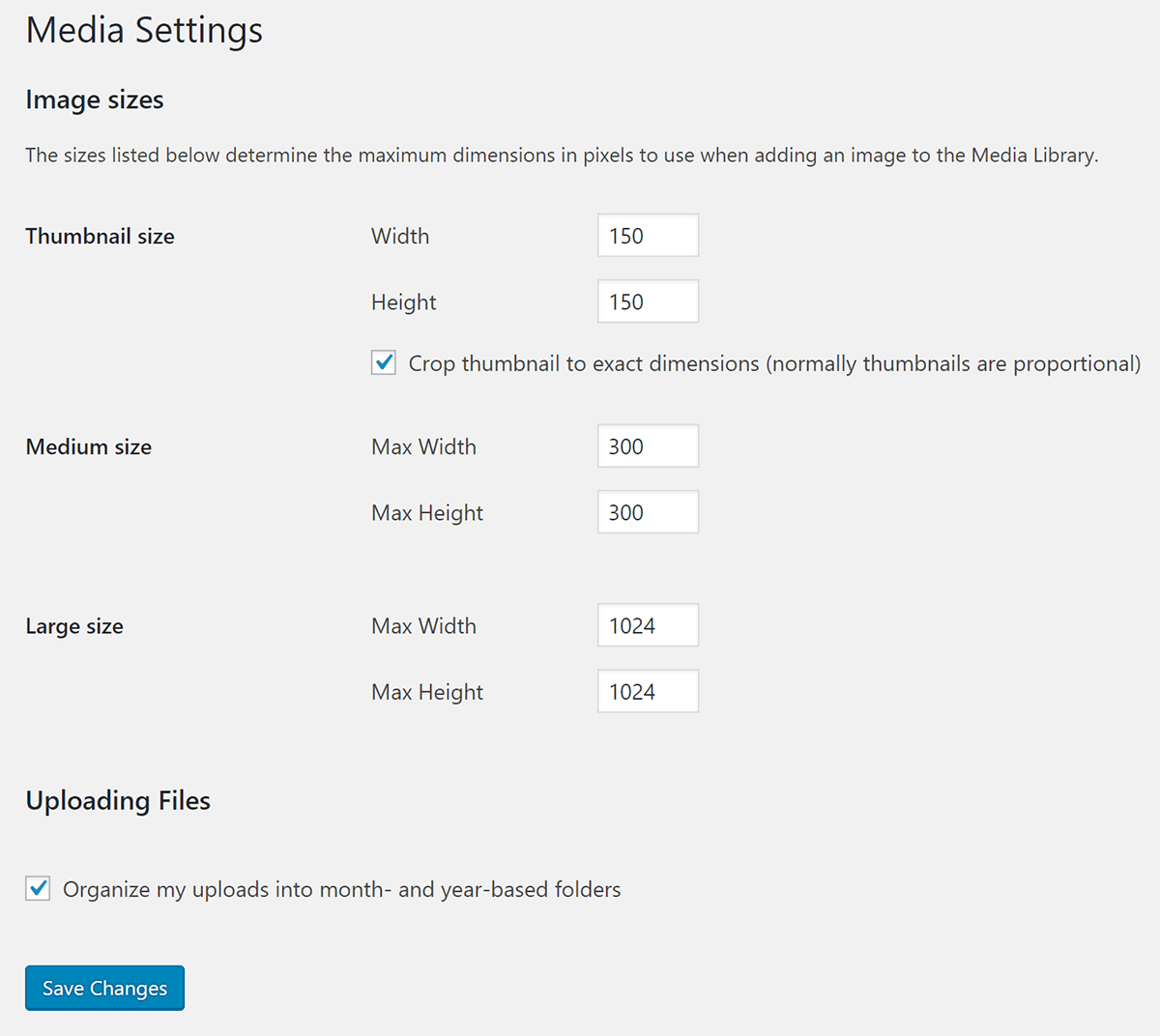
WordPress sets different image sizes for use. These help in displaying images well. The smallest size is the Thumbnail. This is usually 150×150 pixels. It fits in small spaces.
The next size is Medium. It is often 300×300 pixels. It is bigger than a thumbnail. It suits medium-sized spaces.
Large images are next. They are often 1024×1024 pixels. These are for bigger spaces. They show clear details.
Full Size means the image is at its original size. No changes are made. This is best for high-quality needs.
Customizing Thumbnail Sizes
WordPress makes changing image sizes easy. Go to Settings and find Media. Here, you can set the size for thumbnails. Type in the width and height you want. Save your changes. Now, new images will have this size. This is a simple way to manage thumbnails.
You can also change the size in the functions.php file. Open the file and find add_image_size(). Change the numbers to set new sizes. Be careful when editing this file. Always save a backup first. Mistakes can break your site. This method gives you more control.
Choosing The Right Size
Theme design affects thumbnail size. Some themes need big images. Others work best with small ones. Check your theme’s documentation. It often suggests the right size. Custom themes may need custom sizes. Test different sizes. See what looks best on your site.
Big images can slow down your site. Small images load faster. Faster sites keep visitors happy. Use compressed images. They are smaller in size. Tools like TinyPNG help compress images. Test your site’s speed. Make sure it loads quickly. Fast sites rank better on search engines.
Optimizing Thumbnails For Performance
Choosing the right image thumbnail size for WordPress can enhance website loading speed. Standard sizes like 150×150 or 300×300 pixels are commonly used. Keeping image dimensions small ensures faster performance and a better user experience.
Image Compression Techniques
Small files load faster. Compressed images are essential. Use tools like TinyPNG or JPEGmini. They reduce image size while keeping quality. Compress images before uploading. Avoid large files. Large files slow down your site. Small images improve speed.
Plugins For Optimization
Plugins help with image optimization. WP Smush is popular. It compresses images as you upload. Imagify is another option. It also compresses and optimizes. Both plugins are easy to use. They save time. Make sure to install them. They help speed up your site.
Best Practices For Thumbnail Use
Selecting the right image thumbnail size in WordPress boosts website performance and user experience. The recommended size is 150×150 pixels, ensuring fast loading times and clear visuals. This practice enhances engagement, making your content more appealing.
Balancing Quality And Size
Thumbnails should be clear and crisp. It is important they load fast. Large images slow sites down. Smaller images load quicker. Choose the right dimensions. Try 150×150 pixels. This is a good size. Images must look nice. Also, they must load fast.
Maintaining Consistency Across The Site
Use the same thumbnail size everywhere. This keeps the site neat. Do not mix sizes. It is confusing. Choose one size. Stick to it. This helps with design. It looks better. Everything matches. Consistency is key. It makes the site easy to view.
Common Issues And Solutions
Pixelation makes images look blurry and unclear. Use high-resolution images. Check the image size settings in WordPress. Adjust to avoid pixelation. Keep images around 150×150 pixels. This size works well for thumbnails. It keeps images clear. Test different sizes to find the best one. Always use the right format. JPEGs and PNGs work great. Avoid using GIFs for thumbnails. They may pixelate more easily.
Cropping can cut important parts of an image. This creates errors and looks bad. Use the image editor in WordPress. Adjust the crop settings. Set custom thumbnail sizes. This helps avoid mistakes. Always check the preview before saving. Make sure important parts are visible. Use aspect ratio to guide the crop. 16:9 or 4:3 are common ratios. They work well for many images.

Credit: rudrastyh.com

Credit: themeisle.com
Frequently Asked Questions
What Is The Ideal Size For WordPress Thumbnails?
The ideal size for WordPress thumbnails is typically 150×150 pixels. This ensures images are clear and fit well in most themes. Adjust the size in WordPress settings if your theme requires different dimensions. Consistent thumbnail size helps maintain visual appeal and improves user experience on your site.
How Do I Change Thumbnail Size In WordPress?
To change thumbnail size in WordPress, go to Settings, then Media. Adjust the dimensions under “Thumbnail size” and save changes. Regenerate thumbnails using a plugin if needed. This ensures your images display correctly across your site without distortion.
Why Are WordPress Thumbnail Sizes Important?
Thumbnail sizes are crucial for maintaining a consistent and professional look on your site. Proper sizing ensures images load quickly and display correctly. This enhances user experience and can positively affect SEO by improving page load times and overall site aesthetics.
Can I Use Custom Thumbnail Sizes In WordPress?
Yes, you can use custom thumbnail sizes in WordPress. Adjust settings under Media or use plugins for more control. Custom sizes help match your theme’s design and optimize image display. Ensure all images are consistently sized for a cohesive look across your site.
Conclusion
Choosing the right thumbnail size is crucial for your WordPress site. It enhances user experience and boosts website aesthetics. Thumbnails should be clear and attractive. They guide visitors to click on your content. A standard size is often 150×150 pixels.
But adjust based on your design needs. Always optimize images for faster loading times. This helps improve SEO rankings. Consistent thumbnail sizes create a professional look. Experiment with sizes to find what works best. Remember, visuals impact engagement and retention.
A well-sized thumbnail can make your site inviting and memorable.


