
Are you setting up a WordPress site and wondering about the perfect logo size? You’re not alone.
Many WordPress users face this question, and getting the size right can make or break your site’s first impression. Imagine your logo looking blurry or stretched—certainly not the professional look you’re aiming for, right? Your logo is more than just an image; it’s the face of your brand, and it deserves to shine.
You’ll discover the ideal dimensions for a WordPress logo. We’ll dive into why size matters, how it affects your site’s appearance, and share tips to ensure your logo looks crisp and clear. Stay with us, and by the end, you’ll have all the know-how to make your WordPress logo picture-perfect. Ready to enhance your site’s visual appeal and capture your audience’s attention? Let’s get started!
Importance Of Logo Size
A logo is a key part of a website. It shows your brand. Size matters for logos. A logo that is too big can look bad. A small logo might be hard to see. The right logo size helps users see it clearly. Clear logos build trust. They make your site look good.
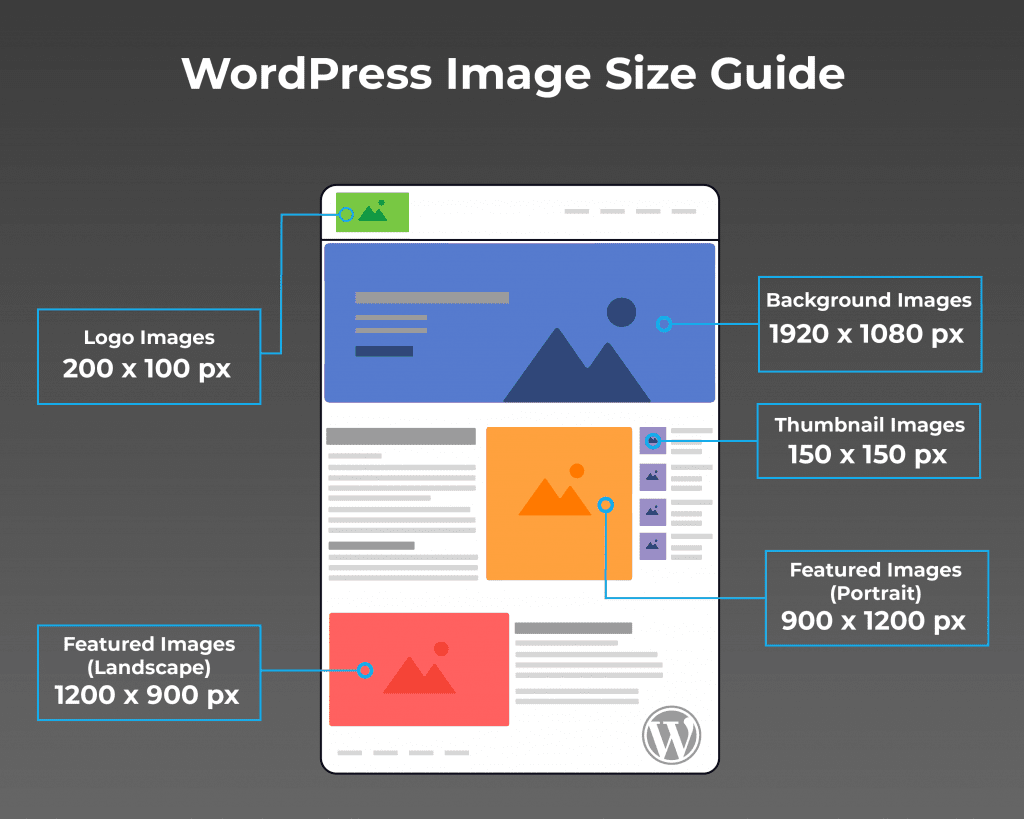
WordPress suggests a logo size. Use 250 by 100 pixels. This size is a safe choice. It fits well on most themes. Logos must be clear on all screens. Test the logo on phones and computers. Adjust if needed.
Credit: enginescout.com.au
Standard Logo Dimensions
A WordPress logo should be clear and easy to see. The standard size is 250 x 100 pixels. This size fits well in most themes. Ensure your logo is not too small or too big. It must be just right.
Logos must look good on mobile and desktop. Test your logo on different devices. It should be scalable and keep its quality. This ensures your site looks professional.
Always check your theme’s requirements. Some themes may have specific dimensions. Follow these guidelines to ensure your logo fits perfectly.
Responsive Design Considerations
WordPress logos need to fit all screen sizes. Make sure the logo is clear on phones and computers. Use SVG format for sharp images. Logos should be 300 pixels wide for larger screens. For small screens, 150 pixels wide works best.
Aspect ratio is important. Keep it square or rectangular. This helps in fitting different responsive layouts. A logo should be light in file size. Faster load times help websites. Compress the logo image if needed.
Test logos on various devices. Use responsive design tools online. This ensures the logo looks good everywhere.
Impact On Site Performance
The size of the WordPress logo affects your site’s speed. A large logo can slow down the loading time. Images take longer to load if they are big. Visitors may leave if the site loads slowly. This hurts your traffic and SEO rankings.
Logos should be small and optimized. This helps the site load faster. A smaller logo improves the user experience. Users like sites that load quickly. Fast loading sites rank better on search engines. Choose the right size for your logo. Keep it simple and neat.
Choosing The Right Format
Vector images use lines and shapes. They can be resized without losing quality. This makes them perfect for logos. They are often created with tools like Adobe Illustrator.
On the other hand, raster images are made of pixels. When resized, they can become blurry. Common raster formats include JPEG and PNG. Choose vector for a clear logo every time.
Logos come in different file types. Some common ones are SVG, EPS, PNG, and JPEG. SVG files are scalable. They work well on websites. EPS files are great for print. PNG files support transparency. JPEG files are smaller in size.
Pick the right type. Your logo will look good everywhere.
Tips For Designing Logos
Simple logos are easy to remember. They stand out more. Avoid too many colors. Use only two or three. Keep shapes basic. This helps people recognize your brand. Clarity is key. Make sure the logo is clear. Even when it’s small. Test it on different screens. Your logo should be easy to read. Even on mobile.
Colors bring life to a logo. Choose colors that match your brand. Contrast helps a logo pop. Light and dark colors work well together. They make the logo stand out. Avoid too many colors. Too many can confuse people. Stick to a simple palette. This keeps the logo clean and clear.
Tools For Logo Creation
Creating a logo can be fun. Many tools help with this. Canva is a popular choice. It offers many templates and designs. Easy to use, even for beginners. Another tool is Adobe Spark. It helps you make professional logos. Perfect for those who need more features. LogoMaker is another option. It is simple and fast. You can make a logo in minutes. Great for small businesses and startups. Choose the tool that fits your needs best. Each tool offers different features. Find the one you like most. Start creating your unique logo today!
Uploading And Adjusting In WordPress
The WordPress Customizer helps change your logo. First, go to your WordPress Dashboard. Click on “Appearance“, then “Customize“. Here, you can find “Site Identity“. This is where you upload your logo. The logo should be clear. It should be between 200×100 and 300×150 pixels. This size keeps your logo looking sharp.
A responsive logo looks good on all devices. After uploading, check your site on phones and tablets. The logo should fit well. No part should be cut off. Use “Responsive View” in the Customizer. This tool helps see how your logo looks on different screens. Adjust the size if needed. A well-fitted logo makes your site look professional.
Common Mistakes To Avoid
Choosing the wrong size for your WordPress logo can affect your site. A too small logo might look blurry or pixelated. On the other hand, a too large logo may slow down loading times. Both options create a poor user experience.
Some file formats don’t work well for logos. JPEGs often lose quality. PNGs are better for transparency. Use the right format for clear and sharp logos.
Always test your logo on different devices. A logo might look fine on a computer but not on a phone. Ensure your logo is responsive and looks good everywhere.

Credit: cyberchimps.com
Case Studies Of Effective Logos
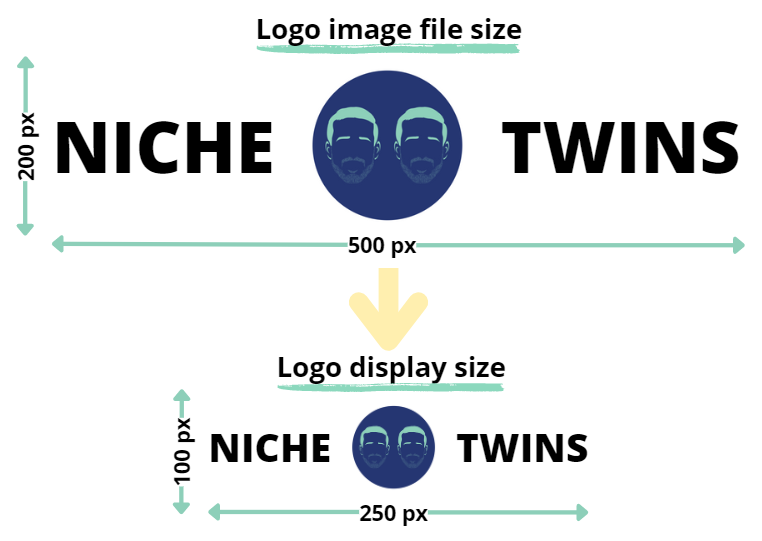
Many famous logos are easy to spot. Apple, for example, uses a simple apple shape. Nike has a simple swoosh. Both are clear and easy to remember. These logos work well on websites and apps. Size matters. A good logo fits anywhere. WordPress logos should be 300×100 pixels. This size works on most screens. It should not be too big or too small. If too big, it might look blurry. If too small, it might be hard to see.
The logo must stand out. It should be unique. But also simple. Simple logos are easier for people to recognize. They leave a lasting impression. People remember them better. Choose colors that match your brand. Keep it clean and clear. This makes your logo more effective.
Credit: nichetwins.com
Frequently Asked Questions
What Is The Ideal WordPress Logo Size?
The ideal WordPress logo size varies based on theme requirements. Generally, 250 x 100 pixels is suitable for most themes. It’s essential to ensure clarity and balance between width and height for a professional look. Check your theme documentation for specific recommendations.
Can I Use A High-resolution Logo?
Yes, using a high-resolution logo ensures clarity and sharpness. WordPress automatically adjusts to fit different screen sizes. Make sure your logo is optimized for web use to prevent slow loading times. Always test how it appears across devices for consistency.
How Do I Change The Logo Size In WordPress?
To change the logo size, access the theme customizer. Navigate to Appearance > Customize > Site Identity. Here, you can upload and adjust your logo. Some themes offer advanced options to resize logos directly within the customizer settings.
Why Is My Logo Blurry In WordPress?
A blurry logo often results from using a low-resolution image. Ensure your logo is high-resolution and optimized for web use. Adjust the logo size in the theme settings to maintain clarity. Check compatibility with different devices and browsers.
Conclusion
Finding the right logo size for WordPress is crucial. It ensures your site looks professional. A well-sized logo enhances user experience. It keeps your brand consistent across devices. Remember, test your logo on different screens. Adjust as needed for clarity and balance.
Use recommended dimensions for guidance. Your logo should be clear and readable. Avoid overcrowding the header space. Balance is key for visual appeal. Following these tips will boost your website’s look. A properly sized logo makes a lasting impression.


