
Imagine unlocking the full potential of your WordPress site with just a simple file. Yes, it’s possible with your robots.txt file.
This small, yet mighty, file plays a crucial role in how search engines view and index your site. Are you harnessing its power effectively? If you’ve ever felt lost in the maze of SEO tactics or wondered if you’re doing enough to boost your site’s visibility, you’re not alone.
Understanding what your robots. txt file should look like can make a significant difference in how search engines interact with your site. Curious to learn how to optimize it for better results? Let’s dive into the essentials you need to know to ensure your site is not just another drop in the vast ocean of the internet.
Purpose Of Robots.txt
The robots.txt file helps guide search engines. It tells them what to see. And what to avoid. This is very important for SEO. It helps control how search engines crawl your site. This can improve your site’s ranking. Or even protect private pages. Always keep it simple. And easy to read.
Search engines use the robots.txt file to decide which pages to visit. This is called crawling. A well-made file can make crawling faster. It also saves server resources. You can even stop search engines from seeing unwanted parts. Like login pages or temporary files. Always check your robots.txt file. Make sure it works well.
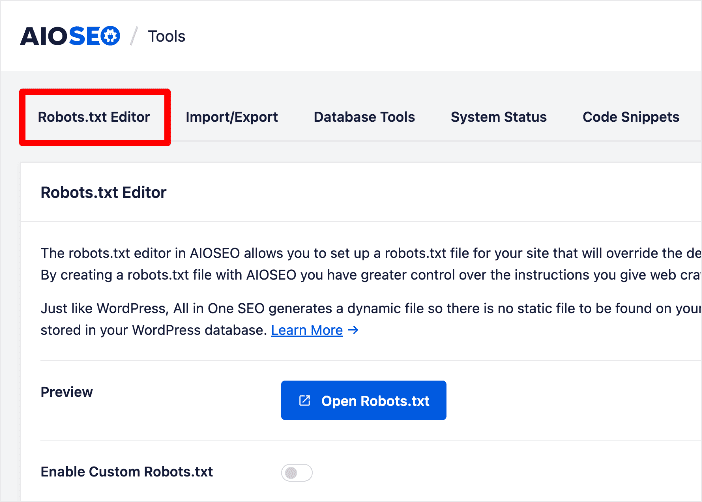
Credit: aioseo.com
Basic Structure Of Robots.txt
The robots.txt file guides search engines. It tells them what to do. Each section starts with a User-Agent. This shows which search engine it talks to. After User-Agent, rules follow. These rules show what is allowed or not allowed.
User-agent Directives
Every User-Agent talks to a different search engine. You can write many User-Agent lines. For Google, write User-Agent: Googlebot. For Bing, write User-Agent: Bingbot. Each search engine gets its own rules. This way, you control what each one sees.
Disallow And Allow Rules
The Disallow rule stops search engines. Write Disallow: /private/ to hide a folder. Use Allow to show parts of a folder. Write Allow: /public/ to show it. These rules help protect site secrets. Choose carefully what to hide or show.
WordPress Specific Considerations
Protect your WordPress site by blocking sensitive directories. Block wp-admin to keep it safe from crawlers. Restrict access to wp-includes to prevent unwanted traffic. Use Disallow in your robots.txt to stop crawlers. Essential for security and privacy.
Plugins can add files that need control. Some plugin files should not be crawled. Use Disallow to manage them. Important to control plugin file access. Helps reduce server load and improves performance. Always check the plugins you use. Block unnecessary files from crawlers.
Recommended Settings For WordPress
The robots.txt file is crucial for your WordPress site. It tells search engines which parts of your site to crawl. You should disallow directories that do not need to be indexed. This helps search engines focus on important parts. It also prevents indexing of unnecessary pages.
Common Directories To Disallow
| Directory | Reason to Disallow |
|---|---|
| /wp-admin/ | Contains admin files not meant for public |
| /wp-includes/ | Technical files not needed for indexing |
| /wp-content/plugins/ | Plugin files that are not useful for search engines |
Optimizing For Search Engines
Search engines need guidance to prioritize content. Use the robots.txt file smartly. It helps in optimizing your site’s visibility. By disallowing certain directories, you make your site more efficient. This improves overall search engine performance. Focus on relevant content and enhance user experience.
Testing And Validating Robots.txt
Google Search Console helps check if robots.txt works right. Visit the console and find the Robots Testing Tool. Enter your site’s URL to see how Google reads it. Errors might show up if something is wrong. Fix them fast to keep your site visible. Always test changes before saving. This way, you ensure search engines can crawl your site.
Sometimes, robots.txt can block important pages. Check for mistakes in the file. Make sure important pages are not blocked. Use a syntax checker to spot errors. If a page is missing in search results, look at robots.txt first. Fixing small errors can make a big difference.
Advanced Robots.txt Techniques
Crawl delay helps control how often search engines visit your site. This can prevent server overload. It is a useful tool for sites with limited bandwidth. Use the “Crawl-delay” directive in your robots.txt file. Set it to a number representing seconds. For example, “Crawl-delay: 10” means a 10-second delay. Note, not all search engines support this feature. Test your settings regularly. Adjust as needed for best performance.
Wildcards and regular expressions allow more flexible rules. Wildcards like “” match multiple characters. Use them to block entire directories. For example, “Disallow: /private/” stops access to all files in the private folder. Regular expressions offer even more control. They create complex rules for specific patterns. Use them wisely to avoid blocking important content. Always check for errors after changes. Mistakes can harm site visibility.
Updating And Maintaining Robots.txt
WordPress updates can change your site. These changes might affect your robots.txt file. You must check the file after each WordPress update. This keeps your site safe and visible.
Sometimes, plugins can change the file. Check if new plugins change any settings. Always keep a backup of your robots.txt file. This helps you restore if things go wrong.
Regular audits are important for your site. These audits help find errors. You must fix these errors to keep your site healthy.
Review your site’s visibility often. Make sure search engines can find all the important pages. This helps your site perform better.
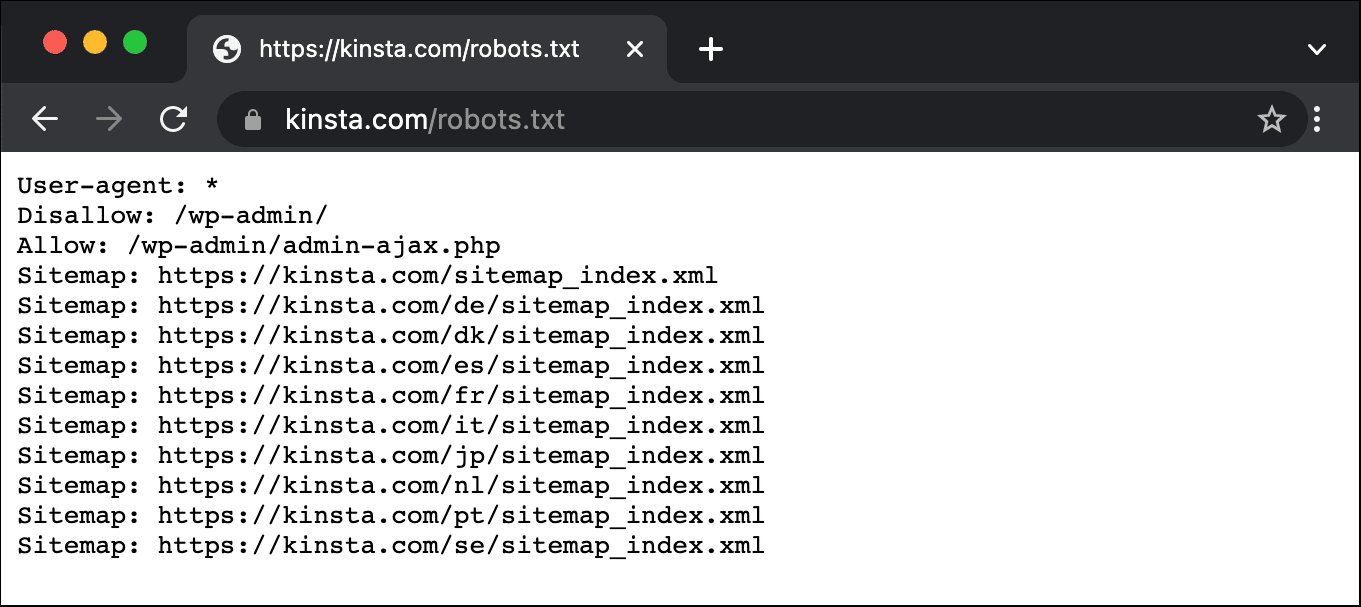
Credit: kinsta.com
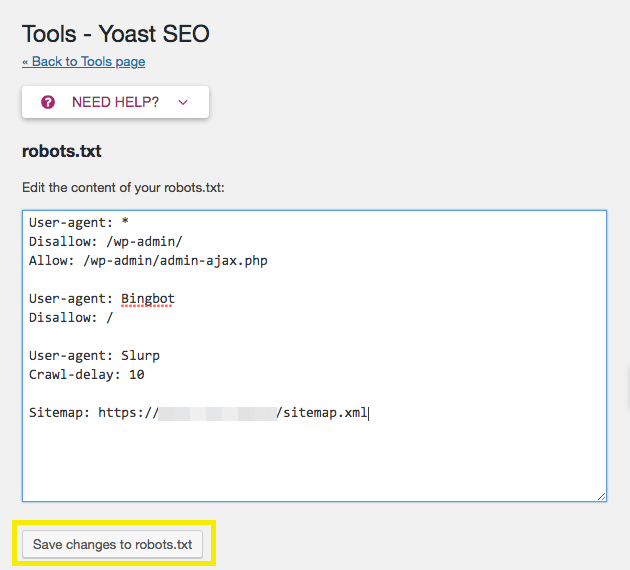
Credit: wpengine.com
Frequently Asked Questions
What Is A Robots.txt File For WordPress?
A robots. txt file guides search engines on which pages to crawl or ignore. For WordPress, it helps optimize SEO by managing access to important pages. It can prevent indexing of admin areas, ensuring search engines focus on valuable content.
Proper configuration enhances your site’s visibility and performance.
How Do I Edit Robots.txt In WordPress?
Editing robots. txt in WordPress is simple. You can use plugins like Yoast SEO to access and modify the file. Alternatively, connect to your server via FTP and locate the file in your root directory. Make necessary changes, ensuring your instructions align with SEO goals and search engine guidelines.
Should I Block Wp-admin In Robots.txt?
Blocking wp-admin in robots. txt is advisable. It prevents search engines from accessing non-public admin pages, focusing on important content. Use “Disallow: /wp-admin/” to restrict access. This enhances security and performance by directing search engine attention to relevant and valuable pages, boosting SEO efforts.
Can Robots.txt Improve WordPress Seo?
Yes, robots. txt can enhance WordPress SEO. By controlling search engine access, you prioritize indexing of valuable content. Blocking unnecessary pages boosts crawl efficiency and site visibility. Proper configuration prevents duplicate content issues, ensuring search engines focus on key pages, ultimately improving your site’s ranking.
Conclusion
Crafting a clear robots. txt file is crucial for your WordPress site. It guides search engines, enhancing your site’s visibility. Always keep it updated with relevant directives. This ensures search engines index the right content. Avoid blocking essential resources like CSS and JavaScript files.
Test your robots. txt file regularly to catch errors early. Remember, a well-structured file can improve your site’s SEO. It helps search engines understand your site better. Prioritize user experience and site performance. A simple, effective robots. txt file plays a vital role.
Make it work for your WordPress site.


