
Have you ever visited a WordPress site and wondered what makes it tick? You’re not alone.
Many of us are curious about the hidden tools that power our favorite websites. What plugins are in use on a WordPress site can dramatically shape your online experience. Whether you’re a blogger, business owner, or just a curious visitor, understanding these plugins can unlock a world of possibilities for your own site.
Imagine boosting your website’s speed, enhancing its design, or even improving security—all with a few simple tools. Dive into this article to discover the plugins that could revolutionize your WordPress site and make your digital presence truly unforgettable.
Credit: www.wordfence.com
Identifying Installed Plugins
Accessing the admin dashboard is a simple way to find plugins. Login to your WordPress site. Navigate to the Plugins section. Here, all installed plugins are listed. This list shows both active and inactive plugins. You can manage them easily. Activate or deactivate with a single click. Always check for updates. Updated plugins work better and are safer. This method is quick and straightforward.
FTP access gives another way to find plugins. Connect to your site’s FTP server. Locate the wp-content folder. Inside, find the plugins directory. Each plugin has its own folder here. This method is useful for deeper inspection. You can see all plugin files. It requires FTP software and login details. Be cautious when exploring these files.
Online tools can help identify plugins on WordPress sites. These tools scan websites. They detect installed plugins quickly. Some tools are free. Others may require payment. Use them for a comprehensive check. They offer detailed reports. Information includes plugin versions and names. This method is easy for beginners. It saves time and effort.
Popular Plugin Categories
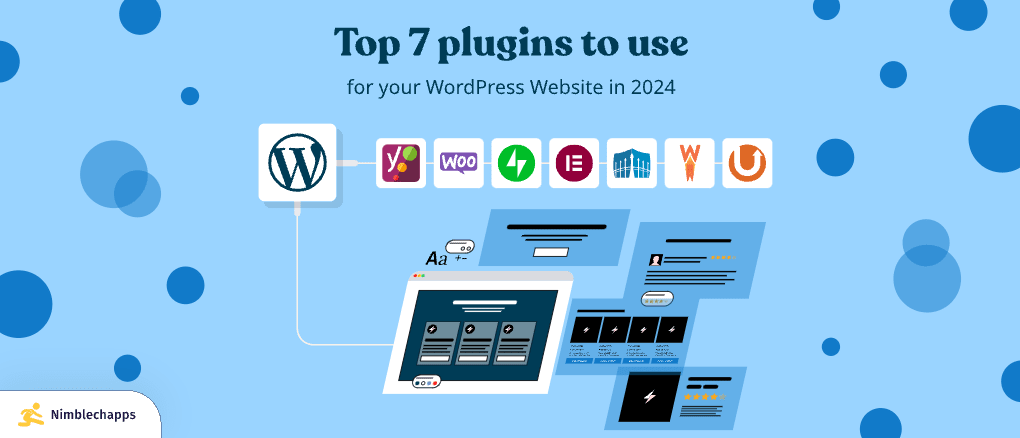
SEO plugins help your site rank better on search engines. They make your content easy to find. Yoast SEO and All in One SEO Pack are top choices. They offer features like meta tags and XML sitemaps. These tools are crucial for improving visibility online. Good SEO means more visitors.
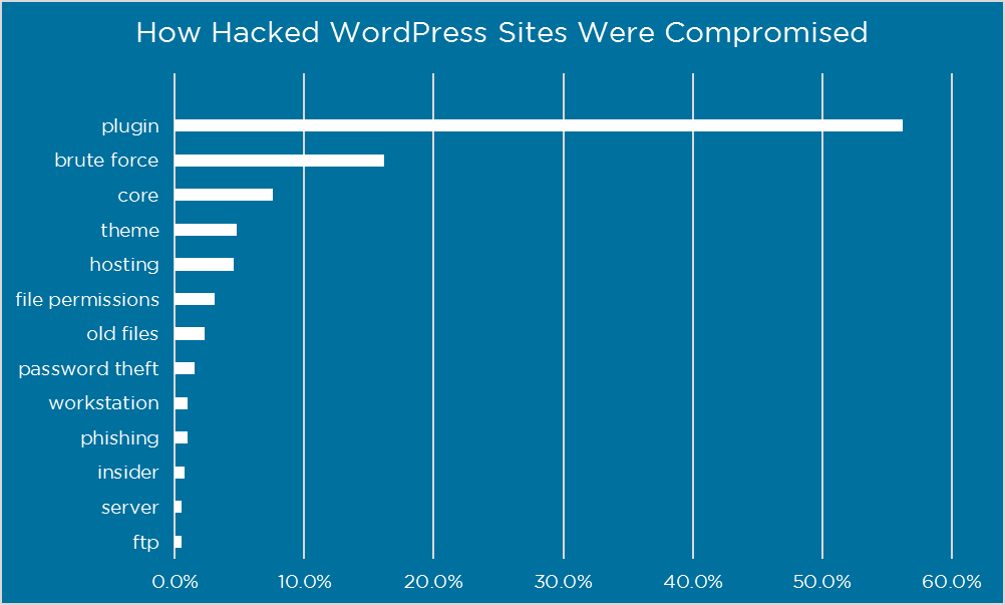
Keeping a site safe is vital. Wordfence and Sucuri Security are popular plugins. They protect against threats and hackers. They offer features like firewall and malware scanning. A secure site builds trust with visitors. Strong security keeps data safe.
Fast websites are important. W3 Total Cache and WP Super Cache improve speed. They reduce load times and enhance user experience. These plugins optimize files and manage caching. Speedy sites keep visitors happy and engaged. Slow sites lose users.
Attractive design matters. Plugins like Elementor and Beaver Builder help. They offer easy drag-and-drop features. Users can create beautiful pages without coding. Good design improves user interaction. A well-designed site draws more attention.
Evaluating Plugin Effectiveness
Plugins can slow your site. They use resources. Check your site’s speed often. Remove plugins if they make it slow. Try to use lightweight plugins. They are faster. Monitor changes in speed after adding new plugins.
Plugins can conflict with each other. This can break your site. Test plugins in a safe environment first. Ensure they work well together. Always check for plugin reviews. They can warn you about conflicts. Choose plugins with high compatibility scores.
Updates keep plugins secure. They fix bugs. Always use plugins that are updated often. Look for plugins with good support. Ask for help when needed. Plugins that are not updated can have issues. Select those with active support teams.

Credit: qodeinteractive.com
Commonly Used Plugins
Yoast SEO helps improve your website’s visibility. It makes sure your content is easy to find. Many people trust it. You can adjust title tags and meta descriptions. This helps search engines understand your content better.
Wordfence keeps your site safe. It protects against hackers and malware. You get alerts if something looks wrong. It also provides a firewall. This blocks bad traffic. Many websites use it for security.
Elementor is a tool for building pages. It works with drag and drop. You can create pretty designs without code. Many users like its flexibility. You can design unique layouts easily.
WooCommerce turns a site into an online store. You can sell products and services. It’s popular for e-commerce. It offers many features for managing sales. You can track orders and handle payments.
Managing Plugin Updates
Identify active plugins on a WordPress site to manage updates effectively. Regularly check the dashboard for installed plugins. Ensure each plugin is necessary and updated for optimal site performance.
Automatic Vs Manual Updates
Automatic updates keep plugins fresh without any effort. They save time and reduce risks. But, manual updates offer more control. You choose when and what to update. Some plugins need manual updates for safety reasons. Both methods have pros and cons. Choose wisely based on your needs. Balance control and convenience for the best results.
Backup Before Updating
Backups protect your site from losing data. Always make a backup before updating plugins. This step prevents problems if updates fail. Use reliable backup tools. Choose plugins that offer easy backup options. Keep backups in a safe place. Regular backups ensure peace of mind. Restoring from backups is fast and easy.
Testing After Updates
Testing checks if updates work well. Always test plugins after updates. Check site features and functions. Look for errors or bugs. Testing finds problems early. Fix issues before users see them. Use testing tools for quick checks. Testing ensures smooth site performance.
Credit: www.nimblechapps.com
Troubleshooting Plugin Issues
Plugins can cause conflicts with each other. This can make your site act funny. Disable plugins one by one. See if the problem goes away. This helps find the troublemaker. Keep track of changes you make. It saves time later.
Sometimes an update breaks your site. Reverting can fix it. Use a backup to go back. Make sure to save copies often. This helps avoid big problems. A safe site is a happy site.
Support teams can help you. They know plugins well. Ask them if you face issues. Be clear about what happens. They can guide you. Sometimes they have quick fixes. It makes your work easy.
Future Trends In Plugins
WordPress plugins shape site functionality. They range from security tools to design enhancers. Future trends favor AI-driven features for personalized user experiences.
Ai-powered Plugins
AI-powered plugins make websites smart. They learn from users. They improve site functions over time. These plugins help in tasks like content recommendations. They also assist in chat responses. They make sites more interactive. Such tools are getting popular. More developers use AI in plugins. The trend is growing fast.
Integration With Emerging Technologies
Plugins now blend with new tech. Virtual reality is one example. Plugins work with VR to create 3D experiences. They also link with IoT devices. This helps in smart home control. Blockchain is another tech in use. Plugins enhance security with blockchain. They offer safe transactions.
Enhanced User Experience Features
Plugins focus on user experience. They make sites easy to use. Faster load times are a key feature. Plugins optimize images and scripts. Better navigation is another aspect. They simplify site paths for users. Plugins also add personalized content. They cater to user preferences. This boosts user satisfaction.
Frequently Asked Questions
How To Identify Plugins On A WordPress Site?
You can identify plugins by using tools like WP Plugin Checker or Wappalyzer. These tools scan websites and list active plugins. Alternatively, you can look at the site’s source code. Sometimes, plugins leave identifiable traces in HTML or JavaScript.
Are Active Plugins Visible To Visitors?
No, active plugins are not visible to visitors. Plugins work in the background to enhance functionality and improve user experience. Only webmasters or administrators can access and manage installed plugins through the WordPress dashboard.
Can Plugins Affect Site Performance?
Yes, plugins can affect site performance. Too many plugins can slow down loading times and cause conflicts. It’s essential to choose lightweight, well-coded plugins. Regular updates and monitoring can help maintain optimal performance.
Do Plugins Need Regular Updates?
Yes, plugins need regular updates to ensure security and functionality. Developers release updates to fix bugs, improve features, and patch vulnerabilities. Keeping plugins updated is crucial for a secure, efficient WordPress site.
Conclusion
Exploring WordPress plugins enhances your site’s functionality. Choose wisely based on your needs. Each plugin serves a unique purpose. Some improve site speed. Others boost security. Many enhance user experience. Regular updates are crucial for performance. Test plugins for compatibility issues.
Backup your site before major changes. A well-chosen set of plugins can streamline your site management. Keep learning about new plugins. Stay informed to keep your site effective and engaging. Your WordPress site deserves the best tools available.


