
Have you ever stumbled upon a WordPress site and wondered, “What plugin is this site using?” You’re not alone.
Whether you’re a seasoned developer looking to enhance your own site or a curious blogger eager to replicate a feature you admire, identifying the right plugin can be a game-changer. Imagine the possibilities: seamlessly incorporating new functionalities, boosting your site’s performance, and enhancing user experience—all with the right plugin.
This article will guide you through the process of uncovering the plugins behind any WordPress site. By the end, you’ll be equipped with the tools and knowledge to transform your own site into a powerhouse. Dive in to discover the secrets that will elevate your WordPress experience.
Identifying WordPress Plugins
Many people use the site’s front-end to find plugins. Right-click on the page and select “Inspect” to look at the code. Search for “wp-content/plugins” in the code. This often shows plugin names. Another way is checking the source code. Find plugin info there too. Look for “wp-json” requests in the code. These can reveal plugin data.
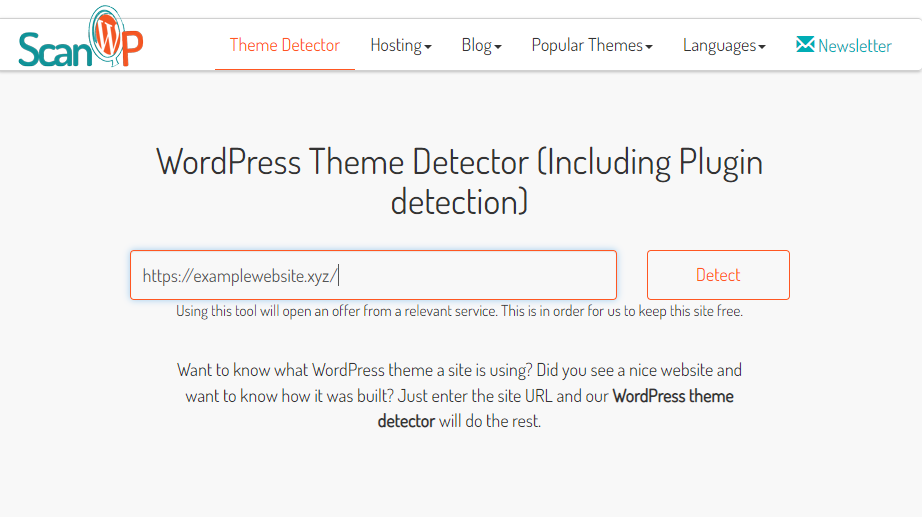
Several tools help find WordPress plugins easily. Wappalyzer is a browser extension. It shows technology used on sites. Another tool is BuiltWith. It provides detailed reports on site technologies. ScanWP is a popular tool too. It scans WordPress sites and lists plugins. These tools help users know what plugins are active on a site.
Credit: www.easywp.com
Using Online Tools
WPThemeDetector is a tool to find out what plugins a WordPress site uses. It works by scanning the website. Results show the active plugins. This tool is easy to use. Enter the website URL and click analyze. Fast results in seconds. It’s perfect for beginners. No tech skills needed.
BuiltWith is another useful tool. It provides a list of plugins on a site. Enter the website address. Click to get results. You can see detailed information. This includes plugins and other technologies. It’s helpful for anyone curious about web setups.
WhatRuns is a browser extension. It shows website plugins in real-time. Install it on your browser. Visit any site and click the icon. Instant details about plugins appear. It’s great for quick checks. Easy and convenient for everyday use.
Browser Extensions
Wappalyzer is a useful tool. It helps find out what a website is using. This includes plugins on a WordPress site. It’s a browser extension. It works on different browsers like Chrome and Firefox. Wappalyzer can detect technologies used on any site. It shows results in a few seconds. Users like its simple interface. It’s easy to use. Click the icon in the browser. A list appears. It shows all the technologies. This includes WordPress plugins. It makes finding plugins quick and easy.
The WordPress Plugin Checker is another tool. It helps identify plugins on a site. This tool is also a browser extension. It works with Chrome. It is popular for its accuracy. Users trust it to find correct plugins. This tool is easy to install. Just add it to the browser. Click the icon to check a site. It provides a list of plugins in use. This way, users can learn more about any website.
Manual Inspection
Open the website in a browser. Right-click and choose “View Page Source.” Look for the wp-content/plugins directory. This often lists plugins. Not all plugins are visible. Some work behind the scenes.
HTML comments can be clues. Use the same “View Page Source” method. Search for comments . Developers sometimes leave notes here. These notes might mention plugins. Not all developers use comments.
Developer Tools Insights
Using developer tools can reveal a lot about a WordPress site. Open the browser’s developer console. Go to the Network tab. Reload the webpage. Watch the requests load. Plugins often send requests to specific URLs. Look for familiar plugin names in these URLs. Some requests may hint at the plugin’s functionality. This can help in identifying the plugins used.
HTTP headers can provide clues. They show the server responses. Check for unique headers related to plugins. Some headers might include plugin names or versions. This information is valuable. It helps in determining which plugins are active. Understanding headers can improve your site analysis skills.

Credit: qodeinteractive.com
Ethical Considerations
Privacy matters. User data should be kept safe. Plugins can access sensitive information. Avoid using tools that exploit this. Respect users’ data. Keep your site trustworthy. Always choose plugins with strong privacy policies.
Legal rules are important. Plugins must follow them. Compliance is key. Breaking rules can lead to penalties. Always check legal requirements. Ensure plugins do not violate laws. This keeps your site safe and reliable.
Alternatives To Plugin Discovery
Reaching out to the site owners can be a simple way to find out about their plugins. Most site owners are happy to share this information. You can use a contact form or email. Be polite and clear in your message. Explain your interest in knowing the plugins used. This approach is direct and often effective. Always thank them for their time and help.
WordPress community forums are full of helpful people. You can ask about the plugins used on a site. Many users and experts visit these forums. They can give you advice or suggestions. Forums have different sections for topics. Choose the right section for plugin questions. Be specific in your query for better answers. Reading past discussions can also help.
Credit: www.nexcess.net
Frequently Asked Questions
How Can I Check WordPress Site Plugins?
To check a WordPress site’s plugins, use a tool like BuiltWith or Wappalyzer. These tools analyze website data and provide a list of plugins used. Alternatively, inspect the website’s source code for plugin references. This method helps identify active plugins on the site.
Are There Tools To Identify WordPress Plugins?
Yes, tools like BuiltWith, Wappalyzer, and WhatRuns can identify WordPress plugins. These tools scan websites and provide detailed information about plugins and technologies used. They offer insights into the site’s functionality, helping you understand the plugins employed.
Why Should I Know A Site’s Plugins?
Knowing a site’s plugins helps understand its functionality and security. It also aids in identifying potential performance enhancements. By analyzing plugins, you can replicate desired features or avoid vulnerabilities. This information is valuable for developers and site owners.
Can Plugins Impact Website Speed?
Yes, plugins can impact website speed. Excessive or poorly-coded plugins can slow down a site. Choose plugins carefully and ensure they’re updated regularly. Optimizing plugin use improves site performance and user experience, helping maintain fast loading times and efficient functionality.
Conclusion
Discovering the right plugin boosts your WordPress site’s performance. It’s crucial to choose one that fits your needs. Always check reviews and ratings before installing. Plugins can enhance functionality and user experience. They offer solutions for SEO, security, and more.
Regular updates keep them secure and efficient. Experiment with different plugins to find the best fit. Keep your site running smoothly and efficiently. Remember, a well-chosen plugin can make a big difference. Always prioritize quality over quantity when selecting plugins.
Stay informed about the latest plugin trends and updates. This ensures your WordPress site remains competitive and user-friendly.


