
Are you struggling to find the perfect plugin for scrolling photos on your WordPress site? You’re not alone.
With countless plugins available, each promising to enhance your website, it can be overwhelming to make the right choice. But don’t worry, you’re in the right place! Imagine capturing your visitors’ attention with stunning, smoothly scrolling photo galleries that tell your story with every swipe.
The right plugin not only showcases your images beautifully but also elevates your site’s user experience. This article will guide you through the best options, ensuring you select the plugin that aligns perfectly with your needs. Stay with us, and let’s transform how your photos are displayed, captivating every visitor that lands on your page.
Choosing The Right Plugin
Picking a photo scroll plugin is a big choice. Compatibility with themes is crucial. Some plugins may not work with your theme. This can cause problems. Always check if the plugin fits your theme. Read reviews to see if others had issues. Updates are important. Plugins should update often. This keeps them safe and working well.
Simple setup is a bonus. Easy plugins save time. Customer support can help if you get stuck. Check if the plugin offers support. Consider how the plugin affects your site speed. Slow sites can lose visitors. Choose a plugin that keeps your site fast.
Top Photo Scrolling Plugins
Slider Revolution is a top choice for many. It can create beautiful slideshows. It works with many themes and is easy to use. Users can add text and buttons. It allows for animations too. This plugin offers many design options. Simple interface means quick setup.
Envira Gallery helps show photos in a clean way. It is fast and mobile-friendly. Users can make albums and tags. It works with social media. You can share photos easily. This plugin loads fast. Great for quick displays.
NextGEN Gallery is popular for many users. It offers both free and paid versions. Users can create slideshows and photo albums. It provides good image management. Easy to use even for beginners. It suits those with many images.
Features To Look For
Responsive design is very important. It makes sure photos look good on all devices. Phones, tablets, and computers. Users can see everything clearly. No matter the screen size. This keeps visitors happy.
Plugins should offer customization options. Change colors, sizes, and more. Make the photo scroller match your site. This gives you control. Your site will look unique.
Performance optimization ensures the site runs fast. Slow websites lose visitors. A good plugin loads images quickly. This keeps the site smooth. Users won’t wait for images to appear.
Installation And Setup
First, find the right plugin. Visit the WordPress Plugin Directory. Search for a photo scrolling plugin. Popular choices include Slider and Gallery plugins. Click ‘Download’ to get the plugin. Save it to your computer.
After downloading, install the plugin. Go to your WordPress dashboard. Find ‘Plugins’ and select ‘Add New’. Upload the plugin file. Activate it once uploaded.
Next, configure the settings. Go to the plugin settings page. Adjust options like speed and image size. Choose how you want photos to scroll. Make sure to save your changes. Now, your photo scroll plugin is ready to use.
Enhancing User Experience
Users love scrolling through photos on their phones. The right plugin makes this easy. Responsive design is key. It helps photos fit any screen size. Large or small, images look great. Touch-friendly navigation is also important. It lets users swipe photos with ease. No need for buttons or arrows. Just smooth, simple scrolling.
Interactive plugins make photos fun to explore. Lightbox effects can show images in big size. Users tap to zoom in. It’s like a mini photo gallery in their hand. Slideshow options add movement. Photos change on their own. But users can control the pace. They decide how fast or slow to view. Both features enhance the photo experience.
Credit: www.youtube.com
Troubleshooting Common Issues
Finding the right plugin for scrolling photos in WordPress can solve display issues easily. Try using “Carousel” or “Slider” plugins to enhance photo visibility and seamless scrolling. These tools offer user-friendly setups and customizable features for a smooth photo browsing experience.
Plugin Conflicts
Plugins sometimes don’t work well together. This can cause errors or bugs. Choose plugins carefully. Try not to use too many. Check for updates regularly. Updated plugins fix many problems. If you find a conflict, disable one plugin at a time. See if the problem goes away. This helps you find the problem plugin. Contact support for help if needed. They can offer solutions.
Loading Speed Problems
Slow loading speeds frustrate users. It can lead to fewer visits. Large photo files slow down pages. Compress photos before uploading them. Use tools like TinyPNG or JPEGmini. These tools reduce file size without losing quality. Consider using a caching plugin. This speeds up loading times. Minimize the number of active plugins. Fewer plugins mean faster loads. Regularly check your site’s speed. Use tools like Google PageSpeed Insights. This helps keep your site fast and efficient.
Best Practices For Photo Display
Clear and crisp images make your blog look nice. High-quality photos attract more people. They help show what you mean. Keep photos sharp and bright. Blurry images can confuse readers. Resize images to fit well on the page. This helps them load faster. Loading time is important. It helps keep people on your site.
SEO helps your photos show up in searches. Use descriptive filenames for your images. Include keywords in the names. This helps search engines find them. Add alt text to each image. Describe what the image is about. It helps those who can’t see the image. Search engines read this text too. Keep text short and clear. It makes your site more accessible.

Credit: blog.templatetoaster.com
Future Trends In Photo Scrolling
AI can make photo scrolling smarter. It can suggest photos you like best. AI learns from your choices and improves over time. This means better photo displays for users.
AI can also help in photo editing. It can adjust colors and lighting. This makes your photos look better. AI-powered tools are becoming popular in many apps.
Virtual reality can make photo scrolling fun. It lets you see photos in 3D. This gives you a new way to enjoy pictures. You can feel like you are in the photo.
VR technology brings photos to life. It can make users more engaged. VR can change how we view and interact with photos. Imagine walking through a gallery of your own pictures.
Credit: www.greengeeks.com
Frequently Asked Questions
What Is The Best WordPress Plugin For Photo Scrolling?
One of the best plugins for photo scrolling in WordPress is “Slider Revolution. ” It offers customizable sliders and galleries. You can create stunning photo displays easily. It’s user-friendly and supports responsive design, making it ideal for modern websites.
How Do I Install A Scrolling Photo Plugin?
To install a scrolling photo plugin, go to your WordPress dashboard. Click on “Plugins,” then “Add New. ” Search for your desired plugin, like “Slider Revolution. ” Click “Install Now,” and then “Activate” to start using it.
Can I Customize The Scrolling Speed In WordPress Plugins?
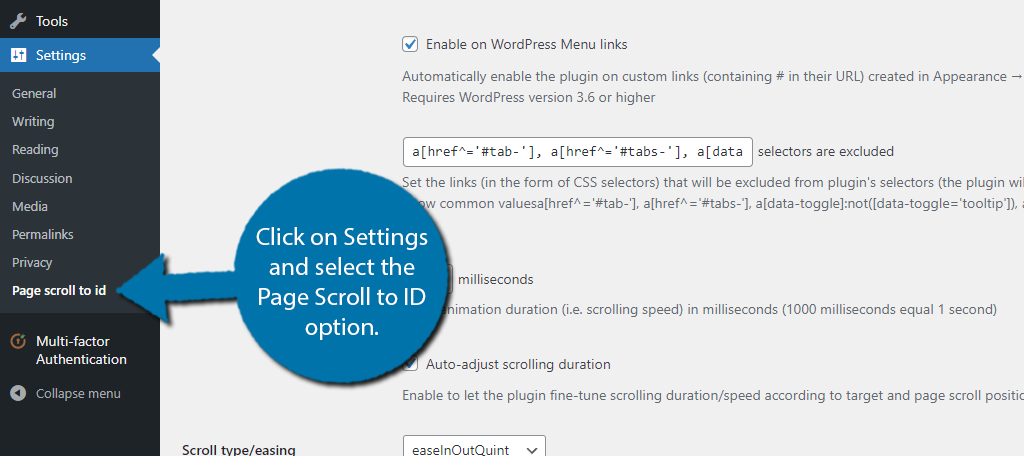
Yes, most WordPress photo scrolling plugins allow customization of scrolling speed. Navigate to the plugin settings after activation. You can adjust speed, transition effects, and more. This ensures your photo displays match your website’s aesthetic and functionality.
Are Scrolling Photo Plugins Mobile-friendly?
Most scrolling photo plugins are designed to be mobile-friendly. They automatically adjust to different screen sizes. This ensures a seamless viewing experience on smartphones and tablets. Always check the plugin description for mobile compatibility before installation.
Conclusion
Choosing the right plugin makes photo scrolling easy. Consider your site’s needs first. Some plugins offer simple features. Others provide advanced customization. Test options to find the best fit. User-friendly design is crucial. Ensure smooth navigation for visitors. Keep loading time fast for better engagement.
Plugins enhance visual appeal, but choose wisely. Your photos deserve attention, so optimize their display. Regular updates maintain plugin performance. Stay informed about new features. Enhancing photo scrolling can improve user experience. It also boosts site attractiveness. Start exploring plugins today to elevate your WordPress site.


