
Are you a WordPress user looking to boost your website’s visibility? If so, you might have come across the term Yoast SEO.
But what exactly is Yoast SEO, and how can it help you? Imagine having a tool that guides you step-by-step to optimize your content, ensuring that search engines like Google can easily find and rank your pages. This powerful WordPress plugin is designed to do just that, transforming your site into a beacon that attracts more visitors.
We’ll unravel the secrets of Yoast SEO, showing you how it can be your ultimate ally in the quest for online success. Stay with us, and discover how to make your website shine brighter in the digital landscape.
Yoast Seo Overview
Yoast SEO is a popular tool for WordPress. It helps make websites better for search engines. It is easy to use. Many people like it. The tool offers simple suggestions for improving content. It checks readability and keywords. Yoast also helps with meta tags and XML sitemaps. These are important for search engines. It is like a guide for your website.
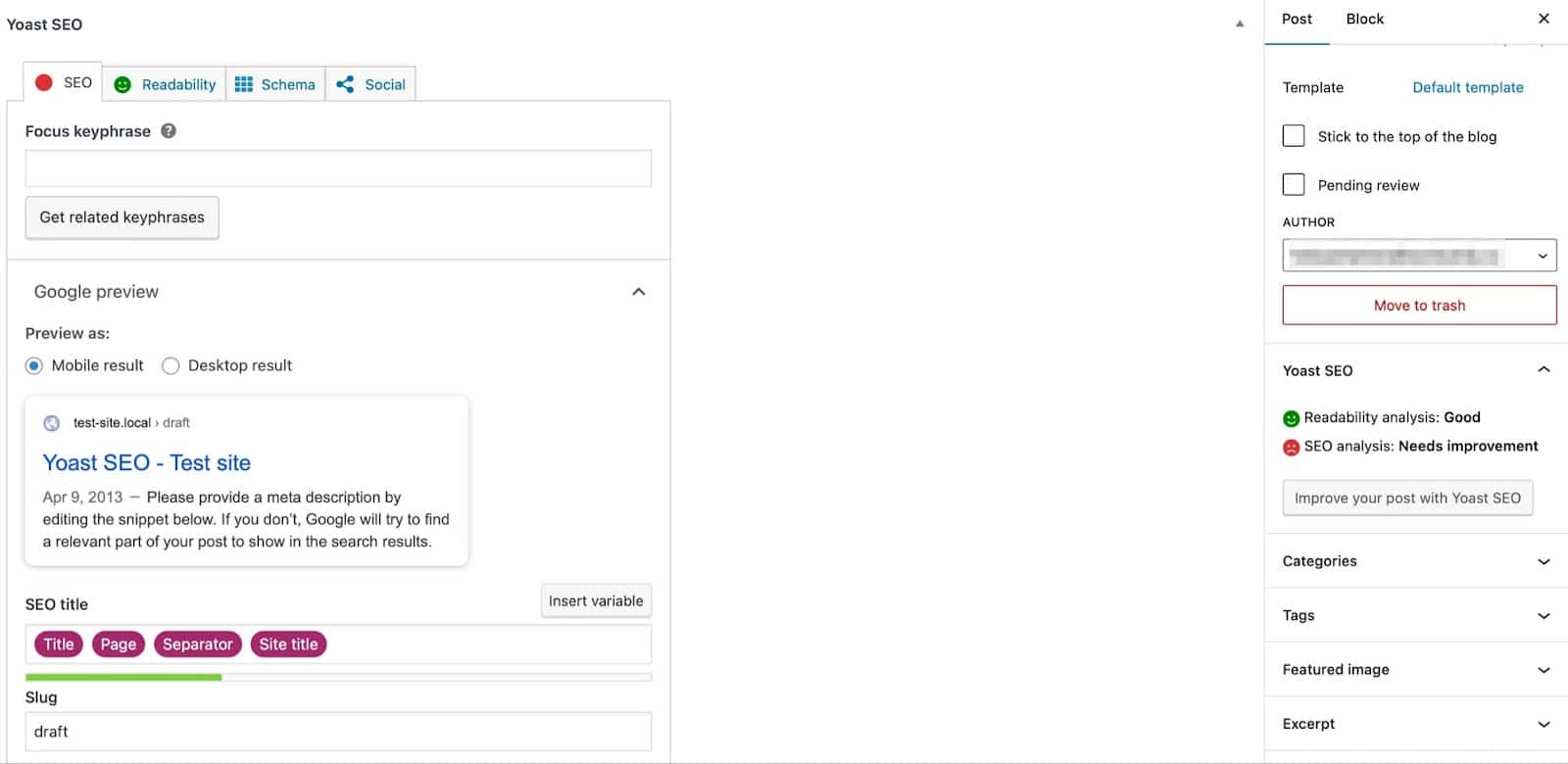
Yoast SEO has features that help beginners. It can analyze pages and posts. Users can see how good their content is. The tool gives a score for readability. It also checks if you use keywords well. This helps your site do better in search results.
Credit: kinsta.com
Key Features
Yoast SEO helps check your content for SEO quality. It makes sure your text is easy to read. This tool shows where improvements are needed. It also checks if you have used the right keywords. Yoast helps make your content better.
Yoast shows how your post looks in search results. This is called a snippet preview. You can see your title and description. This helps you make them interesting for readers. A good snippet gets more clicks.
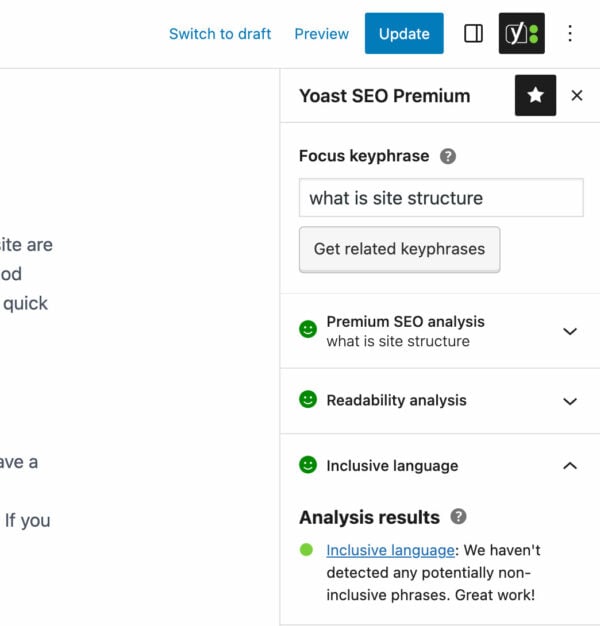
With Yoast, you choose a focus keyword for your post. This is the main word people search for. Yoast checks if you use it well. It shows how often you use the keyword. This helps your post rank better.
Yoast SEO checks if your text is easy to read. It gives tips to make it better. Short sentences and simple words are important. Yoast helps you write in a way people understand. Your message should be clear.
Installation Process
Installing Yoast SEO on WordPress is simple. First, log into your WordPress dashboard. Look for the “Plugins” menu on the left side. Click on “Add New”. In the search bar, type “Yoast SEO”. It should appear as the first result.
Next, click the “Install Now” button next to the Yoast SEO plugin. Wait a few seconds for it to download. Then, click “Activate”. This will turn on the plugin.
Once activated, you will see a new menu called “SEO” on your dashboard. This means Yoast SEO is ready. You can now use it to improve your site’s visibility. It’s a great tool for beginners.
Configuring Settings
Yoast SEO WordPress helps optimize your website for search engines. Configuring its settings is essential to enhance visibility. Adjust meta tags, focus keywords, and readability to improve your site’s ranking.
General Settings
Yoast SEO plugin helps websites rank better. Under General Settings, users can find important tools. Dashboard shows notifications and alerts. Features lets you turn on or off things like readability checks. Webmaster Tools connects your site to search engines. It is important to check these settings often. They help keep your site in good shape.
Search Appearance
Search Appearance decides how your site looks in search results. Title Separator is a small mark like a dash or dot. It splits your site name and page title. Homepage settings help set what shows first. Content Types lets you change how pages appear. Taxonomies help control tags and categories. These settings help make your site look neat and easy to find.
Social Settings
Social Settings help connect your site with social media. This setting is where you add links to your profiles. Facebook lets you set a default image for your posts. Twitter allows setting how your tweets look. Pinterest settings help get pins noticed. These settings make sharing easy and help more people find your site.
Optimizing Content
Yoast SEO for WordPress helps optimize website content effectively. It guides users in improving readability and keyword usage. Enhancing content visibility and search engine ranking becomes easier with its practical tools and suggestions.
Using Focus Keywords
Focus keywords help your content rank better. Choose a keyword that matches your topic. Use it in your title and first paragraph. Add it in headings and subheadings too. This makes your content strong and easy to find. Keep your keyword simple and clear.
Improving Readability
Easy words make your content shine. Short sentences are better. Use everyday words. This helps your readers understand. Break long paragraphs into smaller ones. Add bullet points or lists. Readers love them. Make your content fun and clear.
Enhancing Meta Descriptions
Meta descriptions tell what your page is about. Write a catchy sentence. Include your focus keyword. Keep it under 155 characters. This helps search engines. It attracts readers to click. Make it interesting and brief.
Credit: yoast.com
Yoast Seo For Beginners
Yoast SEO is a helpful tool for WordPress. It helps you make your website better. It makes sure your site shows up in search engines. You can use it to add keywords to your pages. It helps you write good titles and descriptions. These things help people find your site.
Yoast SEO shows you how easy your writing is. It checks if your sentences are too long. It helps you use the right number of links and images. With Yoast, your site can be clear and friendly.
Advanced Features
Yoast SEO helps with Schema Implementation. Schema helps search engines understand your content. It adds extra information to your pages. This information is not visible to users. But it is very useful for search engines. It improves your content’s visibility.
Redirect Management is easy with Yoast SEO. Redirects help you manage broken links. They guide users to the correct page. This improves user experience. It also keeps your site clean.
Yoast SEO offers Internal Linking Suggestions. Linking within your site is important. It helps users find more content. It also helps search engines understand your site. These suggestions make internal linking simple.
Common Issues
WordPress plugins sometimes don’t get along. This leads to plugin conflicts. Yoast SEO may not work well with others. It can cause errors or slow down your site. Always check for updates. Make sure plugins are compatible with Yoast. If issues arise, disable other plugins one by one. Find the troublemaker. Then decide on the best solution.
Keeping Yoast SEO updated is crucial. Updates fix bugs and improve features. Sometimes updates can bring compatibility issues with themes or plugins. Always back up your site first. This way, you can restore your site if something breaks. Test new updates on a staging site. This keeps your live site safe.
Yoast SEO checks your content for SEO quality. Sometimes, it shows errors or warnings. These are SEO analysis errors. They might occur due to incorrect settings or outdated content. Review the suggestions given by Yoast. Make necessary changes to improve your SEO score. Double-check your content for mistakes.
Yoast Seo Vs Competitors
Yoast SEO offers keyword optimization and content readability checks. Competitors may provide similar features. Yet, some lack advanced options. Yoast includes a snippet editor. This helps with meta descriptions. Other tools might not offer this feature.
Yoast SEO has a free version. A premium version is also available. Costs can vary between competitors. Some tools offer only paid plans. Yoast’s pricing is flexible. It suits different user needs.
Yoast is easy to use. The interface is clean and simple. Beginners find it user-friendly. Competitors may be more complex. They can have steeper learning curves. Yoast provides helpful guides and tips.
Credit: www.elegantthemes.com
Frequently Asked Questions
What Is Yoast Seo For WordPress?
Yoast SEO is a popular WordPress plugin that helps optimize your website for search engines. It provides tools to enhance on-page SEO by analyzing content, suggesting improvements, and generating XML sitemaps. Yoast SEO is user-friendly, making it ideal for both beginners and experienced users looking to boost their site’s visibility.
How Does Yoast Seo Improve Seo?
Yoast SEO improves SEO by analyzing your content for keywords, readability, and meta descriptions. It provides actionable suggestions to optimize these elements, ensuring your content is search engine-friendly. Additionally, it helps create XML sitemaps and manage site breadcrumbs, enhancing your site’s structure and indexing by search engines.
Is Yoast Seo Free To Use?
Yes, Yoast SEO offers a free version with essential features for optimizing your WordPress site. It includes content analysis, XML sitemap generation, and basic keyword optimization. For advanced features like multiple keywords optimization and internal linking suggestions, you can upgrade to the premium version.
Can Yoast Seo Help With Content Readability?
Yes, Yoast SEO includes a readability analysis tool to enhance your content’s readability. It evaluates sentence length, paragraph structure, and passive voice usage. The plugin provides suggestions to improve these aspects, ensuring your content is more engaging and accessible to readers, which can positively impact user experience and SEO.
Conclusion
Yoast SEO for WordPress simplifies website optimization. It helps improve search engine rankings. The plugin offers easy tools to boost content quality. Users can manage keywords effectively. It also guides in creating readable content. Yoast provides insights to enhance website visibility.
This tool is user-friendly and suitable for beginners. It supports better content performance. With Yoast, websites can attract more visitors. It’s a valuable asset for WordPress users. Optimize your site easily with Yoast SEO. Achieve better online presence.


