
Have you ever felt overwhelmed while organizing your blog posts or struggled to make them more discoverable? If so, you’re not alone.
Many WordPress users find themselves asking, “What is WordPress Tags? ” This simple yet powerful tool can make a significant difference in how your content is categorized and found by readers. Imagine effortlessly guiding your audience to the topics they care about most, all while boosting your site’s visibility.
By understanding and using WordPress tags effectively, you can transform your blog into a well-organized resource that draws in more visitors and keeps them engaged. Ready to unlock the potential of your WordPress site? Let’s dive in and explore the magic of tags.
WordPress Tags Basics
WordPress tags are labels. They help organize your posts. Each tag tells readers what a post is about. Tags work like a library system. They group similar posts together. Easy to use and simple to understand. Tags are different from categories. Categories are broad topics. Tags are more specific. They highlight key points in a post. Using tags helps readers find content quickly. They improve the site’s navigation. Tags can also boost your site’s SEO. They make content easier to find. Always choose relevant tags. Avoid using too many tags. Use only the ones that fit well. This keeps the site clean and organized.

Credit: blog.hubspot.com
Role Of Tags In WordPress
Tags help organize posts in WordPress. They make finding content easy. Imagine searching for a specific topic. Tags help locate it quickly. They act like labels on posts. Users can spot related articles with tags. This boosts website navigation and user experience. Tags connect similar articles. They create a network of content. This network keeps users on the site longer. It improves site engagement. Tags also affect SEO. They can increase site visibility. Search engines notice these tags. They help in ranking the site better. Using relevant tags is important. They should match the content. This ensures accuracy. Tags can be powerful tools. They enhance website functionality.
Creating Tags
Tags help organize your WordPress posts. They act like keywords. You can create tags easily. Just go to the post editor. Find the tags box on the right. Type your desired words into the box. Press enter after each tag. Add as many tags as you like. But keep them relevant. Tags should reflect the post content. They make your site easier to search. Readers find related posts faster. Tags also help with SEO. They improve your site’s visibility. Use tags wisely. They are powerful tools.
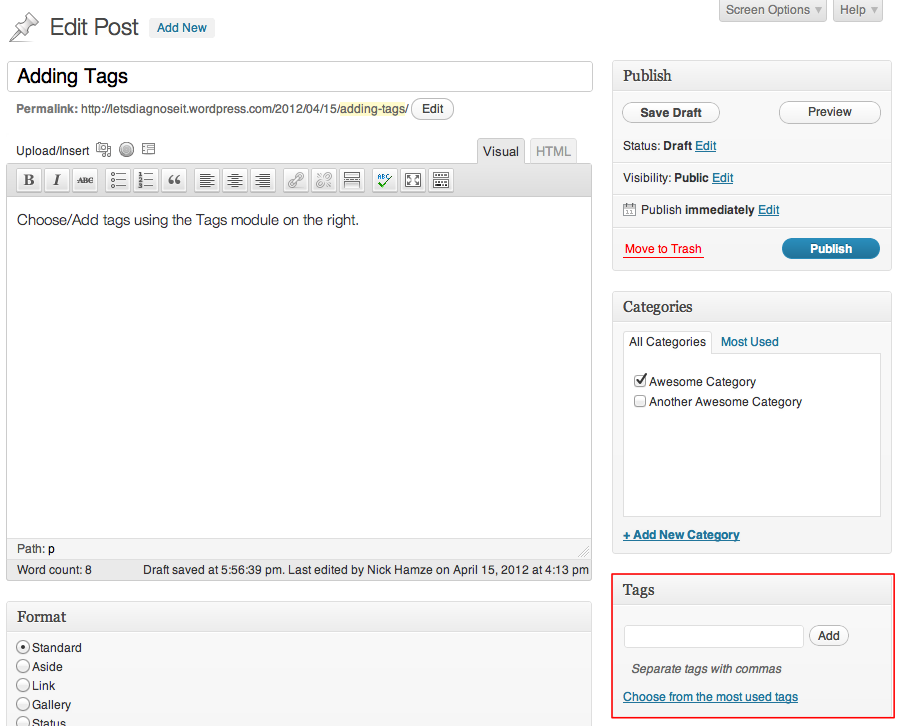
Credit: make.wordpress.org
Managing Tags
Tags help organize your blog posts. They are like labels for your content. You can add tags to each post. This makes it easy for readers to find topics. It also helps in SEO. More tags can improve your site’s searchability.
Keep tags short and simple. Use words that describe your post. Avoid using too many tags. Five to ten tags are enough. This keeps your website clean and organized. Avoid using the same tag for different topics. It can confuse readers and search engines.
You can edit tags later if needed. Go to your WordPress dashboard. Click on “Posts” and then “Tags”. Here, you can add, remove, or edit tags. Make sure to save your changes. This keeps your tags updated and relevant.
Tags Vs Categories
Tags and categories help organize your blog. They make it easier for readers to find content. Tags are like keywords. They describe specific details about a post. Categories group your posts into big topics. Tags are more specific. Categories are broader. Think of tags as labels. They help identify small parts. Categories are like folders. They hold similar posts together.
Imagine you have a blog about food. A post about pasta might have a category called “Italian Cuisine.” The tags could be “pasta,” “recipe,” and “dinner.” This shows how they work together. Both tags and categories improve your blog’s SEO. They help search engines understand your content. This makes it easier for people to find your blog.
Seo Implications
Tags in WordPress help organize content. They group similar topics together. This makes it easier for users to find related posts. Tags also play a role in SEO. Search engines use tags to understand your content. This can improve your site’s visibility.
Using the right tags is important. Avoid using too many tags. This can confuse search engines. Focus on relevant tags. Choose words that describe your content well. This helps search engines know what your page is about. It also helps readers find what they want.
Best Practices For Using Tags
Tags help organize content in WordPress. They are words that describe your post. Keep tags short and simple. Use words your readers search for.
Choose tags that match the content. Avoid using too many tags. Five tags is a good number. This helps in better search results.
Categories are broad topics. Tags are specific topics. Use both for better navigation. Tags make searching easy for users.
Review tags regularly. Remove tags that are not useful. This keeps your site clean. It helps users find related posts easily.
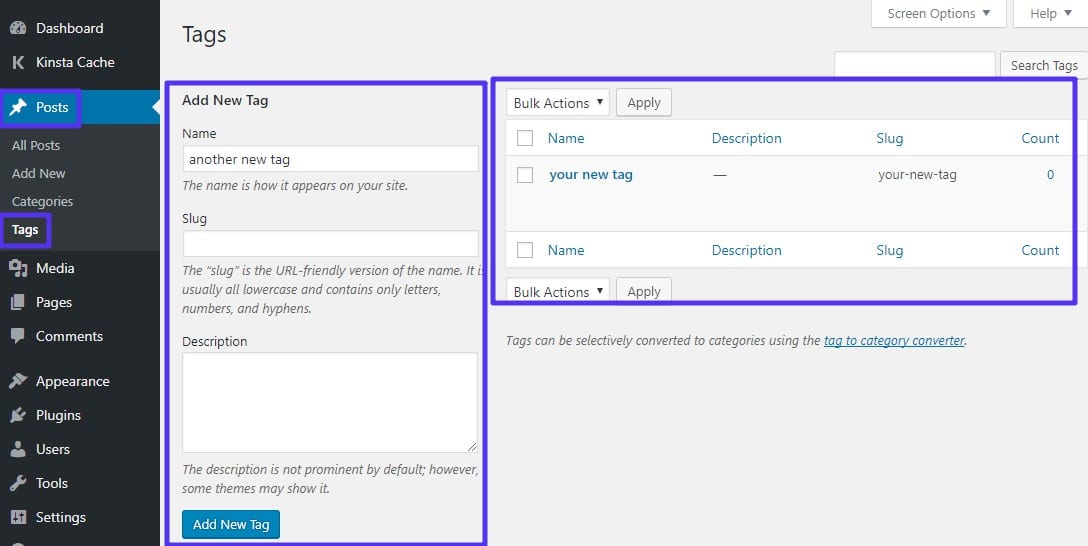
Credit: kinsta.com
Common Mistakes With Tags
Many users overuse tags. They add too many similar tags to posts. This makes tags less effective. Tags should be unique. They should help in organizing content.
Another mistake is creating tags that are too broad. Broad tags do not help in search. They make finding content harder. Tags should be specific.
Some users do not update tags. Tags should be relevant to the current topic. Old tags can confuse readers. Always check and update tags.
Ignoring tags can also be a mistake. Tags help in SEO. They can bring more visitors. Always use tags wisely.
Plugins For Tag Management
Tags in WordPress help you sort and find content easily. Many plugins can help manage these tags. Tag Manager is popular for its simple use. It helps you add, edit, and delete tags fast.
Simple Tags offers more features. It suggests tags based on your content. This tool saves time and keeps tags relevant. WP Tag Manager is another good choice. It lets you bulk edit tags. This is useful for blogs with many posts.
Using these plugins keeps your site neat. It also makes it easier for readers to find posts. Choosing the right tool is important. It makes managing tags easier and faster.
Future Of Tags In WordPress
WordPress tags help organize content. They are like labels. Users find content easier with tags. In the future, tags might get smarter. They could suggest related content automatically. This helps visitors stay longer on a site. Tags might also become more visual. Images could replace words. This makes sites look interesting. Developers may add new features to improve tags. These changes will make managing content easier.
Websites will look cleaner and more organized. Tags are important for SEO. They help search engines find your content. Using tags wisely can improve your site’s rank. It’s important to keep an eye on tag updates in WordPress. Future changes can enhance how we use tags every day.
Frequently Asked Questions
What Are WordPress Tags Used For?
WordPress tags help organize content by grouping similar posts together. They improve navigation and make it easier for visitors to find related articles. Tags also enhance SEO by providing search engines with more context about your content. Use relevant tags to boost user engagement and site visibility.
How Do Tags Differ From Categories?
Tags offer more specific, detailed categorization compared to categories. Categories are broader and cover general topics. Tags can be used to highlight specific details or topics within a category. Both help organize content but serve distinct purposes in structuring your website.
Can Tags Improve My Site’s Seo?
Yes, tags can enhance SEO by offering additional context to search engines. They help categorize content, making it easier for search engines to index your site. Proper use of tags can improve user experience and increase your site’s visibility in search engine results pages.
How Many Tags Should I Use Per Post?
Use a few relevant tags per post to maintain focus and organization. Typically, 3 to 5 tags are sufficient. Avoid using too many tags as it may confuse users and dilute the SEO benefits. Choose tags that accurately represent the content of your post.
Conclusion
WordPress tags boost your site’s organization and user experience. They help visitors find relevant content quickly. Proper use of tags improves your SEO visibility, drawing more traffic. Always choose descriptive, relevant tags for each post. This keeps your content organized and easy to navigate.
Tags are simple, yet powerful, tools for bloggers. They enhance the structure of your site. So, take time to use them wisely. Optimize your blog’s reach and engagement with effective tagging. Remember, a well-tagged post is more discoverable. Happy blogging!


