
Are you curious about the small yet powerful element that can instantly elevate your WordPress site’s identity? Enter the world of the WordPress Site Logo.
This seemingly simple graphic is much more than just an image; it’s the face of your online presence. Imagine having a virtual handshake that leaves a lasting impression on every visitor. Your site logo is that handshake. It encapsulates your brand’s essence and helps you stand out in the crowded digital space.
But what exactly is a WordPress Site Logo, and why is it crucial for your site’s success? By the end of this article, you’ll not only understand its significance but also be equipped to create a logo that resonates with your audience and enhances your brand’s appeal. Ready to dive in and transform your website’s visual identity? Let’s get started!
WordPress Site Logo Basics
A WordPress site logo is a graphic symbol or text. It represents your website. This logo helps visitors identify your site quickly. Every website should have a unique logo. Logos are important for branding.
They help in building trust. People remember logos easily. A good logo is simple and clear. It should be easy to read. The logo can be a picture or text. Many choose to use both. Logos appear at the top of your site. They are usually next to the site name.
Logos make your site look professional. They help in creating a strong first impression. A well-designed logo attracts visitors. People like sites with logos more. Logos can also show your site’s purpose. They should match your site’s theme.
Choosing the right colors is important. Colors can affect mood. They can make your site feel friendly or serious. Use colors that match your brand. This helps in building a strong identity. Your logo should look good on different devices. Test how it looks on phones and computers.

Credit: wordpress.org
Importance Of A Site Logo
A site logo represents your brand. It is the first thing visitors notice. Logos make your site memorable. They create a strong visual identity. A good logo builds trust. It shows professionalism. Users feel connected with a recognizable logo.
Logos help in branding. They differentiate your site from others. People remember logos more than text. A unique logo grabs attention. It increases brand loyalty. A site logo is vital for marketing. It boosts your site’s image. Choose a logo that fits your site theme. Make it simple but effective.
Design Considerations
The color of your logo should match your site. Bright colors grab attention. Soft colors feel calm. Choose colors that fit your brand’s mood. Style matters too. Simple styles are easy to remember. Complex styles can be hard to read. Keep your logo neat and clear.
Your logo must look good in all sizes. Small logos on phones and big logos on computers. If a logo loses detail when small, it doesn’t work well. Scalable logos keep their shape and look good everywhere. Use vector files for best results. They scale without losing quality.
Your logo needs to match your brand. This means using the same fonts and colors. Consistent logos help people remember your site. They build trust. A logo that looks different can confuse users. Keep your logo in line with your overall brand theme.
Creating A WordPress Site Logo
Tools like Canva and Adobe Spark can help create logos. These tools offer easy templates. Pick a template and add your site name. Choose colors that match your site. Use simple shapes for a clean look. Export the logo in high-quality formats. PNG format works best for websites. Save your design for future edits.
Consider hiring an expert for a unique logo. Designers know color and style that fit your brand. They offer different logo versions. Discuss ideas and share your vision. Review drafts and suggest changes. Choose the final design that fits your site. Payment can vary based on designer skills. A good logo can make your site memorable.
Uploading The Logo In WordPress
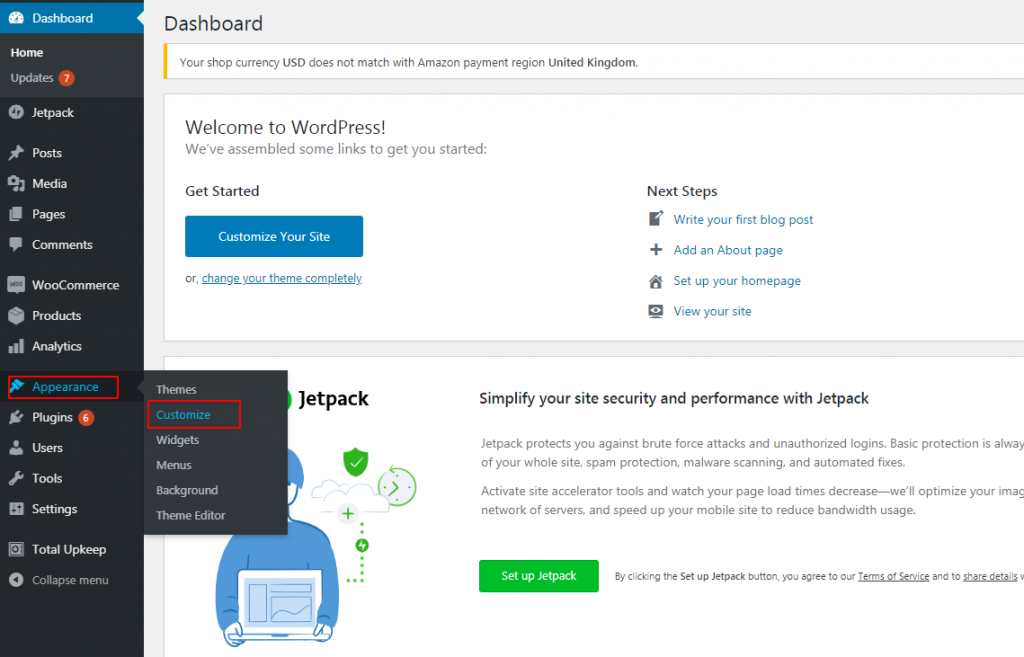
The theme customizer is a simple way to add your logo. First, go to the dashboard. Next, click on “Appearance” and then “Customize.” Look for the “Site Identity” option. Here, you can upload your logo. Choose your file and click “Publish.” Your logo should now be on your site.
Another way is through a logo plugin. Search for a logo plugin in the plugins section. Install and activate it. Most plugins have a simple setup. Follow the steps to upload your logo. Plugins often offer extra features. Check their settings for more options.
Troubleshooting Common Issues
WordPress site logo is a small image that represents your website. It usually appears in the site header. Troubleshooting common issues with site logos often involves adjusting image size or format to ensure proper display.
Resolution Problems
A blurry logo can be frustrating. Ensure the logo image matches the recommended size. Check the pixel dimensions in your WordPress theme settings. Use a high-resolution image for the best quality. Avoid stretching the image to fit the space.
Alignment And Positioning
Sometimes, the logo appears off-center. This can affect the site’s look. Check the theme’s settings for alignment options. Use CSS adjustments to fine-tune the position. Ensure the logo is well-balanced with other elements.
Logo Not Displaying
A missing logo can cause confusion. First, ensure the logo file is uploaded correctly. Check the file path and image format. Some themes only support specific formats like PNG or JPEG. Re-upload if necessary, and save the changes.
Tips For An Effective Logo
A good logo is simple. It should be easy to understand. Avoid too many details. Use clear shapes. Colors should not be too bright. Simple logos are easier to remember. They look good everywhere. On a phone, a poster, or a website.
A memorable logo stays in the mind. People should remember it after seeing it once. Use bold shapes or symbols. Keep the design unique. A memorable logo helps people recognize your brand. It makes your brand stand out.
The logo must fit your brand. Think about what your brand does. Use images or symbols that match your work. Colors and shapes should reflect your brand’s message. This makes your logo meaningful. People will know what your brand is about.
Credit: www.inmotionhosting.com
Credit: www.elegantthemes.com
Frequently Asked Questions
What Is A WordPress Site Logo?
A WordPress site logo is a visual representation of your brand. It appears on your website, usually in the header. It helps visitors identify your site and enhances brand recognition. Logos are essential for creating a professional and cohesive look across your website and other marketing materials.
How Do I Add A Logo To WordPress?
To add a logo, go to your WordPress dashboard. Navigate to “Appearance” and click on “Customize. ” From there, select “Site Identity. ” You’ll find an option to upload or change your logo. Choose your logo file, adjust the settings if needed, and click “Publish” to save changes.
What Size Should My WordPress Logo Be?
The ideal logo size depends on your theme’s design requirements. Generally, a size of 250×100 pixels works well. Always check your theme’s documentation for specific size recommendations. A properly sized logo ensures it displays correctly across various devices and screen resolutions, maintaining visual consistency.
Can I Use A Text Logo For WordPress?
Yes, you can use a text logo for your WordPress site. Text logos are simple and effective for conveying brand identity. You can create a text logo using the WordPress Customizer under “Site Identity. ” Choose a font and color that align with your brand aesthetics for a cohesive look.
Conclusion
A WordPress site logo is more than just an image. It represents your brand’s identity. It helps visitors recognize your site quickly. A well-designed logo builds trust and consistency. Choose colors and fonts that fit your brand. Keep the design simple yet memorable.
Always ensure it’s visible on all devices. This small detail can make a big impact. Take time to create a logo that stands out. Your brand deserves it. With these tips, your logo will shine. And your website will look professional.


