
Have you ever wondered where all the magic happens behind your WordPress website? Understanding the WordPress root directory is your first step towards mastering the technical aspects of your site.
This seemingly hidden realm holds the key to customizing and troubleshooting your website effectively. Imagine having the power to tweak your site’s settings, enhance security, and optimize its performance—all from one central hub. Dive into this article to uncover the secrets of the WordPress root directory.
Discover how this vital component can transform your website management experience, making you the true master of your digital domain.
WordPress File Structure
Core files are important for your WordPress. They make the site work. These files include wp-config.php and wp-settings.php. They are in the root directory. Do not change these files. They are important for your site’s health.
Themes and plugins help make your site look good. They add features too. You can find them in the wp-content folder. Themes change the design. Plugins add new tools to your site. Always choose safe themes and plugins.
All your pictures and files go here. They are in the wp-content/uploads folder. This folder keeps your media files safe. You can upload images, videos, and more here. Keep this folder organized for easy use.
Locating The Root Directory
cPanel is a popular tool. It helps find the WordPress root directory. First, log into your cPanel account. Then, look for the File Manager icon. Click it to open. Once open, find the folder named public_html. This folder is your root directory. It’s where your WordPress files are stored. Easy, right?
FTP clients like FileZilla are useful too. Start by downloading an FTP client. Install and open the client. Enter your FTP login details. Connect to your site. Look for the public_html folder. This folder holds your WordPress files. It’s the root directory. Quick and simple.
Hosting providers offer file managers. They help access the root directory. Log in to your hosting account. Find the file manager option. Click to open. Search for public_html. This is your root directory. It contains all WordPress files. Straightforward and easy.
Components Of Root Directory
The wp-admin folder is vital for website control. It holds files that let you manage your WordPress site. This includes the dashboard and settings. Admin tools live here. Without it, site management is impossible. It’s where you log in to make changes. Protecting this folder is crucial. It keeps your site secure.
The wp-content folder stores all the fun stuff. Themes and plugins stay here. Media files like images and videos are saved here too. This folder makes your site look and feel unique. You can add new themes or plugins to change your site. Keeping it tidy is essential. It helps your site run smoothly.
The wp-includes folder is full of important code. WordPress needs this code to work right. It has files for site functions. These files are like the brain of your site. They help with things like comments and feeds. Updating this folder is important. It keeps your site up-to-date.
Configuration files are key for setting up WordPress. They contain your site’s settings. These files decide how your site behaves. One main file is wp-config.php. It links your site to the database. Editing these files can change your site. Handle them with care. Mistakes can break your site.
Importance Of Root Directory
The root directory plays a big role in keeping your site safe. It holds important files that protect your website. If someone changes these files, your site could be at risk. So, it’s crucial to secure the root directory. This means only trusted people should access it.
Keeping the root directory clean improves site speed. When files are organized, the site runs faster. This makes visitors happy. A fast site also ranks better on search engines. So, organize files well in the root directory. This helps in making the website perform well.
Regular backups of the root directory are essential. If something goes wrong, you can restore the website. It saves time and stress. Store backup copies safely. This way, you will always have a plan if there is a problem.
Modifying Root Directory
The .htaccess file is key for controlling your site. It helps manage redirects and error pages. Before changing it, make a backup. Always keep a copy safe. Use a text editor to make changes. Save your edits and upload the file back to the server. Changes take effect immediately.
The wp-config.php file holds important settings. It connects WordPress to your database. To update, download the file first. Use a text editor to make changes. Be careful not to remove any code. Save the changes and re-upload the file. Your site will use the new settings.
PHP files are crucial for WordPress. They control how your site works. Access them through the root directory. Use a text editor to view or change them. Always back up before editing. This keeps your site safe from errors. After changes, save and upload back.
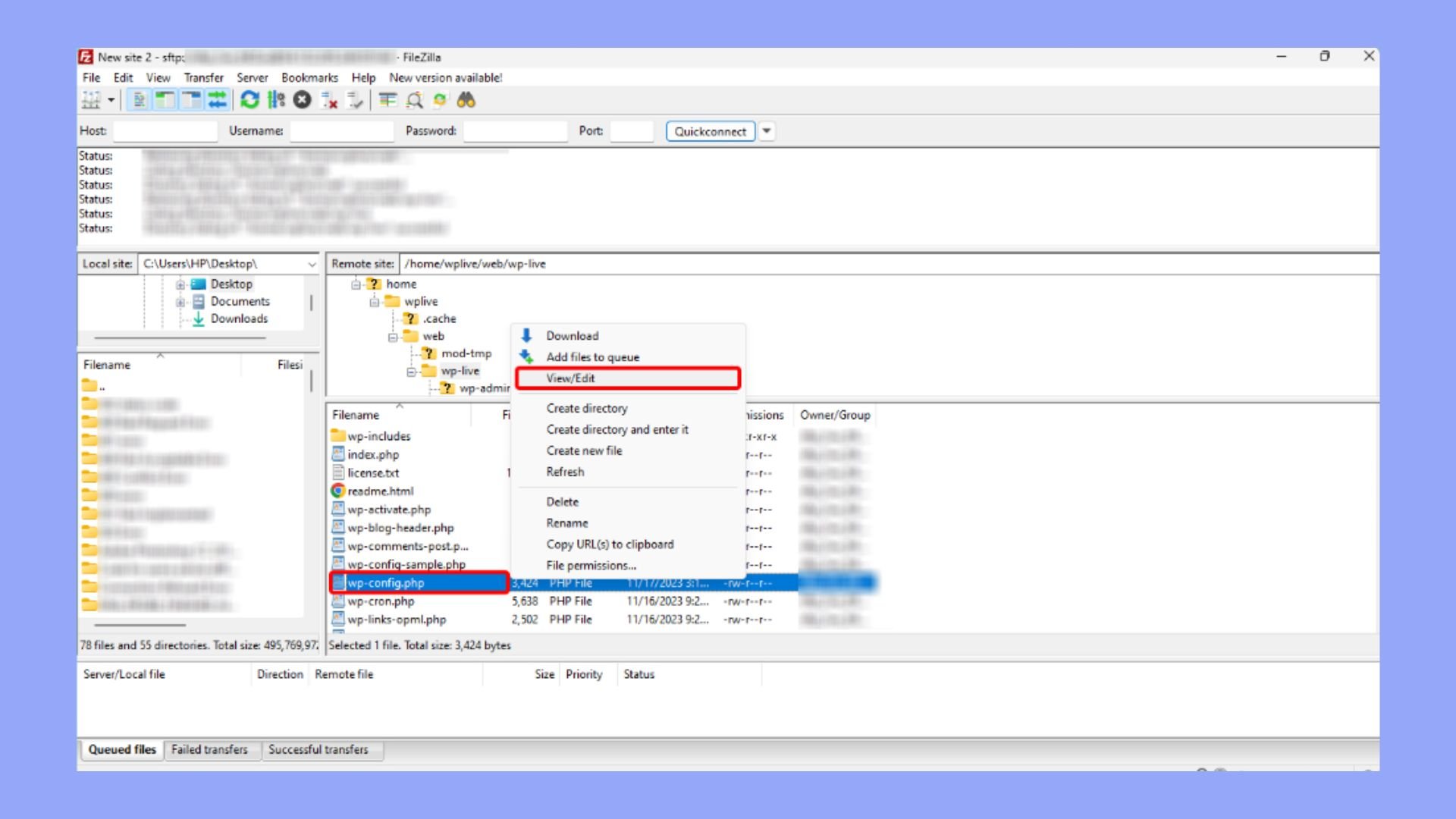
Credit: 10web.io
Troubleshooting Common Issues
WordPress root directory holds essential files and folders for your website. Navigating it can solve common issues. Accessing this directory is often necessary for troubleshooting.
File Permission Errors
File permission errors can stop files from opening. These errors might happen if permissions are set wrong. It’s important to check file permissions. Change them to read, write, and execute if needed. Use FTP client or cPanel to adjust permissions. Avoid making files 777, it can be unsafe. If errors persist, consult a tech expert.
Missing Files
Missing files can break your website. Check if files are moved or deleted. Restore from backup if files are lost. Backups protect data from loss. Missing files can break themes or plugins. Always maintain a current backup. Keep files organized to prevent issues.
Broken Links
Broken links can frustrate users. They occur if URLs change or pages are removed. Use tools to find broken links. Fix them promptly to maintain user trust. Redirect old URLs to new ones. This helps users and search engines find content. Regular checks prevent broken links.
Best Practices
Always make backups of your WordPress files. Regular backups keep your data safe. Use backup plugins for easy management. Store backups in multiple locations. This way, you can restore your site if needed.
Set correct file permissions for your WordPress files. This keeps your site safe from hackers. Only give access to trusted users. Use strong passwords for extra security.
Keep files in an organized way. This helps you find things fast. Use clear names for folders. Group similar files together. This makes your site easy to manage. An organized structure also helps others understand your setup.

Credit: themehunk.com

Credit: themehunk.com
Frequently Asked Questions
What Is The WordPress Root Directory?
The WordPress root directory is the main folder containing all core files. It includes essential files like wp-config. php and. htaccess. This directory is crucial for running your WordPress site. Accessing it allows you to manage themes, plugins, and uploads effectively.
How To Access WordPress Root Directory?
Access the WordPress root directory via your hosting account’s File Manager. Alternatively, use an FTP client like FileZilla. You’ll need your FTP login credentials from your hosting provider. Once logged in, navigate to the public_html folder to find the root directory.
Why Is WordPress Root Directory Important?
The WordPress root directory contains vital configuration files. It enables you to modify core settings and manage your website’s functionality. By accessing it, you can troubleshoot issues, enhance security, and optimize performance. Understanding its importance ensures better control over your WordPress site.
Can I Modify Files In The Root Directory?
Yes, you can modify files in the root directory. However, proceed with caution as changes can affect your site’s performance. Always back up files before making edits. This ensures you can restore them if something goes wrong during modifications.
Conclusion
Understanding the WordPress root directory is crucial. It holds essential files for your site. These files include configuration and themes. Knowing their location aids troubleshooting. It also helps in managing site security. Keeping these files organized is key. This boosts site performance.
It ensures smooth updates and backups. Regular checks on this directory are wise. They prevent errors and enhance efficiency. So, explore your WordPress root directory today. It’s a step towards better site management. Happy blogging and keep learning!


