
Imagine you could transform your website into a thriving hub where people can find local businesses, services, or places of interest, all tailored to specific regions. That’s exactly what WordPress GeoDirectory offers you.
It’s not just another plugin; it’s a powerful tool that turns your site into a localized directory. Whether you’re a business owner wanting to capture local traffic or a developer aiming to create niche directories, understanding GeoDirectory can elevate your website’s functionality and reach.
As you explore this guide, you’ll discover how GeoDirectory can revolutionize the way you connect with your audience, making your site a go-to resource for location-based information. Get ready to unlock the potential of your website and see how it can serve both you and your audience better.
WordPress Geodirectory Basics
WordPress Geodirectory is a powerful plugin that transforms your site into a location-based directory. It offers tools to build and manage listings effectively, providing users with comprehensive local information. Ideal for creating city guides, travel portals, or business directories.
Definition And Purpose
WordPress Geodirectory is a tool for location-based directories. It helps create directories for places. Businesses, shops, and services can be listed. The purpose is to make finding local places easy. Users can search by location. Maps show where things are. This tool is helpful for local searches. It is useful for city guides.
Key Features
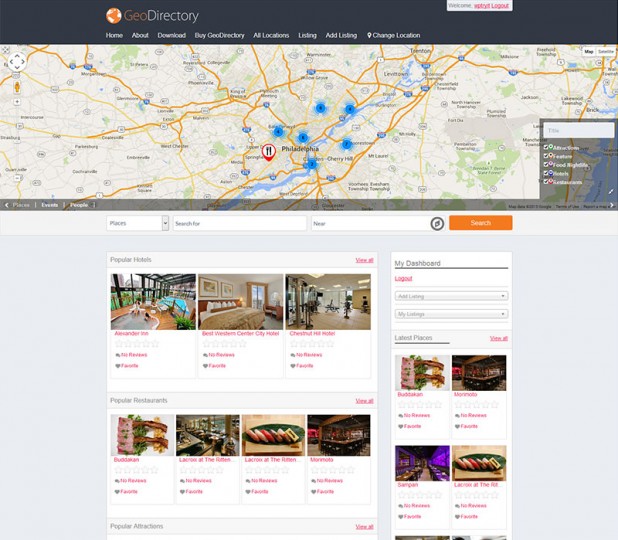
Geodirectory has many features. It supports Google Maps integration. Users can see locations on maps. It allows business listings with details. Reviews and ratings can be added by users. Categories help in organizing listings. It is simple to use. The interface is user-friendly. Customizable options are available. Users can change the look of the directory. It supports multiple languages. This helps reach more users.
Credit: wpgeodirectory.com
Installation Process
WordPress GeoDirectory simplifies creating a location-based directory website. First, download and install the plugin from WordPress. Activate it, then configure settings to suit your needs.
Prerequisites
Ensure your hosting supports WordPress. Check the PHP version. It should be recent. MySQL database is necessary. Make sure you have FTP access. Your WordPress site should be ready. Enable plugins installation.
Step-by-step Guide
Download the Geodirectory plugin from the WordPress site. Log into your WordPress dashboard. Go to the plugins section. Click on “Add New”. Upload the downloaded file. Activate the Geodirectory plugin. Configure the settings to your liking. Set up your directory locations. Customize the appearance. Test your setup for functionality.
Customization Options
Geodirectory offers many themes. Each theme changes how a site looks. Users can pick a theme that fits their style. Layouts make pages look neat. Layouts help show information clearly. People can choose different layouts for different pages. This makes sites more interesting. Simple changes can make a big difference. Sites can look modern or classic. Users enjoy sites with good layouts.
Plugins add extra features to Geodirectory. They make sites more useful. Extensions offer more options for users. Some plugins help with maps. Others help with reviews. Users can find what they need. More plugins mean more choices. Extensions can make a site unique. They help meet different needs. Adding plugins is easy. Users can improve sites with a few clicks.
Managing Listings
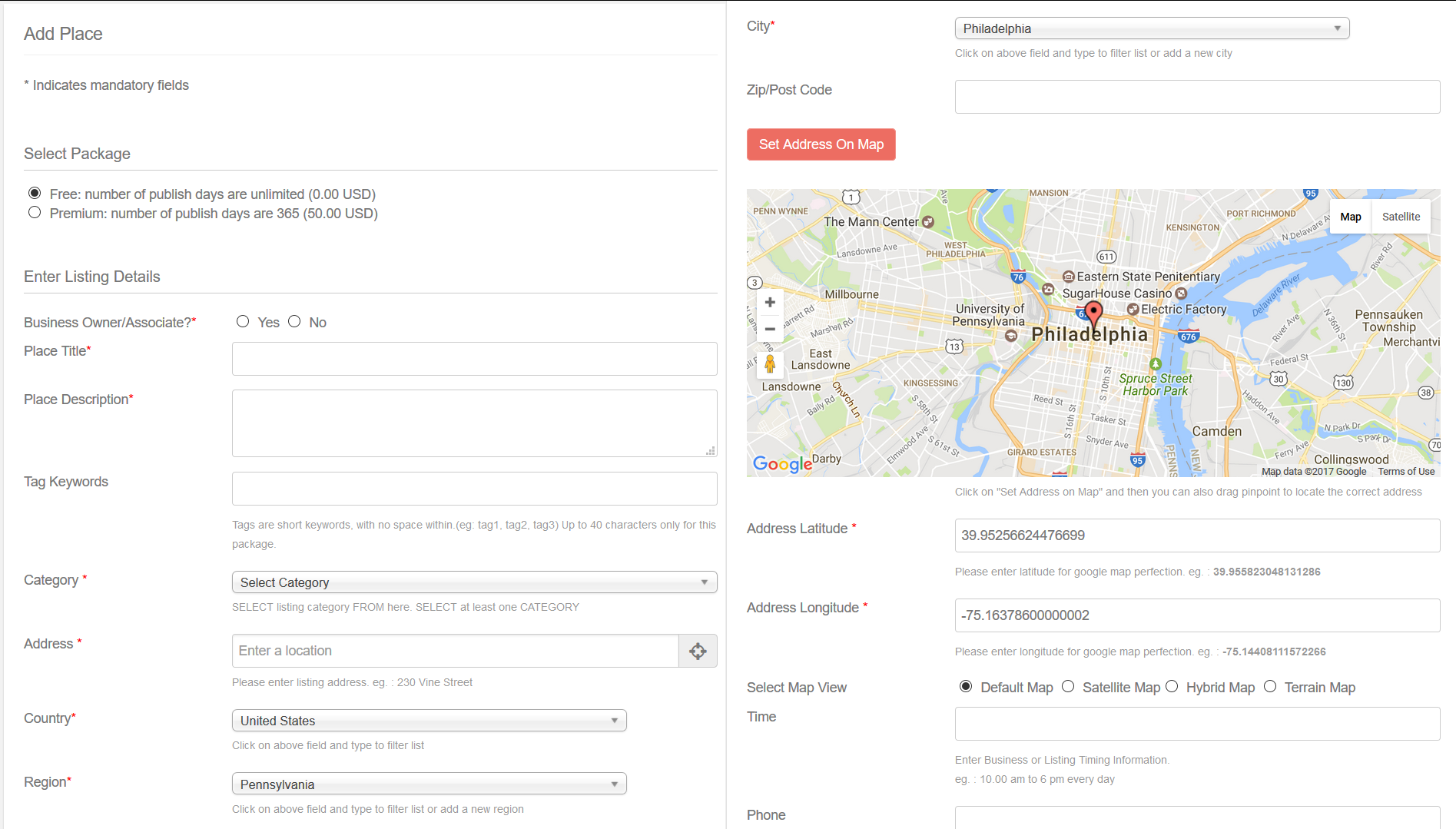
Adding a listing is easy. Click on the add new button. Fill in the details. Use simple words. Keep the title short. Add a picture. Make sure the address is correct. Check before saving. Editing is just as simple. Click on the edit button. Make changes you need. Save when done. Listings should be clear. Easy to understand for everyone.
Organize listings into categories. Categories help users find what they need. Choose names that make sense. Each category should have a unique name. Avoid using long words. Keep it simple and clear. Regularly check categories. Add new ones if needed. Remove ones not in use. Proper category management improves navigation.
Monetization Strategies
Creating membership plans helps in earning money. Offer special features for paying members. Users can access exclusive content. They may also enjoy discounts on services. A simple membership plan can attract many users. Customize plans to fit different needs. Make sure users find value in joining.
Sell ad space on your site. Local businesses can place ads. This is a great way to earn. Charge businesses a fee for placing ads. Offer different ad sizes for variety. Make sure ads do not clutter your site. Keep user experience in mind. Ads should be relevant to your audience.
Credit: wordpress.org
Seo And Marketing
Keywords are important for Geodirectory. They help people find your site. Use local terms in your content. This makes your site easier to find. Write clear descriptions for every place. This helps search engines understand your site. Keep your sentences short and easy. This makes your site more readable. You can also use meta tags. These are hidden words for search engines. They improve your site’s visibility.
Link your Geodirectory to social media. This helps people share your places. More shares mean more people see your site. Use buttons for sharing. Make them easy to find. Add social media links on every page. This keeps visitors connected. Show your site updates on social media. This keeps people interested. More interest means more visits to your site.
User Engagement
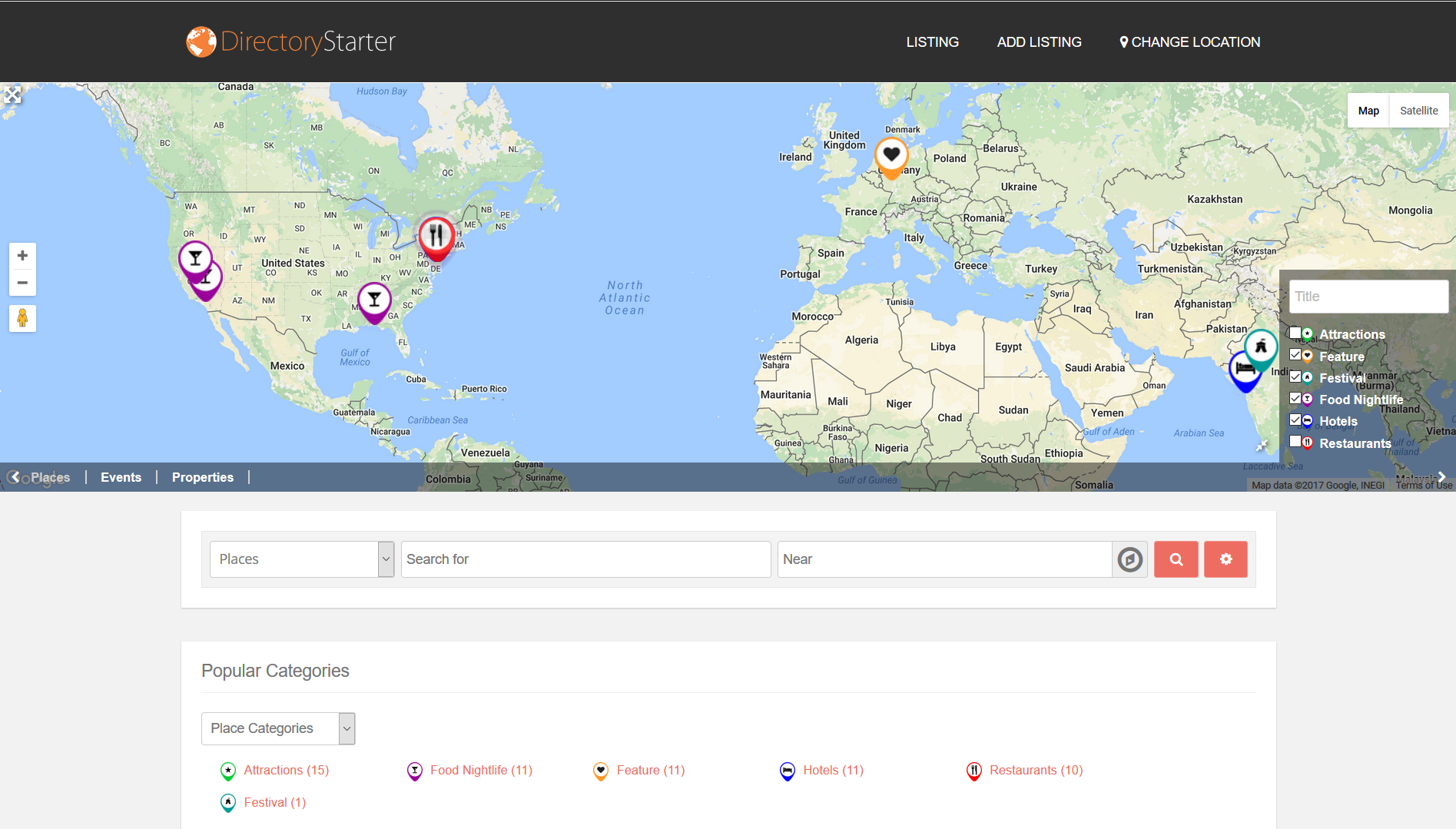
Interactive features make websites fun. They keep people coming back. Maps show locations. Users can click on them. They find places nearby. This helps users explore more.
Forms let users share information. They can ask questions or give details. This connects them with the site. It’s a way to make them feel involved.
Feedback is important. It tells what users think. Reviews help others decide. They share real experiences. Good reviews build trust. Bad reviews show what needs fixing.
People like reading reviews. They trust them more than ads. Reviews are like advice from friends. Users feel heard when they leave a review.
Credit: wordpress.org
Troubleshooting Common Issues
WordPress GeoDirectory helps create location-based directories easily. Common issues include plugin conflicts and slow loading times. Regular updates and checking for compatibility resolve most problems.
Performance Optimization
Improving performance is important for a smooth user experience. First, check your website’s speed. Slow speeds can frustrate users. Use tools like GTmetrix to test the speed. Then, focus on caching. Caching can make your site faster. Plugins like W3 Total Cache can help. Also, optimize images. Large images slow down websites. Use tools to compress them. Finally, consider a Content Delivery Network (CDN). A CDN can distribute site data faster.
Technical Support Resources
Getting help is easy with the right resources. The GeoDirectory forum is a great place to start. Here, users share tips and solutions. Also, explore the WordPress support pages. They offer many guides and tutorials. For specific issues, the plugin’s documentation is helpful. It provides detailed instructions. Consider reaching out to professional support if needed. They offer expert help and advice.
Frequently Asked Questions
What Is WordPress Geodirectory Used For?
WordPress Geodirectory is used to create location-based directories. It allows businesses to list their services by location. Users can find businesses nearby or in specific areas easily. This enhances local search visibility for businesses. It’s ideal for creating city directories, travel guides, or local business listings.
How Does WordPress Geodirectory Work?
WordPress Geodirectory works by integrating with your WordPress site. It provides tools to list and manage locations effectively. Users can search for listings by location, category, or keyword. The plugin supports maps and user reviews, enhancing user experience. It helps businesses reach local audiences efficiently.
Is WordPress Geodirectory Free?
WordPress Geodirectory offers a free basic version. This version includes essential features for creating a directory. Additional features require premium add-ons or a membership plan. These enhance the functionality and customization of your directory. Users can choose based on their business needs and budget.
Can I Customize Geodirectory Listings?
Yes, you can customize Geodirectory listings extensively. It offers various themes and layout options. You can add custom fields to match your business needs. The plugin supports different types of listings and categories. This flexibility helps in creating a unique and tailored directory.
Conclusion
WordPress Geodirectory helps create detailed local directories. It offers powerful features for businesses. Users can list locations, services, and events easily. Customization is simple and flexible. This tool enhances local business visibility online. It supports growth with its user-friendly interface.
Small businesses can benefit greatly from it. Geodirectory is reliable for directory needs. It integrates smoothly with WordPress themes. Many find it useful for community building. A valuable asset for anyone needing a directory solution. Explore it to see its potential for your site.


