
Ever wondered how you can keep your readers updated with fresh content from your WordPress site? The secret lies in understanding what a WordPress Feed URL is and how it can supercharge your site’s connectivity.
Imagine having a seamless way to distribute your latest posts, engage more readers, and boost your site’s traffic. Sounds enticing, right? By grasping the concept of WordPress Feed URLs, you unlock a powerful tool that can transform the way you share content.
Keep reading to discover how this simple URL can make a significant impact on your online presence and help you stay ahead in the digital game.
Credit: www.wpzoom.com
Understanding WordPress Feed
RSS stands for Really Simple Syndication. It helps to share content easily. It delivers updates straight to users. No need to visit websites again. RSS feeds contain article titles, summaries, and links. Users can read them in feed readers. This saves time.
Feeds keep blogs updated. They send new posts to subscribers. This attracts more readers. Feeds improve user engagement. They allow users to stay informed. WordPress supports feeds automatically. It is built-in and easy to use. Every blog has a unique feed URL. It is simple to find in settings.
Credit: 10web.io
Locating Your WordPress Feed Url
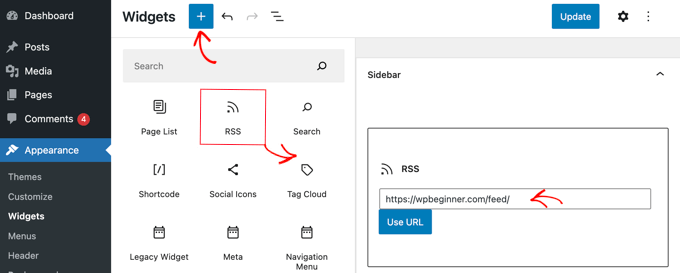
The default WordPress feed URL is easy to find. It usually ends with “/feed”. For example, if your website is www.example.com, the feed URL will be www.example.com/feed. This URL is important for sharing updates. It helps others follow your posts easily.
Some users like to change the feed URL. They want it to match their needs. You can use plugins for this. These plugins let you make special feed URLs. Custom URLs help with branding. They make your feed look unique. Always test your new URL. Ensure it works well for your audience.
Types Of WordPress Feeds
WordPress uses feeds to share updates. The most common are RSS and Atom. RSS stands for Really Simple Syndication. It is popular for blogs and news. Atom is a different type of feed. It is newer and offers more features. Yet, many people still choose RSS.
RSS is simple and works with many readers. Atom can be more flexible. Some users like its extra options. Both feed types help websites share content. Readers can choose which feed to follow. They get updates easily. Feeds make online reading fun and fast.
WordPress offers a comments feed too. This feed shows recent comments. It helps users track discussions. Comments feed is useful for active blogs. Readers stay updated on conversations. They don’t miss any replies.
Benefits Of Using WordPress Feeds
WordPress feeds help in sharing content across different platforms. This is called content syndication. It spreads your posts to a wider audience. Readers get updates without visiting your site. They use feed readers to see new posts.
Content syndication can increase traffic to your site. More people know about your blog. They might visit and read more. This helps you reach a larger group of people. Your ideas and stories spread further.
Feeds keep readers engaged. They see your latest updates easily. This makes them come back for more. Regular readers are more likely to comment and share. Feeds keep them informed and interested.
Engagement grows when readers feel connected. Feeds help build this connection. They bring your content straight to the reader. This makes your blog a part of their routine.
Customizing Your WordPress Feed
Plugins make WordPress feed changes easy. Find a plugin that fits your need. Many plugins help with feed customization. These tools can change how your feed looks. They also change what your feed shows. Some plugins have more features than others. Pick one that is easy to use. Make sure it works well with your site. Always check reviews before installing. This helps you avoid problems.
Code changes need some coding skills. Use a child theme to make changes. This keeps your main theme safe. Add custom code to your functions.php file. This file controls feed settings. Be careful with code changes. Mistakes can break your site. It’s best to back up your site first. This way, you can fix errors easily. Always test changes before going live. This keeps your site running well.
Troubleshooting Common Feed Issues
WordPress feed URL is a link that shows your site’s latest posts. It’s important for sharing updates. Troubleshooting feed issues helps ensure your readers see new content without problems.
Error Messages
Sometimes feeds show error messages. This can confuse users. Check the feed URL first. Make sure it is correct. An incorrect URL can cause errors. Also, check your internet connection. Poor connections lead to feed errors. Lastly, verify settings in WordPress. Wrong settings may cause feed issues.
Feed Not Updating
Feeds may not update regularly. This can annoy users. Check your cache settings. Sometimes cache prevents updates. Clear the cache to solve this. Review your feed settings. Ensure all settings are correct. Wrong settings stop updates. Finally, inspect your plugins. Some plugins interfere with feeds. Disable those plugins if necessary.
Enhancing Feed Functionality
Feeds show updates from sites. WordPress feeds can include media. Media makes feeds interesting. Add images to keep readers engaged. Videos can also be included. They help explain content better. Use audio for podcasts or music. Media needs to be lightweight. Heavy files slow down feeds.
Adding Media To Feeds
Images should be compressed. Small sizes load faster. Videos should not autoplay. Autoplay uses more data. Audio files need to be short. Long audio files take time to load. Use simple formats like JPEG or MP3.
Optimizing For Seo
SEO helps people find feeds. Use keywords in titles. Add meta descriptions to feeds. This makes them searchable. Include alt text for images. Alt text helps search engines. Use clear language. Simple words are best. Avoid jargon. Use short paragraphs for readability. Small paragraphs are easier to follow.
Credit: support.vendasta.com
Frequently Asked Questions
What Is A WordPress Feed Url?
A WordPress feed URL is a web address that allows users to subscribe to website updates. It typically ends with /feed and provides an RSS feed for posts. This URL helps users receive automatic updates in feed readers or email applications, keeping them informed about new content without visiting the site.
How Do I Find My WordPress Feed Url?
You can find your WordPress feed URL by adding /feed to the end of your website’s URL. For example, if your site is www. example. com, your feed URL is www. example. com/feed. This applies to both posts and comments feeds, making it easy to share updates with your audience.
Can I Customize My WordPress Feed Url?
Yes, you can customize your WordPress feed URL using plugins or custom code. Many plugins offer options to change feed URLs, add categories, and even create custom feeds. Customizing feed URLs helps tailor content delivery to specific audiences and enhances user engagement with your website.
Why Is My WordPress Feed Url Not Working?
Your WordPress feed URL might not work due to permalinks or plugin conflicts. First, check permalinks settings and reset them to default. If the issue persists, deactivate plugins one by one to identify conflicts. Ensuring a functional feed URL is crucial for delivering updates to your audience.
Conclusion
Understanding WordPress feed URLs is essential for efficient site management. These URLs help distribute your content widely. They play a crucial role in reaching your audience. Easy access to feeds enhances user experience. It also boosts engagement on your site.
Ensure your feeds are properly configured. This guarantees seamless content delivery. Regular checks prevent feed issues. Stay informed about updates and best practices. This will keep your site performing well. Mastering feed URLs can strengthen your online presence. Make sure your WordPress site is optimized for feeds.
Your audience will appreciate it.


