
Have you ever wondered why some websites grab your attention instantly while others just seem bland? The secret often lies in their visual appeal, and one crucial element is the banner size.
If you’re using WordPress, understanding the right banner size can make a significant difference. It’s not just about aesthetics; it’s about creating an unforgettable first impression. Imagine landing on a website where everything looks perfect, and you can’t help but explore further.
This could be your website! You’ll discover what the perfect WordPress banner size is and how it can elevate your site, making it both engaging and effective. Let’s dive in and unlock the potential of your WordPress site!
Credit: www.wpxpo.com
WordPress Banner Basics
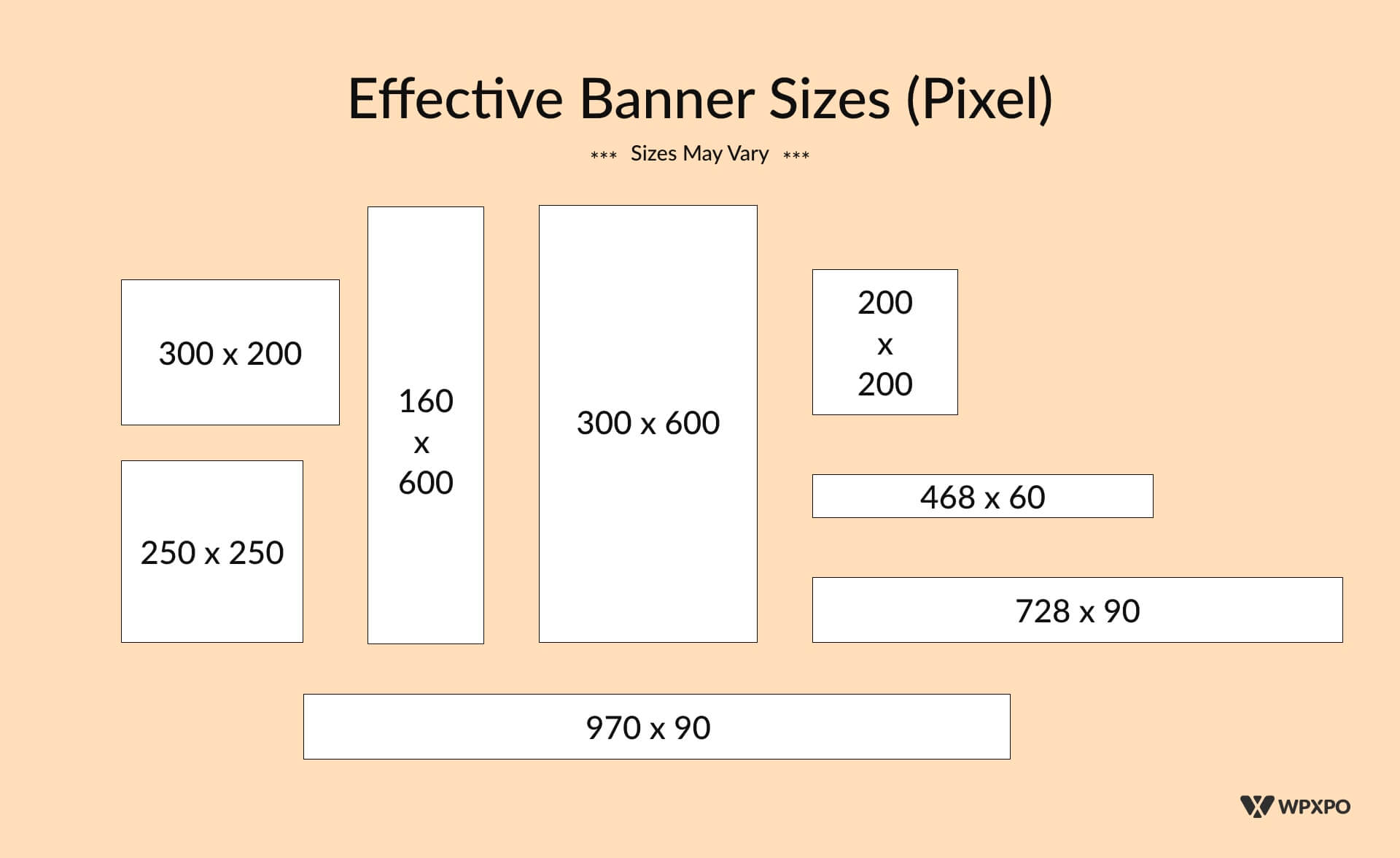
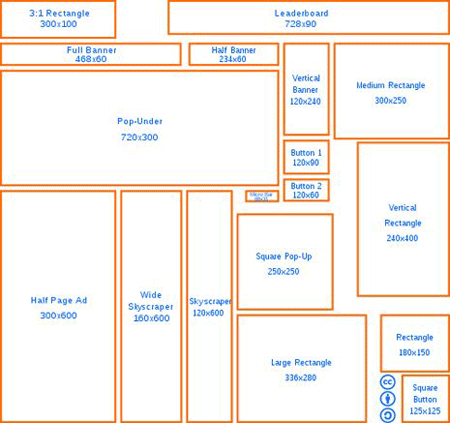
Banners are important for websites. They catch the eye of visitors. Choosing the right banner size is crucial. Common sizes include 728×90, 300×250, and 160×600 pixels. Each size serves different purposes. Large banners are often at the top of pages. Smaller ones fit in sidebars or between content. It’s vital to know your needs before picking a size.
Images must be clear and not blurry. The banner should fit well on mobile and desktop screens. Adjust banners based on device needs. Test your banner size on different screens. This ensures it looks good everywhere.
Consider banner design too. Bright colors and simple text work best. Make sure the message is clear. A good banner can help visitors stay longer. This is why correct size and design matter.
Importance Of Banner Size
Banner size matters for a good website. A good banner makes a site look nice. It helps catch the eye of visitors. A banner that is too big or small can look bad. It can make a website hard to read. Correct size helps in loading pages fast. Large banners slow down a site. Visitors may leave if a site loads slowly. Responsive design is important. Banners should look good on phones and computers. Different devices have different screen sizes. Good banners fit all screens. This helps keep visitors happy. They stay longer and visit more pages. A well-sized banner can improve the user experience. It helps with better engagement. Users like sites that look clean and tidy.
Standard Banner Dimensions
Header banners are usually large. They are placed at the top. Common size is 1200×300 pixels. This size fits most screens. It looks clear and attractive. It captures attention quickly. Header banners introduce the website’s theme.
Sidebar banners are smaller. They are vertical. Popular size is 300×600 pixels. They fit well beside content. Sidebar banners are easy to see. They provide extra information. They can promote events or offers.
Footer banners are at the bottom. They are often wide. Typical size is 728×90 pixels. Footer banners can show links. They offer space for contact details. They help with navigation. Footer banners are subtle yet effective.
Customizing Banner Size
Picking the right banner size is important. A typical banner is 1200×600 pixels. This size fits well on most screens. It looks clean and not too crowded. Bigger banners can be 1440×720 pixels. They are great for large displays. Smaller banners, like 800×400 pixels, suit mobile devices. It is wise to check your website theme. Some themes need specific sizes. Use the theme guide for help.
Image tools help make banners perfect. Adobe Photoshop is popular. It can change banner sizes easily. GIMP is free and works well. You can crop, resize, and adjust images. Online tools like Canva are user-friendly. They offer templates for banners. Choose a template, then adjust the size. Save and upload your banner to WordPress.
Impact On Website Performance
Large banners slow down a website. Loading speed is crucial. Visitors may leave if a site is slow. Optimizing banner size helps. A smaller image means faster loading. This keeps users happy. Use tools to compress images. This keeps quality but reduces size. Fast websites rank better on search engines. They provide a smoother experience for visitors.
Websites should work on all devices. Responsive design is key. Banners must adapt to different screen sizes. Big banners may not fit on small screens. Use CSS for flexible design. This ensures banners look good everywhere. A site that works on all devices attracts more users. They can view it on phones, tablets, and computers. Always test banners on different devices. This guarantees a good user experience.
Tips For Effective Banner Design
Make sure your banner looks good. Use bright and clear colors. Choose images that stand out. Keep the design simple. Avoid clutter to enhance readability. Choose fonts that are easy to read. Ensure they match the overall style. Size matters. Keep the elements balanced.
Encourage visitors to take action. Use clear and direct words. Make buttons noticeable. Place them where people can see. Use colors that grab attention. Use action words like “Join” or “Learn”. Keep messages short and clear. Make it inviting for users.
Common Mistakes
Many struggle with setting the right WordPress banner size. Choosing incorrect dimensions can make images look distorted. This affects website aesthetics and user experience. Proper size ensures clarity and professional appearance.
Ignoring Mobile Optimization
Many websites look great on computers. They forget about phones. This is a big mistake. Banners can appear too big or too small on mobile screens. A good banner adjusts to every screen size. Mobile users are growing fast. Make sure your banners fit all devices. This helps keep visitors happy.
Overloading With Text
Too much text on a banner is confusing. People like clear and simple messages. Banners should be easy to read. Use short sentences. Highlight key points. Images can help. They make banners interesting. Avoid small fonts. They are hard to read. Keep banners clean and tidy. This attracts attention.
Credit: www.tipsandtricks-hq.com
Credit: hardcorewp.com
Frequently Asked Questions
What Is The Ideal WordPress Banner Size?
The ideal WordPress banner size varies based on design needs. Commonly, 1200×600 pixels works well for most themes. However, ensure your banner is responsive for mobile devices. Adjust the dimensions according to your theme’s guidelines to maintain visual appeal and clarity.
How Do I Change A WordPress Banner Size?
To change the banner size, access your WordPress dashboard. Navigate to Appearance > Customize. From there, adjust the header image dimensions. Ensure the new size matches your theme’s requirements for optimal display. Always preview changes before saving to ensure proper appearance.
Why Is Banner Size Important In WordPress?
Banner size is crucial for maintaining a professional look. Proper sizing ensures your banner displays correctly on all devices. It enhances user experience, reduces loading time, and improves SEO. A well-sized banner can significantly impact user engagement and retention.
Can I Use Custom Banner Sizes In WordPress?
Yes, you can use custom banner sizes in WordPress. Many themes allow customization through the WordPress Customizer. Enter the desired dimensions, but ensure they align with your theme’s guidelines. Custom sizes offer flexibility but ensure they maintain image quality and responsiveness.
Conclusion
Understanding WordPress banner size is essential. It affects your site’s visual appeal. Choose the right size to enhance your site’s look. Banners should be clear and fit your design. Proper sizing ensures better loading times. This improves user experience and engagement.
Remember, a well-sized banner can make a big difference. It helps convey your message effectively. Always test different sizes for best results. Adjust as needed to suit your content. Keep your design consistent and user-friendly. This way, visitors enjoy a seamless browsing experience.
Prioritize banner size for a polished, professional website appearance.


