
Have you ever felt overwhelmed trying to customize your WordPress site? You’re not alone.
Many WordPress users, both new and seasoned, often find themselves wishing for an easier way to create stunning websites without diving deep into complex coding. Imagine having a tool that simplifies this process, allowing you to build and manage your site with ease and creativity.
That’s where Unyson comes in. Unyson is a powerful WordPress framework designed to help you craft beautiful websites with less effort and more fun. But what exactly is Unyson, and why should you consider using it for your WordPress projects? We’ll explore the ins and outs of Unyson, uncover its unique features, and show you how it can transform your WordPress experience. Get ready to discover how Unyson can be the game-changer you’ve been looking for in your web development journey.
Unyson Framework
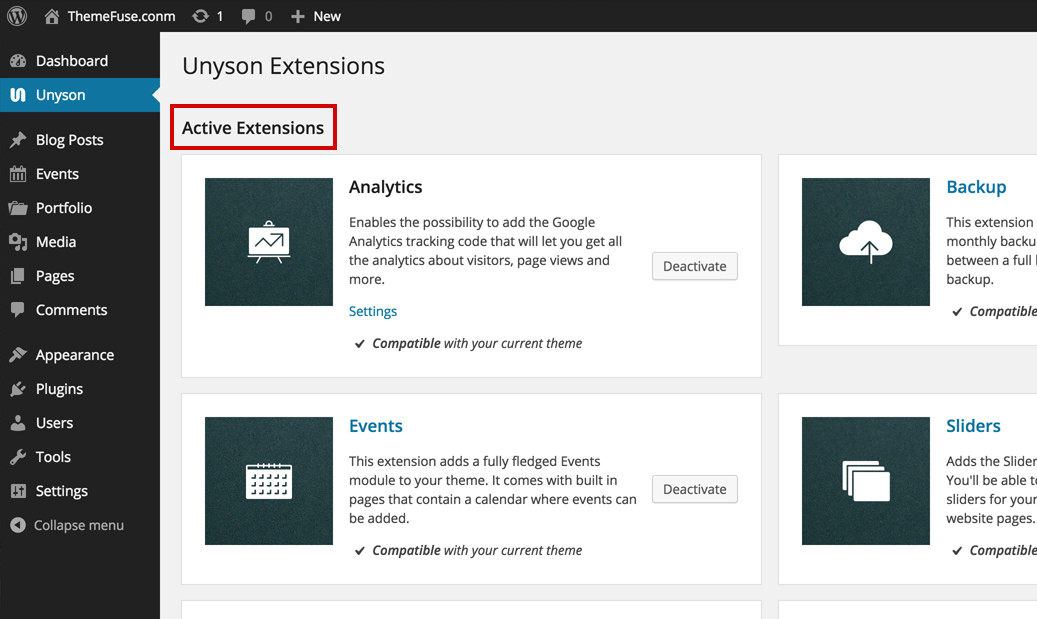
Unyson is a tool for building WordPress websites. It helps create themes with ease. The framework provides many features. Users can make custom pages. They don’t need coding skills. It has a drag-and-drop builder. This makes designing easy. Unyson has extensions for extra features. Users can add sliders, portfolios, and more. All with a few clicks.
Themes made with Unyson are responsive. They look good on all devices. The framework is open-source. This means it’s free for everyone. Developers can contribute and improve it. Unyson is a great choice for beginners. It makes creating websites simple and fun. Users can focus on creativity, not code.
Credit: docs.themefuse.com
Features Of Unyson
The Drag and Drop Page Builder is very easy to use. You can move elements around with ease. No coding skills are needed. It helps you design beautiful pages quickly. Every change can be seen instantly. This makes designing fun and fast.
Unyson offers many built-in extensions. These extensions add extra features to your website. You can choose from sliders, mega menus, and more. Each extension is easy to install. They help to enhance your site’s functionality. This makes your site more appealing and interactive.
SEO tools in Unyson help your site rank better. These tools are user-friendly. They improve your site’s visibility on search engines. You can set meta titles and descriptions. This boosts your site’s reach. More people will find your website easily.
Backup and restore features keep your data safe. You can save your site data regularly. Restoring is quick if something goes wrong. This ensures your site is always secure. You never lose important information. Your site can recover from problems easily.
Benefits Of Using Unyson
Unyson is very easy to use. Even beginners find it simple. It comes with a drag-and-drop builder. This means you can design without coding. Just move things where you want. It saves time and effort.
Unyson offers great customization options. You can change many things. Colors, fonts, and layouts are easy to adjust. This makes your website look unique. You have the freedom to create your style.
Unyson is free to use. You don’t need to buy it. This helps save money. You can create a nice site without spending. It’s a good choice for budget-friendly projects.

Credit: themedev.net
How To Install Unyson
Open your WordPress dashboard. Find the Plugins menu and click Add New. In the search bar, type Unyson. Locate it and click Install Now. After installation, click Activate. Now, Unyson is ready to use.
Download the Unyson plugin from its official website. Save it on your computer. Go to your WordPress dashboard, then to Plugins, and click Add New. Select Upload Plugin and choose the file you downloaded. Click Install Now. Activate it after installation. Now, Unyson is active.
Creating A Website With Unyson
Unyson makes it easy to set up a new theme. Begin by choosing a theme that supports Unyson. Install it through the WordPress dashboard. Next, activate the theme. Now, your site is ready for content. Unyson simplifies the process. No coding is needed. Themes provide a unique look. Users can customize them as desired. Unyson gives flexibility and ease.
The Unyson Page Builder helps you create beautiful pages. Drag and drop elements onto the page. You don’t need special skills. Choose from many modules like text, image, or video. Arrange them to suit your style. The Page Builder is user-friendly. Make your website look professional with ease.
Extensions add more features to your site. Unyson offers many options. Install extensions through the dashboard. Some popular extensions are sliders and contact forms. Each extension enhances your site. Extend your website’s capabilities without hassle. Unyson ensures a smooth experience. Make your site stand out with extra features.
Popular Extensions For Unyson
Unyson in WordPress offers a powerful framework for theme development. Popular extensions include sliders, SEO optimization tools, and contact forms. These enhance website functionality, making it easier for users to customize and manage their sites effectively.
Slider Extension
The Slider Extension lets you create beautiful slideshows. You can add images and text. It’s easy to use with a simple interface. The extension helps in showcasing products or stories. You can customize the slides to fit your website’s theme. It’s perfect for grabbing attention.
Mega Menu
The Mega Menu extension enhances navigation. It organizes links into neat dropdowns. Users find what they need quickly. This extension is great for sites with many pages. It makes browsing easy and fun. You can add images and icons to menus. It’s a useful tool for large websites.
Contact Form Builder
The Contact Form Builder creates forms for your site. Visitors can reach you easily. Customize fields to gather specific information. It’s simple to set up. This extension keeps communication open. It’s handy for receiving feedback or inquiries. Forms help connect with your audience.
Alternatives To Unyson
Elementor is a popular WordPress page builder. It offers a drag-and-drop interface. Users can create beautiful pages easily. No coding skills are needed. Many templates are available. These templates help in quick design. It is also responsive, so pages look great on all devices.
WPBakery is another powerful page builder. It allows users to design pages visually. It integrates well with most themes. Users can choose from many pre-made layouts. WPBakery also offers a frontend editor. This feature lets users see changes in real-time.
Gutenberg is the default WordPress editor. It uses blocks to build content. Each block can be a paragraph, image, or video. This makes editing easy and flexible. Gutenberg is also lightweight. It does not slow down websites.
Credit: github.com
Common Issues And Solutions
Sometimes, installing Unyson can cause errors. Incomplete downloads may be the reason. Check your internet connection first. Then, try downloading the file again. File permissions might also block the installation. Make sure you have the right permissions. If problems persist, contact your host. They can help solve server issues.
Unyson might not work with some plugins. Deactivate other plugins to find the conflict. Then, activate them one by one. This helps you see which one causes the issue. Some themes may not support Unyson. Check if your theme is compatible. You can reach out to the theme developer for support.
Future Of Unyson
Unyson in WordPress is a powerful framework for theme developers. It offers drag-and-drop page building and custom extensions. As WordPress evolves, Unyson’s ease of use and flexibility position it well for future growth.
Ongoing Development
Unyson continues to grow. Developers are always improving it. They add new tools and fix bugs. This makes Unyson better. Each update brings something new. Changes keep it fresh and useful. Updates happen often. Developers listen to user feedback. Feedback helps improve the tool. Users can expect more features. New features make work easier. The goal is to make Unyson user-friendly.
Community Support
Unyson has a strong community. People share tips and tricks. Forums and groups help users. Sharing makes learning easy. Users help each other solve problems. Support is friendly and helpful. Everyone can ask questions. Answers come quickly. Community helps with updates. Users suggest new ideas. Ideas make Unyson better. Community support is vital. It keeps Unyson alive.
Frequently Asked Questions
What Is Unyson Plugin In WordPress?
Unyson is a free WordPress plugin that offers drag-and-drop page building. It includes various extensions for creating custom layouts. Unyson is popular for its user-friendly interface and flexibility. It helps beginners and developers create professional websites easily. This plugin enhances WordPress functionality significantly.
How Does Unyson Benefit WordPress Users?
Unyson provides numerous benefits to WordPress users. It simplifies the website creation process with its intuitive interface. The plugin offers customizable templates and extensions. It improves site functionality and user experience. Unyson also supports SEO optimization, making websites more discoverable.
It’s ideal for users seeking a powerful yet easy-to-use tool.
Is Unyson Suitable For Beginners?
Yes, Unyson is perfect for beginners. Its drag-and-drop functionality makes website design straightforward. The plugin offers pre-built templates and extensions. Beginners can create professional websites without coding skills. The user-friendly interface simplifies complex tasks. Unyson also provides detailed documentation and support, ensuring a smooth experience for new users.
Can Unyson Be Integrated With Any Theme?
Unyson is compatible with most WordPress themes. It enhances theme functionality with its extensions. Users can create custom layouts without theme restrictions. The plugin works seamlessly with both free and premium themes. Unyson’s flexibility allows integration with any design, enhancing the site’s visual appeal and functionality.
Conclusion
Unyson is a helpful tool for WordPress users. It offers flexibility for creating custom websites. Many beginners find it easy to use. The drag-and-drop builder simplifies design tasks. You can add features without complex coding. Themes and extensions make customization easy.
Unyson provides a good mix of options and ease. Remember to keep your plugins updated. This ensures smooth performance and security. Explore its potential for your projects. A good choice for those seeking a simple yet powerful tool. Enjoy building unique websites with Unyson’s features.


