
Imagine having the power to connect your WordPress website with other web applications seamlessly. That’s exactly what the WordPress REST API offers.
If you’ve ever wondered how to enhance your site’s functionality or integrate it with different platforms, you’re in the right place. We’ll dive into what the WordPress REST API is and why it could be a game-changer for your website.
You’ll discover how it can transform your site from just a blog to a robust, dynamic platform. By the end of this read, you’ll understand why tapping into the power of the REST API could be the smartest move for your online presence. Get ready to explore a world of possibilities that can elevate your WordPress experience.
WordPress Rest Api Basics
The WordPress REST API helps to connect websites and apps. It uses simple HTTP requests. This makes it easy to use. Developers can get data from WordPress sites. They can also change the data. This is done through JSON format.
APIs let different systems talk to each other. The WordPress REST API is like a bridge. It connects WordPress with other apps. This helps in creating new features easily.
Some important actions include retrieving posts, updating content, and deleting items. Each action needs a simple HTTP request. Developers need to understand these requests.
Security is important. Always use strong authentication methods. This keeps your data safe. Learning the basics is essential for beginners.
Benefits Of Using Rest Api
REST API helps connect different software systems. It is easy to use. Developers can make websites talk to apps. It works with many programming languages. Data can be shared fast and safely. It makes websites load faster. Users can get new updates quickly. REST API supports mobile-friendly sites. It is flexible for changes and growth. Developers love its simplicity. It is a popular choice for many projects. Many big companies use it daily. Security features protect user data well.
Core Components
Endpoints are like doors. They let you enter data. Or get data out. WordPress uses many endpoints. Each one has a special job. Some send data. Others receive data. Developers use these doors to build plugins. Or make websites smarter.
Routes are like maps. They show the way to endpoints. Every route has a name. It’s like an address. This helps in finding the right door. Routes make sure you reach the right endpoint. They guide the data to its place.
Requests are messages. They ask for data. Or send data. A request says what it needs. It uses routes to find endpoints. Then, it waits for an answer. Requests and responses talk to each other. This helps websites work well.

Credit: kinsta.com
Authentication Methods
Cookie Authentication uses cookies to keep users logged in. When you log in, a cookie is saved in your browser. This cookie helps the website know who you are. It is simple and works well for web browsers. But, it is not the best choice for apps or scripts. Cookies can be unsafe if not protected.
OAuth is a way to give apps access without sharing passwords. It is secure and common for many services. When you use OAuth, you allow an app to access parts of your account. The app will not see your password. This makes OAuth a good choice for mobile apps. It can be hard to set up, but worth it for safety.
Application Passwords are special passwords for apps. They are different from your main password. You make them in your WordPress settings. These passwords are easy to create and use. They help apps connect to your site safely. If a password gets lost, you can make a new one. This keeps your account secure.
Integrating Rest Api With WordPress
REST API helps connect different software. It acts like a bridge. WordPress uses REST API to share data. This process is called integration. Integration makes websites smarter. It allows data to flow freely. This makes websites better.
First, install WordPress. Then find the REST API settings. Adjust the settings for your needs. This sets up a connection. Ensure everything is correct. Double-check the details.
REST API fetches data easily. It pulls data from servers. This data can be posts or user info. It helps create dynamic pages. Dynamic pages change with new data.
REST API offers many benefits. It saves time and effort. It improves website speed. Data sharing becomes simple. Websites become more interactive. This leads to better user experience.
Common Use Cases
WordPress Rest API enables developers to connect and interact with WordPress sites. It allows data retrieval and updates remotely. Common uses include creating mobile apps, integrating third-party services, or customizing front-end experiences.
Mobile App Development
The WordPress Rest API helps connect apps to websites. Developers use it to fetch data from WordPress sites. They can update or delete content remotely. This is useful for mobile apps needing real-time updates. It allows apps to show posts, comments, and other data easily. The API makes app building faster and simpler.
Custom Dashboards
Businesses use the API for custom dashboards. It helps display site data in new ways. Users can view analytics, sales, and comments at a glance. The API fetches data from WordPress and shows it on these dashboards. Custom dashboards can help teams work smarter. They offer a tailored view of important info.
Third-party Integration
The API allows easy third-party integration. Developers connect WordPress with other tools. This helps share data between platforms. For example, e-commerce sites can link WordPress with payment systems. It ensures smooth data exchange. This integration can enhance site functionality. It helps streamline business processes.
Security Best Practices
Using the WordPress REST API safely is very important. It keeps your website and data safe. Authentication is one key step. Always use strong passwords. Don’t share them with anyone. It’s good to update your plugins often. This helps to block old security holes.
Another step is using HTTPS. It makes your data travel safely on the internet. Rate limiting can stop too many requests at once. This keeps your website running smoothly. Also, keep your API keys secret. Never show them in your code.
Checking your logs is helpful. It can show you strange activity. If you see something odd, act fast. Remember, keeping your site safe is a daily task.
Troubleshooting Common Issues
WordPress Rest API can sometimes be confusing. Errors might pop up, stopping your tasks. 404 errors mean a resource is missing. 500 errors suggest server trouble. Check if the endpoint URL is correct. Ensure the server is running smoothly.
Permissions can block access. Make sure API keys are valid. Verify that user roles have correct permissions. Cache can cause problems. Clear the cache often. This helps update changes. Plugins may conflict with the API. Disable unnecessary plugins. Turn them off one by one.
Network issues can interrupt connections. Ensure your internet is stable. Firewalls might block requests. Adjust settings to allow API access. Debugging tools help spot errors. Use tools like Postman or cURL. They test API responses. Follow these steps to solve common issues.
Future Of Rest Api In WordPress
The WordPress REST API is growing and getting better. It helps developers connect different parts of a website. Developers can use it to build new tools. This makes WordPress even more useful. The API allows websites to work with apps. This can be on phones or computers.
More people are using the REST API. This means more exciting features can come. The community is helping to make it stronger. Security is very important. So, developers are working hard to keep data safe. With REST API, WordPress can do more than ever before.

Credit: wptavern.com
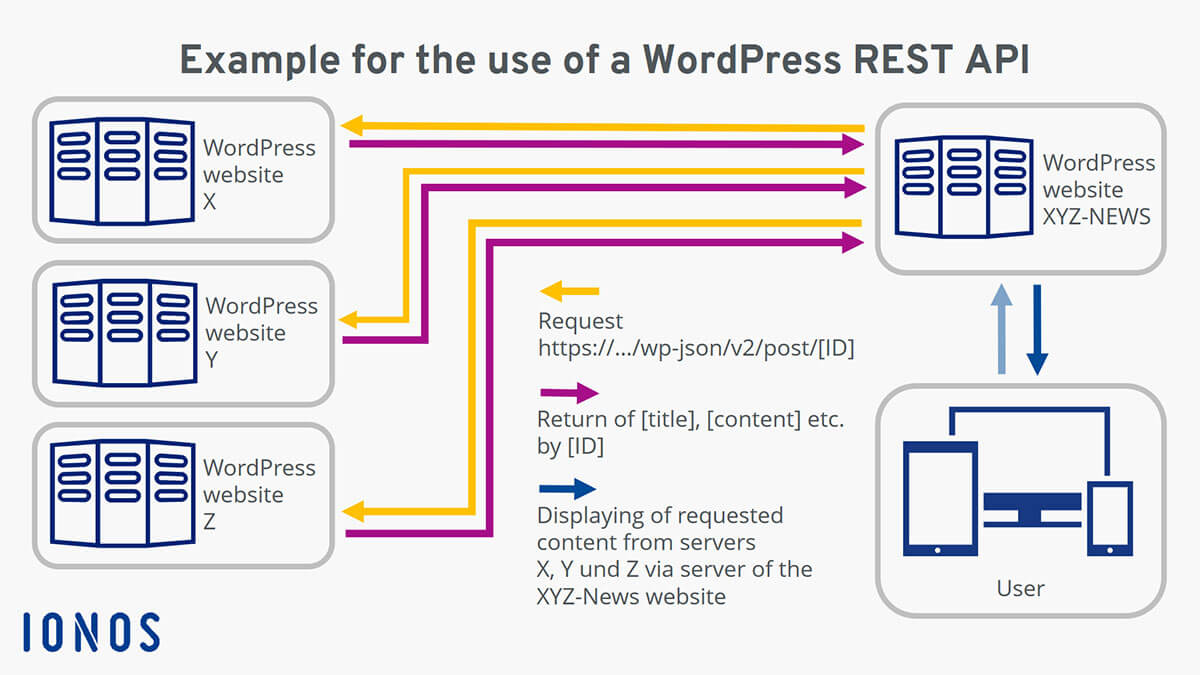
Credit: www.ionos.com
Frequently Asked Questions
What Is The WordPress Rest Api Used For?
The WordPress REST API allows developers to interact with WordPress sites remotely. It provides endpoints for posts, pages, and users, enabling external applications to retrieve and manipulate data. This feature is essential for building custom apps and integrating WordPress with other platforms, enhancing the site’s functionality and user experience.
How Do I Enable WordPress Rest Api?
WordPress REST API is enabled by default in WordPress versions 4. 7 and above. You can access it through your site’s URL by appending `/wp-json/`. Ensure permalinks are set up correctly in your settings. Custom endpoints can be added using plugins or themes for more tailored functionality.
Can Rest Api Improve Site Performance?
Yes, REST API can improve site performance by allowing asynchronous data loading. It reduces server load and enhances user experience by fetching data only when needed. Developers can optimize queries and responses, ensuring faster page load times and better resource management on both client and server sides.
Is WordPress Rest Api Secure?
WordPress REST API is secure when implemented correctly. It uses nonces for authentication and supports OAuth for enhanced security measures. Always keep your WordPress updated and use secure coding practices. Regularly review API permissions and access controls to protect your data from unauthorized access.
Conclusion
The WordPress REST API opens new possibilities for developers. It offers flexibility and power. You can create custom solutions. Connect WordPress with other applications easily. Build unique user experiences. The API makes integration simple. Access data from anywhere. Update and manage content efficiently.
Developers can craft tailored applications. Enhance your website’s functionality. The REST API supports modern web development. Understanding it improves your skills. Boost your site’s performance with it. Dive into this tool today. It’s a valuable resource for web projects. Create dynamic sites with ease.
Explore its potential for your needs.


