
Are you diving into the world of WordPress and feeling a bit overwhelmed by the technical jargon? You’re not alone.
One term you’ll frequently encounter is “WordPress cPanel. ” But what exactly is it, and why should it matter to you? Imagine having a dashboard that simplifies the complex web hosting tasks and brings them to your fingertips. This is what WordPress cPanel offers.
It’s not just a tool; it’s your new best friend in managing your website efficiently. By understanding how to use the cPanel effectively, you’ll unlock a new level of control over your site. This means less stress and more time to focus on what truly matters—creating amazing content. Stick around, and we’ll break down the essentials you need to know about WordPress cPanel, empowering you to make the most out of your website.
What Is WordPress Cpanel
WordPress cPanel is a simple online tool. It helps you manage your website. Many people use it with WordPress websites. It makes tasks easier. Like uploading files or setting up emails.
With cPanel, you can see your website’s data. You can check how many visitors come each day. You can also make backups of your website. This is important to keep your data safe.
cPanel has many tools. You can install new software with a few clicks. You can also manage your website’s security. It helps keep bad people away from your site.
Many hosting companies offer cPanel. They give it to you when you get hosting. It is very popular because it is easy to use.
Features Of Cpanel
cPanel has a simple design. It is easy to use. Users can find tools quickly. It saves time. Beginners can learn fast. The layout is clear. Icons help users navigate. The interface is clean.
Managing files is simple. Users can upload files quickly. They can delete files easily. The file manager is intuitive. Users can organize files in folders. Drag and drop is available. This makes file tasks quick.
Databases are easy to manage. Users can create databases fast. They can edit databases easily. Backup tools are available. Users can restore data quickly. Database management is efficient.
Setting up email is simple. Users can create accounts fast. They can manage accounts easily. Filters are available. Users can block spam quickly. Email tools are efficient.
Security is strong. Users can set passwords. Firewalls are available. They can block threats easily. SSL certificates are supported. Security tools protect data.
Benefits Of Using Cpanel For WordPress
cPanel is simple to understand. It helps manage websites. Users find it easy to navigate. Menus are clear and straightforward. Beginners can use it with confidence. No special skills needed. Just basic computer knowledge. Help is available with guides and videos.
cPanel offers full control over your WordPress site. Users can manage files and databases easily. It helps with email setup too. Security settings are simple to adjust. You can install apps with one click. Many tools are available for customization. Your site is entirely in your hands.
cPanel helps track site resources. CPU and memory usage are visible. Users can optimize site performance. It helps with bandwidth management. Alerts notify you of resource limits. This ensures your site runs smoothly. Tools are available for efficient management. Your website stays fast and responsive.

Credit: www.interserver.net
How To Access WordPress Cpanel
To access your WordPress cPanel, you need a username and password. These are given by your hosting provider. Go to your hosting website and find the login section. Enter your username and password here. Make sure to keep your details safe. If you forget, you can reset them through email. Once you log in, you will see the cPanel dashboard. It has many tools and features.
Inside the cPanel dashboard, you will find many icons and options. Each icon does something special. To manage files, look for the File Manager icon. To create email accounts, find the Email Accounts option. For database tasks, use the MySQL Databases icon. Explore these tools to get familiar with them. If unsure, ask for help or read the guides provided by your host.
Common Tasks In WordPress Cpanel
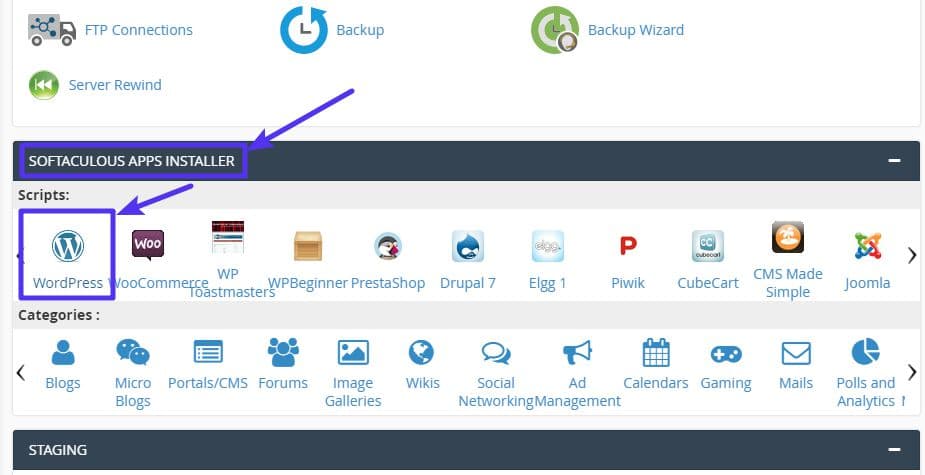
WordPress setup is easy with cPanel. Look for the Softaculous App Installer. Click it. Choose WordPress from the list. Enter your website details. Click install. Your WordPress site is ready now. Just like that!
Backing up your site is crucial. Use the Backup Wizard in cPanel. Click on it. Choose backup. Save it safely. Now your data is secure.
Keep your software up-to-date. Updates fix bugs. They add new features. In cPanel, find WordPress Manager. Check for updates. Install them. This keeps your site running smoothly.
Check how well your site works. Use Metrics in cPanel. Look for visitor numbers. Check server load. Find any slow pages. Fix them for a better site experience.
Credit: kinsta.com
Troubleshooting Cpanel Issues
WordPress cPanel is a web hosting control panel for managing WordPress websites. Users can handle files, domains, and databases easily. Troubleshooting cPanel issues helps ensure smooth website operation.
Common Errors
cPanel often shows errors. Server Timeout is frequent. This means the server is slow. Login Failures occur too. Wrong passwords cause this. Database Connection Errors are common. They happen due to misconfigurations.
Solutions And Tips
Try refreshing the page. This often solves timeout issues. For login failures, check your password. Ensure it’s correct. Database errors need careful checks. Look at your settings. Make sure details are right. If problems persist, contact support. They can help fix tricky issues.
Alternatives To Cpanel For WordPress
cPanel is popular, but other options exist. Let’s explore them.
Plesk is one choice. It is easy to use and secure. But it can be costly. DirectAdmin is another option. It is fast and less expensive. Yet, it lacks some features. Webmin is free and open-source. It might be harder for beginners.
| Control Panel | Pros | Cons |
|---|---|---|
| Plesk | Easy, Secure | Expensive |
| DirectAdmin | Fast, Cheap | Fewer features |
| Webmin | Free, Open-source | Complex |
Each control panel has pros and cons. Choose based on your needs.

Credit: www.interserver.net
Frequently Asked Questions
What Is WordPress Cpanel Used For?
WordPress Cpanel is a web hosting control panel. It helps manage WordPress sites efficiently. You can install WordPress, create email accounts, and manage databases. It offers user-friendly interfaces for easy navigation. Cpanel makes website management simple and effective for users of all levels.
How To Access WordPress Cpanel?
Access WordPress Cpanel through your web hosting account. After logging in, find the Cpanel link or icon. It usually appears on your hosting dashboard. Click it to enter Cpanel. You’ll then see various tools for managing your WordPress site.
Can I Install Plugins Via Cpanel?
Yes, you can install plugins via Cpanel. Use the File Manager tool to upload plugin files. Navigate to the ‘wp-content/plugins’ directory. Upload the plugin zip file and extract it there. Activate the plugin from your WordPress admin dashboard afterwards.
Is Cpanel Necessary For WordPress?
Cpanel is not strictly necessary for WordPress. It simplifies site management but WordPress can function without it. You can manage your site through other hosting interfaces. However, Cpanel offers convenience and user-friendly tools for effective site management.
Conclusion
WordPress Cpanel simplifies website management. Users gain control over essential functions. It offers a user-friendly interface with straightforward options. Even beginners can navigate it easily. Features like file management and database access enhance utility. Users can manage email accounts, domains, and backups.
This tool supports better website performance. Understanding its features can boost your site’s effectiveness. Knowledge of Cpanel is a valuable skill. Explore its features to optimize your WordPress experience. It’s a tool worth mastering for any website owner. Dive in and start making the most of your WordPress site today.


