
Have you ever found yourself wondering where to find the WordPress admin login URL? You’re not alone.
Navigating the backend of your website can sometimes feel like a maze, especially if you’re new to WordPress. But don’t worry, you’re in the right place. Unlocking the gateway to your site’s management panel is simpler than you might think.
Imagine having the ability to effortlessly update your content, manage plugins, or tweak your design with just a few clicks. This article will guide you step-by-step, ensuring you can locate and access your WordPress admin login URL with confidence. Stay with us, and by the end, you’ll be ready to take full control of your website’s potential.
Credit: www.elegantthemes.com
WordPress Admin Login Url
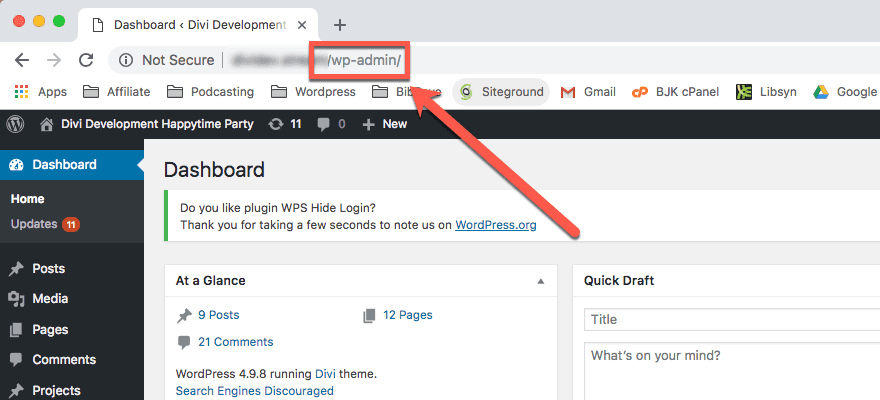
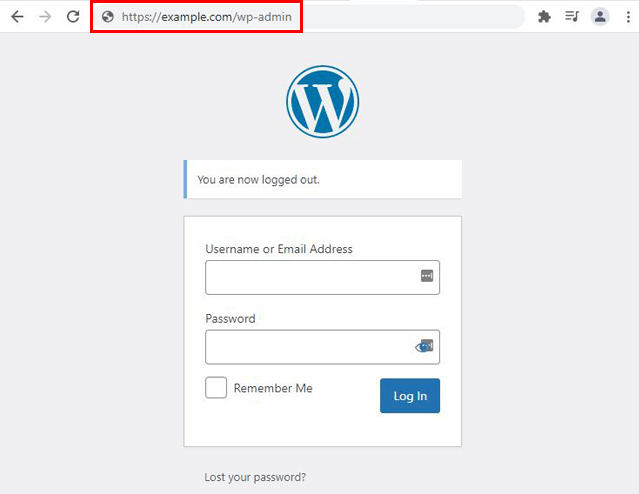
The WordPress admin login URL is where you access your site’s dashboard. By default, add /wp-admin at the end of your site’s URL. For example, if your site is www.example.com, type www.example.com/wp-admin in your browser. This is the standard path for most WordPress sites.
Sometimes, website owners change this URL for security. They use plugins or code to do this. Changing the login URL can protect against hackers. If you can’t log in, check with your website administrator. They might have changed the URL. Always keep your login details safe and secure.
If you forget your password, use the “Lost your password?” link. This helps you reset your password easily. Make sure your email is correct in your user profile. This ensures you receive the reset email.
Common Login Url Formats
The default WordPress login URL is easy to remember. Just add “/wp-admin” to your website’s URL. This takes you to the admin login page. For example, if your site is “example.com“, type “example.com/wp-admin“. This is the standard way to access your WordPress dashboard.
Some users choose to have a custom login URL. It makes their site more secure. You can change the login URL using plugins. Plugins like WPS Hide Login help you create a custom URL. Custom URLs protect from unauthorized access. Always remember your new URL. It must be easy for you to type and recall.
Accessing The Admin Dashboard
The WordPress admin login URL is simple to find. Just add “/wp-admin” at the end of your website address. This takes you to the login page. Enter your username and password. Click the login button to access the dashboard.
Forgot your password? Click on the “Lost your password?” link. This helps you reset it. If the page doesn’t load, check your internet connection. Still having trouble? Clear your browser cache. Contact your hosting provider for more help. They can fix server issues.
Securing The Login Url
Keeping the login page safe is very important. Hackers often try to guess passwords. They want to enter your site without permission. A strong security system keeps them out. Protecting your login page is like locking your front door. It keeps your site safe and your data private. Security is not just a choice; it’s a must.
There are many ways to secure your login page. You can change the login URL. This makes it harder for hackers to find it. Use strong passwords with numbers and symbols. Enable two-factor authentication for extra protection. Limit login attempts to stop repeated guessing. Always keep your WordPress updated. These methods help in keeping your website safe.
Customizing The Login Url
Changing the login URL keeps your site safe. Hackers look for easy targets. Many sites use the default URL. This makes them vulnerable. Customizing the URL protects your site. It adds an extra layer of security. You can do this with plugins. Or, you can change it manually. Both methods are effective. Choose the one that suits you.
Plugins For Customization
Plugins are easy to use. They offer many features. Popular plugins include WPS Hide Login and Custom Login URL. These plugins change your login URL. Some plugins also add security features. They are user-friendly. No coding skills are needed. Just install and activate them. Follow the simple steps they provide.
Manual Customization
Manual customization requires some coding skills. You need to edit the functions.php file. Backup your site first. This prevents data loss. Find the code that defines the login URL. Change it to your preferred URL. Save the changes. Check if the new URL works. It’s important to test after editing. This ensures everything is correct.
Credit: wpuserregistration.com
Recovering Lost Login Url
Access the File Manager in your hosting panel. This tool shows your site’s files. Navigate to the wp-config.php file. This file holds key settings for your WordPress site. Open it and look for the site URL. This helps find the admin login link.
You can use the database to find the login URL. Access the database through phpMyAdmin. Search for the wp_options table. This table stores important site info. Look for the home or siteurl fields. These fields show your site’s main URL. This URL helps find the admin login page.
Credit: kinsta.com
Frequently Asked Questions
How Do I Access The WordPress Admin Login?
To access the WordPress admin login, append “/wp-admin” to your website’s URL. For example, if your website is “www. example. com”, the admin login URL is “www. example. com/wp-admin”. Enter your username and password to log in.
What Is The Default WordPress Admin Url?
The default WordPress admin URL is “yourdomain. com/wp-admin”. Replace “yourdomain. com” with your actual website domain. This link directs you to the WordPress login page where you can enter your credentials to access the dashboard.
Can I Change The WordPress Admin Login Url?
Yes, you can change the WordPress admin login URL for security reasons. Use plugins like WPS Hide Login to customize the URL. Changing the login URL helps protect your site from unauthorized access and brute force attacks.
Why Can’t I Access My WordPress Admin Login?
If you can’t access your WordPress admin login, check your internet connection and URL spelling. Ensure your site is not down. Clear your browser cache or try a different browser. If issues persist, contact your hosting provider for assistance.
Conclusion
Understanding how to access your WordPress admin is crucial. The correct URL is key. It usually follows the format: yoursite. com/wp-admin. This URL leads to your dashboard. Here, you manage content and settings easily. Bookmark it for quick access. Remember your login credentials.
Protect them well. Regular updates ensure security. Keep plugins and themes updated. This simple step helps safeguard your site. With the right URL, you control your WordPress world. Now, managing your site becomes seamless and intuitive. Enjoy the simplicity WordPress offers.
Happy blogging!


