
Ever wondered what the IP of a WordPress web is and why it matters to you? If you’re managing a WordPress site, understanding its IP address is crucial.
It’s not just a string of numbers—it’s your website’s home on the internet. Just like knowing the address of your house, knowing your WordPress IP can help you troubleshoot issues, enhance security, and improve your site’s performance. Imagine having the power to optimize your site and protect it from potential threats.
Intrigued? Let’s dive into why this matters for your online presence and how you can leverage this knowledge for your WordPress site.

Credit: www.malcare.com
WordPress Hosting Basics
Shared hosting means many websites use the same server. This option is often cheaper. But it may be slower at times. Traffic spikes on one site can affect others. For small websites, shared hosting is a good choice.
Dedicated hosting gives one website its own server. This means faster speeds and more control. It’s a bit more costly. Large websites often choose dedicated hosting. They need more resources.
Every website has an IP address. It acts like a home address for websites. When you type a domain name, it goes to the IP. This helps find the right server. Shared hosting uses shared IP addresses. Many sites share one IP.
Dedicated hosting often has unique IP addresses. This can help with security and performance. Knowing the IP of your website is important. It helps in managing and troubleshooting.
Credit: www.greengeeks.com
Understanding Ip Addresses
IP addresses are like home addresses for computers. They help computers find each other. There are two main types of IP addresses. These are IPv4 and IPv6. Both are important for the internet.
IPv4 is older and more common. It uses numbers like 192.168.1.1. But there are not enough IPv4 addresses for everyone. That’s why IPv6 was made. It uses longer numbers. An example is 2001:0db8:85a3:0000:0000:8a2e:0370:7334. IPv6 gives us more addresses. This helps more devices connect to the internet.
Ip Address For WordPress Sites
Shared hosting means multiple sites share one IP. This is common for new sites. It costs less. But, it can affect site speed. If one site is busy, others slow down. Security risks are higher. Spammers might use the same IP. This can lead to blacklisting. Always check hosting reviews. Choose reliable hosts. They offer better IP management.
Dedicated hosting gives a site its own IP. This is safer. No other sites affect your site. Performance is better. Your site runs faster. Security is stronger. You control the IP. No risk of sharing with spammers. It costs more. But, it’s worth it for big sites. Business sites often choose this option.
IP affects site speed and security. Shared IPs can slow sites. Dedicated IPs keep sites fast. Search engines like fast sites. Fast sites rank higher. Slow sites lose visitors. Security risks are less with dedicated IPs. Choose the right hosting for your needs. Check reviews and compare options. Make sure your choice fits your site.
Finding Your WordPress Site Ip
Login to your hosting account. Go to the control panel section. Look for server details or account information. You will see your site’s IP address listed there. The control panel makes this easy.
Open the command line on your computer. Type ping yoursite.com and press enter. The command will show your site’s IP address. This method is quick.
Use free online tools. Go to websites that find IPs. Enter your WordPress site URL. The tool will show the IP address. This is very simple and fast.
Ip Addresses And Seo
Discover the IP address of your WordPress site to enhance its SEO performance. It helps identify server locations, affecting site speed and rankings. Keep your IP address secure to maintain optimal website performance.
Importance For Search Rankings
IP addresses can affect search rankings. Search engines use IP addresses to locate websites. A unique IP address might help SEO efforts. It can improve a site’s trustworthiness. Shared IPs may lead to issues. If a site on the shared IP gets spammy, all sites can suffer. Search engines may see them as less trustworthy.
Effects Of Shared Ips
Shared IPs are common for many websites. Shared hosting uses one IP for multiple sites. This can sometimes hurt SEO. If one site misbehaves, all sites might be punished. Search engines may think all sites on the IP are bad. Unique IPs are safer for SEO. They help protect against others’ mistakes.
Security Implications
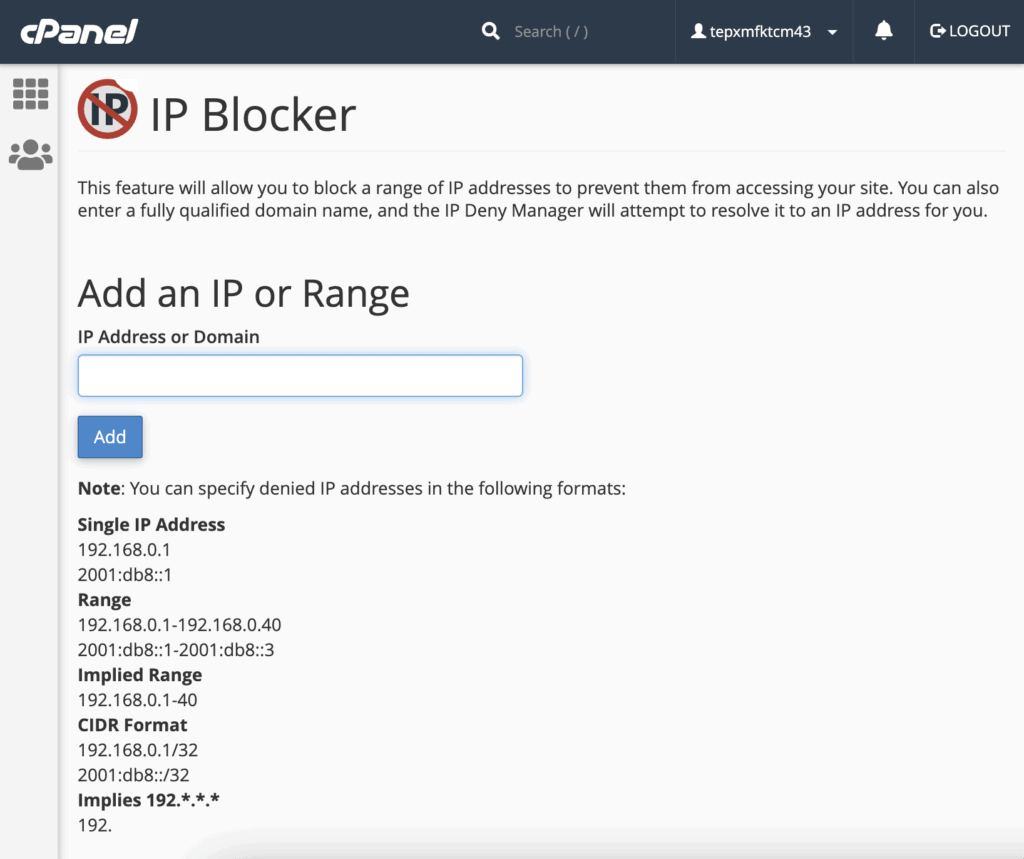
IP blacklisting blocks unwanted users. Sites use it for security. Hackers cannot access blocked IPs. This keeps data safe. WordPress admins use plugins for blacklisting. It helps in keeping the site secure. Visitors from blocked IPs cannot see the site.
DDoS attacks flood sites with traffic. This can slow down or crash the site. Mitigation tools help stop these attacks. They block bad traffic quickly. WordPress sites must stay protected. Good security keeps them running smoothly. These tools can save the site from trouble.
Switching Ip Addresses
Sometimes, changing your IP address is important. Security is one reason. Keeping data safe matters. Another reason is performance. Websites run faster with the right IP. Privacy also counts. Protecting your identity online is crucial. Accessibility is another factor. You might need a different IP to access certain sites. Location-based restrictions can be bypassed with a new IP. Some sites block certain regions. Changing IP can solve that. Remember, a new IP can improve many things.
Start by logging into your WordPress account. Locate the settings menu. Find the network settings. Click to change the IP address. Enter your new IP carefully. Double-check to avoid mistakes. Click save changes to update. Your website will now use the new IP. Test your site to ensure it’s working. Fix any issues if they appear. Follow these steps each time you change IP.
Credit: www.malcare.com
Frequently Asked Questions
How To Find WordPress Website Ip Address?
To find your WordPress site’s IP, access your hosting dashboard. Navigate to server settings or information section. Alternatively, use terminal commands like `ping` to retrieve the IP. This information is crucial for troubleshooting and server management. Always ensure you have the necessary permissions to access server details.
Can WordPress Ip Address Change?
Yes, WordPress IP can change due to server migrations or DNS updates. Shared hosting often results in IP changes. Always check with your hosting provider for updates. IP changes can affect site accessibility and SEO settings. Regular monitoring ensures your site remains active and reachable.
Why Is WordPress Ip Important?
WordPress IP is vital for server identification and troubleshooting. It helps in setting up domain DNS records. Knowing your IP ensures smooth site migration and security checks. It also assists in blocking unwanted traffic. Regularly verify your IP for effective website management and hosting compatibility.
Does WordPress Use A Fixed Ip?
Typically, WordPress doesn’t use a fixed IP on shared hosting. Dedicated servers may have fixed IPs. IP may vary due to hosting configurations. Check with your hosting provider for specifics. Fixed IPs offer better security and reliability for websites. Always verify IP settings post any server changes.
Conclusion
Understanding the IP of a WordPress site is crucial. It helps in troubleshooting site issues. Ensures smooth server communication. Protects your site’s security. Knowing the IP address simplifies site management. Easy access to server details aids problem-solving. A vital aspect for site admins.
Enhances overall site efficiency. Remember, it’s a technical detail. But useful for maintaining your WordPress site. Stay informed. Keep your site running optimally. With this knowledge, you manage your site better. Simplifies tasks for non-tech users too. Make your WordPress experience smoother.
Empower your site management skills today.


