
Have you ever wondered what makes your WordPress website tick behind the scenes? You might already know about the importance of content and visuals, but there’s a hidden powerhouse working tirelessly to boost your site’s performance: the head and head tags.
Understanding these elements can be a game-changer for you. They play a crucial role in SEO, making your site more visible to search engines, and ultimately, to your target audience. Imagine unlocking the potential to enhance your site’s ranking without a complete overhaul.
That’s the magic of mastering head tags. Curious about how these small snippets of code can make such a big difference? Stick around as we unravel the mystery, showing you how to harness their full potential for your WordPress site. You’ll be amazed at how a few simple tweaks can elevate your online presence.
The Basics Of Head Tags
The head tag is like a book’s cover. It tells what the webpage is about. It helps the browser understand the page. Inside the head tag, we have many other tags. These tags give important info. For example, the title tag. It shows the name of the page. The meta tag gives extra info. These are not visible to users. But they are very important. They tell search engines about the page.
Head tags are key in website design. They make sure the page loads fast. They can add styles and scripts to a page. This makes the page look nice and work well. Without head tags, a website may look broken. Search engines may not find it easily. So, they are very important for any website.
Credit: saeedkhosravi.com
Understanding Head Tags In WordPress
Head tags are important in WordPress. They help with SEO. These tags contain information about your webpage. Title, meta descriptions, and links are examples. They are not visible on the website. But they help search engines understand your site better.
WordPress adds some default head tags. These include charset, viewport, and link tags. Charset tells browsers about the text’s character set. Viewport helps with mobile device display. Link tags include stylesheets and RSS feeds.
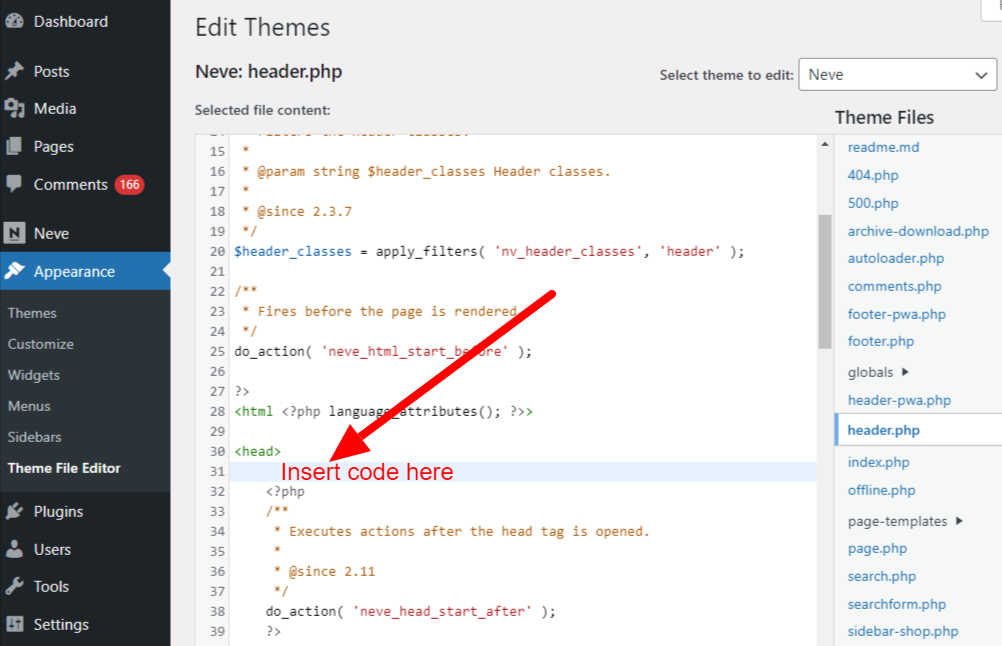
You can change head tags in WordPress. Use a plugin or edit the theme file. Plugins are easy for beginners. They do not require coding. Theme files need more skills. You must know HTML and PHP. Both ways allow you to add new tags or remove old ones. Choose what suits your skills best.
Common Elements In Head Tags
Title tags tell search engines the name of your page. They show up in browser tabs. Title tags should be short and clear. They help people know what your page is about. Every page needs a good title tag.
Meta tags give more info about your page. They are not visible on the page. Meta tags can help search engines understand your page. A meta description explains what the page is about. It should be less than 160 characters.
Link tags connect to other files. They can link to CSS stylesheets. Link tags make your page look good. They can also link to other sites or pages. Link tags are important for page design.
Script tags hold JavaScript code. They make pages interactive. Script tags can make a button work. They help with animations. Script tags are key for dynamic content.

Credit: brickslabs.com
Seo Implications
Meta descriptions are short. They tell what your page is about. Search engines use them. They show up on search results. A good meta description can bring more visitors. It should be short and to the point. Use important words. Make them clear and catchy. Don’t forget to add keywords. Keep it natural.
Keywords are words people search for. They help your page show up. You need to use them wisely. Put them in titles and first paragraphs. Don’t use too many. That can hurt your page. Use them naturally. Make sure they fit the text. This helps readers and search engines.
Search rankings are important. They show where your page appears. Higher rankings mean more visitors. Using head tags helps improve rankings. Proper use of meta tags helps too. Keep your content relevant and fresh. This makes your page more attractive to search engines. Follow these tips for better results.
Managing Head Tags With Plugins
Plugins make managing head tags easy. Some plugins are very popular. They offer great features and benefits for users. Yoast SEO is a famous plugin. It helps with SEO and head tags. Users find it simple and useful. Another one is All in One SEO Pack. It offers many options for head tags. It is easy to use.
Rank Math is also a good choice. It is user-friendly and effective. These plugins save time and effort. They are easy to install and use. They help improve your site. Your website can become better with these tools. Choose one that fits your needs. Enjoy the benefits of a well-managed site.

Credit: www.youtube.com
Best Practices For Head Tags
The head tag in WordPress holds essential information for web browsers and search engines. It includes title tags, meta descriptions, and links to stylesheets. Implementing best practices ensures your site loads quickly and ranks well in search results.
Seo Optimization
Using head tags is important for SEO. These tags help search engines understand your site. Always include a title tag with keywords. Add a meta description for each page. This tells search engines what your page is about. Use header tags like H1, H2, and H3. They organize content and improve readability.
Performance Considerations
Keep head tags simple and clean. Too many tags can slow down your site. Avoid using large scripts in the head. This can make your page load slowly. Use CSS for styling instead of inline styles. This helps with faster loading. Make sure to minify CSS and JavaScript files. This reduces their size and speeds up the site.
Security Measures
Security is key for head tags. Always use HTTPS for your site. This encrypts data and keeps it safe. Limit the use of external scripts. They can be unsafe. Set a strong Content Security Policy in your head tags. This protects against harmful attacks. Regularly update your site’s plugins and themes. This helps keep your site secure.
Frequently Asked Questions
What Are WordPress Head Tags?
Head tags in WordPress are HTML elements used in the head section of a webpage. They include meta tags, title tags, and link tags. These tags provide essential information to browsers and search engines. Properly using head tags can improve SEO and enhance website functionality.
How Do I Edit Head Tags In WordPress?
To edit head tags in WordPress, use a theme editor or SEO plugin. Most themes allow customization of head tags through their settings. Alternatively, plugins like Yoast SEO offer user-friendly interfaces to manage head tags efficiently. Always back up your site before making changes.
Why Are Head Tags Important For Seo?
Head tags are crucial for SEO as they help search engines understand your content. Meta tags, like descriptions and keywords, influence search rankings. Title tags affect click-through rates in search results. Proper use of head tags can improve visibility and attract more organic traffic.
Can I Add Custom Code To The Head Section?
Yes, you can add custom code to the head section in WordPress. Use a child theme or a custom plugin to ensure changes are preserved. Many SEO plugins also offer features to insert code snippets directly into the head section, making customization easier.
Conclusion
Understanding head and header tags in WordPress is crucial. They help organize your site’s structure. Good use of tags improves SEO. It ensures search engines find your content easily. Clear tags enhance user experience. Visitors navigate your site better. Remember, simplicity in your tags is key.
Keep them straightforward and relevant. This makes your site more appealing. Both to users and search engines. Make thoughtful choices with your tags. They impact your site’s performance. Better tags lead to better results. So, focus on them for effective WordPress management.
Your site’s growth depends on it.


