
Are you trying to decide between Webflow and WordPress for your next web project? You’re not alone.
Many find themselves puzzled over which platform to choose. Both Webflow and WordPress offer unique features, but they serve different needs. Imagine having the power to create a stunning, professional website without the steep learning curve. Sounds appealing, right? Understanding the core differences between these two platforms can save you time, money, and a lot of headaches.
Dive in to discover which one aligns with your vision, creativity, and business goals. By the end of this article, you’ll have a clear picture of which tool is the perfect fit for your web development journey.
Platform Basics
Webflow offers visual design flexibility, allowing users to create websites without coding. WordPress provides a content management system ideal for blogging, with numerous plugins for customization. Webflow is suited for designers; WordPress caters to those focused on content creation and management.
Webflow Overview
Webflow is a design-first platform. It lets you create websites visually. You don’t need to know code. This makes it easy for beginners. Webflow offers a drag-and-drop editor. You can see changes in real time. It’s like magic! Webflow also provides hosting. This means you can publish your site directly. You get a responsive design by default. This means your site looks good on phones and computers. Webflow is great for designers. It gives you more control over the look of your site.
WordPress Overview
WordPress is a popular content management system. It powers many websites online. WordPress is open-source. This means it’s free to use. You need to find your own hosting. WordPress offers many themes and plugins. They help you add features to your site. WordPress is flexible. It’s good for blogs, shops, and more. You need some technical skill to set it up. But it has a big community. They can help you if you get stuck. WordPress is a good choice for content-heavy sites.
Design Flexibility
Webflow lets you design websites freely. You can move elements anywhere. It’s like drawing on paper. No coding needed. Everything is visual. You can create unique layouts easily. Designers love this freedom. It’s great for custom sites. You can see changes instantly. That’s a huge help.
WordPress uses themes for design. Themes are like templates. You pick one and edit it. Some themes have many settings. Others have fewer. You can change colors and fonts. But you’re limited by the theme. Customizing beyond that is hard. Sometimes, you need a developer. WordPress is flexible but not as much as Webflow.
Ease Of Use
Webflow offers a clean and intuitive interface. Beginners find it simple to navigate. The drag-and-drop feature makes designing easy. No need for complex coding knowledge. Templates are available to get you started quickly. Users can customize designs with ease. The visual editor lets you see changes live. It’s a great choice for design-focused users.
WordPress is popular and widely used. It can be a bit tricky for new users. The dashboard has many options. It might seem confusing at first. Plugins help make tasks easier. Themes offer design flexibility. More learning might be needed for full use. Community support is strong if help is needed.
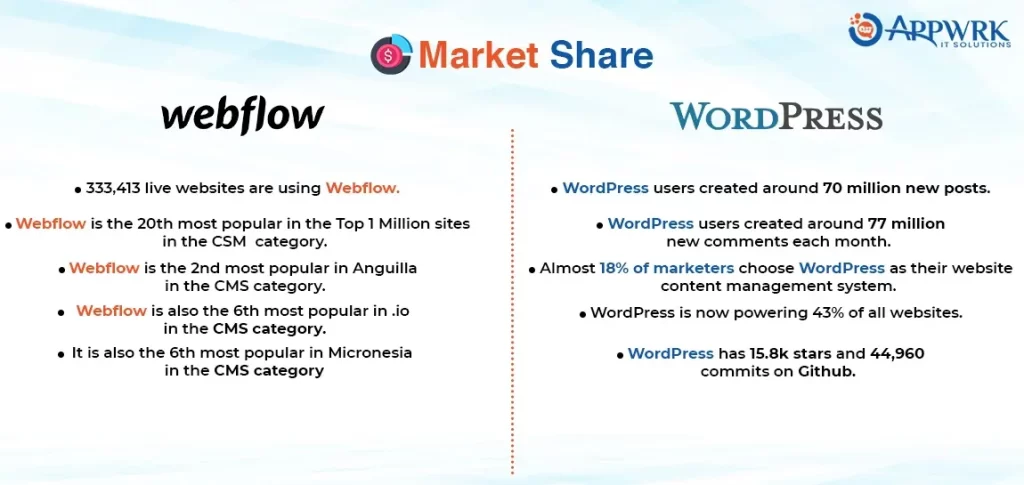
Credit: appwrk.com
Customization And Control
Webflow offers intuitive visual design with precise control over elements, while WordPress provides robust customization through plugins and themes. Users choose Webflow for hands-on design, whereas WordPress caters to extensive plugin options for enhanced functionality.
Webflow Customization Features
Webflow offers a visual design tool. It allows users to build websites without code. This tool is great for design freedom. Users can drag and drop elements easily. Webflow gives users control over responsive design. It supports custom animations and interactions. Users can also use custom code for more features. Webflow’s CMS helps manage content simply. This makes it easy to update websites. Webflow is great for creative designs.
WordPress Plugin Ecosystem
WordPress has a huge plugin library. These plugins add extra features to websites. Users can find plugins for SEO, security, and design. Plugins are easy to install and use. Many plugins are free and open-source. WordPress themes can change a site’s look quickly. Users have a lot of customization options. The ecosystem is large and active. It supports many languages and styles. WordPress is perfect for diverse needs.
Seo And Performance
Webflow offers built-in tools for SEO. Users can easily set meta titles and descriptions. It allows custom URLs. You can control image alt tags. There’s a feature for redirects. Webflow supports clean code. This helps with fast loading. Fast loading boosts SEO performance. The platform is visual. Users can preview changes live. This helps to see SEO changes instantly.
WordPress has many SEO plugins. One popular plugin is Yoast SEO. It helps with meta titles and descriptions. Users can add keywords easily. Plugins offer XML sitemaps. This helps search engines find pages. Plugins can check readability. They provide suggestions for improvement. WordPress plugins are flexible. Users can choose based on needs. This makes WordPress a good choice for SEO flexibility.
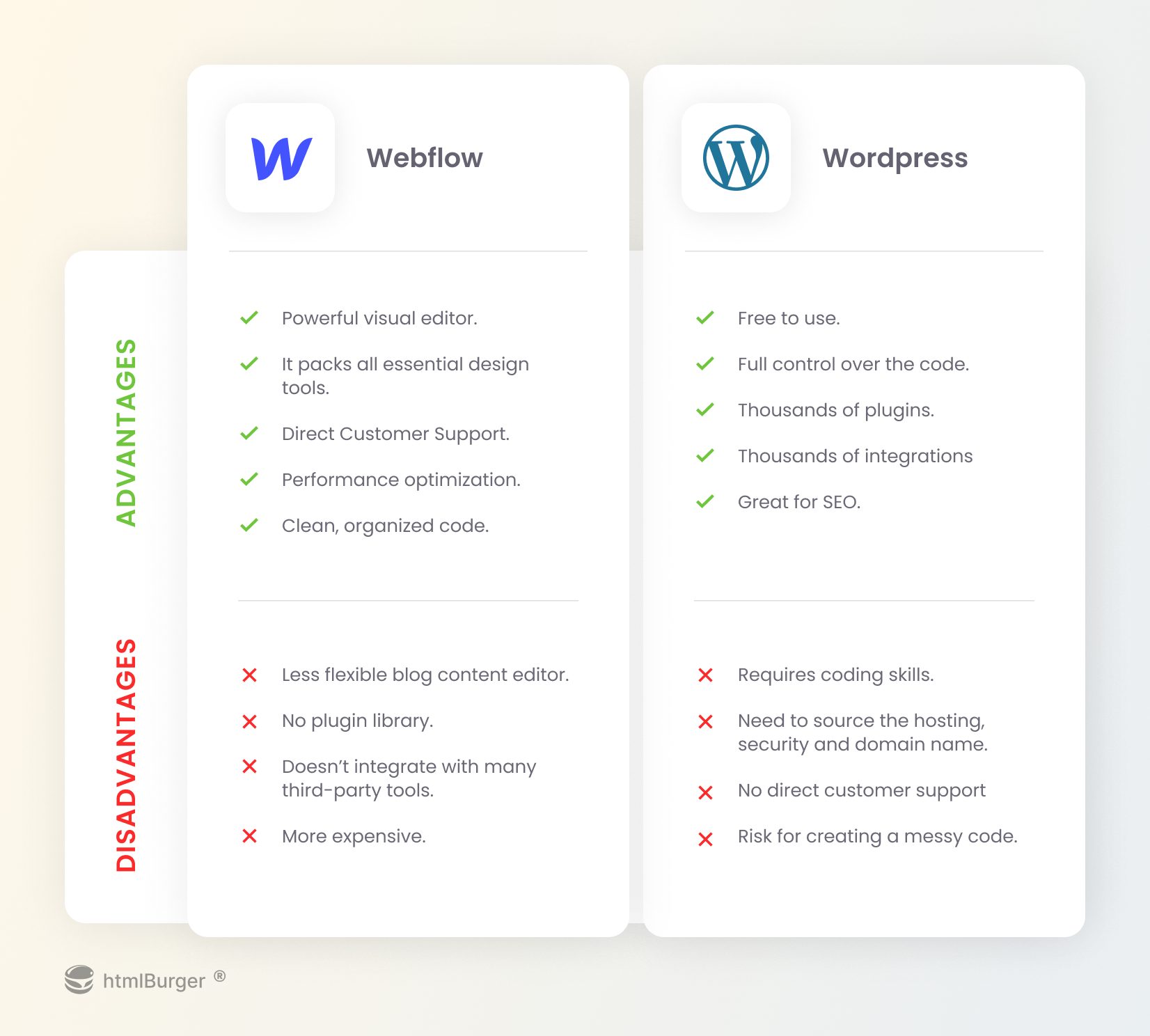
Credit: htmlburger.com
Pricing Models
Webflow offers clear pricing plans. There are options for different needs. Personal plans suit small projects. Business plans fit larger projects. Each plan has a set price. Users pay monthly or yearly. This makes budgeting easy. Webflow plans may include hosting too. It’s a one-stop solution for many. Choose based on project size and needs.
WordPress itself is free to use. But, some costs may arise. Users need hosting services. Hosting can be monthly or yearly. Themes and plugins might have fees. Some themes are free, others not. Plugins may require payment for full features. Domain names also need purchase. Costs add up depending on choices. It’s important to plan and budget.
Support And Community
Webflow provides excellent customer support for its users. Their support team is available to help with any issues. Users can access helpful tutorials and guides. Webflow also offers a community forum. Here, users can share tips and ask questions. The forum is a great place to learn and grow. Webflow’s support makes it easy to solve problems. Users appreciate the fast responses. Many users find the support team very friendly. It’s easy to get help when you need it. This makes Webflow a popular choice for designers.
WordPress has a huge community worldwide. Thousands of people share their knowledge online. Users can find tutorials, forums, and blogs. Many WordPress users help each other. This community offers plugins and themes for free. Users can join forums to ask questions. Answers come from experienced users. WordPress community is very active. They regularly update resources. It’s easy to find help for any problem. Many users love this supportive environment. WordPress is popular for its vast resources. Learning is simple with so much information.
Ideal Use Cases
Webflow shines for designers who want complete control over their website’s visuals. It suits those who need customized layouts without coding. Webflow helps create beautiful sites that are responsive and interactive. It’s ideal for small business owners who want a unique online presence. Webflow is perfect for agencies creating sites for clients with specific design needs. It’s great for projects needing dynamic content and animations. Webflow is best for those who value design flexibility over backend management.
WordPress is ideal for bloggers who need a simple platform to publish content. It suits businesses wanting e-commerce capabilities with plugins. WordPress fits well for large websites with extensive content. It’s perfect for users who need SEO tools and analytics. WordPress works well for those who require community features like forums and membership sites. It’s great for non-profits needing donation systems. WordPress is best for users preferring easy updates and plugin support.
Credit: www.elegantthemes.com
Frequently Asked Questions
Is Webflow Better Than WordPress?
Webflow offers a visual design approach, making it ideal for those without coding skills. WordPress is more flexible and has a vast plugin ecosystem. The choice depends on your project needs and technical skills.
Can I Migrate From WordPress To Webflow?
Yes, you can migrate from WordPress to Webflow, but it requires careful planning. Webflow does not have a one-click import feature, so manual data transfer might be necessary.
Which Is Cheaper, Webflow Or WordPress?
WordPress is usually cheaper because of its open-source nature and low hosting costs. Webflow has subscription plans that might be pricier, but it includes hosting and design tools.
Is Webflow Easier To Use Than WordPress?
Webflow is often easier for beginners due to its visual interface. WordPress has a steeper learning curve but offers more customization through plugins and themes.
Conclusion
Choosing between Webflow and WordPress depends on your needs. Webflow offers design flexibility. Perfect for creative control. WordPress is versatile with plugins. Great for varied functionalities. Webflow suits designers with its visual tools. WordPress suits bloggers and developers. Both platforms have unique strengths.
Consider your project requirements. Webflow excels in design. WordPress excels in customization. Each platform can build successful websites. Choose based on your priorities. Whether design or functionality. Make informed decisions. Your choice shapes your online presence. Take time to explore both options.
Understand what fits your vision best.


