
When you start building your website on WordPress, you might wonder about the difference between posts and pages. It’s a common question and understanding it can make managing your site much easier.
Imagine you’re crafting your online presence, and you need to know where to place your latest blog entry or where your ‘About Us’ information should go. Posts and pages serve different purposes, and knowing how to use them effectively can enhance your website’s functionality and user experience.
What if you could make your content more engaging for your audience just by choosing the right format? By grasping the differences, you can create a site that not only looks good but also works perfectly for your needs. Dive into this article, and discover how these two elements can be the keys to a successful WordPress site. You’ll learn how to optimize your content strategy, making your website not just informative, but also captivating for your visitors.
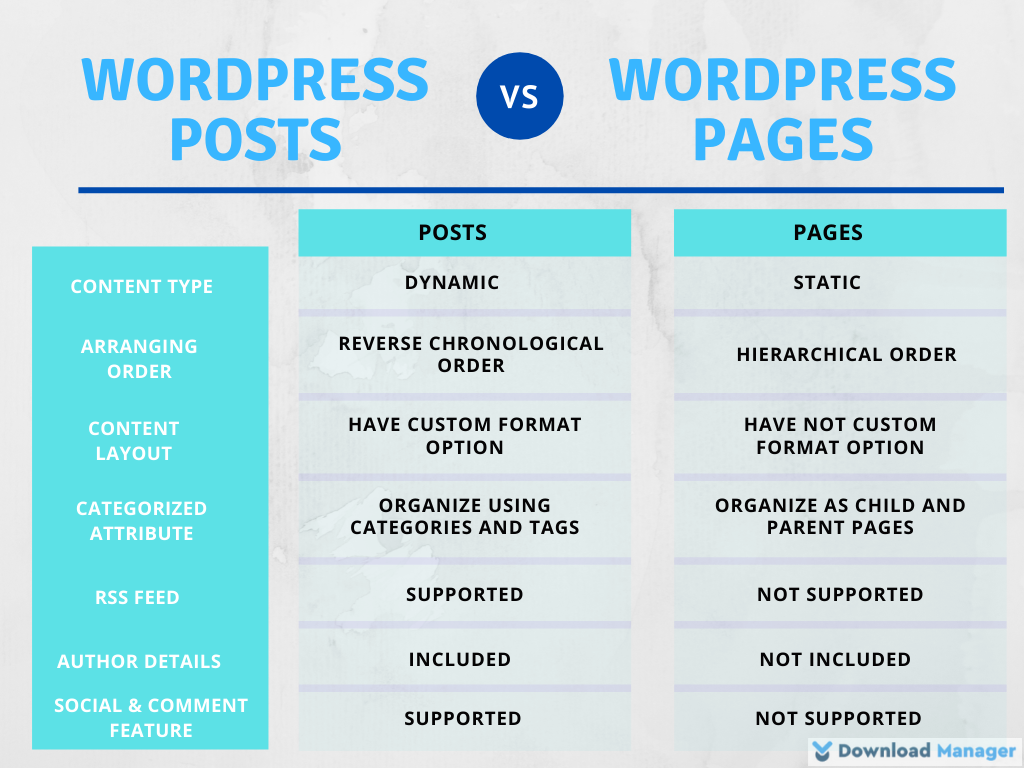
Credit: www.wpdownloadmanager.com
WordPress Structure
WordPress is a popular tool for making websites. It is a content management system. This means it helps you organize your website. It has tools to add and manage content easily. You can make changes without knowing how to code. This is why many people use it.
Posts and pages are two main parts of WordPress. They help you create and manage content. Posts are for regular updates. Like blog entries. They show up in order, with the newest first. They can have categories and tags. This helps in organizing them.
Pages are for static content. Like the “About Us” or “Contact” pages. They do not change often. They are not part of a timeline. Pages do not use categories or tags. Both are important for a website. Each has its own role.

Credit: amandaschoedel.com
Defining Posts
Posts are entries listed in reverse order. They appear on the homepage. Posts have a date and author. They show the latest content first. Users can comment on posts. Posts are part of a blog. They belong to categories and tags. This helps organize content. Posts are dynamic and updated often.
Characteristics Of Posts
Posts are timely. They are often news updates. Posts have publication dates. They allow reader comments. They are listed in reverse order. Posts can be archived by month or year. They are shareable on social media. Posts often have a call to action. They are a key part of blogs.
Use Cases For Posts
Posts work well for news articles. They are perfect for updates. Posts can share stories. They are good for tutorials. Posts can announce events. They are useful for reviews. Posts help in sharing opinions. They are ideal for time-sensitive content. Posts keep content fresh and engaging.
Posts In Seo
Posts are SEO-friendly. They help with keywords. Posts can have meta descriptions. They improve search rankings. Posts can be linked internally. They attract backlinks. Posts are often shared widely. They increase website traffic. Posts can boost site visibility. They are important for SEO strategy.
Defining Pages
Pages are static elements of a website. They do not change often. Pages are used for timeless content. They usually include information like the “About Us” section or “Contact” details. Pages are not listed by date. They have no tags or categories. Pages are easy to find from menus. They help visitors navigate your site.
Pages have no author information. They are not interactive. Pages do not have comments. They have a hierarchical structure. Pages can have child pages. Pages do not appear in RSS feeds. They are not part of the blog’s timeline. Pages are meant to be permanent. They do not change like posts. Pages are used for important information.
Pages are good for legal information. They show terms and conditions. Pages hold privacy policies. They provide service descriptions. Pages detail product information. They display company history. They list team members. Pages are ideal for FAQs. They can be used for testimonials. Pages present pricing details. They highlight press releases.
Pages help with SEO. They improve your site’s structure. Pages give search engines clear paths. They help with indexing. Pages have permanent links. They are good for important keywords. Pages boost site authority. They focus on specific topics. Pages enhance user experience. They make websites easier to understand.
Comparing Posts And Pages
Posts are time-sensitive. They appear in a blog feed. Readers can see the newest first. Pages are static. They stay in one place. Good for contact info or about us. Posts use categories and tags. Helps organize topics. Pages do not use these. They are outside the timeline.
Posts often have a date in the URL. Shows when it was written. Example: myblog.com/2023/10/post-title. Pages have a simpler URL. They do not show a date. Example: myblog.com/page-title. This makes it easier to find.
Pages can have custom templates. This means each can look different. Posts usually have one template. All posts look the same. Some themes let you change it. This is less common.
When To Use Posts
Posts are perfect for sharing blog content. They are like diary entries. People use them for thoughts and stories. Posts are always in order. Newest ones come first. They keep readers engaged.
Sharing news and updates is easy with posts. They are ideal for fresh information. You can tell readers what’s new. Posts help spread the word fast. They keep your audience informed.
Time-sensitive information needs quick sharing. Posts work best for this. They allow timely updates. Readers see the latest first. This keeps them in the loop. Posts ensure information is not missed.

Credit: media-studies.com
When To Use Pages
Static content remains the same for a long time. Pages are perfect for this. They hold information that doesn’t change. Pages give structure to your site. They help users find important details.
About and contact information should be on pages. These sections tell visitors who you are. They offer ways to reach you. This builds trust. Users know they can rely on this info.
Pages are vital for essential website sections. Sections like services, policies, and FAQs belong here. They guide users. They answer common questions. They show your site’s purpose. Pages keep important content organized.
Common Misconceptions
Understanding the difference between posts and pages in WordPress is crucial for effective content management. Posts are dynamic, regularly updated entries often used for blogs, while pages are static, timeless content such as “About” or “Contact” pages.
Interchangeability Myth
Many think posts and pages are the same. They are not. Posts are for blog entries. Pages are for static content. Posts have dates. Pages do not. Posts can have tags. Pages do not use tags. Posts show up in blogs. Pages are not part of a blog.
Seo Impact Misunderstandings
People often believe pages rank better. This is not true. Both posts and pages can rank well. Use good keywords in both. Posts help with fresh content. Pages are good for important info. Both need SEO for best results.
Best Practices
WordPress offers both posts and pages for content creation. Posts are timely entries, ideal for blog updates and news. Pages serve static content, like ‘About Us’ or ‘Contact’ pages. Understanding these differences helps organize your website effectively.
Optimizing Posts For Engagement
Posts should be engaging and relevant. Add interesting details to attract readers. Use short paragraphs to keep interest high. Add images or videos to make content lively. Ask questions to involve readers. Use simple words for easy understanding. Add links to related posts. This helps readers find more information. Keep content fresh and updated. Use tags and categories to organize posts. This makes it easy to find. Encourage comments for interaction. Respond to comments to build community.
Structuring Pages For Clarity
Pages should be clear and organized. Use headings to break content. This helps readers follow along. Keep sentences short and simple. Use bullet points for lists. This makes information easy to read. Add a table of contents for long pages. This helps readers jump to sections. Use images for visual breaks. Avoid clutter and keep design clean. Consistency is key. Use the same style across all pages. This helps readers know what to expect.
Frequently Asked Questions
What Are WordPress Posts Used For?
WordPress posts are primarily used for blogging purposes. They are displayed in reverse chronological order on your site. Posts can be categorized and tagged, making them easy to organize and search. They often encourage reader interaction through comments and are frequently updated to keep content fresh.
How Do WordPress Pages Differ From Posts?
WordPress pages are static and timeless content pieces. Unlike posts, pages do not appear in chronological order. They are typically used for permanent content like “About Us” or “Contact” pages. Pages do not have categories or tags, making them more suitable for hierarchical organization.
Can Posts And Pages Have The Same Design?
Yes, posts and pages can share similar design elements. Both can include images, text, and multimedia content. However, posts often have additional features like comments and social sharing buttons. Pages are designed to be more static, focusing on essential information without frequent updates.
Are Pages Better For Seo Than Posts?
Both pages and posts can be optimized for SEO effectively. Pages are ideal for targeting evergreen keywords due to their static nature. Posts can boost SEO with regular updates and keyword-focused content. Using categories and tags in posts helps in better indexing and search visibility.
Conclusion
Understanding the difference between posts and pages in WordPress is vital. Posts are dynamic. They keep your content fresh and engaging. Pages provide static information. They stay constant and reliable. Both have unique purposes. Knowing when to use each improves your site’s structure.
It enhances user experience. Remember, posts are for timely content. Pages are for timeless information. This clarity helps in efficient website management. Make informed choices. Your WordPress site will benefit greatly.


